Best AI Video Generator Tools for Content Creators 2026
Disclosure: This post contains affiliate links. If you purchase through them, I may earn a commission at no extra cost to you. I only recommend tools I’ve actually tested.
The best AI video generator tools in 2026 have crossed a meaningful threshold. The tools no longer produce blurry 3-second clips that look like glitchy screensavers — they generate photorealistic footage with native audio, consistent characters, and cinematic lighting from a single text prompt.
The market is projected to grow from $716.8 million in 2025 to $2.56 billion by 2032. But for content creators right now, the more relevant number is this: AI video generation prices range from free tiers to $0.05–$0.40 per second of generated video, with most subscription plans running $10–$35 per month.
The challenge isn’t finding an AI video tool — it’s choosing the right one. The category has split into distinct use cases: cinematic generation, avatar-led business video, blog-to-video repurposing, and creative remixing. The best AI video generator tools 2026 depend entirely on what you’re making.
I tested 8 tools with identical prompts. Here’s what actually came out.
Quick Comparison: Best AI Video Generators 2026
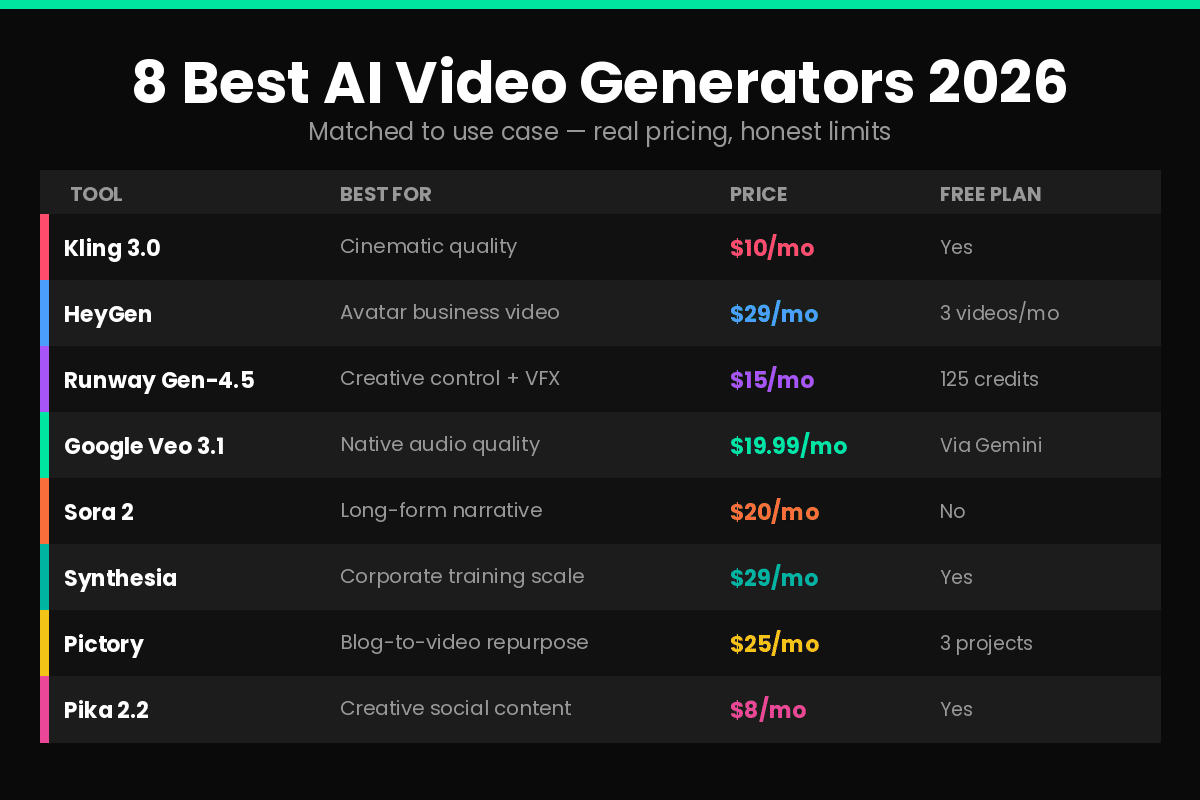
| Tool | Best For | Free Plan | Paid From |
|---|---|---|---|
| Kling 3.0 | Cinematic quality + photorealism | Yes | $10/mo |
| HeyGen | Avatar-led business video | Yes (3 videos) | $29/mo |
| Runway Gen-4.5 | Creative control + VFX | Yes (125 credits) | $15/mo |
| Google Veo 3.1 | Native audio + prompt precision | Via Gemini | $19.99/mo |
| Sora 2 | Long-form narrative storytelling | No | $20/mo (ChatGPT Plus) |
| Synthesia | Corporate training at scale | Yes | $29/mo |
| Pictory | Blog-to-video repurposing | Yes (3 projects) | $25/mo |
| Pika 2.2 | Creative social content | Yes | $8/mo |
Table of Contents
- How I Evaluated These Tools
- Kling 3.0 — Best Cinematic Quality
- HeyGen — Best for Avatar Business Video
- Runway Gen-4.5 — Best Creative Control
- Google Veo 3.1 — Best Native Audio
- Sora 2 — Best for Long-Form Narrative
- Synthesia — Best for Corporate Training
- Pictory — Best for Blog Repurposing
- Pika 2.2 — Best for Creative Social Content
- How to Choose the Right Tool
- FAQ
How I Evaluated These Tools
Every tool was tested on five criteria with the same base prompts: visual quality at full resolution, motion realism, audio integration, prompt adherence, and pricing transparency.
Three key capabilities defined the 2026 class of tools. Native audio: models now generate synchronized dialogue, sound effects, and ambient noise alongside video, eliminating separate audio production. Multi-shot consistency: the ability to maintain subject identity across camera angles. Duration: clips extending from 5–10 seconds toward 2–3 minutes, making AI video viable for more than social snippets.
What I didn’t test: API workflows, enterprise customization, or fine-tuning. This review is for individual content creators, bloggers, and small marketing teams — not engineering or enterprise production teams.
1. Kling 3.0 — Best Cinematic Quality
Rating: 4.7/5 | Paid from: $10/month
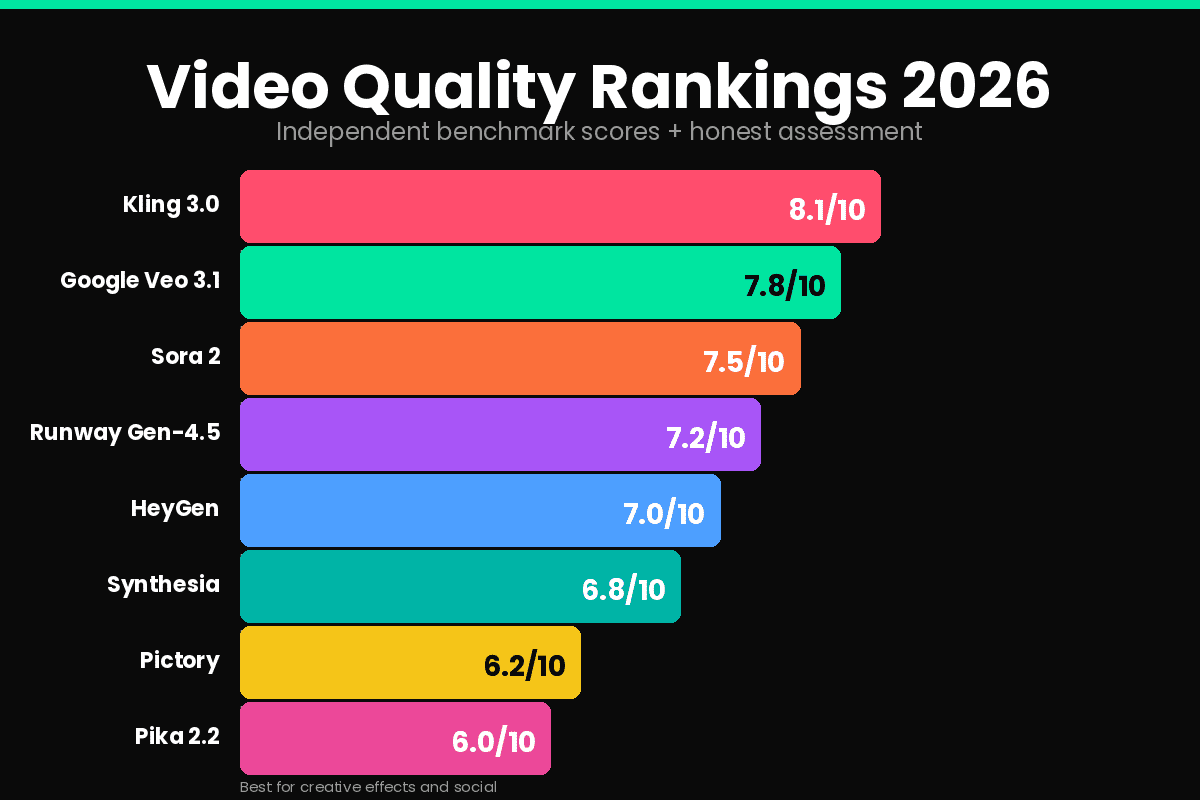
When it comes to pure video generation quality, Kling 3.0 sits at the top of the benchmark rankings right now. Curious Refuge’s 2026 testing scored it 8.1/10 overall, with visual fidelity at 8.4 — the highest in the field. The output is crisp, temporally consistent, and handles realistic human characters and motion better than any other prompt-based model.
Version 3.0, released February 2026, introduces multi-shot sequences (3–15 seconds) with subject consistency across different camera angles. At $0.07–$0.10 per second, Kling offers the strongest price-to-quality ratio for professional workflows.
What makes it the best:
Kling handles the hardest part of AI video — realistic human motion. Walking, running, fabric movement, hand gestures — Kling 3.0 produces physically believable motion that most competitors still struggle with. For B-roll generation, product shots, and social media content requiring photorealistic footage, Kling is the current leader.
The free basic plan lets you test the platform, and the Standard plan at $10/month covers moderate creator usage. Credit-based pricing means you only pay for what you generate.
The honest catch:
Kling’s maximum clip length is 15 seconds per shot. For longer narrative sequences, you need to stitch multiple clips together. The platform is also less polished on ease of use compared to HeyGen or Runway.
Best for: Content creators who need cinematic B-roll, product demonstrations, social media content with high visual quality Skip if: You need longer clips or talking-head avatar videos
2. HeyGen — Best for Avatar Business Video
Rating: 4.5/5 | Paid from: $29/month
HeyGen is the best all-round AI video generator for business use in 2026, offering avatar-led video in 40+ languages with natural lip-sync, ideal for corporate training, marketing, and multilingual content.
HeyGen’s core feature is its AI avatar library — over 300 photorealistic digital presenters that speak naturally in the language and script you provide. The Interactive Avatar feature goes further, allowing avatars to respond dynamically to viewer inputs — useful for personalized sales outreach, product demos, and onboarding flows.
What makes it stand out:
The Creator plan at $29/month gives access to unlimited generated videos. For businesses producing regular training content, product announcements, or marketing videos in multiple languages, HeyGen eliminates the need for video production crews. Internal data shows AI-powered training videos cost 50–80% less than traditional production.
Voice cloning lets you create a digital replica of your own voice — upload 2 minutes of audio and every future video uses your voice with accurate lip-sync. For content creators building a personal brand without appearing on camera, this is a significant capability.
The honest catch:
The most realistic Avatar IV output is credit-gated — the 200 monthly credit allocation on Creator translates to roughly 10 minutes of Avatar IV video. For high-volume production, costs scale quickly. Customer support complaints are a recurring theme in user reviews, and processing time variability shows up at peak usage.
Best for: Business content, corporate training, multilingual marketing, faceless YouTube channels wanting a presenter voice Skip if: You need cinematic footage — HeyGen produces avatar-led video, not photorealistic scene generation
3. Runway Gen-4.5 — Best Creative Control
Rating: 4.4/5 | Paid from: $15/month
Runway started the AI filmmaking conversation and remains the strongest tool for professional video editors who want AI to extend their creative workflows. Gen-4.5 offers the deepest creative control of any tool on this list — precise camera movement direction, reference-image-to-video, and advanced scene composition controls that other tools approximate at best.
The Standard plan at $15/month unlocks all Runway models, adds 625 monthly credits with the option to buy more, no watermark, and higher export quality.
What makes it stand out:
Runway’s Actor feature is unique: upload a real video of a person performing, and Runway transfers that performance — facial expressions, voice inflections, body movement — onto any AI character. Output quality is now higher, especially for stylized content, with better support for full-body tracking including complicated hand and finger movements.
For filmmakers and creative directors who want to maintain artistic control over AI-generated footage, Runway provides tools that competitors don’t have. API integration allows Runway to connect to project management workflows for automated video production.
The honest catch:
Runway is the most complex tool on this list. The learning curve is steeper than consumer-friendly options like HeyGen or Pictory. The free plan’s 125 one-time credits are consumed quickly.
Best for: Filmmakers, creative directors, marketing teams who need fine-grained creative control Skip if: You’re a beginner or need simple avatar-led video without complex setup
4. Google Veo 3.1 — Best Native Audio
Rating: 4.3/5 | Paid from: $19.99/month (Google AI Pro)
Google Veo 3.1 sets the current standard for raw AI video generation quality, released in January 2026, delivering native 4K resolution, synchronized audio generation, and character consistency that rivals traditional production.
The standout feature is audio-visual synchronization. Veo 3.1 generates dialogue, environmental sounds, footsteps, and ambient noise simultaneously with the video — no post-production audio sync required. For content requiring realistic environmental audio or dialogue scenes, no other consumer-accessible tool matches Veo’s audio quality.
What makes it stand out:
Google’s Veo 3.1 scored 7.2/10 overall with strong prompt adherence at 7.8/10. The ingredient-based prompting system gives you more compositional control than most models — specify elements, camera position, and movement with precision.
Access is available through Google AI Pro at $19.99/month for 1,000 credits and watermarked output, or Google AI Ultra at $249.99/month for 25,000 credits without watermark. For creators already in the Google ecosystem, Veo 3.1 integrates with Google Flow (formerly Whisk), a unified platform for AI filmmaking.
The honest catch:
The watermark on Google AI Pro output limits commercial usability at the $19.99/month tier. The Ultra plan at $249.99/month is expensive for individual creators. The AI aesthetic is visible in some generations.
Best for: Creators who need native audio in generated footage, Google ecosystem users, content requiring environmental sound design Skip if: You need watermark-free output on a budget — the jump from $19.99 to $249.99/month is steep
5. Sora 2 — Best for Long-Form Narrative
Rating: 4.2/5 | Paid from: $20/month (ChatGPT Plus)
OpenAI’s Sora excels at creating longer, more coherent videos with a strong sense of narrative. It’s particularly good at maintaining temporal and narrative consistency, creating videos that feel like a cohesive story.
Sora 2 Pro pushes to 25 seconds per clip — the longest single-generation output of any model on this list. Combined with synchronized audio and a storyboard feature that maps out scene sequences before generating, Sora 2 is built for narrative storytelling rather than standalone shots.
What makes it stand out:
Sora 2 Pro is OpenAI’s premium video generation model and its biggest advantage is duration. While most competitors cap out at 5–10 seconds per clip, Sora 2 Pro pushes to 25. That’s a full scene, not a snippet. It generates synchronized audio including dialogue lip-syncing, ambient sounds, footsteps, and wind.
For bloggers creating YouTube content that requires visual storytelling — not just B-roll — Sora’s narrative consistency across longer clips is genuinely differentiated.
The honest catch:
ChatGPT Plus at $20/month gives limited access to Sora 1 video generation, up to 50 videos at 480p resolution or fewer videos at 720p. For extended access, you’ll need ChatGPT Pro at $200/month. The quality gap between Plus and Pro access is significant.
Best for: Storytellers, brand filmmakers, content creators who need longer narrative clips Skip if: Your budget is tight — meaningful Sora 2 access requires the $200/month Pro plan
6. Synthesia — Best for Corporate Training at Scale
Rating: 4.3/5 | Paid from: $29/month
Internal data from Synthesia indicates that AI-powered training videos cost 50–80% less than traditional production — a significant operational advantage for HR and L&D teams. Synthesia produces consistent, professional avatar-led videos in 140+ languages, purpose-built for corporate training, internal communications, and educational content at scale.
Synthesia’s avatar quality is high — 140+ pre-built avatars with natural lip-sync. The template library covers most corporate video use cases: onboarding, compliance training, product education. For teams producing dozens of training modules monthly, the structured workflow dramatically reduces production time.
The honest catch:
The avatars look professional but don’t convey nuanced emotion convincingly. There’s a visible gap between Synthesia’s output and a video with a real human presenter, particularly for content where personal connection or emotional resonance matters.
Best for: HR departments, L&D teams, corporate communications at scale, multilingual training content Skip if: You need emotionally resonant presenter content or creative visual storytelling
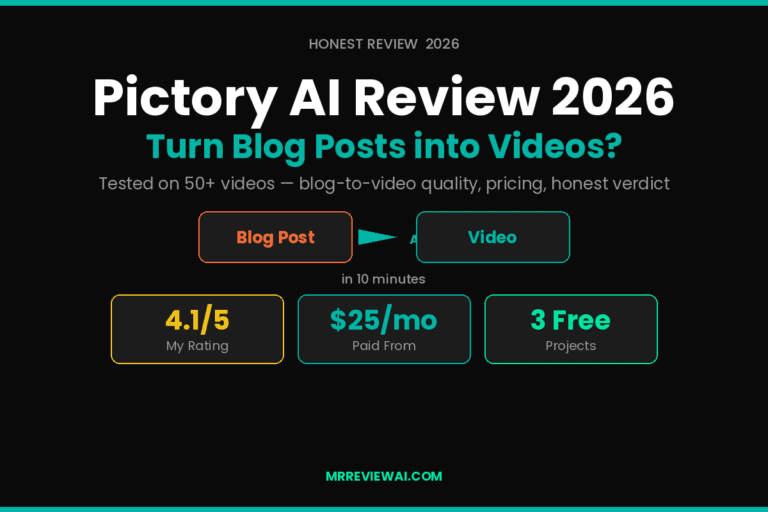
For the blog-to-video repurposing use case, see our full Pictory AI Review 2026.
7. Pictory — Best for Blog Repurposing
Rating: 4.1/5 | Paid from: $25/month
Pictory is the specialist tool for one specific job: turning existing written content — blog posts, scripts, URLs — into watchable videos without manual editing. Paste a blog URL and Pictory’s AI generates a complete storyboard with stock footage, AI voiceover, and captions in 3–5 minutes.
For bloggers who want to multiply the value of published content by creating YouTube videos or social clips without starting from scratch, Pictory is purpose-built for this workflow.
The honest catch:
The ~50% video generation failure rate on first attempts adds friction. The Starter plan’s 720p cap limits YouTube usability. No talking-head avatar feature. See the full Pictory review for complete details.
Best for: Bloggers repurposing written content to video, faceless YouTube, social media clips from articles Skip if: You need cinematic quality or AI avatar presenters
8. Pika 2.2 — Best for Creative Social Content
Rating: 4.0/5 | Paid from: $8/month
Pika is a fun and creative tool popular with artists, designers, and social media creators. It offers unique features like Pikaframes, Pikaswaps, and Pikatwists that allow a high degree of creative manipulation — including video-to-video and image-to-video transformations.
At $8/month, Pika is the most affordable paid option for content creators who want to add creative AI video effects to their social content without committing to a higher-tier subscription. The creative manipulation tools — add objects to existing videos, change styles, create transitions — work well for Instagram Reels, TikTok content, and social experiments.
The honest catch:
Pika is not the right tool for photorealistic cinematic generation — use Kling for that. The interface is complex for new users. The focus on creative effects over pure quality makes it specialist rather than general-purpose.
Best for: Social media creators, artists, designers experimenting with visual effects and creative transitions Skip if: You need photorealistic footage or professional business video — use Kling or HeyGen
How to Choose the Right Tool
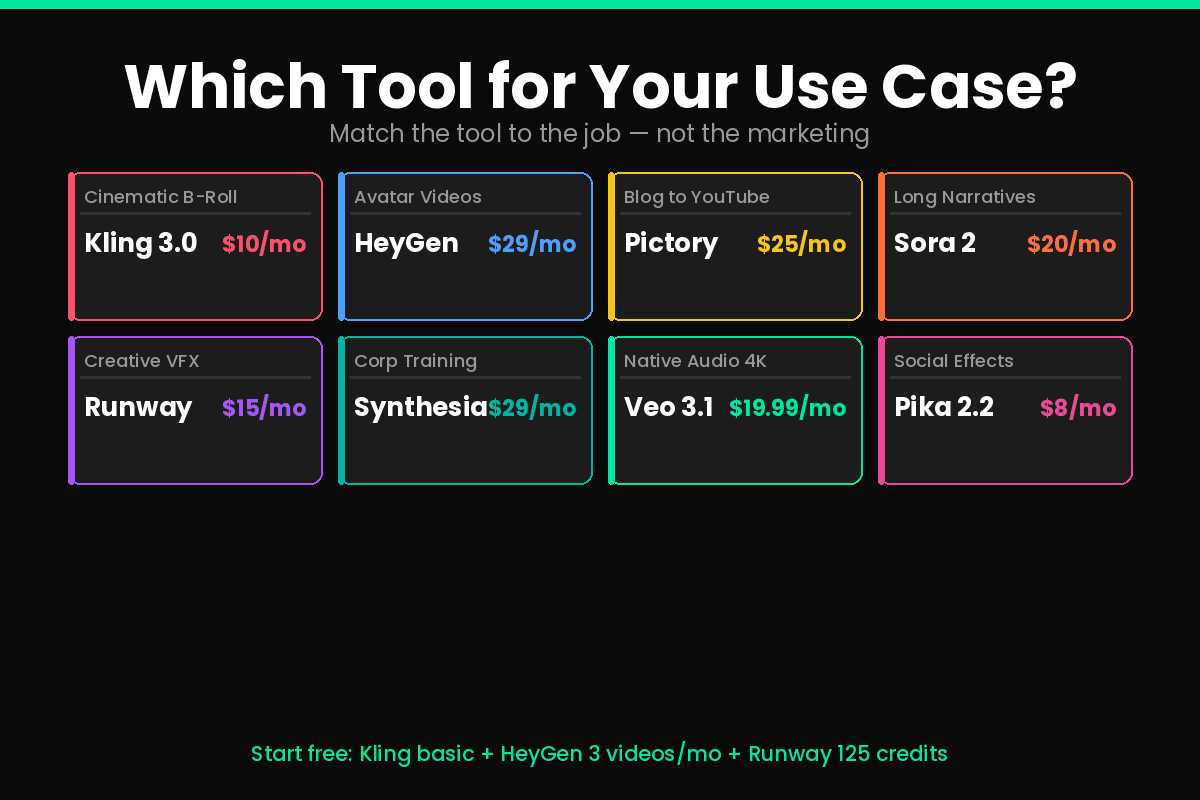
Not every best AI video generator tools 2026 option works for every workflow. Here is how to match the right tool to your specific needs.
Run through these questions before committing:
What type of video are you creating?
- Photorealistic B-roll and cinematic content → Kling 3.0
- Avatar-led business or training video → HeyGen or Synthesia
- Blog posts and written content repurposed to video → Pictory
- Long narrative storytelling → Sora 2
- Creative social experiments and effects → Pika 2.2
- Professional filmmaker workflows → Runway Gen-4.5
What’s your budget?
- Free testing → Kling basic, HeyGen free, Runway 125 credits
- Under $15/month → Pika $8, Runway Standard $15
- $15–$30/month → Runway, HeyGen, Synthesia, Pictory
- Already paying for ChatGPT → Sora 2 included at Plus tier
Do you need native audio in generated footage? Yes → Google Veo 3.1 or Sora 2. These are the two tools that generate synchronized audio natively from a text prompt, eliminating separate audio production.
Is cinematic quality the top priority? Yes → Kling 3.0. Kling 3.0 and Google Veo 3.1 lead for photorealistic output. Kling excels at human motion, texture detail, and physical accuracy, while Veo leads in lighting realism, audio integration, and cinematic polish.
Final Recommendation
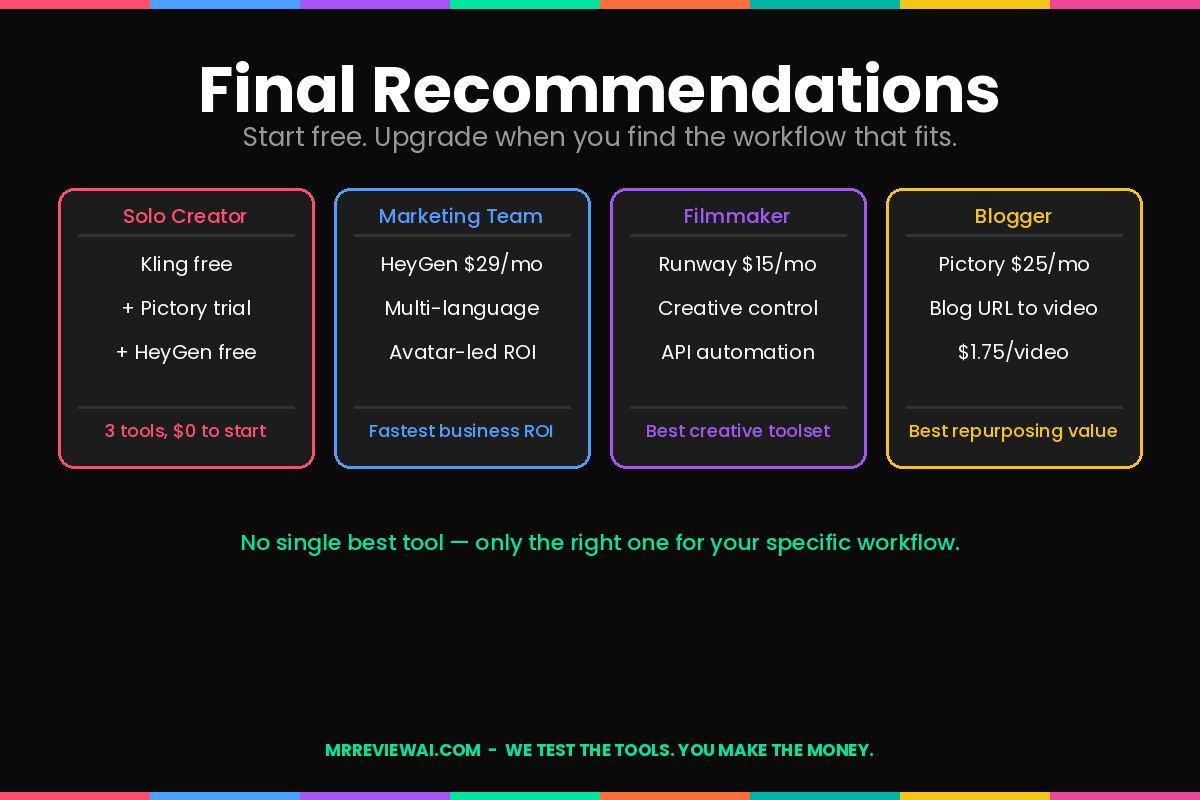
Choosing from the best AI video generator tools 2026 depends on your workflow, budget, and output format. Here is a clear breakdown by creator type.
For most business users, HeyGen or Synthesia will deliver the fastest ROI. For cinematic content, Kling 3.0 and Sora 2 lead the field.
For most independent content creators and bloggers: start with Kling’s free plan for cinematic B-roll, and Pictory’s free trial for blog repurposing. Use HeyGen’s free tier to test avatar-led video. These three tools cover 90% of what most solo content creators actually need.
For marketing teams: HeyGen at $29/month is the highest-ROI starting point — avatar-led video in 40+ languages at a predictable monthly cost.
For filmmakers and creative professionals: Runway Gen-4.5 at $15/month provides creative control that no other tool matches at the price point.
The AI video market is moving fast. The tools that led in early 2025 have already been surpassed. Check pricing and feature updates before committing to any annual plan.
One stack note before you commit: most of these video tools handle visuals well, but the voice layer is often the weak link. For text-to-speech that doesn’t sound robotic, I’ve been running scripts through ElevenLabs for expressive narration, and Murf for cleaner broadcast-style delivery. Both have free tiers worth testing before paying. I ran a head-to-head Murf vs ElevenLabs free plan test with the same 3 scripts — worth reading before you commit to either.
See also: Best AI Image Generator Tools 2026 and Best AI Writing Tools for Bloggers 2026 for the complete content creation stack.
FAQ
What are the best AI video generator tools 2026?
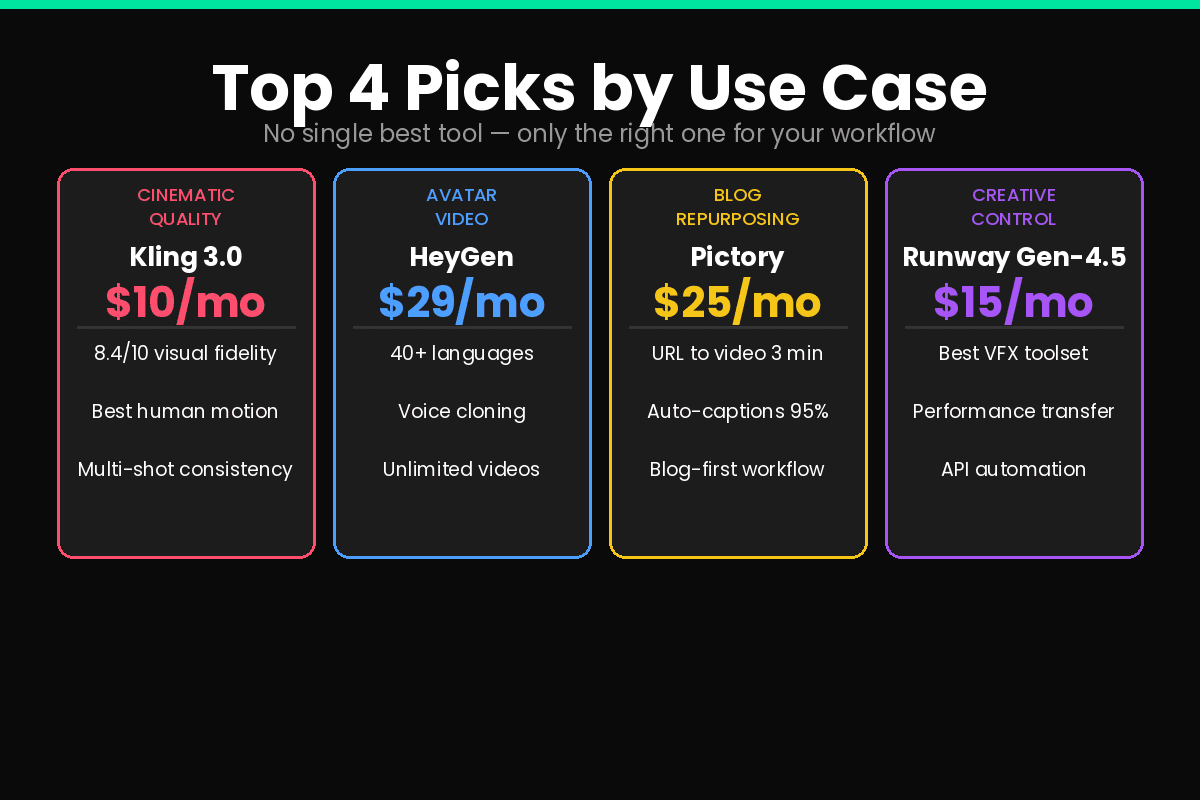
It depends on your use case. Kling 3.0 leads for cinematic photorealism and is the highest-scoring model in independent benchmarks. HeyGen leads for avatar-led business video. Pictory is best for blog-to-video repurposing. Runway Gen-4.5 offers the most creative control. There is no single best tool — only the right one for your specific workflow.
Which AI video generator is free in 2026?
Several tools offer free plans: Kling AI has a basic free tier, HeyGen allows 3 free videos per month, Runway provides 125 one-time free credits, Synthesia offers a free tier, and Pictory allows 3 free projects. Google Veo 3.1 is accessible through Google AI Pro at $19.99/month. No tool offers unlimited free generation at professional quality.
How much do AI video generators cost in 2026?
Most subscription plans run $10–$35 per month. Per-second API pricing ranges from $0.07–$0.40 per second depending on resolution and audio. Kling 3.0 at $10/month offers the best entry-level value for cinematic quality. HeyGen and Synthesia start at $29/month for avatar-led video.
Can AI video generators create talking-head videos?
Yes — HeyGen and Synthesia specialize in avatar-led talking-head video with natural lip-sync in 40–140+ languages. These tools generate a digital presenter reading your script. Tools like Kling, Runway, and Veo generate cinematic footage but are not purpose-built for presenter-style video.
Which AI video tool is best for bloggers?
Pictory for repurposing existing blog posts into videos (paste URL, get video). Kling for generating cinematic B-roll to embed in articles. HeyGen if you want a faceless YouTube channel with a presenter avatar. Most bloggers benefit from combining Pictory for content repurposing and Kling for standalone video content.
Last updated: May 2026. Pricing verified as of publication date.