Best SaaS Tools for Solopreneurs 2026 (Under $100/Month Stack)
This post contains affiliate links. I may earn a commission at no extra cost to you.
More than 41 million people in the US now run solo businesses. In this guide, I’ll cover the best SaaS tools for solopreneurs that I’ve tested on real businesses in 2026.
That number climbed from 30.5% of solo-founded startups in 2024 to over 36% in 2025. Not because people got braver — because the tools got good enough that one person can now do what used to require a team of five.
I’ve been building mrreviewai.com as a one-person operation. No team. No office. No agency. Just a laptop, a carefully chosen stack of SaaS tools, and about $75-100/month in software costs.
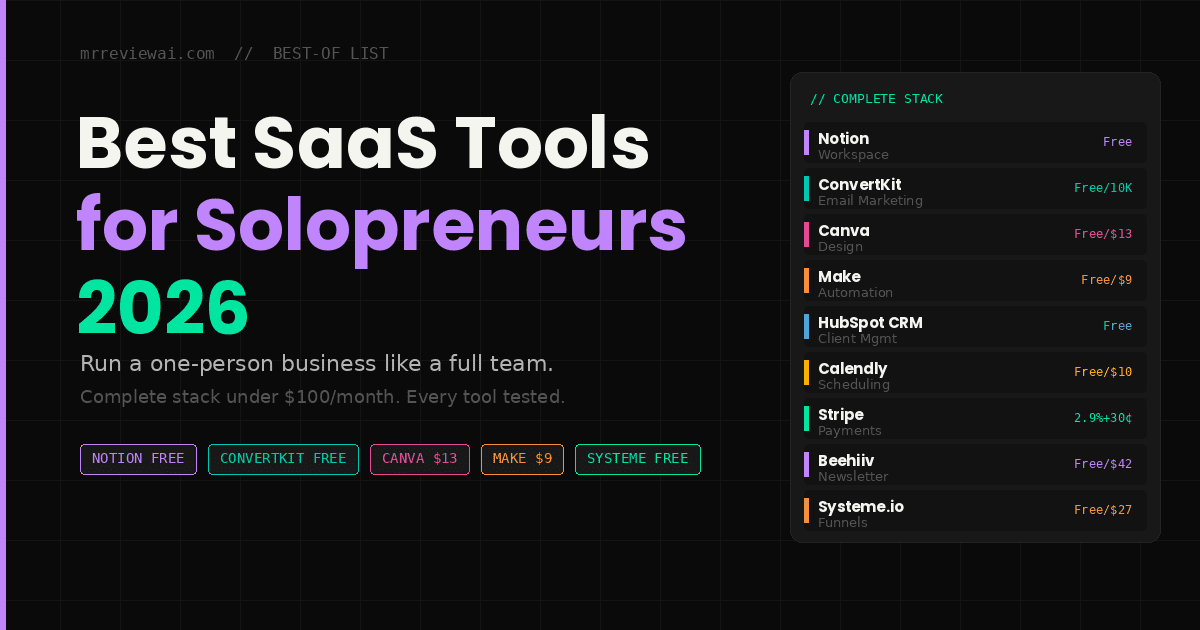
This list is the stack of SaaS tools for solopreneurs I’d build if I were starting over today. Organized by category. Priced honestly. With the free tier reality check that most best-of lists skip entirely.
Table of Contents
- The Solopreneur Stack Philosophy
- Quick Stack Overview
- Notion — Best All-in-One Workspace
- ConvertKit — Best Email Marketing
- Canva — Best Design Tool
- Zapier / Make — Best Automation
- HubSpot Free CRM — Best Client Management
- Calendly — Best Scheduling Tool
- Stripe — Best Payment Processing
- Loom — Best Async Video Communication
- Beehiiv — Best Newsletter Platform
- Systeme.io — Best All-in-One Funnel
- The Complete Stack by Budget
- FAQ
The Solopreneur Stack Philosophy
Before the list of the best SaaS tools for solopreneurs — the rules I use to evaluate every tool:
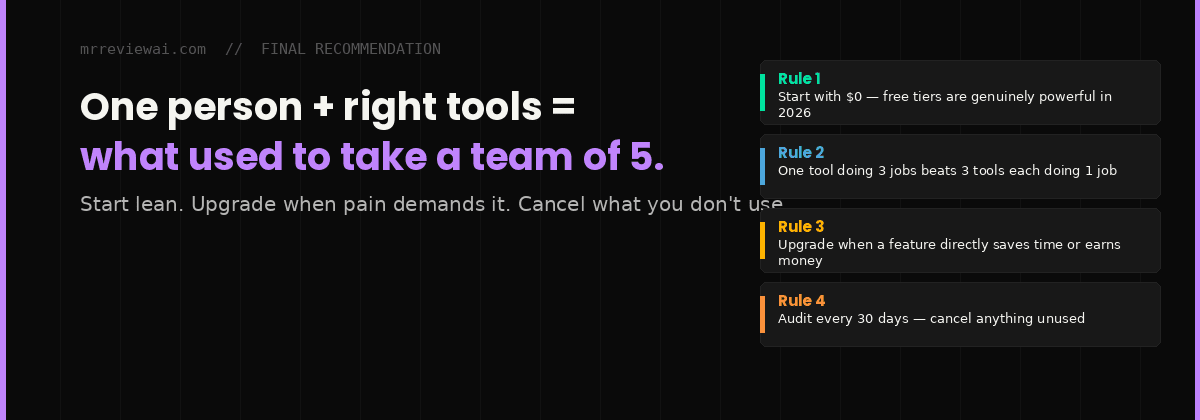
Rule 1: One tool, multiple jobs The best solopreneur tools replace two or three single-purpose apps. Notion replaces your wiki, project tracker, and light CRM. Canva replaces a junior designer. A tool that does one thing needs to do it exceptionally well to earn its spot.
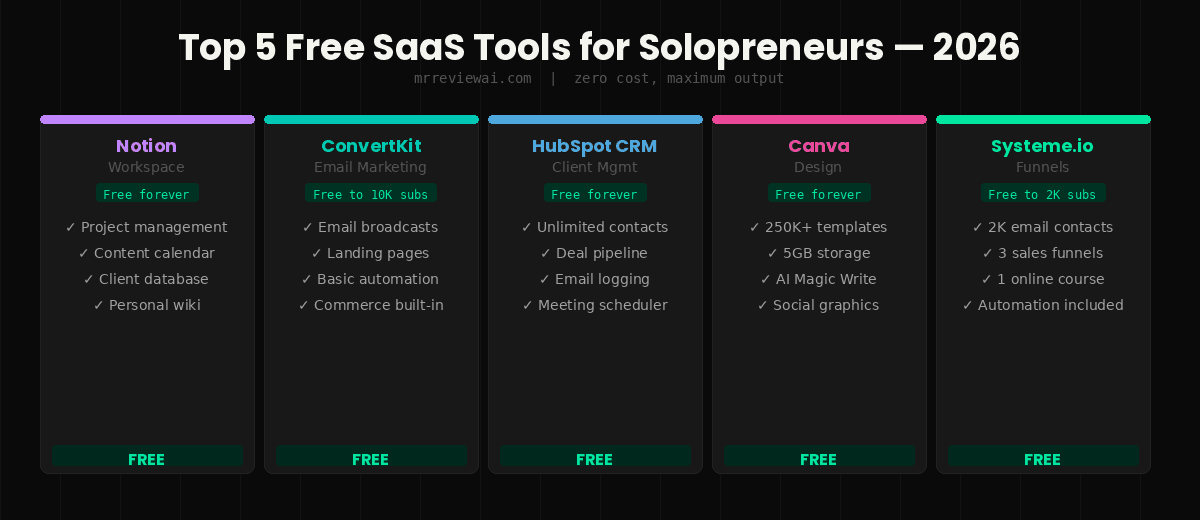
Rule 2: Generous free tiers are real In 2026, the free plans from Notion, HubSpot, Canva, and ConvertKit are genuinely functional — not crippled demos. Most solopreneurs can run a serious operation at $0-30/month for the first 6-12 months.
Rule 3: Don’t mirror an enterprise stack The most common mistake is building a 10-tool stack that mimics a 50-person company. More logins, more notifications, more context switching — all slowing you down. Three tools you use daily beat ten tools you dabble in.
Rule 4: Upgrade when pain demands it, not when FOMO strikes Track a tool for 30 days. If you haven’t used it, cancel it. The best stack isn’t the most sophisticated — it’s the one generating the most output for the least friction.
Quick SaaS Tools Stack Overview
| Tool | Category | Free Plan | Paid Entry | Best For |
|---|---|---|---|---|
| Notion | Workspace | Yes — generous | $10/month | Everything in one place |
| ConvertKit | Yes — 10K subs | $25/month | Creator email marketing | |
| Canva | Design | Yes — solid | $13/month | All visual content |
| Make | Automation | Yes — 1K ops | $9/month | Workflow automation |
| HubSpot CRM | CRM | Yes — full | $12/month | Client management |
| Calendly | Scheduling | Yes — 1 type | $10/month | Meeting booking |
| Stripe | Payments | No fee — 2.9%+30¢ | Per transaction | Collecting revenue |
| Loom | Video | Yes — 5 min | $12.50/month | Async communication |
| Beehiiv | Newsletter | Yes — 2.5K subs | $42/month | Newsletter + monetization |
| Systeme.io | Funnels | Yes — 2K subs | $27/month | Full sales funnel |
1. Notion — Best All-in-One Workspace
Price: Free | Pro: $10/month Best for: Every solopreneur, every stage
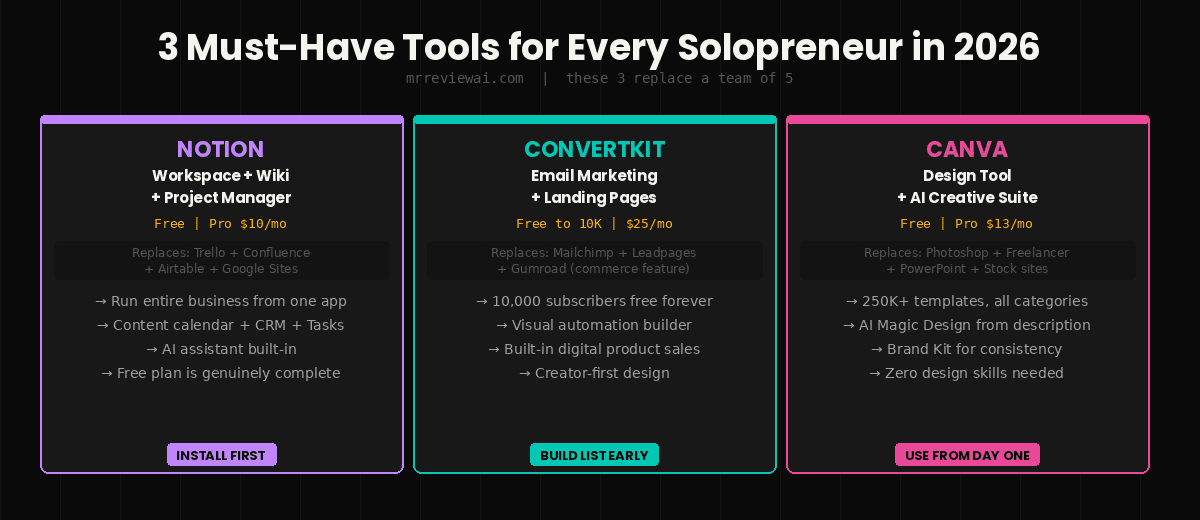
Notion is the Swiss Army knife of solopreneur tools. It replaces your wiki, project tracker, task manager, content calendar, client database, and personal knowledge base — in a single workspace.
The free personal plan is genuinely complete. Block-based editor, unlimited pages, real-time collaboration, web clipper, and basic databases. The Pro plan at $10/month adds unlimited file uploads and version history — useful once you’re storing client deliverables, but not necessary on day one.
What mrreviewai.com uses Notion for:
The entire 30-day content calendar lives in Notion. Each article is a database entry with title, keyword, status, schedule date, images status, and Rank Math score. At a glance, I know what’s written, what needs images, what’s scheduled, and what’s live.
The AI features in 2026:
Notion AI ($10/month add-on or included in some plans) generates summaries, drafts, action items from meeting notes, and translations. It’s less powerful than Claude or ChatGPT for complex writing — but the deep integration with your existing Notion workspace makes it uniquely useful for in-context work.
Bottom line: Install Notion first. It becomes the operating system for your business. It’s the foundation of any SaaS tools stack for solopreneurs.
2. ConvertKit — Best Email Marketing for Creators
Price: Free — 10,000 subscribers | Creator: $25/month Best for: Solopreneurs building an email audience
ConvertKit (now rebranding to Kit) is built specifically for creators and solopreneurs — not ecommerce brands, not enterprise teams. The free tier covers up to 10,000 subscribers with unlimited landing pages, unlimited email broadcasts, and basic automations.
For a solopreneur building an email list alongside a blog or content business, this is the best free email tool available in 2026. Competitors at this level require paid plans to access landing pages and basic automations.
What stands out:
The visual automation builder is genuinely beginner-friendly. You can set up a welcome sequence, tag subscribers by interest, and trigger product recommendation emails without writing a single line of code. For affiliate bloggers building toward product launches or recurring email revenue, this automation capability is what converts an email list from a vanity metric into a revenue channel.
The commerce feature:
ConvertKit’s built-in commerce lets you sell digital products, courses, and paid newsletters directly without a separate platform. For solopreneurs selling a PDF, template pack, or mini-course, this replaces Gumroad or Payhip.
Limitation: The email designer is more limited than Mailchimp’s. If highly branded, visual HTML emails are your priority, Mailchimp or Beehiiv may serve you better. For plain-text, relationship-building emails — which convert better for creator audiences — ConvertKit wins.
Bottom line: The best free email platform for content-driven solopreneurs. The 10,000 subscriber free tier is genuinely remarkable value.
👉 Try ConvertKit Free — Up to 10K Subscribers →
3. Canva — Best Design Tool for Non-Designers
Price: Free — solid | Pro: $13/month Best for: All visual content without design skills
Canva is the tool that most obviously replaced what used to require a freelance designer. Social media graphics, blog hero images, pitch decks, PDF lead magnets, presentation slides, email headers, thumbnails — all designed in a consistent branded style, in minutes.
The free tier includes over 250,000 templates, thousands of photos and graphics, and 5GB of storage. For most solopreneurs, this covers all visual content needs indefinitely.
The AI upgrade in 2026:
Canva’s AI suite — Magic Design, Magic Write, Text-to-Image, Magic Eraser — is genuinely useful. Magic Design generates full slide decks or social posts from a description. Magic Eraser removes unwanted elements from photos in one click. These replace tasks that used to require either Photoshop skills or a freelance designer at $30-50/hour.
The Pro plan at $13/month unlocks Magic Resize (instantly adapt any design across platforms), Brand Kit (store your exact colors, fonts, and logos for consistency), Background Remover, and 100GB storage. For bloggers creating content at mrreviewai.com’s pace, the Brand Kit alone — ensuring every image looks consistent — is worth $13/month.
Bottom line: Free for casual use, $13/month for consistent branded content. No solopreneur should be without Canva in 2026.
4. Make (formerly Integromat) — Best Automation Tool
Price: Free — 1,000 operations/month | Core: $9/month Best for: Automating repetitive tasks between tools
Zapier is the household name in automation. Make (formerly Integromat) is what serious solopreneurs use when they realize Zapier’s free plan is too limited and Zapier’s paid plans are expensive.
In 2026, Make’s free tier gives 1,000 operations per month — enough to automate several meaningful workflows without spending anything. The Core plan at $9/month unlocks 10,000 operations, which covers most solopreneurs’ automation needs comfortably.
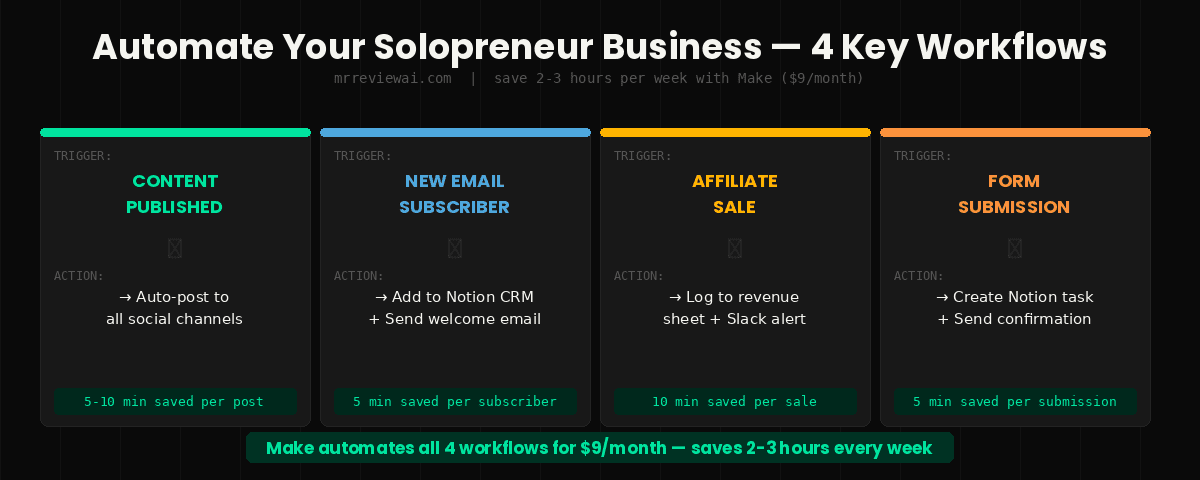
Practical workflows Make replaces manual work:
- New blog post published → auto-post to social media channels
- New email subscriber → add to Notion CRM database + send welcome sequence
- New affiliate sale notification → log to revenue tracking sheet + send Slack alert
- Contact form submission → create task in Notion + send confirmation email
Each of these workflows, done manually, takes 5-10 minutes per trigger. Automated, they take zero time. For a solopreneur handling 20-30 events per day across these categories, automation saves 2-3 hours per week.
Zapier vs Make:
Zapier is simpler and has more native app connections. Make is more powerful, more visual, and significantly cheaper. For complex, multi-step automations — the kind where you’re routing data conditionally or transforming it between steps — Make handles it better. For simple “if this, then that” triggers, Zapier’s simplicity can be worth the premium.
Bottom line: Make at $9/month is the best value automation tool for solopreneurs who want serious workflow automation without Zapier’s pricing.
5. HubSpot Free CRM — Best Client Management
Price: Free | Starter: $12/month Best for: Managing client relationships without expensive CRM software
The free HubSpot CRM is genuinely enterprise-grade client management at zero cost. Contact management, deal pipeline, email logging, follow-up reminders, and a built-in meeting scheduler — all free, forever, for unlimited contacts.
For solopreneurs managing 10-30 active client relationships, HubSpot’s free tier covers everything. The deal pipeline visualizes where each client relationship stands. The email logging automatically records every conversation in the contact record. The meeting scheduler (similar to Calendly) eliminates scheduling back-and-forth.
When to upgrade:
The free tier has one meaningful limitation: email marketing is basic. If you want sequences, automated follow-ups, and segmentation beyond manual tasks, the Starter plan at $12/month unlocks the essentials. Most solopreneurs can run 12-18 months on the free CRM before needing the upgrade.
Bottom line: Start here before paying for Salesforce, Pipedrive, or any other CRM. The free plan replaces $50-100/month of paid CRM software for most solopreneur use cases.
6. Calendly — Best Scheduling Tool
Price: Free — 1 event type | Standard: $10/month Best for: Eliminating scheduling back-and-forth
Calendly eliminates the most annoying time sink in client work: the 4-email thread to find a 30-minute window that works for both people.
Share your Calendly link. The client books a time that fits their schedule. It shows in your calendar automatically. Google Meet or Zoom link is generated. Reminder emails go out. You spend zero minutes on scheduling administration.
The free plan supports one event type — enough if you run a single type of meeting (discovery call, consultation, check-in). The Standard plan at $10/month unlocks unlimited event types, custom workflows, and payment collection through Stripe.
Bottom line: The free plan covers most solopreneurs’ needs. One of the highest ROI tools in the entire stack — the time it saves in the first month pays for itself multiple times over.
7. Stripe — Best Payment Processing
Price: No monthly fee — 2.9% + 30¢ per transaction Best for: Accepting any form of digital payment
Stripe is the payment infrastructure that powers most solo online businesses. No monthly fee — you only pay when you make money (2.9% + 30¢ per transaction). Hosted checkout pages, subscription billing, and one-time payments work out of the box.
For affiliate bloggers adding digital products, consulting, or a paid newsletter — Stripe handles payment processing without a platform fee on top of the transaction cost. ConvertKit Commerce and Gumroad both use Stripe under the hood while adding their own percentage. Going direct to Stripe saves that additional cut.
Bottom line: Not optional if you’re collecting money online. Add it before you need it — setup takes 30 minutes and is infinitely easier before you have customers waiting to pay.
8. Loom — Best Async Video Communication
Price: Free — 5-minute limit | Business: $12.50/month Best for: Async client updates, tutorials, feedback
Loom records your screen, webcam, or both simultaneously and produces an instantly shareable link. For solopreneurs working with clients across time zones, it replaces meetings that didn’t need to be meetings.
A 3-minute Loom explaining a deliverable, giving feedback on a design, or walking through a report replaces a 30-minute video call. The viewer can watch on their schedule. You can record it asynchronously. Time zones become irrelevant.
The free plan’s 5-minute limit is the genuine limitation — most useful solopreneur Looms run 3-8 minutes. The Business plan at $12.50/month removes the limit and adds analytics (who watched, how much, when they dropped off).
Bottom line: Start with the free plan. The 5-minute limit forces conciseness, which is often an improvement anyway. Upgrade when client communication volume justifies it.
9. Beehiiv — Best Newsletter Platform
Price: Free — 2,500 subscribers | Scale: $42/month Best for: Solopreneurs monetizing an email audience
Beehiiv is the newsletter platform that took serious market share from ConvertKit and Substack in 2025-2026. What differentiates it: built-in ad network, boosts (paid subscriber acquisition), referral programs, and premium subscriptions — all in one platform.
For solopreneurs whose primary revenue model involves a newsletter (paid or free with sponsorships), Beehiiv’s monetization infrastructure is significantly better than ConvertKit or Substack.
ConvertKit vs Beehiiv:
Use ConvertKit if your email list supports a product, service, or blog — it’s the better marketing automation tool. Use Beehiiv if the newsletter itself is the product — the monetization features and growth tools are built specifically for this model.
Bottom line: The best newsletter-first platform in 2026. Free up to 2,500 subscribers — try it before committing to Scale.
10. Systeme.io — Best All-in-One Funnel Tool
Price: Free — 2,000 subscribers | Startup: $27/month Best for: Solopreneurs who want email + landing pages + courses in one tool
Systeme.io is the most comprehensive free plan in this entire list. The free tier includes 2,000 email contacts, 3 sales funnels, 1 course, unlimited emails, and access to automation features. That’s a complete digital business infrastructure at zero cost.
For affiliate bloggers building toward their first digital product or online course, Systeme.io replaces ClickFunnels ($97/month), Kajabi ($149/month), and an email platform — in a single tool, for free.
The Startup plan at $27/month expands to 5,000 contacts, unlimited funnels, unlimited courses, and a full affiliate program feature. For a solopreneur selling a course, coaching program, or digital product, this is the highest-value all-in-one platform available.
Limitation: The interface is less polished than Kajabi. Email deliverability is generally good but not best-in-class. For a solopreneur prioritizing value over aesthetics, it’s unbeatable. For someone selling a premium course at $500+ where brand perception matters, Kajabi’s polish may be worth the premium.
Bottom line: The best free plan for solopreneurs building a digital product business. Start here before spending $100+/month on enterprise funnel tools.
The Complete Solopreneur Stack by Budget
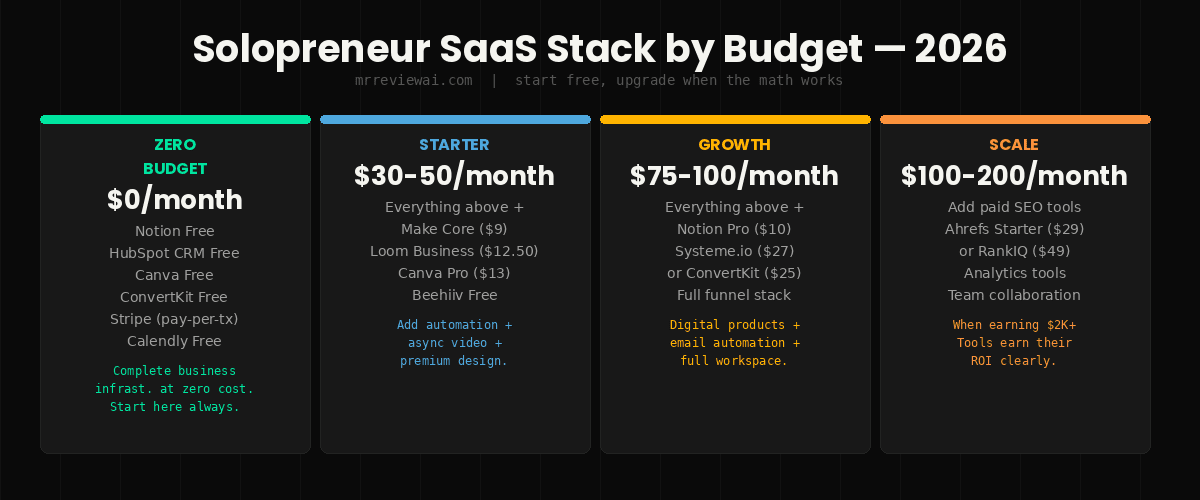
Zero budget — $0/month: Notion Free + HubSpot CRM Free + Canva Free + ConvertKit Free + Stripe (pay-per-transaction) + Calendly Free
This covers: workspace, client management, design, email up to 10K subscribers, payment processing, and scheduling. A complete solopreneur business for zero fixed monthly cost.
Starter — $30-50/month: Add Make Core ($9) + Loom Business ($12.50) + Beehiiv or Canva Pro ($13-42)
This covers automation, async video, and either newsletter monetization or premium design features.
Growth — $75-100/month: Add Notion Pro ($10) + Systeme.io Startup ($27) or ConvertKit Creator ($25)
Full workspace + email automation + digital product sales infrastructure. Everything a growing solopreneur business needs.
The honest reality: Most solopreneurs earning under $2,000/month should be running the $0-30/month stack. Spending $200+/month on tools before your business justifies it is how SaaS subscriptions become a drain rather than an asset.
FAQ
What is the best SaaS tool for solopreneurs starting out? Start with Notion (free) for your workspace and HubSpot CRM (free) for client management. These two tools cover the operational core of most solopreneur businesses at zero cost. Add ConvertKit (free) when you’re ready to start building an email list.
Can a solopreneur run a complete business under $50/month? Yes. Notion Free + HubSpot CRM + Canva Free + ConvertKit Free + Stripe + Make Core ($9) + Calendly Free covers workspace, client management, design, email marketing, payment processing, automation, and scheduling for under $10/month in fixed costs.
Is Notion good for solopreneurs? Yes — it’s the single most versatile SaaS tool on this list. Project management, documentation, content calendar, client database, and knowledge base all in one workspace. The free plan is genuinely complete for most solopreneurs.
ConvertKit vs Beehiiv — which should I use? Use ConvertKit if your email supports a blog, service, or product business. Use Beehiiv if the newsletter itself is the primary product with its own subscription revenue. Both have meaningful free tiers.
When should I upgrade from free tools to paid? When a specific paid feature would directly save you time or generate more revenue than its cost. Not based on FOMO or because you feel like a “real business” needs paid tools. Track your tools’ usage every 30 days and cancel anything you haven’t actively used.
The solopreneur advantage in 2026 isn’t scale — it’s speed. One person with the right tools can now ship, market, and sell what used to require a small team. The best SaaS tools for solopreneurs available in 2026 make this possible.
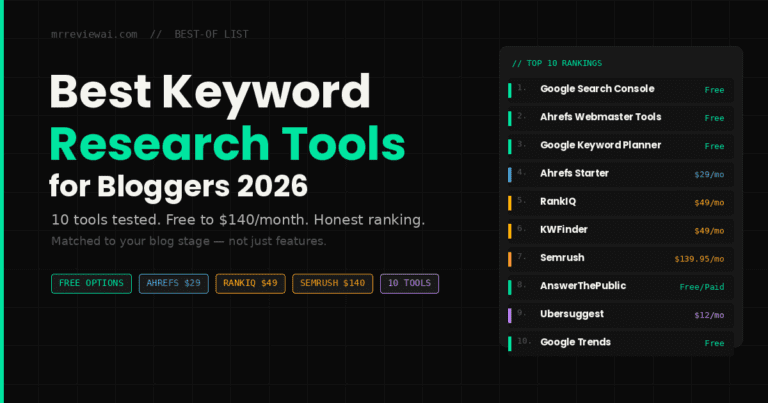
This stack of SaaS tools for solopreneurs costs under $100/month fully loaded. It replaces tens of thousands of dollars per year in employee costs or agency fees. And every tool on this list has a free tier worth starting with before you spend a cent. For content-focused solopreneurs, pair this stack with best AI writing tools and best AI SEO tools to maximize your content output.
Start lean. Add tools when pain demands it. Cancel everything you don’t use. When you’re ready to scale your content strategy, learn keyword research with AI tools and check out the Koala AI review for blog writing automation.
👉 Start with Notion Free → 👉 Try ConvertKit Free — 10K Subscribers → 👉 Try Systeme.io Free →
Published by mrreviewai.com | Last updated: May 2026 Tested across mrreviewai.com and multiple solopreneur businesses.
🎁 Free Weekly AI Tool Picks
Join 1,000+ bloggers getting tested AI tool recommendations every week. No spam, unsubscribe anytime.