
Canva vs Adobe Express 2026: Which Design Tool Wins?
Disclosure: This post contains affiliate links. If you purchase through them, I may earn a commission at no extra cost to you. I only recommend tools I’ve actually tested.
If you’re creating graphics for a blog, social media, or any online business in 2026, you’ve landed on one of two tools: Canva or Adobe Express. Both are free to start, both are built for non-designers, and both can produce professional-looking visuals without a design degree.
So which one should you actually use?
I’ve run both tools daily for over a year — Canva for blog thumbnails, social media posts, and infographics, Adobe Express for branded quick-turnaround content. This Canva vs Adobe Express 2026 comparison cuts through the marketing copy and tells you exactly which tool fits which situation.
The short answer: Canva wins for most bloggers and content creators. Adobe Express wins if you’re already deep in the Adobe ecosystem. But the gap has narrowed significantly in 2026, and Adobe Express is now genuinely competitive on price.
Quick Verdict: Canva vs Adobe Express 2026
| Canva | Adobe Express | |
|---|---|---|
| Best for | Bloggers, marketers, teams | Adobe CC users, brand content |
| Free plan | Yes — 1.6M+ templates | Yes — 100K+ templates |
| Paid from | $15/mo (Pro) | $9.99/mo (Premium) |
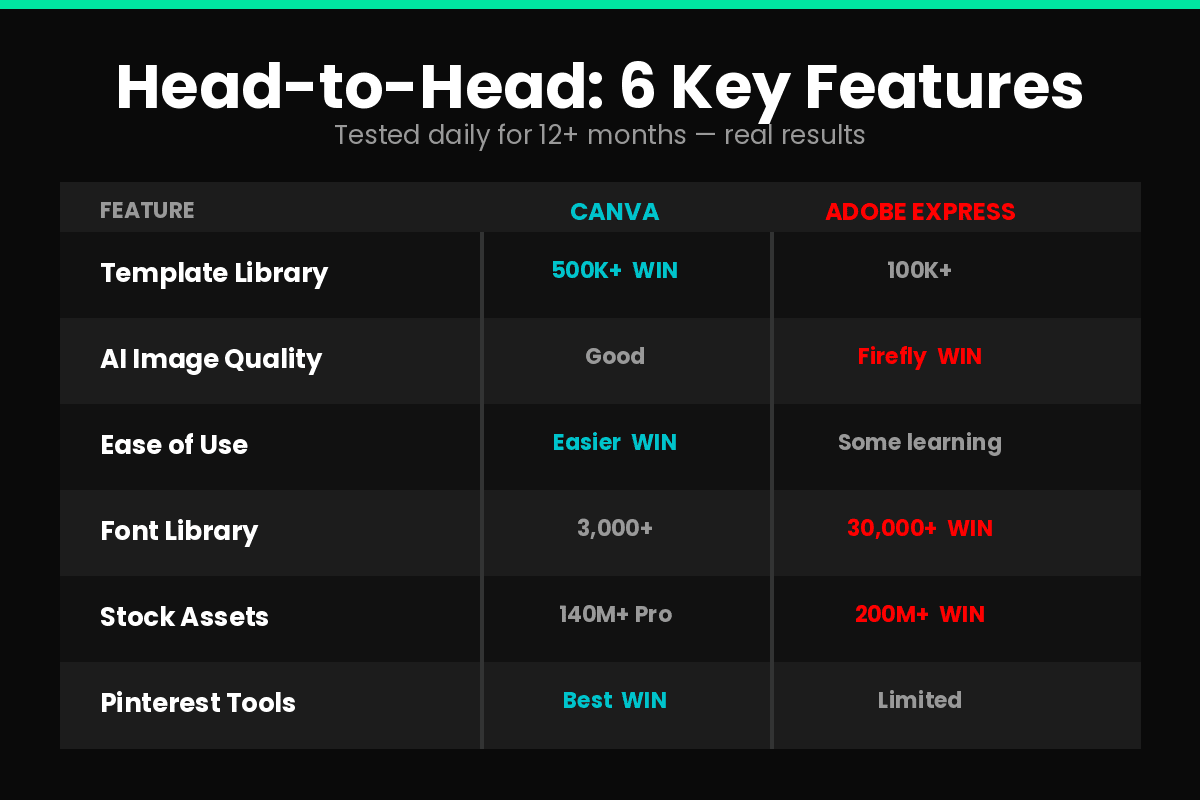
| Templates | 500,000+ | 100,000+ |
| AI features | Magic Studio suite | Adobe Firefly (stronger AI) |
| Stock assets | 140M+ (Pro) | 200M+ Adobe Stock (Premium) |
| Adobe CC integration | No | Yes — native |
| My rating | 4.6/5 | 4.1/5 for non-Adobe users |
Try Canva Free → | Try Adobe Express Free →
Table of Contents
- The Core Difference
- Templates and Design Assets
- AI Features Compared
- Pricing: Canva vs Adobe Express 2026
- Ease of Use
- For Bloggers and Content Creators Specifically
- Where Adobe Express Actually Wins
- Who Should NOT Use Each
- Final Verdict
- FAQ
The Core Difference
Before comparing features, it helps to understand what each tool is fundamentally built for.
Canva was designed from day one for non-designers who need to create a wide variety of content quickly. It’s breadth-first — massive template library, hundreds of content types, team collaboration, social scheduling, even a basic website builder and AI video tool. Canva has grown into an “everything creative” platform with 260 million monthly users worldwide.
Adobe Express was built as an accessible entry point to Adobe’s professional ecosystem. It’s designed for people who need fast, branded content — and who may eventually move their more complex work into Photoshop, Illustrator, or Premiere. Express is polish-first, not breadth-first.
The practical implication for a blogger: if you need to create blog graphics, Pinterest pins, Instagram posts, YouTube thumbnails, and email headers — all from one place, with a huge template library — Canva is built for your workflow. If you need your quick graphics to look and feel consistent with work you’re doing in Photoshop or Illustrator — Adobe Express is built for that bridge.
Templates and Design Assets
This is where Canva’s lead is most visible.
Canva: 500,000+ templates across every category imaginable. Social media posts, presentations, posters, infographics, email headers, YouTube thumbnails, book covers, CVs, menus — if you need it, there’s almost certainly a template for it. The quality ranges from basic to genuinely impressive. For a blogger creating multiple content types daily, the template depth reduces creation time significantly.
Adobe Express: 100,000+ templates — still a lot, but 5x fewer than Canva. The templates trend toward higher visual quality and more polished brand aesthetics. Adobe’s templates feel more curated — fewer options, but less time sorting through mediocre ones.
For stock assets, Adobe Express actually wins on volume: 200M+ royalty-free Adobe Stock photos, videos, and graphics on the Premium plan. Canva Pro offers 140M+ assets. Adobe also provides access to 30,000+ premium fonts — roughly 10x more than competitors.
Winner: Canva for breadth, Adobe Express for quality and font library.
AI Features Compared

Both platforms have invested heavily in AI — but their approaches are different.
Canva Magic Studio
Canva’s AI suite is called Magic Studio and includes:
- Magic Design: auto-generates design layouts from a few keywords
- Magic Write: generates text for your designs
- Magic Expand: enlarges images without quality loss
- Magic Eraser: removes unwanted objects from photos
- AI Photo Editor: point-and-click editing, background replacement, object removal
- Magic Sheets: AI-powered data charts and insights
Magic Studio is well-integrated into the Canva workflow. For a blogger who needs to generate a blog thumbnail fast — type a description, get layout options, adjust, export — the workflow is smooth.
Adobe Firefly
Adobe Express uses Adobe Firefly for AI generation, and this is where Adobe genuinely outperforms Canva:
- Text-to-Image: generates images from prompts with significantly higher quality than Canva
- Generative Fill: fills selected areas with AI-generated content — like Photoshop’s generative fill, but inside Express
- Text Effects: adds AI-generated textures and styles to text
- Text-to-Template: generates full design templates from a text description
- 250 AI credits/month on both free and premium plans
Adobe Firefly produces noticeably better image quality than Canva’s Magic Studio for complex prompts. The reason: Firefly is trained exclusively on licensed Adobe Stock content, which means results are both higher quality and commercially safe without copyright concerns.
Winner: Adobe Express for AI image quality. Canva for AI workflow integration and ease of use.
Pricing: Canva vs Adobe Express 2026
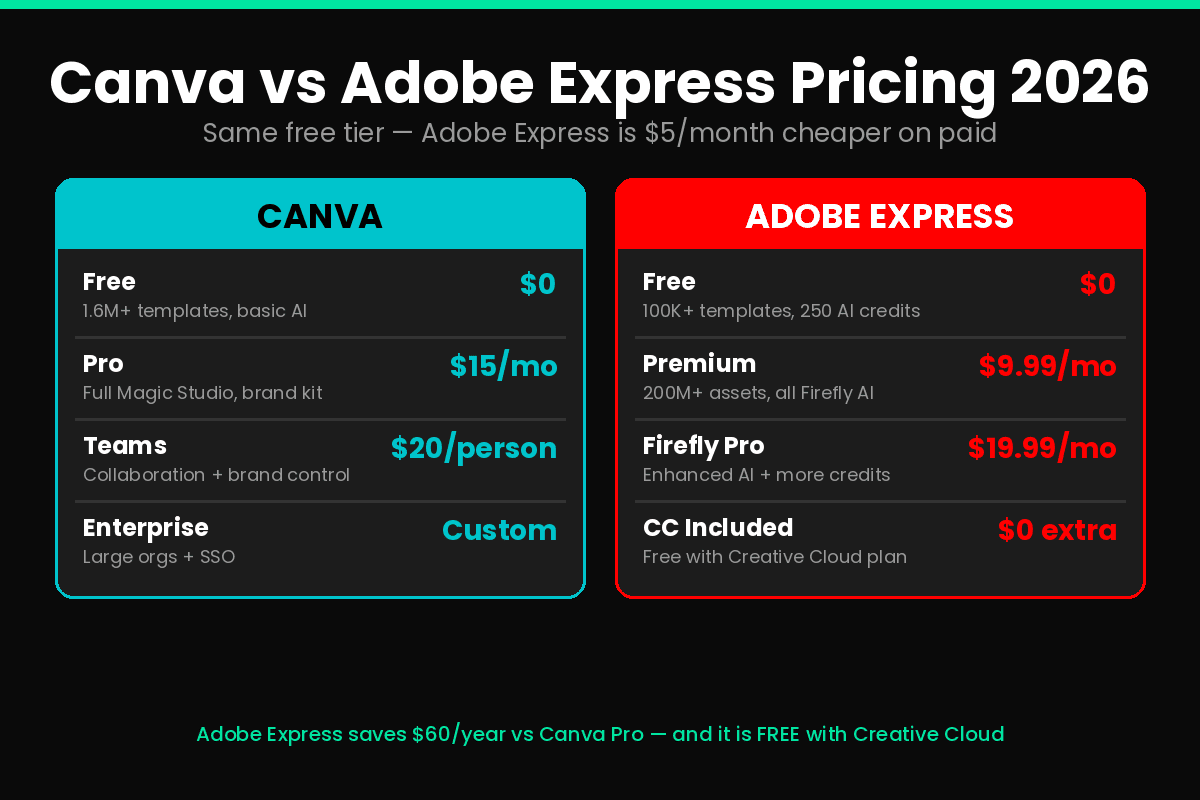
This is where Adobe Express has become genuinely competitive.
Canva Pricing 2026
- Free: 1.6M+ templates, core editor, basic AI tools
- Pro: $15/month — premium templates, background removal, full Magic Studio, brand kit, 140M+ stock assets
- Teams: $20/person/month — collaboration, centralized brand assets, team workflows
- Enterprise: Custom pricing
Adobe Express Pricing 2026
- Free: 100K+ templates, 1M+ Adobe Stock assets, 4,000+ fonts, 250 Firefly AI credits/month
- Premium: $9.99/month — all templates, 200M+ assets, 30,000+ fonts, full Firefly suite, social scheduling on 3 accounts per network
- Firefly Pro: $19.99/month — enhanced AI generation, more credits
- Included in Adobe Creative Cloud All Apps plan — if you already pay for Creative Cloud, Express Premium is included at no extra cost
The pricing reality: Adobe Express Premium at $9.99/month is $5/month cheaper than Canva Pro. Over a year, that’s $60 saved. More importantly, if you’re already paying for Adobe Creative Cloud ($55+/month), Express is included — meaning the marginal cost is zero.
For bloggers not in the Adobe ecosystem: Canva Pro at $15/month offers more templates, better workflow integration, and a more mature feature set. For Adobe CC users: Express Premium is the obvious choice given the included pricing.
My Pricing Recommendation
| Situation | Tool | Plan |
|---|---|---|
| Starting out, low budget | Canva | Free |
| Active blogger creating daily | Canva | Pro $15/mo |
| Already paying for Adobe CC | Adobe Express | Included free |
| Need best AI image generation | Adobe Express | Premium $9.99/mo |
| Team with brand guidelines | Canva | Teams $20/person/mo |
Ease of Use
Both tools are accessible to non-designers, but they feel different to use.
Canva: The drag-and-drop editor is as intuitive as it gets. Most users can start creating within minutes. The homepage is organized around what you want to make — “Create a social media post,” “Design a presentation” — which guides you toward the right template format immediately. For bloggers who need to create fast without thinking about design theory, Canva removes friction better than anything else.
Adobe Express: Clean and modern, but slightly steeper learning curve for complete beginners. Users familiar with other Adobe products will feel at home immediately — the layer-based approach and panel organization echo Photoshop’s logic. Users with no Adobe background may need an extra 30 minutes of exploration before feeling confident.
One area where Adobe Express stands out: the Quick Actions feature. Single-click tasks like background removal, image resize for multiple channels, PDF conversion, and video trimming execute instantly. Canva has equivalents but they’re buried deeper in menus.
Winner: Canva for first-time users and speed. Adobe Express for efficiency once you know the interface.
For Bloggers and Content Creators Specifically
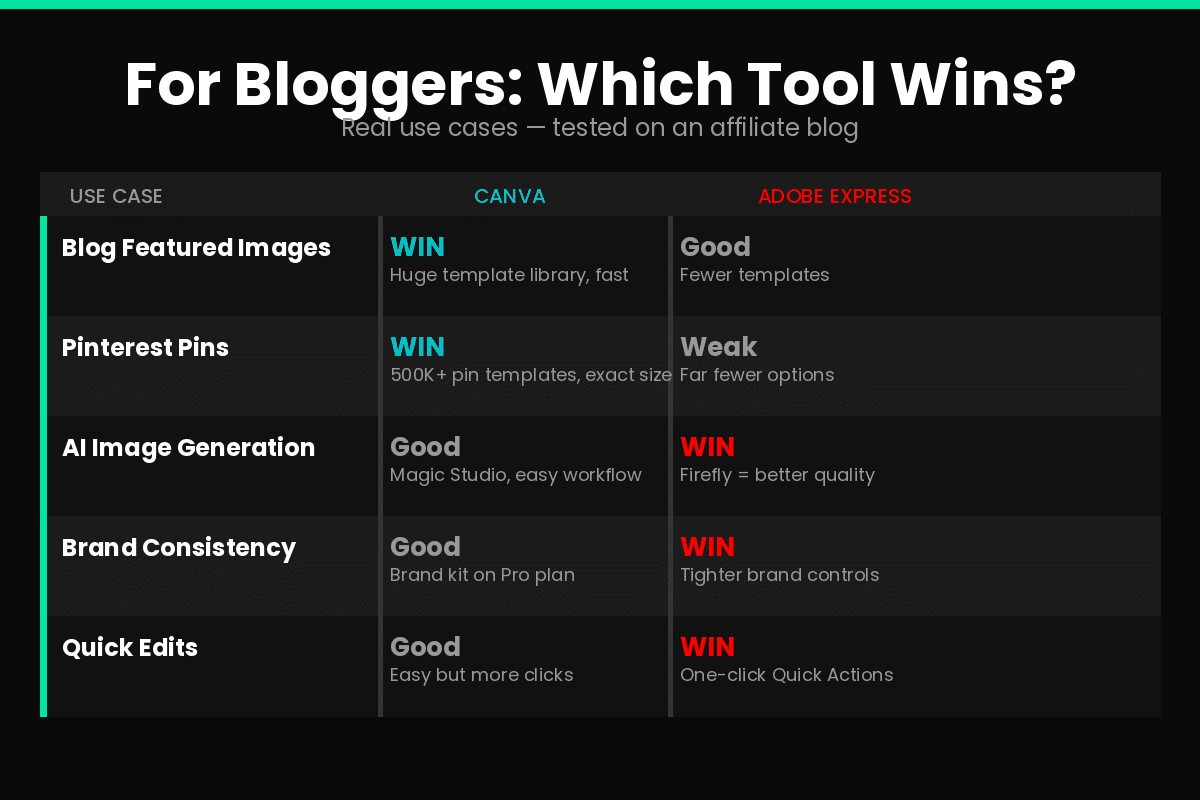
Here’s how each tool performs on the tasks affiliate bloggers actually need:
Blog Featured Images and Thumbnails
Canva: Large template library in exactly the right dimensions. Hundreds of blog header and featured image templates. Easy to maintain consistent visual style across posts with brand kit. I create all six images per blog post in Canva in about 45 minutes — with a workflow that’s now muscle memory.
Adobe Express: Fewer blog-specific templates but higher visual quality on what’s available. The Quick Actions resize feature is genuinely useful when you need to repurpose one image across multiple dimensions.
Winner: Canva — template volume and workflow speed matter more than polish for high-frequency blog image creation.
Pinterest Pins
Canva: Dominant here. The Pinterest pin template library is enormous — hundreds of options in the exact 2:3 ratio Pinterest recommends. Bulk creation with slight variations is straightforward.
Adobe Express: Has Pinterest templates but significantly fewer. If Pinterest is a primary traffic channel, Canva is the correct choice.
Winner: Canva, not close.
Social Media Posts
Canva: Social media is Canva’s home turf. Instagram, Facebook, LinkedIn, X, TikTok — templates optimized for every platform, all accessible from one interface. The built-in social scheduling lets you queue posts directly from Canva.
Adobe Express: Solid social media tools and includes social scheduling on 3 accounts per network on Premium. The Content Scheduler is clean and functional. For someone already in Adobe’s ecosystem, this works well.
Winner: Tie — both handle social media well. Canva wins on template variety, Adobe Express wins on integrated scheduling at a lower price point.
Quick Edits and Brand Consistency
Adobe Express: Wins here. The brand controls in Express are tighter — logos, fonts, colors locked for consistency across team members. The Quick Actions single-click tools genuinely save time for repeated tasks. If you’re managing a brand with strict visual guidelines, Express enforces them better.
Canva: Brand Kit (available on Pro) works well for individuals but is more flexible than locked — team members can still deviate from brand guidelines more easily.
Winner: Adobe Express for brand control and quick single-action edits.
Where Adobe Express Actually Wins
To give Adobe Express its full credit, here’s where it genuinely outperforms Canva:
AI image generation quality. Adobe Firefly produces better results for complex image generation prompts. The commercially-safe training data means you can use AI-generated images in client work without copyright risk — a meaningful advantage for freelancers and agencies.
Adobe Creative Cloud integration. If you work in Photoshop, Illustrator, or InDesign, the workflow between those tools and Express is seamless. Import a Photoshop file, make quick edits in Express, export — no conversion or quality loss.
Font library. 30,000+ premium Adobe Fonts vs Canva’s 3,000. For typographically sensitive design work, Adobe Express wins by a wide margin.
Price. $9.99/month vs $15/month — Express Premium is objectively cheaper for comparable premium features. And it’s free with Creative Cloud subscriptions.
Video editing depth. Adobe Express offers 4K video support, background removal from video, animation, and auto-captions in 100+ languages. Canva’s video tools are capable but less powerful.
Who Should NOT Use Each
Don’t use Canva if:
- You’re already paying for Adobe Creative Cloud — Express is included and integrates with your existing workflow
- You need professional-grade AI image generation for client work — Firefly produces better commercially-safe results
- You work primarily in Photoshop or Illustrator — Express is the natural bridge tool, not Canva
Don’t use Adobe Express if:
- You need a massive template library for high-volume content creation — Canva’s 500,000+ templates vs Express’s 100,000+ is a real difference for daily creators
- You’re building a Pinterest traffic strategy — Canva’s Pinterest template library is unmatched
- You’re a complete beginner with zero design experience — Canva’s learning curve is gentler
- You need advanced team collaboration features — Canva Teams is more mature
Final Verdict

For most bloggers and content creators: Canva wins.
The template library depth, intuitive interface, Pinterest optimization, and mature workflow make Canva the more productive daily tool for anyone creating blog content at scale. At $15/month for Pro, it’s a justified investment once you’re publishing more than 4 posts per month.
For Adobe Creative Cloud users: Adobe Express wins.
If you’re already paying $55+/month for Creative Cloud, Express Premium is included. The Firefly AI quality, font library, and native CC integration make it the obvious choice for users already in Adobe’s world.
The honest one-sentence verdict: Canva is the better tool for most online business owners — but Adobe Express has stopped being a distant second and is now a genuine alternative, especially for AI-heavy workflows and Adobe ecosystem users.
Try Canva Free → | Try Adobe Express Free →
For more on building your content creation stack, see Best AI Writing Tools for Bloggers 2026 and Best SaaS Tools for Solopreneurs 2026.
FAQ
Is Canva better than Adobe Express in 2026?
For most bloggers and content creators, yes. Canva has 5x more templates, a more intuitive interface for beginners, and a more mature workflow for high-volume content creation. Adobe Express is better for Adobe Creative Cloud users and those who need higher-quality AI image generation.
Is Adobe Express free in 2026?
Yes. Adobe Express has a genuinely useful free plan with 100,000+ templates, 1M+ Adobe Stock assets, 4,000+ fonts, and 250 monthly Firefly AI credits. The Premium plan adds full template access, 200M+ assets, and 30,000+ fonts for $9.99/month.
How much does Canva Pro cost in 2026?
Canva Pro costs $15/month (monthly billing) or approximately $10/month on annual billing. It unlocks premium templates, background removal, the full Magic Studio AI suite, brand kit, and 140M+ premium stock assets.
Can I use Adobe Express if I don’t have Adobe Creative Cloud?
Yes. Adobe Express works as a standalone tool — you don’t need a Creative Cloud subscription. The free plan is available to anyone. However, if you already pay for Creative Cloud All Apps, Express Premium is included at no extra cost, making it one of the best-value additions to an existing Adobe subscription.
Which is better for Pinterest — Canva or Adobe Express?
Canva, by a significant margin. The Pinterest pin template library in Canva is enormous — hundreds of options in the exact dimensions Pinterest recommends. Pinterest is one of Canva’s strongest use cases. Adobe Express has Pinterest templates but far fewer.
Last updated: May 2026. Pricing verified as of publication date.
FREE WEEKLY BRIEFING
Get AI tool insights before everyone else
One real story. One tested tool. One takeaway. Every week. No spam, no sponsored picks.
No thanks, I already know enough

About the Author
Hung Nguyen
Hung Nguyen is a digital marketer and the founder of Mr Review AI - an independent AI tools testing site he launched on April 25, 2026. He started the site to document his own experience with affiliate marketing and AI tools, publishing real hands-on reviews from day one. His review methodology prioritizes real-world experience: every review is based on his own hands-on testing with real accounts, tracked credits, and documented results - not vendor demos or secondhand information. His AI voice reviews cover ElevenLabs, Murf AI, and MiniMax Audio - all personally tested with live audio outputs. Content is written with Claude AI assistance via the Chrome extension, but all testing, findings, and conclusions are his own. As of June 2026, Mr Review AI covers AI voice tools, AI writing tools, email marketing, and SaaS tools - from the perspective of a solo affiliate marketer who is new to the field but committed to honest, firsthand testing.