How to Use Koala AI to Write 10 Posts Per Week (Two Methods, Real Results)
Disclosure: This post contains affiliate links. If you buy through my links, I may earn a commission at no extra cost to you. I only recommend tools I’ve actually used in my own publishing workflow.
Here’s exactly how to use Koala AI to publish 10 blog posts per week — and what actually happens when you start on the free plan. I tested it first with 5,000 words and 25 chat messages, no credit card required. Writing one article with Deep Research mode on consumed 4,995 of those 5,000 words. The entire free quota, gone after a single draft.
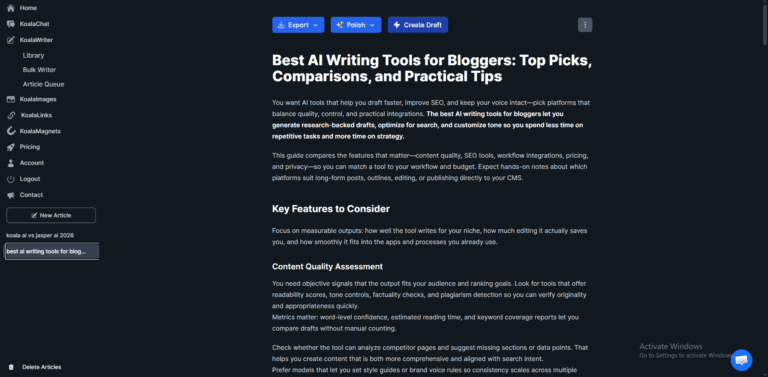
That article — a Best AI Writing Tools for Bloggers roundup — became the test case for everything described in this guide. If you want to see exactly what raw Koala output looks like before editing and how long the editing process actually takes, that article is published here → with a full editorial note at the top.
That experience taught me the first real thing most Koala AI guides skip: the free tier is for evaluating the tool, not for building a publishing workflow. Once I understood what the paid plans actually unlock — and how the two different generation methods work — hitting 10 posts per week became a system I could repeat.
This guide breaks down both methods: Bulk Writer (faster, good for cluster content) and step-by-step (slower, better for affiliate reviews and pillar pages). I’ll show you real output from Koala, honest editing times, and exactly where the tool falls short.
⚡ Quick Verdict
| Best for | Solo affiliate bloggers publishing 5–15 posts/week |
| Fastest method | Bulk Writer — generate 10 drafts simultaneously in one queue |
| Best quality method | Step-by-step — configure per article, edit per article |
| Free trial | 5,000 words + 25 chats — enough for 1 article with Deep Research on |
| Minimum plan for this workflow | Essentials ($9/mo, 15,000 words) — but Professional ($49/mo, 100,000 words) is required for Deep Research + KoalaLinks |
| Critical pricing note | GPT-5.2 or Claude 4.5 Sonnet = 2x word credit consumption. 100,000 words on Professional → effectively 50,000 words at quality settings |
| Skip if | You publish fewer than 4 posts/month, or work in medical/legal/finance niches |
| Try free | Start Koala AI — No Credit Card → |
Table of Contents
- Why 10 Posts Per Week Is Achievable (But Not Simple)
- What You Need Before You Start — And the Pricing Reality
- Method 1 — Bulk Writer: Generate 10 Drafts Simultaneously
- Method 2 — Step-by-Step: Higher Control, Better Output for Reviews
- What Raw Koala Output Actually Looks Like — Before and After Editing
- Bulk Writer vs Step-by-Step: Which Should You Use?
- Realistic Results by Week
- Who Should NOT Use This Workflow
- FAQ
Why 10 Posts Per Week Is Achievable (But Not Simple)
Publishing 10 posts per week with Koala AI is a realistic target — but only if you treat it as a drafting engine with a required editing step, not a publish button.
Here’s the actual time breakdown per article:
| Task | Bulk Writer method | Step-by-step method |
|---|---|---|
| Keyword selection (batched Monday) | ~10 min | ~10 min |
| Configuration | ~2 min (global settings) | ~8 min (per article) |
| Generation | ~4 min (queued) | ~4 min |
| Spot-editing | ~30–40 min | ~20–35 min |
| WordPress publish + scheduling | ~10–15 min | ~10–15 min |
| Total per article | ~55–70 min | ~50–70 min |
Two articles per workday. Ten per week. That’s the math.
The two failure modes I’ve seen (and experienced):
- Using default settings — output uses the cheapest AI model (GPT-5 Mini), produces generic structure that needs significant rewriting, not spot-editing
- Skipping editing entirely — Koala’s intros are consistently the weakest section; publishing raw output signals low quality to Google and kills reader trust immediately
The workflow below fixes both.
What You Need Before You Start — And the Pricing Reality
The plan you actually need
Free trial: 5,000 words + 25 chat messages. No credit card. Good for testing output quality on 1–2 articles. Not enough for a publishing workflow — I burned through the entire free quota writing one article.
Essentials ($9/mo): 15,000 words. Works for 4–6 articles/month at standard model settings. Does not include Deep Research mode or KoalaLinks — the two features that make output spot-editable rather than rewrite-level.
Professional ($49/mo): 100,000 words. Unlocks Deep Research, KoalaLinks, KoalaMagnets, Bulk Writer at full speed, and premium AI image models. This is the minimum plan for a 10-posts/week workflow.
The credit trap most guides don’t mention: Word counts listed on the pricing page are based on GPT-5 Mini (the cheapest model). If you switch to GPT-5.2 or Claude 4.5 Sonnet — which produce noticeably better output — credits burn at 2x the rate. On Professional, 100,000 listed words = effectively 50,000 words at quality settings. Factor this in before choosing your plan.
At $49/mo Professional and ~40 articles/month (10/week), that’s roughly $1.20 per draft using premium models. No human writer operates at that rate.
The integrations Koala supports (verified from dashboard)
From the Account → Integrations section: WordPress, Shopify, Webflow, and Ghost — all one-click connections. Zapier and Make.com via webhook. API access available on all paid plans including Essentials.
What you need before generating a single article
- 20–30 keywords queued — batch production only works when keyword decisions are made in advance, not daily
- WordPress integration connected — eliminates 10–15 minutes of formatting per article
- KoalaLinks set up — requires your sitemap submitted and 10+ published articles before it adds real value
Method 1 — Bulk Writer: Generate 10 Drafts Simultaneously
Bulk Writer is the feature Google’s AI Overview is currently surfacing for this query — and the one most workflow guides skip entirely.
Instead of configuring and generating articles one at a time, Bulk Writer lets you input an entire keyword list, apply global settings, and generate all drafts in a single queue while you step away.
Step-by-step: How to use Koala AI Bulk Writer
Step 1 — Access Bulk Writer From the KoalaWriter sidebar: Library → Bulk Writer. This is separate from the standard single-article view.
Step 2 — Paste your keyword list One keyword per line. Each line becomes a separate article:
how to use koala ai for affiliate blogging
koala ai vs jasper ai 2026
best ai writing tools for bloggers
writesonic review 2026
copy ai review 2026
…
Step 3 — Set global settings These apply to every article in the queue:
- Article Type: Blog Post or Listicle
- AI Model: GPT-5.2 or Claude 4.5 Sonnet (remember: 2x credit consumption, but worth it)
- Tone of Voice: “SEO optimized, confident, and knowledgeable” for most affiliate content
- AI Features: Toggle on Real-Time Data, Cite Sources, Automatic Internal Linking
- Length: Default unless you have specific targets
Step 4 — Save as a Preset Name it (e.g., “Affiliate Review — Standard”). Load this preset next Monday instead of reconfiguring from scratch. Saves 15–20 minutes per batch session.
Step 5 — Click Bulk Create and step away Koala queues and generates all articles sequentially. At 10 articles: roughly 30–50 minutes depending on Deep Research depth. You don’t need to stay at your desk.
Step 6 — Batch edit the following day Do not edit immediately after generating. Wait until the next morning, then edit 2 articles per day across the week. Fresh eyes catch more errors and the editing rhythm is more sustainable.
What Bulk Writer editing looks like
For each bulk-generated draft, this is the editing checklist I run:
 Rewrite the intro — always the weakest section, consistently generic (3–5 min)
- Verify all statistics and pricing — Deep Research is accurate but not infallible (5 min)
- Add affiliate links manually — Koala will not place these for you
- Rewrite the conclusion — add a specific CTA and a “next step” link (3 min)
- Confirm KoalaLinks suggestions — the tool suggests, you decide if each link is contextually accurate
Total editing per Bulk Writer article: ~30–40 minutes
The real limitation of Bulk Writer that other guides skip
Bulk Writer applies global settings to every article. That means:
- Same tone across all 10 posts — problematic if your keyword mix includes both conversational how-tos and analytical reviews
- No per-article outline review — Koala’s default outline for each keyword may include filler H2s you’d remove if configuring individually
- Intro quality is more consistently generic across the batch — budget an extra 2–3 minutes editing each one
Bottom line on Bulk Writer: Best for informational how-tos, supporting cluster posts, and high-volume publishing where speed matters more than per-article customization. Not suitable for pillar pages or high-stakes affiliate reviews where every section needs deliberate configuration.
Method 2 — Step-by-Step: Higher Control, Better Output
Use this method for your monetization articles — affiliate reviews, comparison posts, pillar pages. The configuration step takes more time per article but produces output that needs significantly less editing.
Build your keyword queue first (once per week)
The biggest time waster in content production isn’t writing — it’s deciding what to write next.
Front-load this every Monday:
- Open Ahrefs or Ubersuggest (budget option)
- Search your main topic (e.g., “AI writing tools”)
- Filter: KD 0–25, volume 100–2,000, informational + commercial intent
- Export 30–40 candidates, cut to 20–25 good ones
- Sort by content type: reviews, comparisons, how-tos, best-ofs
- You now have 2–3 weeks of content queued
Don’t randomize the order. Publish content that internally links together — reviews before comparison posts, cluster posts before pillar pages. This builds topical authority faster and gives KoalaLinks more content to link to as you go.
Configure KoalaWriter per article
AI Model: Use GPT-5.2 or Claude 4.5 Sonnet. Both produce noticeably more natural prose than GPT-5 Mini. Yes, this burns credits at 2x — but it cuts editing time by roughly 30%, which nets out to better ROI on your time.
Deep Research mode: Non-negotiable on Professional plan. Deep Research pulls from real-time authoritative sources before generating. The difference between standard and Deep Research output is significant: factual depth, source citations, and structural coherence all improve. Standard mode produces drafts that need heavy editing; Deep Research produces drafts that need spot-editing.
Tone of Voice: Koala has 7 options. I use “Conversational” for how-to guides and “Analytical” for comparison posts and reviews. This single setting reduces the “AI voice” problem by roughly half.
KoalaLinks: Once you have 10+ published articles and your sitemap submitted, enable this. It automatically suggests contextual internal links based on your existing content. For affiliate sites, internal linking is a significant SEO signal — and one that’s easy to forget when publishing at volume.
Edit the outline before generating: This adds 3–5 minutes and saves 20+ minutes in editing. After Koala generates its suggested outline:
- Remove filler H2s (“What Is [Tool]?” — readers already know)
- Add sections that match your audience’s actual buying questions
- Reorder for buying-journey logic: problem → solution → pricing → verdict → who should NOT use this
For affiliate reviews specifically: opening with the verdict, covering pricing mid-article, and ending with “who should not use this” consistently converts better and gives Google the clear structure it prefers.
Generate, then spot-edit
Hit Generate. Wait 3–5 minutes.
The 30% rule: If you’re rewriting more than 30% of a draft, one of two things is wrong — either the configuration was off, or the topic is too specialized for Koala to handle accurately. Fix the input rather than brute-forcing a bad draft.
Always fix:
- The intro (always generic — replace with a specific pain point in the first 2 sentences)
- All statistics and pricing claims (5 minutes of verification prevents credibility damage)
- The conclusion (add a specific CTA and link to a related article)
Usually leave:
- Body paragraphs in middle sections (solid with Deep Research on)
- H2/H3 heading hierarchy (Koala’s structure is consistently clean)
- FAQ sections (usable as-is — format for schema markup)
Always add manually: Affiliate links. Place them after the Quick Verdict box, after the pricing section, and in the conclusion CTA. Never rely on Koala to place these.
One-click WordPress publishing
Copy-pasting from Koala into WordPress costs 10–15 minutes per article in formatting cleanup. At 10 posts/week: nearly 2 wasted hours.
Setup (one time only):
- Koala dashboard → Account → Integrations → WordPress → Connect
- Enter your WordPress site URL
- Generate a WordPress Application Password (WP Admin → Users → Profile → Application Passwords — different from your login password)
- Test with one article
Once connected: “Publish to WordPress” inside Koala pushes the formatted article, headings, meta description, and featured image prompt directly to your WordPress draft.
What you still do manually (~10–15 min):
- Insert affiliate links
- Upload featured image
- Set Rank Math SEO fields
- Schedule publish time
What Raw Koala Output Actually Looks Like — Before and After Editing
This is the section most Koala AI reviews don’t include. Here’s what the tool actually produced on the free plan — and what I changed.
The raw Koala opening paragraph (from the “best ai writing tools for bloggers” article I generated):
“You want AI tools that help you draft faster, improve SEO, and keep your voice intact—pick platforms that balance quality, control, and practical integrations. The best AI writing tools for bloggers let you generate research-backed drafts, optimize for search, and customize tone so you spend less time on repetitive tasks and more time on strategy.”
The problems with this intro:
- Opens with “You want…” — generic framing that assumes the reader’s goal without earning it
- No hook, no pain point, no reason to keep reading
- Could have been written for any AI tools article — nothing specific to affiliate bloggers
- Bold statement in the middle buries the lead
What I’d rewrite it to:
“Writing one blog post used to take me 3–4 hours. After switching to Koala AI as my drafting engine, it takes 45 minutes — including the time I spend editing the draft. That’s the real number, not the marketing claim. Here’s the exact workflow.”
What Koala did well in the same article:
- The H2/H3 structure was clean and logical throughout
- The “Pricing Models and Value” section was accurate and well-organized
- The comparison table in the “Data Privacy” section was publish-ready with no changes needed
- FAQ-style content at the end needed only formatting adjustments
The honest summary: Koala’s body content is significantly better than its intros and conclusions. If you spend your editing time on the opening 150 words and the final CTA, the middle sections of most articles can stay largely intact. That’s where the 20–35 minute editing time comes from — not from rewriting everything, but from fixing the weakest 15% of the draft.
The full edited version of that “Best AI Writing Tools for Bloggers” article — with the editorial note explaining what Koala generated vs. what was rewritten — is published here: Best AI Writing Tools for Bloggers 2026 →. It’s the clearest example of this editing process applied to a real article.
Bulk Writer vs Step-by-Step: Which Should You Use?
| Bulk Writer | Step-by-step | |
|---|---|---|
| Speed | ✅ Faster — 10 drafts in one queue | 🔄 Slower — one at a time |
| Quality per article | ❌ Global settings, no outline control | ✅ Per-article configuration |
| Editing time | ~30–40 min per article | ~20–35 min per article |
| Intro quality | ❌ Consistently the weakest point | ❌ Still needs rewriting |
| Best for | How-to guides, cluster posts, informational content | Affiliate reviews, comparisons, pillar pages |
| Tone flexibility | ❌ One tone for all articles | ✅ Different tone per article |
| Credit consumption | Same as step-by-step if using premium models | Same — 2x at GPT-5.2 or Claude 4.5 Sonnet |
| Recommended if new | ❌ Harder to catch systemic errors across a batch | ✅ Better feedback loop per article |
The hybrid workflow I actually use:
| Day | Method | Content type |
|---|---|---|
| Monday | Bulk Writer (queue all 5) | How-to guides + best-of lists |
| Tuesday | Step-by-step | Affiliate review |
| Wednesday | Step-by-step | Comparison post |
| Thursday | Step-by-step | Affiliate review |
| Friday | Step-by-step | Comparison post |
Monday’s 5 articles are bulk-generated in the morning and edited 1 per day through Friday alongside the step-by-step articles. 10 posts total, published Monday through Sunday on a scheduled drip.
Realistic Results by Week
| Timeline | Output | What’s happening |
|---|---|---|
| Week 1–2 | 4–6 posts/week | Learning configuration, fixing settings that produce bad drafts, rebuilding editing rhythm |
| Week 3–4 | 8–10 posts/week | Settings locked in as presets, editing time dropping as you recognize Koala’s consistent patterns |
| Month 2+ | 10 posts/week | Keyword queue always 2 weeks ahead, preset loaded Monday morning, editing on autopilot |
Quality benchmarks from actual use:
- With Deep Research + edited outline: 85–90% publish-ready (body sections)
- Intro + conclusion: always rewritten (budget 8–10 min specifically for these two sections)
- Editing time for how-to guides: 20–30 min (less factual verification needed)
- Editing time for affiliate reviews: 30–40 min (pricing and feature claims require verification)
- Editing time for Bulk Writer output: 30–40 min (intro consistently needs more work)
The credit reality at 10 posts/week: Using GPT-5.2 or Claude 4.5 Sonnet on Professional plan ($49/mo, 100,000 words):
- Average article length: ~1,500 words
- At 2x credit consumption: each article costs ~3,000 credits
- 40 articles/month × 3,000 = 120,000 credits — slightly over Professional limit
- Real recommendation: If you’re consistently at 10 posts/week with premium models, the Boost plan ($99/mo, 250,000 words) is the honest number. Professional works if you mix premium and standard models per article type.
What Koala won’t fix:
- Keyword research — the tool writes articles, it doesn’t find opportunities
- Domain authority — no volume of AI content substitutes for backlinks and trust signals
- First-hand experience — Koala can draft around your experience, not replace it
- Affiliate link strategy — every link is placed manually
Who Should NOT Use This Workflow
Skip this if:
- You publish 1–4 posts/month — Essentials ($9/mo) is sufficient; Professional at $49/mo doesn’t make financial sense at that volume
- Your niche is medical, legal, or financial — AI drafts in these areas require extensive expert review before publishing; factual errors carry real consequences
- Your content depends on first-hand experience that’s genuinely yours — Koala can produce a technically accurate review of a product it’s read about online, but readers who’ve used the product will notice the difference
- Your bottleneck is keyword strategy or site SEO — no AI writing tool fixes a weak content strategy; volume doesn’t compound if the keywords aren’t right
This is the right tool if:
- You’re building a content-dense affiliate or authority site that needs 50–100 articles published fast to establish topical coverage
- You have a clear keyword strategy and the bottleneck is execution speed
- You can commit to a 20–40 minute editing pass on every single draft — no exceptions
- You’re operating solo and want to maintain a consistent publishing schedule without burning out
FAQ
How do I use Koala AI to write 10 posts per week? There are two methods. Bulk Writer: go to KoalaWriter → Bulk Writer in the sidebar, paste 10 keywords (one per line), apply global settings including premium AI model and Deep Research, save as a preset, and click Bulk Create. Koala generates all 10 drafts in ~30–50 minutes. Edit 2 per day across the week. Step-by-step: configure each article individually — AI model, Deep Research, tone, and outline edit before generating — then spot-edit the draft. Most affiliate bloggers use a hybrid: Bulk Writer for informational content, step-by-step for monetization articles.
What is Koala AI Bulk Writer and how does it work? Bulk Writer is a feature inside KoalaWriter that generates multiple articles simultaneously from a keyword list. You input keywords one per line, set global settings (article type, tone, AI model, features), save as a preset, and click Bulk Create. Koala queues and generates all articles sequentially. Available on the Professional plan ($49/mo) and above. Note: global settings apply to every article — no per-article outline control.
How many words does Koala AI give you per month? Free trial: 5,000 words + 25 chats (no credit card required — enough for 1–2 articles). Essentials: $9/mo, 15,000 words. Professional: $49/mo, 100,000 words. Boost: $99/mo, 250,000 words. Important: word counts are based on GPT-5 Mini. Using GPT-5.2 or Claude 4.5 Sonnet consumes 2x credits. On Professional, plan for approximately 50,000 usable words at premium model settings.
Can Koala AI write content that actually ranks on Google? Yes, with the editing step. Koala’s Deep Research mode produces articles aligned with current SERP signals for the target keyword. Published without editing, raw Koala output tends to underperform — the intro and conclusion in particular read as AI-generated to both Google and readers. Edited, human-reviewed drafts that add specific data points, correct any factual errors, and include a rewritten intro perform significantly better.
What’s the real difference between Koala AI and ChatGPT for SEO content? The key difference is SERP analysis. Before generating, KoalaWriter scans the top-ranking pages for your target keyword and structures the article around what Google is currently rewarding. ChatGPT generates from training data with no real-time SERP awareness. For SEO-focused content that needs to match current ranking signals, this distinction is significant. Koala also includes KoalaLinks (automatic internal linking) and one-click CMS publishing — features ChatGPT doesn’t have.
Should I use Bulk Writer or step-by-step for affiliate reviews? Step-by-step, every time. Affiliate reviews need per-article outline control (different structure per product), tone calibration (more analytical than informational), and careful factual verification of pricing and features. Bulk Writer’s global settings can’t account for these per-article differences. Use Bulk Writer for your informational how-tos and cluster posts; reserve step-by-step for any article with affiliate links.
The Bottom Line
There are two ways to learn how to use Koala AI to hit 10 posts per week — and both require different tradeoffs.
Bulk Writer is the faster path: paste keywords, apply global settings, generate simultaneously, edit in daily batches. Best for informational and cluster content.
Step-by-step produces better output for articles that matter: configure per article, edit the outline before generating, spot-edit the draft. Best for affiliate reviews and pillar pages.
The sustainable system combines both — and treats editing as non-negotiable, not optional. That’s the complete picture of how to use Koala AI at publishing scale.
One thing worth being honest about: the free plan is genuinely useful for evaluating Koala’s output quality. But 5,000 words disappears after one article with Deep Research on. If you’re building a real content operation, the Professional plan is the minimum viable tool — and the Boost plan is the honest number if you’re publishing at quality settings with premium models consistently.
👉 Try Koala AI Free — 5,000 Words, No Credit Card 👉 See Professional and Boost Plans →
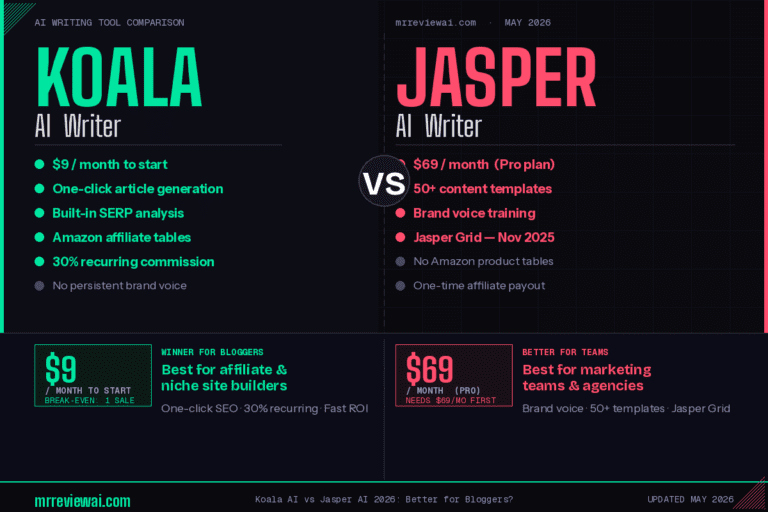
Want to compare Koala against alternatives? Read our Koala AI vs Jasper AI comparison and full Koala AI review for complete breakdowns.
About This Post
This article was written as part of building mrreviewai.com — an affiliate content site publishing one article per day in the AI tools niche. The “best ai writing tools for bloggers” article referenced in the Before/After section was generated using Koala AI’s free trial (5,000 words, free plan), which was fully consumed by that single draft. The editing observations, credit consumption data, and workflow benchmarks reflect actual use of the tool, not feature list descriptions.
mrreviewai.com — We Test the Tools. You Make the Money.

About the Author
Hung Nguyen
Hung Nguyen is a digital marketer and the founder of Mr Review AI - an independent AI tools testing site he launched on April 25, 2026. He started the site to document his own experience with affiliate marketing and AI tools, publishing real hands-on reviews from day one. His review methodology prioritizes real-world experience: every review is based on his own hands-on testing with real accounts, tracked credits, and documented results - not vendor demos or secondhand information. His AI voice reviews cover ElevenLabs, Murf AI, and MiniMax Audio - all personally tested with live audio outputs. Content is written with Claude AI assistance via the Chrome extension, but all testing, findings, and conclusions are his own. As of June 2026, Mr Review AI covers AI voice tools, AI writing tools, email marketing, and SaaS tools - from the perspective of a solo affiliate marketer who is new to the field but committed to honest, firsthand testing.