Descript Free Plan Review (2026): I Used 25 Credits Testing It — Here’s the Truth
Affiliate Disclosure: This article contains affiliate links. If you purchase through our Descript link, we may earn a small commission at no extra cost to you. All screenshots are from our own Toplistno1 account, tested hands-on — no vendor demos.
Last Updated: July 3, 2026 — tested on a real free account, 3 rounds of exploration, 25 credits used. Re-verified July 3, 2026: ElevenLabs V3 confirmed as new default TTS engine; voice cloning now supports file upload in addition to live recording.
Quick Verdict: Descript Free Plan — 6.5/10
| THE BEST | No audio download wall — MP3, WAV, AAC all free. Video editor + transcript editor + 20+ AI tools in one platform. ElevenLabs V3 (default) powers the TTS engine — Multilingual v2 still selectable. |
| THE WORST | 100 credits is LIFETIME — not monthly. I burned through 25 credits in a few test sessions without finishing a single video. 100 credits is LIFETIME — burns faster than you expect across 3 test sessions. |
The Short Answer
Descript is not a pure AI voice generator like ElevenLabs or Murf. It’s a video and podcast editor with AI built in — TTS is just one of 20+ features inside the platform.
The free plan gives you 100 lifetime credits (not monthly — they never reset) and 1 hour of media per month. I used 25 of those 100 credits just exploring the Underlord AI production feature — without completing a single video.
If you only need AI voice: Descript’s free plan is the wrong tool. ElevenLabs gives you 10,000 characters per month — resetting every month — which is far more practical for pure TTS use.
If you need video editing + transcription + AI tools in one place: Descript is worth exploring — but come in with realistic expectations. Those 100 credits disappear faster than you think.
Descript Free Plan: At a Glance
| Feature | Free Plan |
|---|---|
| AI Credits | 100 credits lifetime (never resets) |
| Media Hours | 1 hour/month upload limit |
| Audio Download | Free — MP3, WAV, AAC |
| TTS Engine | ElevenLabs V3 (default) / Multilingual v2 (optional) |
| Voice Cloning | Live recording OR upload audio file (WAV, MP3, M4A) |
| Video Editor | Full access |
| Transcript Editor | Full access |
| Underlord (AI production) | Available (~8–12 credits per session) |
| AI Tools | 20+ tools (all credit-gated) |
| Watermark on audio | None |
| Price | $0/month — no credit card required |
How I Tested Descript’s Free Plan
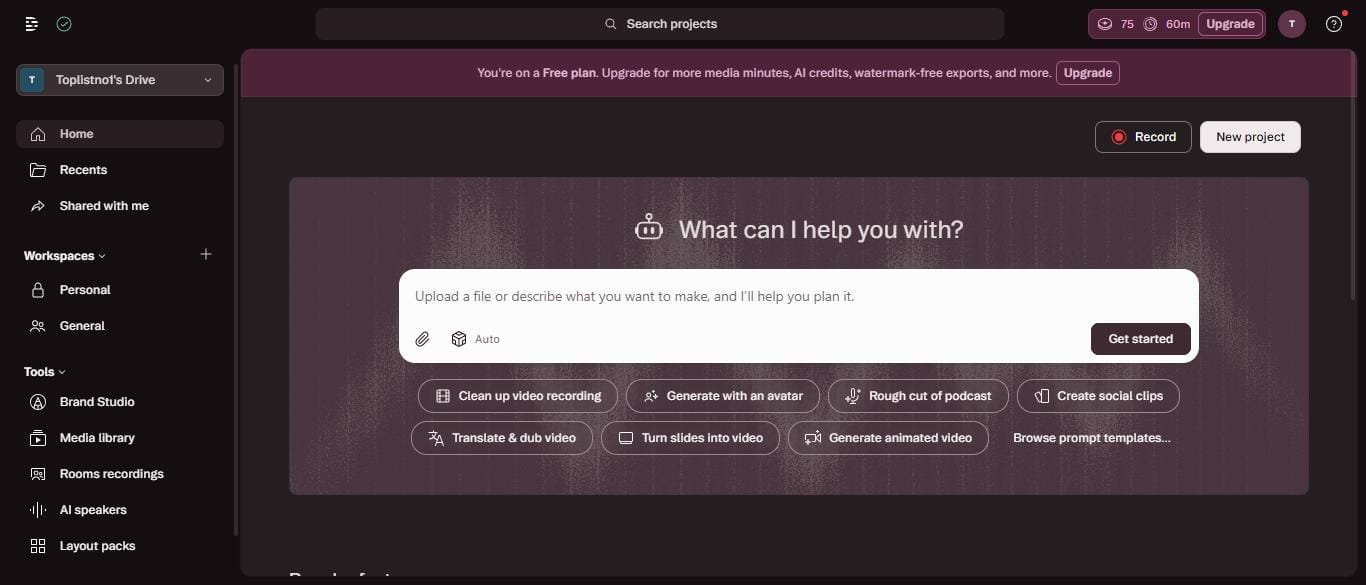
I opened web.descript.com on a real free account (Toplistno1’s Drive) — not a demo, not a sponsored trial. I ran three full rounds of exploration:
Round 1 — Interface overview: Explored the entire sidebar, checked every menu item, and clicked into AI Speakers to test how voice cloning works on the free plan.
Round 2 — Editor deep dive: Created a new video project, opened the AI Tools panel and counted every tool listed, checked the Export panel to verify download access, and ran Underlord with a real script to watch how credits get consumed.
Round 3 — Settings audit: Went into Settings → AI Models, Settings → Plan, and Settings → Usage to verify the real numbers directly from the account dashboard. Then clicked Upgrade to check actual pricing from the checkout screen.
Result: I consumed 25 credits across those three rounds. The account now shows 75/100 credits remaining.
Rating Breakdown
| Category | Score | Notes |
|---|---|---|
| Voice Quality | 8/10 | ElevenLabs V3 engine (default) — genuinely good |
| Credit Limits | 3/10 | 100 lifetime credits disappears fast |
| Download Freedom | 9/10 | MP3/WAV/AAC all free — no paywall |
| Video Editor | 8/10 | Transcript-based editing is powerful |
| Voice Cloning | 6/10 | Live recording OR file upload (WAV, MP3, M4A) — improved |
| Overall Free Plan Value | 6/10 | Good for exploring, not for production |
| Free Plan Score | 6.5/10 |
What You Actually Get on the Free Plan
Credits: 100 Lifetime — The Most Important Thing to Understand
This is the single most important thing to know about Descript’s free plan — and the detail that most reviews get wrong or skip entirely.
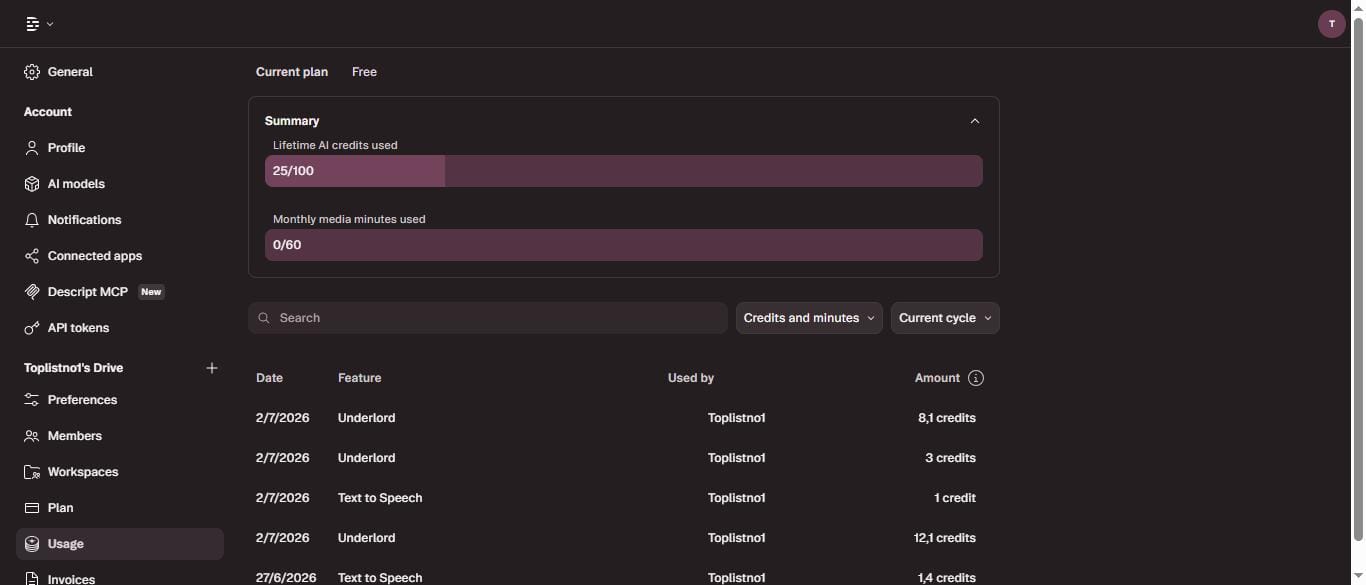
Inside Settings → Usage, the dashboard shows exactly: “Lifetime AI credits used: 25 / 100”
These 100 credits are the total you ever get on the free plan. They do not reset. They do not refresh on the 1st of the month. Once you hit 100, you’re done — upgrade or stop using AI features.
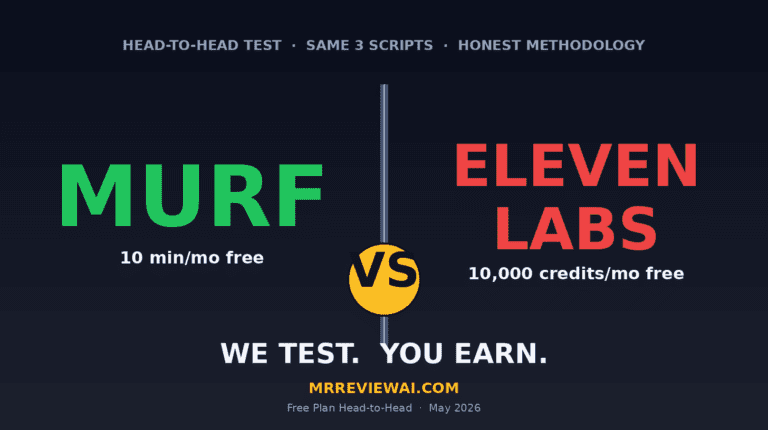
Compare that to how competitors handle free plans: ElevenLabs resets 10,000 TTS credits every single month. Murf gives 10 minutes lifetime (also non-resetting). MiniMax resets 10,000 credits monthly with commercial rights included.
Here’s what my 25 credits actually went to, pulled directly from the usage log:
- Underlord session 1: 12.1 credits
- Underlord session 2: 8.1 credits
- Underlord session 3: 3 credits
- Text to Speech tests: 1–1.4 credits each
That’s 25 credits used — and I never rendered a complete video. If you use Descript’s free plan seriously for production, expect to run out within 1–2 weeks.
Media Hours: 1 Hour Per Month
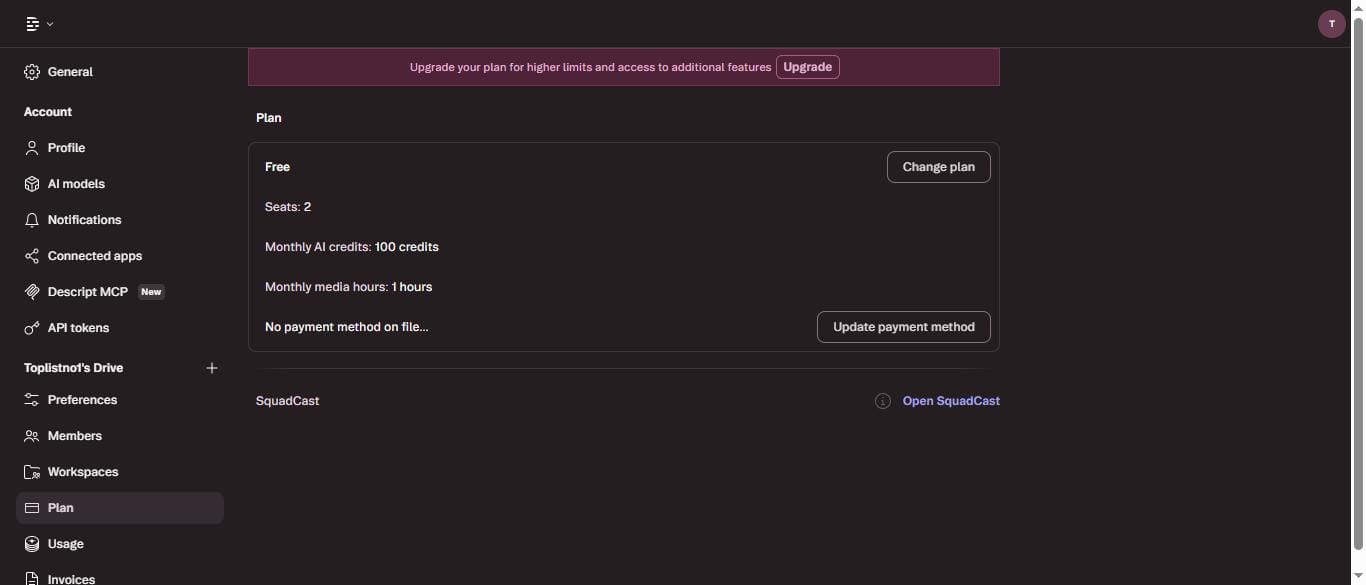
Settings → Plan confirms: “Monthly media hours: 1 hours.” The Usage page shows: “Monthly media minutes: 0 / 60.” One hour means 60 minutes of media you can upload per month.
AI Voice: Powered by ElevenLabs V3 (Default)
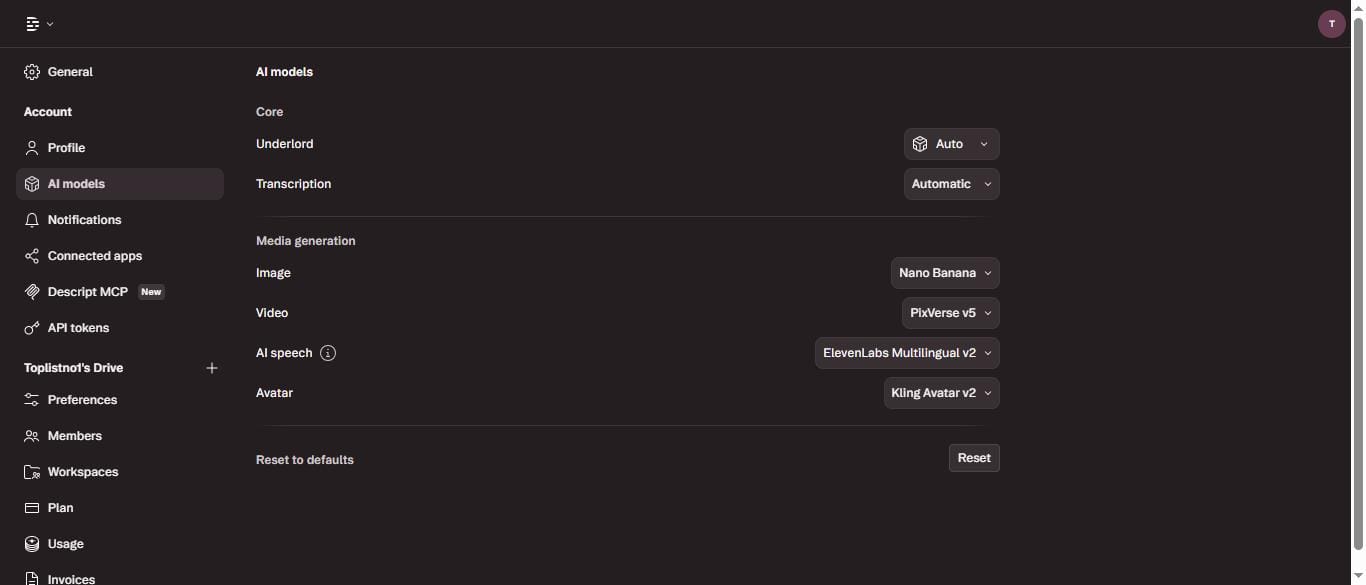
The biggest discovery from Round 3, found inside Settings → AI Models: Descript doesn’t build its own TTS engine. They license ElevenLabs’ API and integrate it.
- AI speech: ElevenLabs V3 (default) — Multilingual v2 still available in Settings → AI Models
- Avatar: Kling Avatar v2
- Video: PixVerse v5
- Image: Nano Banana
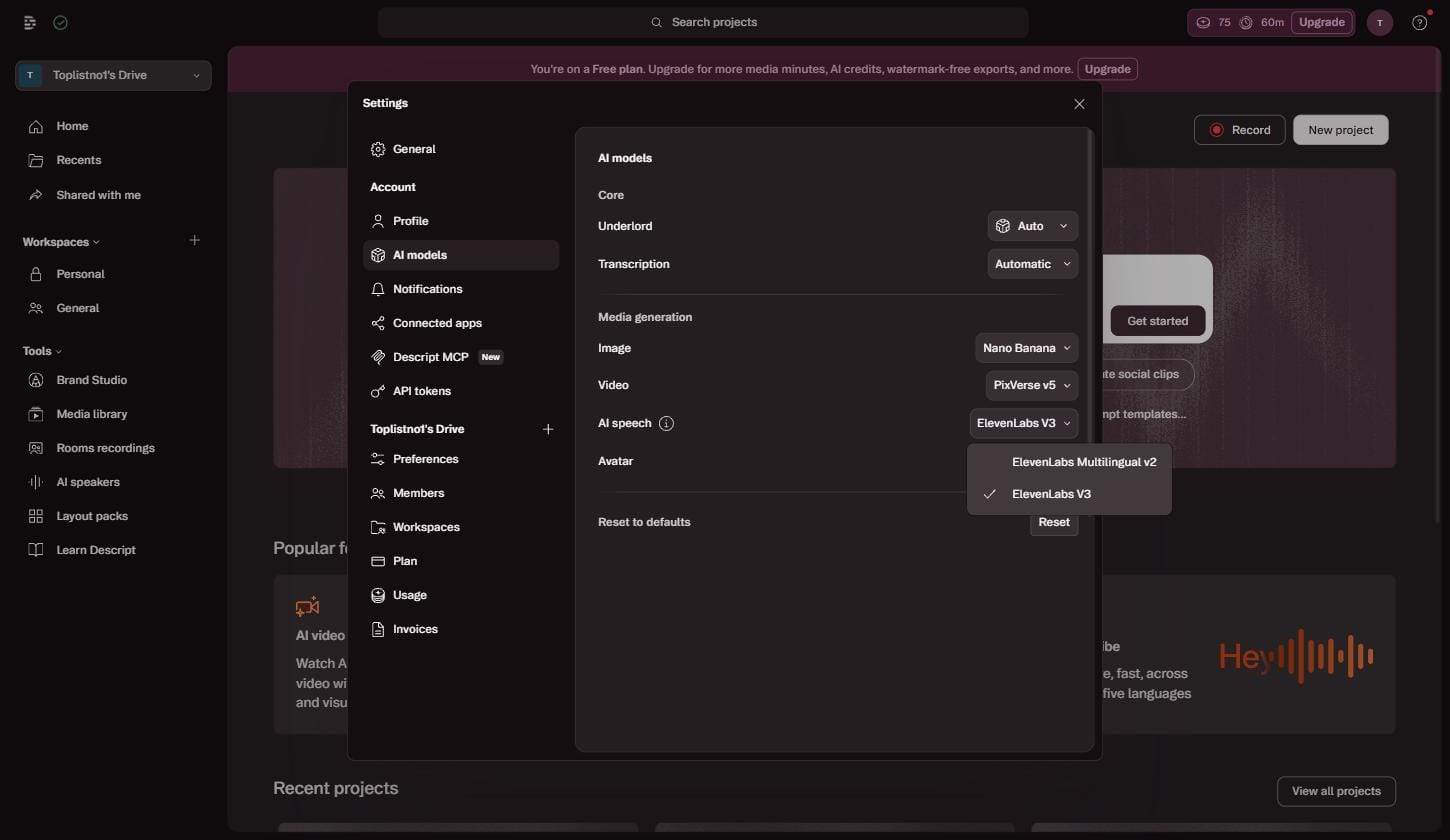
The voice quality you get in Descript is essentially ElevenLabs Multilingual v2 quality — which is excellent. The catch: you’re getting it through a much more restricted credit system. ElevenLabs free plan gives you 10,000 characters monthly resetting. Descript gives you 100 credits lifetime shared across every AI feature.
No Audio Download Wall
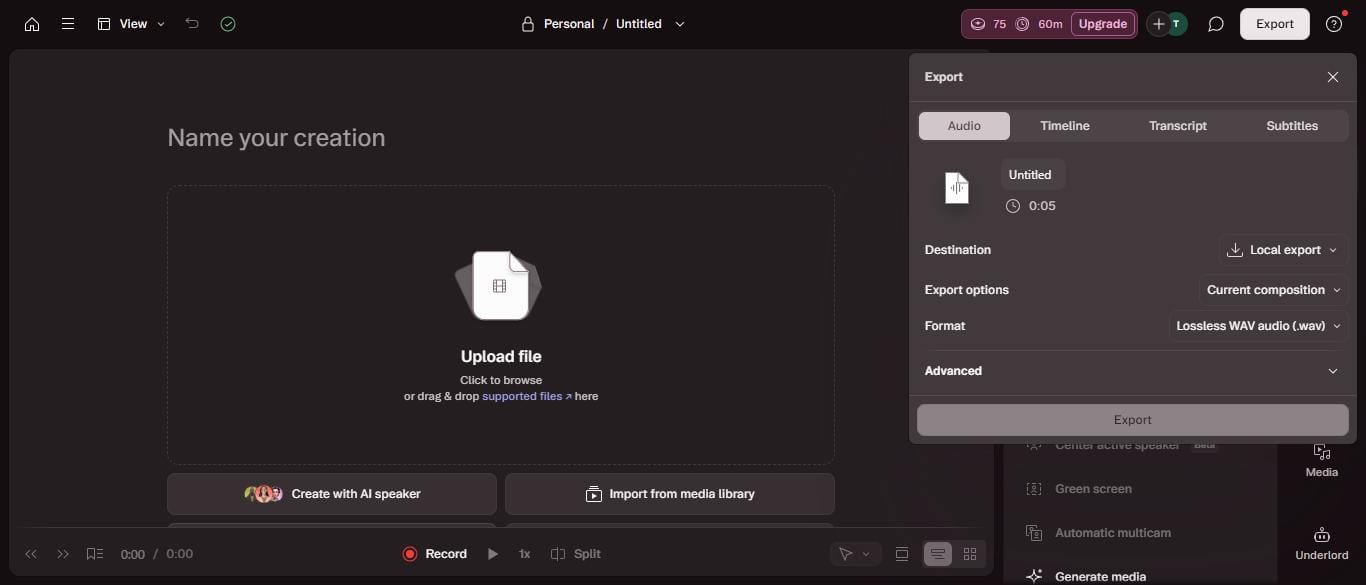
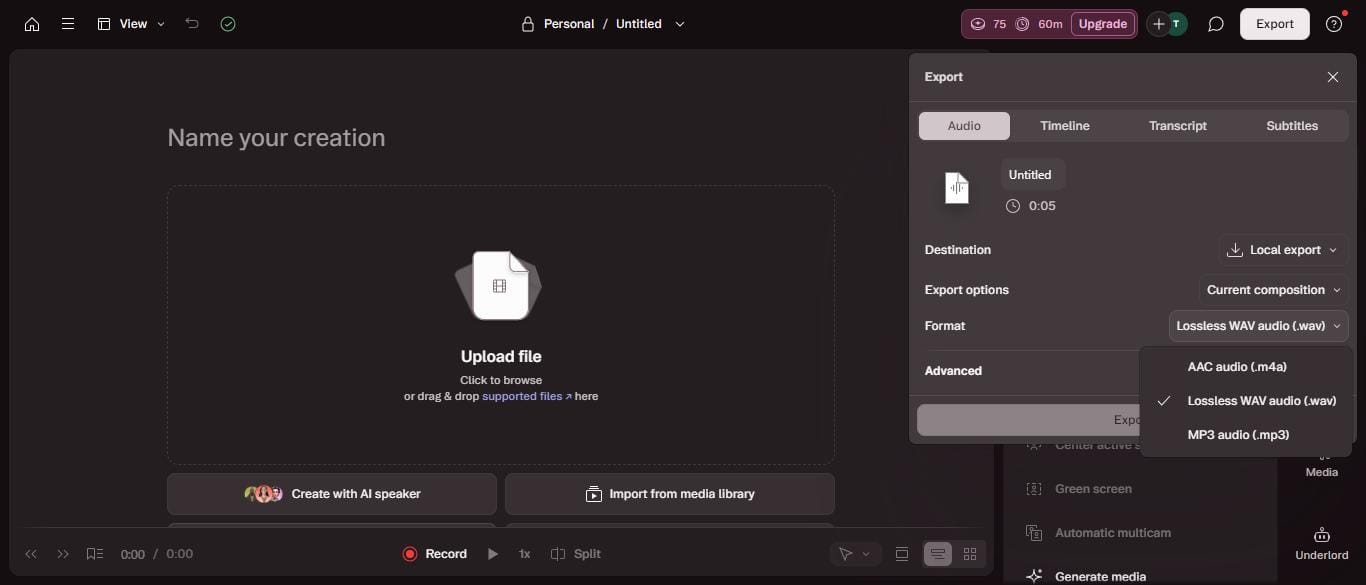
I clicked Export inside the video editor and checked every tab carefully. The Audio tab shows: MP3, WAV (Lossless), and AAC — all accessible without any upgrade prompt. No “Unlock downloads” paywall. No watermark on audio files.
This is a meaningful difference from Murf AI, which completely blocks audio downloads on the free plan. The Transcript tab exports as .docx (free). The Subtitles tab exports as .srt (free).
Voice Cloning: Live Recording or File Upload
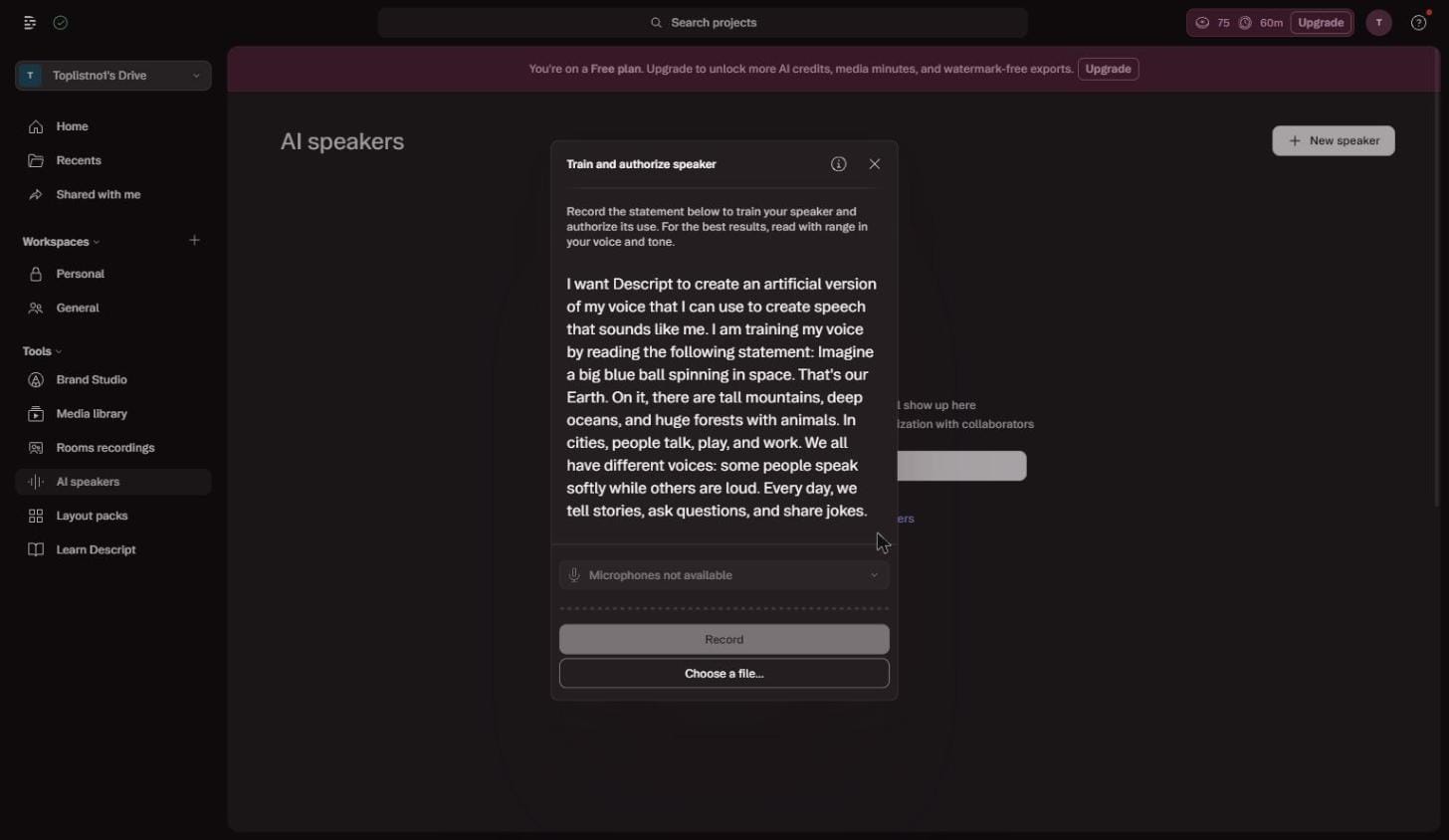
When I opened AI Speakers → + New Speaker, a two-step dialog appeared: first you name the speaker, then “Train and authorize speaker” opens with a script to read aloud. There are two options: record live via microphone, or upload an audio file (WAV, MP3, M4A, WebM accepted). This is more flexible than the earlier version I originally tested.
ElevenLabs lets you upload an MP3 or WAV file to clone a voice. MiniMax clones from a 10-second audio clip. Descript now also supports file upload — though it still asks you to read a script for best results, which adds a training step that ElevenLabs and MiniMax skip.
AI Tools: 20+ Features in the Editor
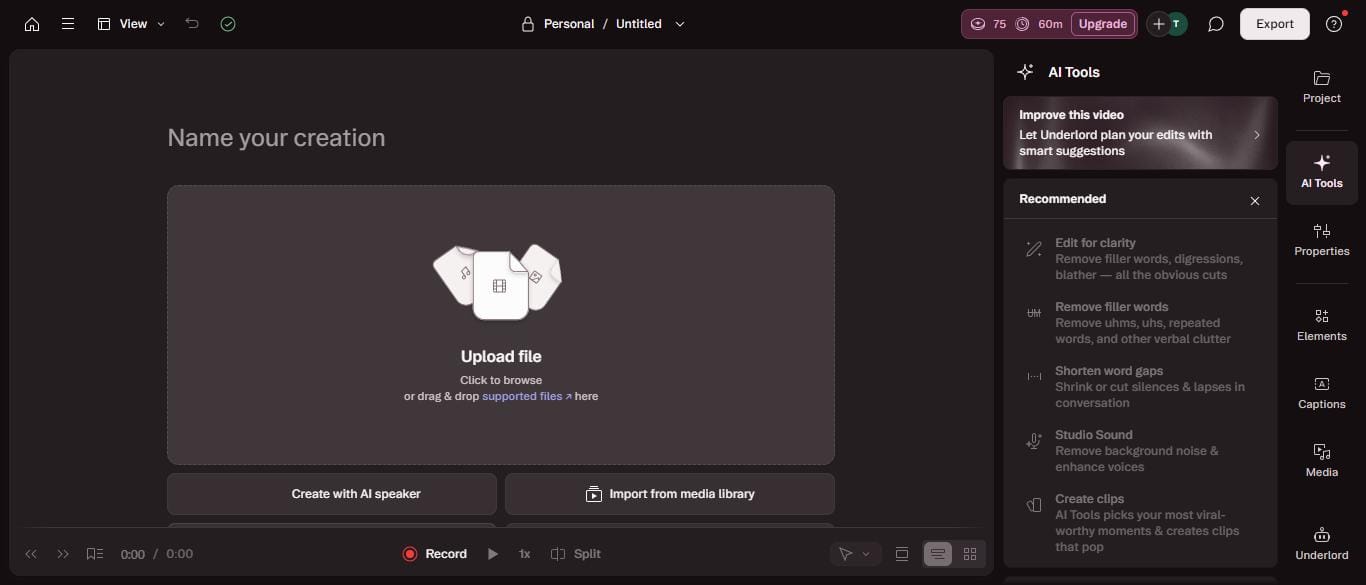
Inside the video editor, the AI Tools panel contains five categories — all credit-gated:
Sound good: Edit for clarity, Remove filler words, Studio Sound, Remove background noise, Adjust loudness, Enhance speech, Shorten word gaps, Add chapters
Look good: Quick design, Eye Contact, Center active speaker (Beta), Green screen, Automatic multicam, Generate media
Repurpose: Create social clips, Extract highlights, Resize for platform
Publish: Add captions, Translate & dub, Create chapter markers
Write: Improve script, Summarize, Generate show notes
Every tool in this list draws from your 100 lifetime credits. Use them strategically — or they’ll disappear faster than you expect.
Descript Free vs. Competitors
| Criteria | Descript Free | ElevenLabs Free | Murf Free | MiniMax Free |
|---|---|---|---|---|
| Free Credits | 100 credits lifetime | 10,000 chars/month | 10 min lifetime | 10,000 credits/month |
| Monthly Reset | Never | Every month | Never | Every month |
| Audio Downloads | Free | Free | Blocked | Free |
| TTS Engine | ElevenLabs ML v2 | ElevenLabs native | In-house | In-house |
| Voice Cloning | Live recording or file upload (WAV/MP3/M4A) | Upload file | Enterprise only | 10-sec clip |
| Video Editor | Full | None | None | None |
| Transcript Editor | Full | None | None | None |
| Practical Lifespan | 1–2 weeks | 1 month | 2–3 sessions | 1 month |
| Commercial Rights | No | No | No | Yes |
Paid Plans: Verified from Checkout
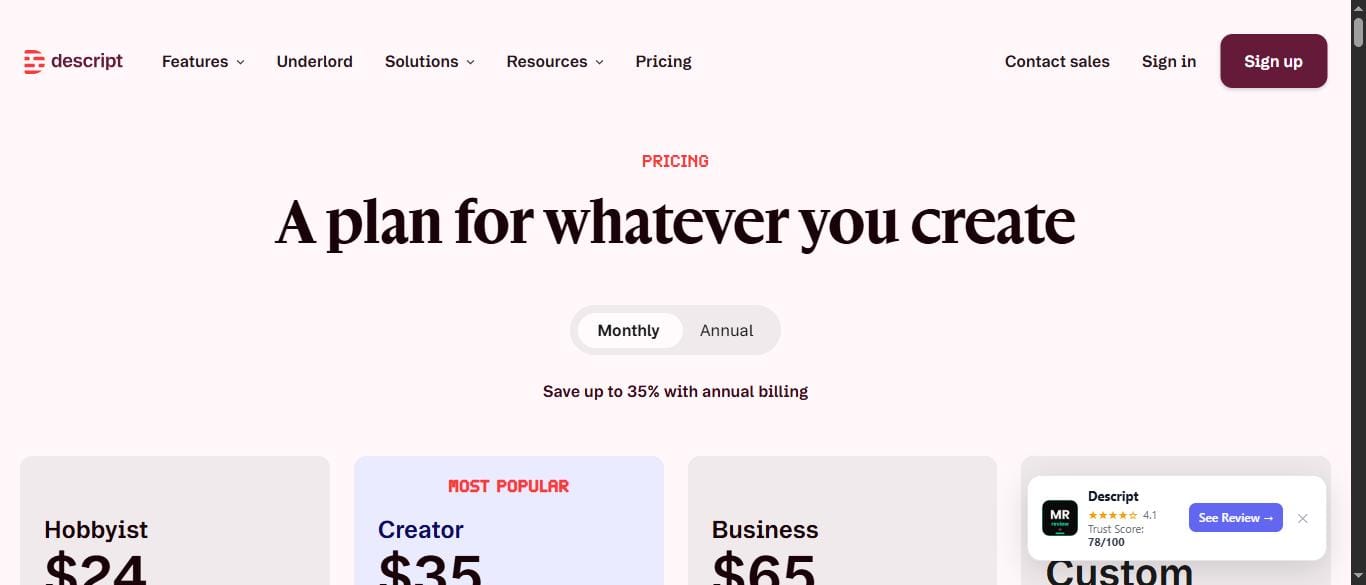
I clicked the Upgrade button and verified pricing directly from the checkout page — not the marketing page:
Hobbyist — $24/month (monthly billing) / ~$16/month (annual): 400 credits/month, 10 hours media/month.
Creator — $35/month/person (monthly billing) / $24/month/person (annual): 800 credits/month, 30 hours media/month, watermark-free exports.
Business — $65/month/person (monthly billing): 1,500 credits/month, 40 hours media/month, priority support.
Note: Prices have increased. If you’ve seen Hobbyist at $16/month or Creator at $24/month in other reviews, those are the old annual prices. Always check the checkout page for current pricing.
Who the Free Plan Is Actually For
| Good for | Not good for |
| Evaluating Descript before buying | Anyone needing AI voice regularly — 100 lifetime credits runs out fast |
| Occasional light editing (under 60 min/month) | Cloning a voice from an existing audio file |
| ElevenLabs users wanting to add video editing | Daily content production — 1 hour/month media is not enough |
| Podcasters needing transcription + basic cleanup | Pure TTS use — ElevenLabs free plan is far more practical |
Frequently Asked Questions
Do Descript free plan credits reset every month?
No. Verified directly from Settings → Usage: the dashboard reads “Lifetime AI credits used: 25 / 100.” These 100 credits are a one-time lifetime allocation. They never reset.
What AI voice engine does Descript use?
ElevenLabs Multilingual v2 — confirmed from Settings → AI Models. Descript licenses ElevenLabs’ API rather than building their own TTS engine.
Does Descript free plan have a watermark?
Audio files (MP3/WAV/AAC) — no watermark, free to download. Video exports on the free plan may include a watermark (the upgrade banner mentions “watermark-free exports” as a paid feature).
Can I clone a voice using an audio file on Descript?
Yes — as of mid-2026, Descript’s voice cloning supports both live microphone recording and audio file upload (WAV, MP3, M4A, WebM). You name the speaker first, then the “Train and authorize speaker” dialog lets you choose either method. ElevenLabs and MiniMax still require less setup (no script reading required).
What does Descript cost in 2026?
Verified July 2026 from checkout: Hobbyist $24/month (monthly) or ~$16/month (annual). Creator $35/month/person (monthly) or $24/month/person (annual). Business $65/month/person (monthly).
Descript vs ElevenLabs — which free plan is better for AI voice?
For pure AI voice use: ElevenLabs wins — 10,000 characters per month resetting every month vs Descript’s 100 lifetime credits. For video editing + transcription + AI voice in one platform: Descript is the only option in this comparison.
Final Verdict
Descript’s free plan is one of the most interesting in the AI voice and video space — but it comes with a trap that catches almost every new user: those 100 credits are lifetime, not monthly.
The platform itself is excellent. The transcript-based video editor is genuinely powerful. The AI Tools panel covers more ground than any competitor. The voice quality (ElevenLabs ML v2 under the hood) is top-tier. And unlike Murf AI, you can actually download your audio files for free.
But the credit structure means the free plan is best understood as a generous trial — not a sustainable working tool. If you want to evaluate Descript before paying, 100 credits is enough to get a real feel for the platform. If you want to run a content workflow on it, you’ll need to upgrade within your first two weeks.
Free plan score: 6.5/10. The product is a 9/10. The free plan limitation is real.
Tested: July 2, 2026 on a real free account (Toplistno1’s Drive). Starting credits: 99/100. Ending credits: 75/100 after 3 rounds of hands-on testing. Pricing verified directly from web.descript.com checkout page.

About the Author
Mr Review AI Team
This review was researched and tested hands-on by the Mr Review AI editorial team. We create real accounts, run actual campaigns, and document every limitation we encounter — no vendor demos, no copied spec sheets. Our reviews are editorially independent: no tool pays for a score or placement, ever. Where we have affiliate relationships, we disclose them transparently on each page.
Want to know who founded this site and what drives our editorial standards? → Meet the founder on our About page