Mailchimp vs MailerLite Free Plan 2026: We Tested Both — Here’s the Honest Verdict
Last updated: June 27, 2026 | Tested by: Mr Review AI Team | Both accounts verified June 2026
Disclosure: Some links in this review are affiliate links. If you sign up for a paid plan through our links, we may earn a commission at no extra cost to you. We tested both tools on real free accounts. Our scores and recommendations are never influenced by compensation.
Quick Answer
- You send more than 2 emails/month to your list
- A/B testing matters to you at $0
- You want email scheduling free
- You need 3 automations, not 1
- You already use Mailchimp with Shopify or WooCommerce
- Your list is under 200 and you send once a month
- Migration costs outweigh the benefits of switching
What We Tested — And How
We hold real free accounts on both platforms, both created for mrreviewai.com. Our MailerLite account was created before June 16, 2026, so it currently runs under the old limits, which transition for existing accounts on July 1, 2026. We verified all new plan restrictions against MailerLite’s official pricing page and free plan update FAQ, accessed June 2026. New accounts created after June 16 are already on the updated limits: 250 subscribers and 2,500 emails per month.
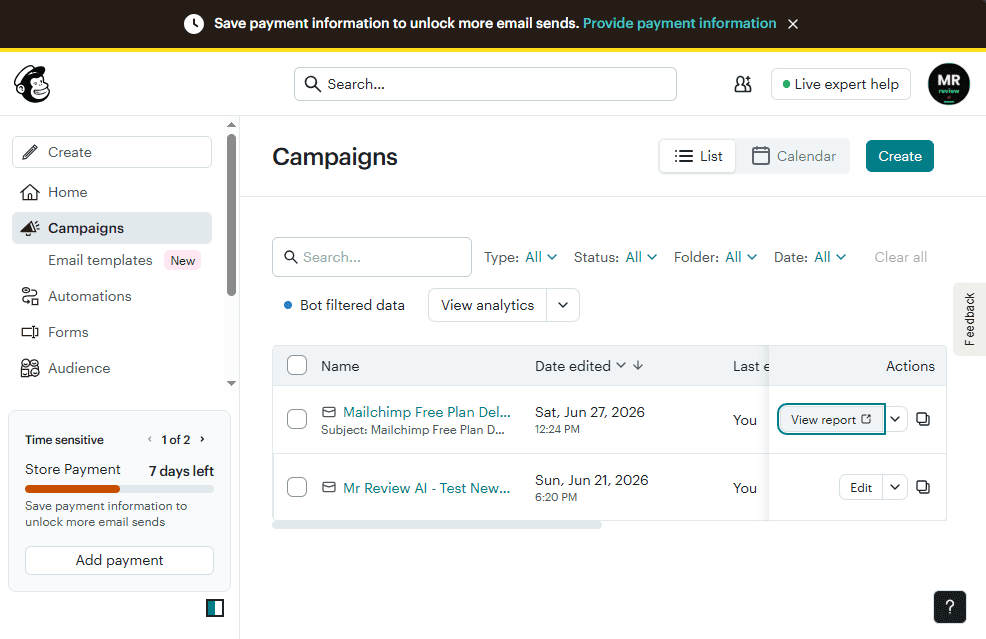
Our Mailchimp account was created June 20, 2026. We navigated every major section of the dashboard — Home, Campaigns, Automations, Templates, Audience, and Billing. We confirmed the free plan limits directly from Mailchimp’s own plan selection UI inside the account: 250 contacts, 500 emails/month, 1 user seat. We also documented the $20 auto-charge from inside our own billing dashboard, where it was actively scheduled for July 5, 2026.
Budget transparency: Mr Review AI is an independent review platform. We are on free plans for both tools. We have not tested paid plans with our own money. Where we describe paid features, we note it clearly.
The $20 Trial Trap — Mailchimp Only
This is the single most important thing to know about Mailchimp in 2026. When you create a new Mailchimp account today, you are not on the free plan. You are on a Standard plan free trial that auto-charges $20 if you do not manually downgrade before the trial ends.
When we logged into our account on June 20, 2026, the dashboard showed: “Next estimated bill: $20.00 — Autopay on Jul 5, 2026.” A countdown timer in the left sidebar read “Store Payment — 13 days left.” This is not a theoretical risk — we confirmed the charge was scheduled and active on our own account. Most review articles describe this vaguely. We are documenting it directly so there is no ambiguity.
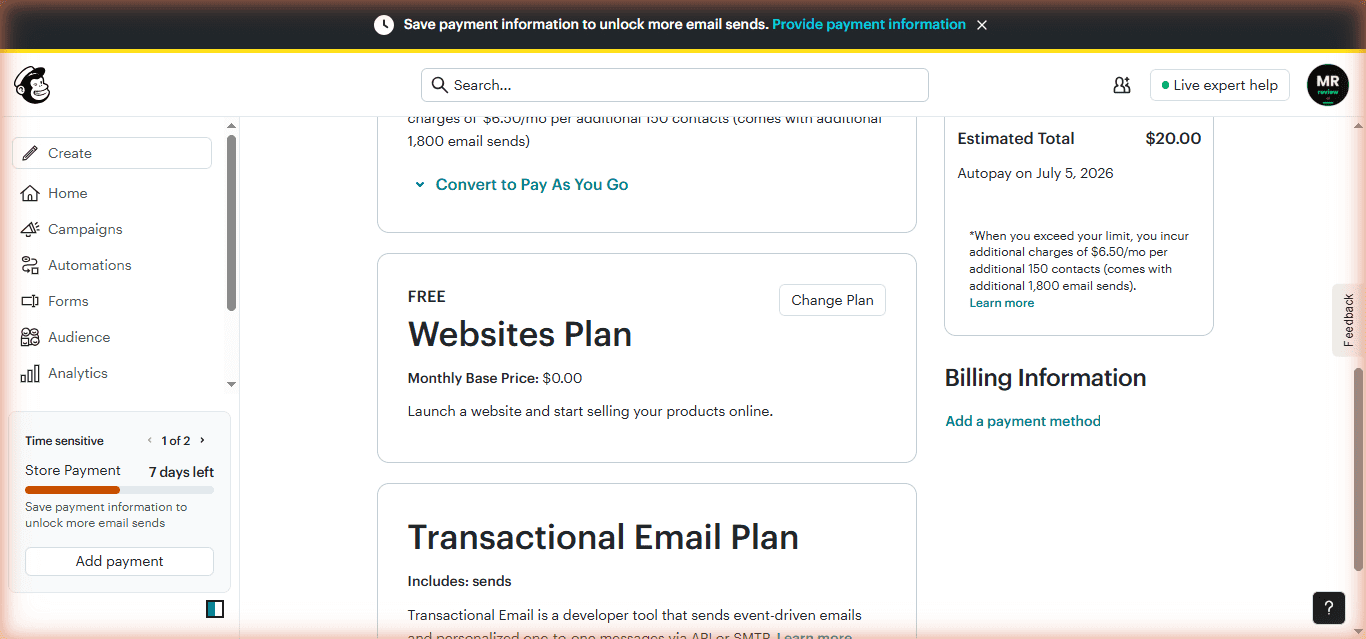
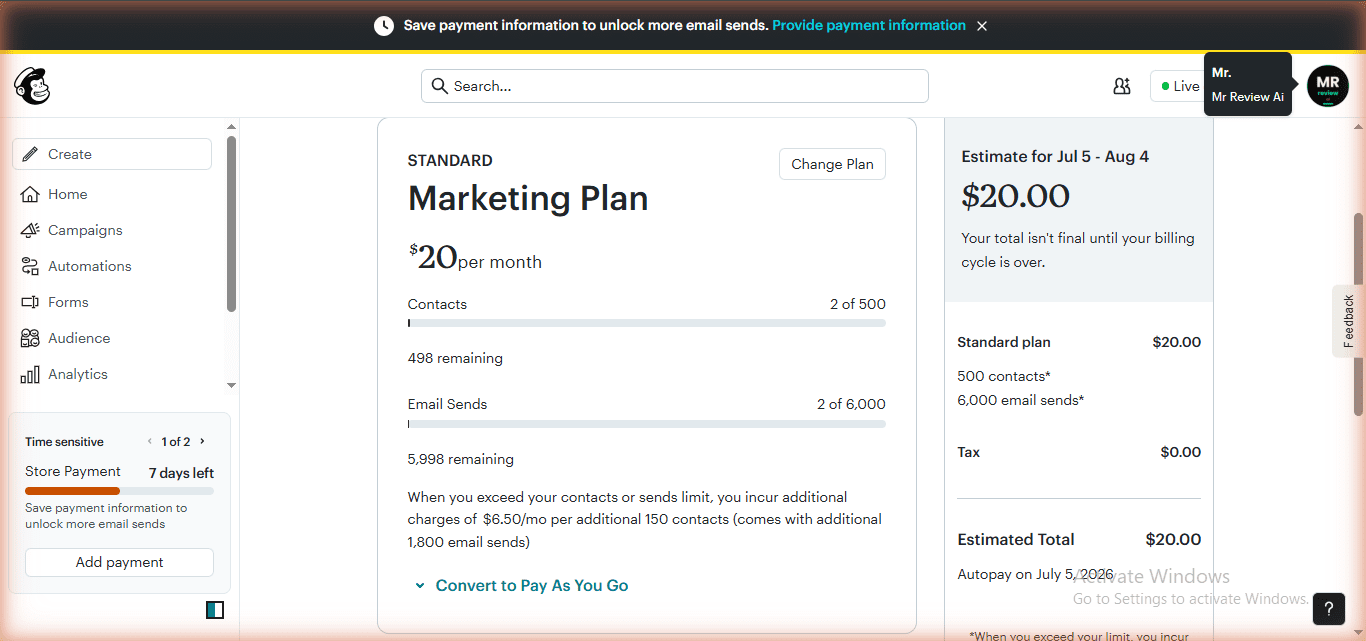
How to avoid it: Log into Mailchimp, click your account name in the top right, go to Account and Billing, then Billing, then Manage Plan, and select Free. Do this before the trial ends. There are two things to know: first, Mailchimp only allows one lifetime downgrade to the free plan per account. Second, if your contact list has already exceeded 250 at the time you try to downgrade, the option is not available — you must remove contacts first.
MailerLite has no equivalent. The free plan is permanent, no credit card required, and no auto-charge. You sign up and the free plan applies immediately.
Mailchimp Free Plan — What You Actually Get in 2026
Mailchimp’s free plan was cut in February 2026, continuing a long trend of reductions since the Intuit acquisition. Here is exactly what the current free plan includes, verified from our account dashboard:
- Contacts: 250 hard ceiling
- Emails per month: 500 (daily limit: 250)
- Automations: 1 Customer Journey flow
- Landing pages: 1 basic page
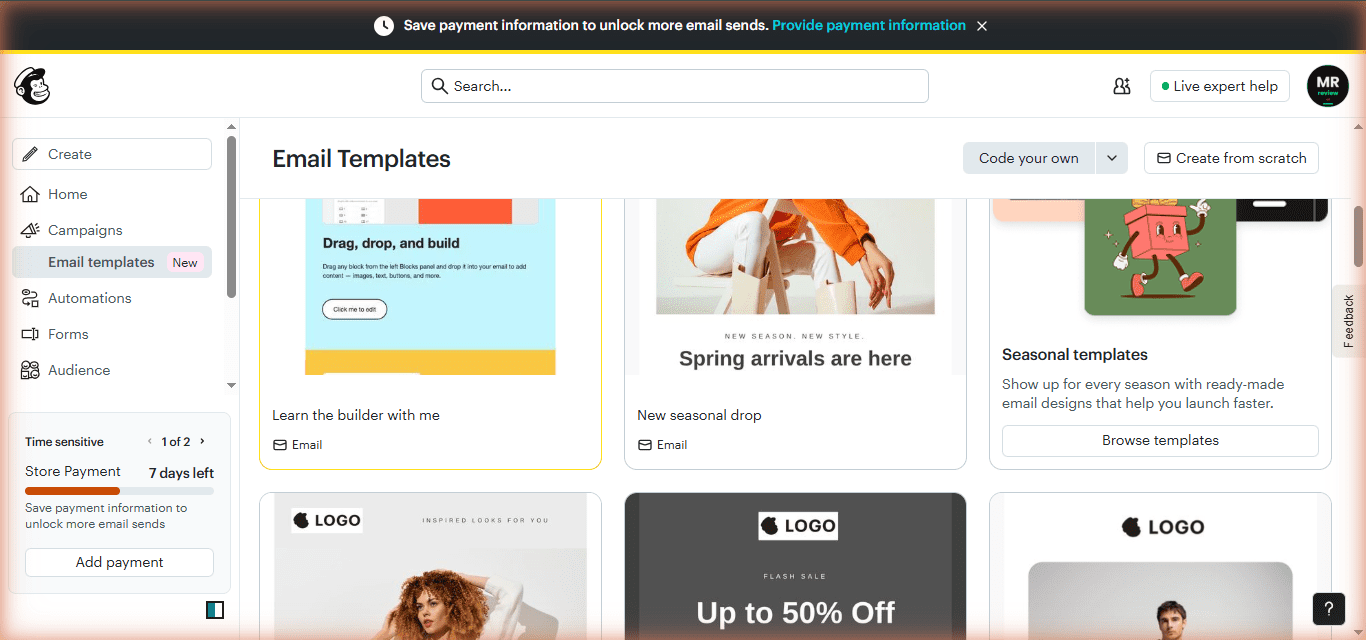
- Templates: Limited — most of the 300+ template library requires a paid plan
- A/B testing: Not available on free
- Email scheduling: Not available on free (send immediately only)
- Custom sender domain: Paid only
- Remove branding: Essentials plan ($13/month) minimum
- Support: Email and chat for the first 30 days only
- User seats: 1
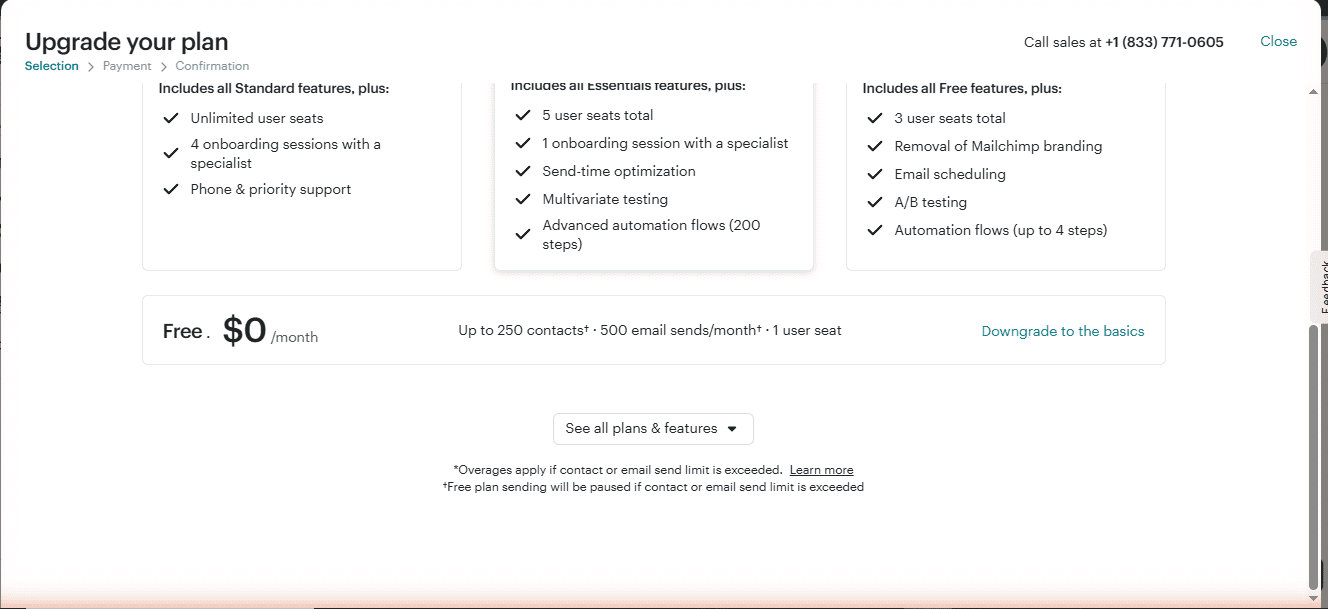
What genuinely works well on Mailchimp free: The interface and onboarding experience is the most polished of any email marketing tool at this price point. Integration depth is unmatched — over 300 connections with Shopify, WooCommerce, WordPress, Squarespace, and many others, all available on free. Reporting is comprehensive: open rates, click rates, bounce rates, and industry benchmarks are visible without paying.
What does not work: With 500 emails per month and 250 contacts, you can email your entire list exactly twice a month. A weekly newsletter alone would require 1,000 sends per month — double the free limit. Campaign scheduling is paywalled, so every email has to go out immediately when you send it. A/B testing is entirely behind a paid plan. Most templates are locked. After day 30, if something goes wrong, you are on the knowledge base alone.
How Mailchimp’s free plan has shrunk: Pre-2019 it offered 2,000 contacts and 12,000 emails per month. By 2022 it was 500 contacts and 2,500 emails per month. As of February 2026 it is 250 contacts and 500 emails per month. Each reduction was announced to existing users with approximately 30 days notice.
MailerLite Free Plan — What You Actually Get in 2026
MailerLite restructured its free plan on June 16, 2026 — the third cut in approximately two years. For new accounts created after June 16:
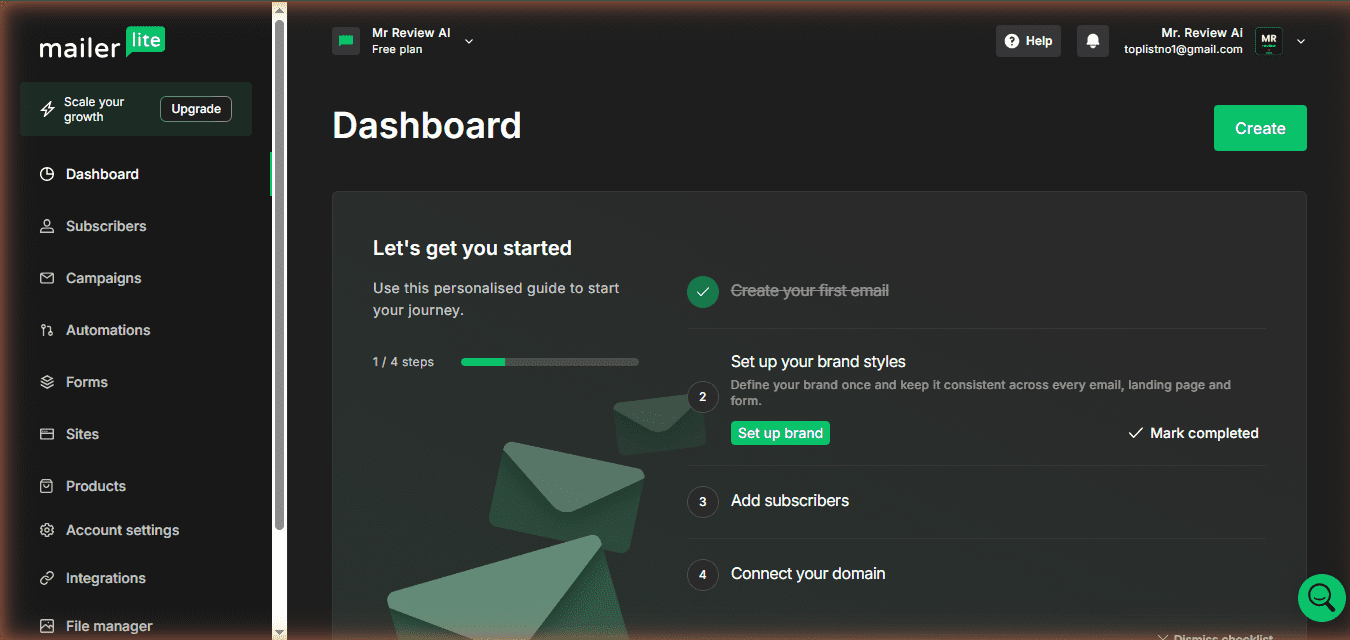
- Subscribers: 250 (reduced from 500; itself reduced from approximately 1,000 in late 2025)
- Emails per month: 2,500 (reduced from 12,000)
- Active automations: 3 max with up to 5 steps each (previously unlimited)
- Active forms: 3 max
- Landing pages: 1
- Website builder: 1 full website (with blog support)
- User seats: 2 (increased from 1)
- Email templates: Predefined templates not available on Free plan (must upgrade; build from scratch using drag-and-drop editor)
- Promotional pop-ups: Now free (previously paid)
- A/B testing campaigns: Free
- Custom sender domain: Paid only — emails send from @ml.mailerlite.com on free
- Remove branding: Comfort plan ($12/month) minimum
- Support: Email and chat for the first 14 days only
- Digital products: 1 active product or booking
For existing accounts created before June 16: subscriber and email limits change on July 1, 2026. Feature use limits (automations, forms, digital products) change in August 2026.
The pattern worth knowing: MailerLite has cut its free plan three times in two years. Each cut was paired with a feature unlock — this time templates and pop-ups — but the core numbers (subscribers and sends) have gone in one direction only. Anyone who built their list-building strategy on MailerLite’s unlimited free automations in 2024 has now lost that. This is not a prediction of a fourth cut — but it is a documented pattern, and free plan users who rely on specific limits remaining stable have been caught out before.
mailchimp-vs-mailerlite-free-2026 — Rating Breakdown
Best free volume · A/B testing · 3 automations · no auto-charge
Better deliverability · deeper eCommerce · 30-day support
Mailchimp 7/10 vs MailerLite 4.4/10 — mail-tester.com June 2026
MailerLite — 5x more sends, A/B testing, scheduling at $0
MailerLite wins overall — Mailchimp only if already embedded
Head-to-Head: Feature by Feature
All data verified June 2026 from each platform’s live dashboard and official pricing page.
| Feature | Mailchimp Free | MailerLite Free | Winner |
|---|---|---|---|
| Free contacts / subscribers | 250 | 250 | Tie |
| Monthly email sends | 500 (250/day cap) | 2,500 | MailerLite — 5x more |
| Active automations | 1 Customer Journey | 3 automations (5 steps each) | MailerLite |
| A/B testing | Paid only | Free | MailerLite |
| Email templates | Most locked on free | Predefined templates locked on free (drag-and-drop editor available) | Neither |
| Email scheduling | Paid only | Free | MailerLite |
| Landing pages | 1 basic | 1 + 1 full website | MailerLite |
| Popup forms | Paid only | Free (June 2026) | MailerLite |
| Custom sender domain | Paid only | Paid only | Tie — both lose here |
| Remove branding | $13/month minimum | $12/month minimum | MailerLite (marginally) |
| User seats | 1 | 2 | MailerLite |
| Trial trap risk | $20 auto-charge | None | MailerLite |
| Support on free | 30 days | 14 days | Mailchimp |
| eCommerce integrations | 300+ (Shopify, WooCommerce) | 100+ integrations | Mailchimp |
| First paid plan | $13/month (250 contacts) | $12/month (500 subs) | MailerLite |
Email Volume: The Biggest Practical Difference
The sending limit gap is where the day-to-day experience diverges most sharply. MailerLite gives free users 2,500 emails per month. Mailchimp gives 500. That is a 5x difference on the same 250-contact cap.

In practical terms: with 250 subscribers on MailerLite, you can send 10 emails per subscriber per month. One weekly newsletter (250 contacts x 4 sends = 1,000 emails) fits with 1,500 emails to spare — room for automated welcome sequences running simultaneously. With Mailchimp’s 500/month limit, you can email your full list of 250 exactly twice. A weekly newsletter alone would require 1,000 sends — double the free limit.
Mailchimp’s 250 daily cap compounds this further. Even within the monthly limit, you cannot send to your full 250-contact list in a single day without hitting the daily ceiling. Every broadcast to a full list requires spreading sends across multiple days.
Automations: Three vs One
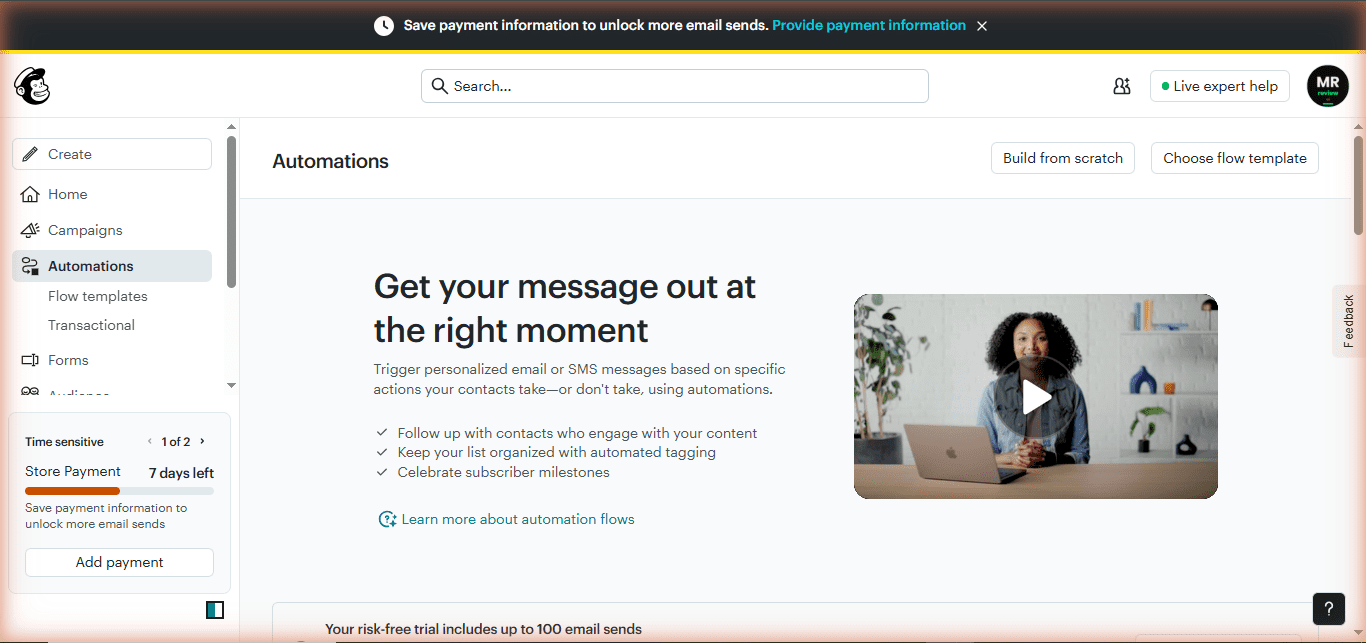
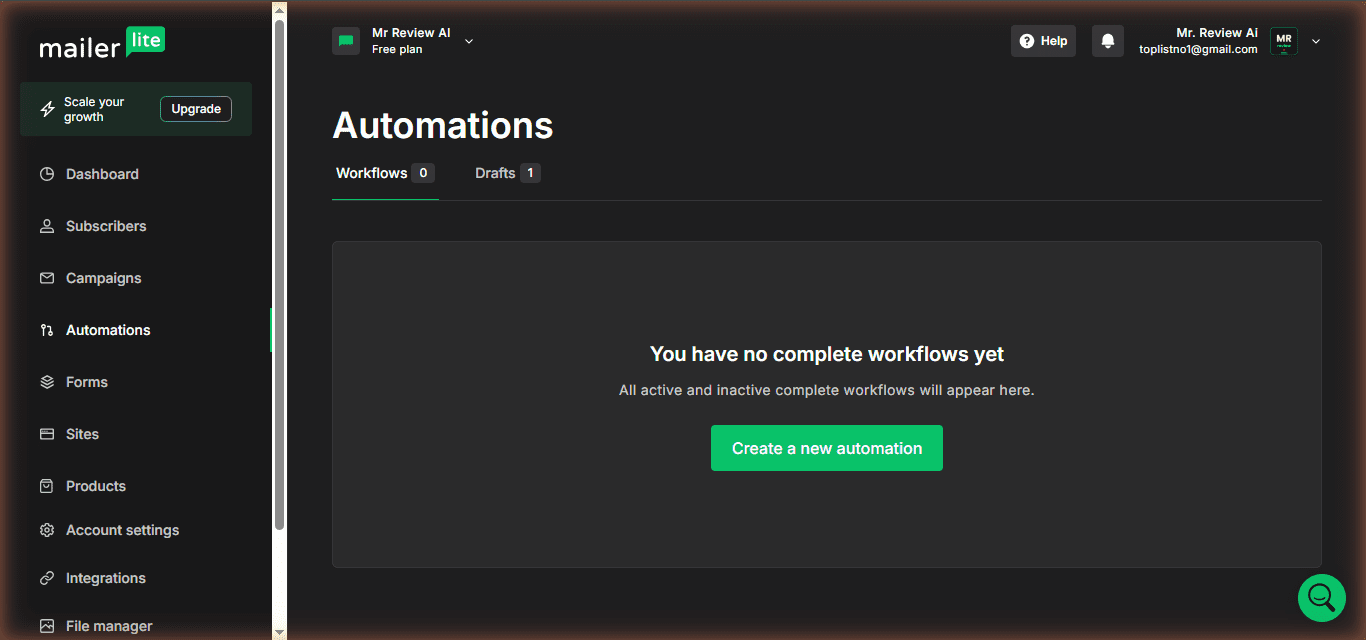
MailerLite allows 3 active automations on free, each with up to 5 steps. Mailchimp allows 1 active Customer Journey on free.
In practice, one automation covers a basic welcome email sequence. On Mailchimp free, that is your entire automation budget. On MailerLite free, you have three slots — enough for a welcome sequence, one lead magnet delivery, and one re-engagement flow. That covers a basic creator funnel without hitting the limit. If you have more than three sequences — multiple lead magnets, a course delivery sequence, a re-engagement flow — MailerLite’s free plan also runs out.
Context worth knowing: Before June 2026, MailerLite offered unlimited automations on free. That was its clearest advantage over every other platform at $0. The June restructure eliminated that. At 3 vs 1, MailerLite still leads, but the gap is much narrower than it was six months ago.
A/B Testing: MailerLite’s Clearest Differentiator
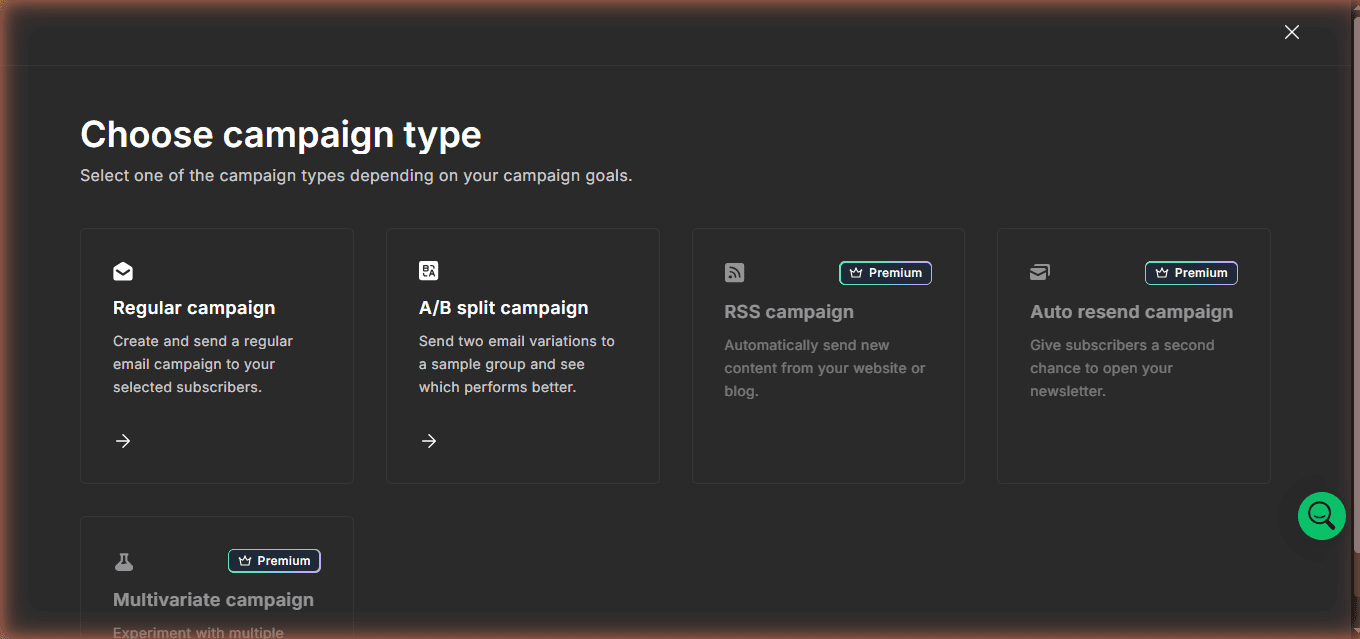
MailerLite includes subject line A/B testing for free users. Mailchimp requires a paid Essentials plan (minimum $13/month) to access any split testing. Brevo and Kit.com also lock A/B testing behind paid plans. MailerLite is the only major email platform that includes this feature at $0.
For someone starting out, this matters more than it might seem at first. A/B testing subject lines is one of the simplest and most effective ways to improve open rates. Getting that data during your first few months — before you pay for anything — gives you cleaner insight into what works for your specific audience before you commit to a paid tool.
Email Editor and Templates
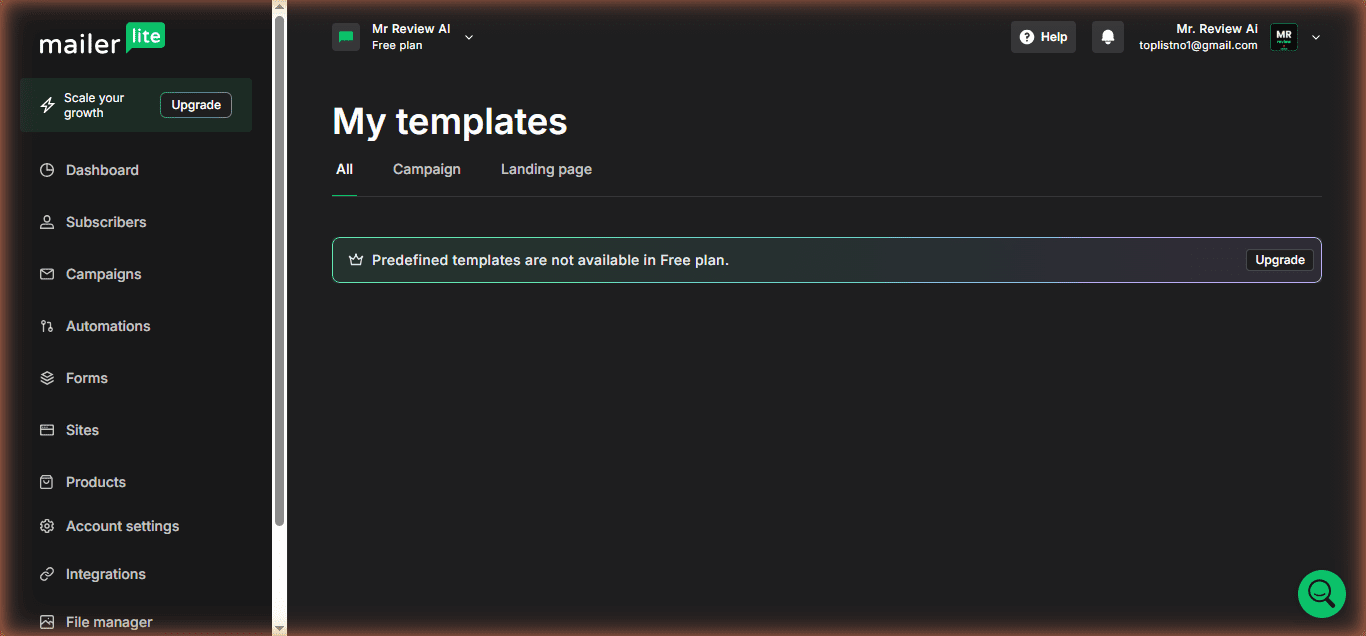
MailerLite’s drag-and-drop editor is the better-designed of the two. It is cleaner, more modern, and less cluttered than Mailchimp’s. However, as of June 2026, predefined email templates are not available on the MailerLite free plan — you will see the message “Predefined templates are not available in Free plan” with an Upgrade prompt. You can still build campaigns from scratch using the drag-and-drop editor.
Mailchimp’s editor is polished and beginner-friendly, but the template situation on free is genuinely frustrating. There are over 300 templates in the system. Most require a paid plan. You only discover which ones are locked when you click on them and see the upgrade prompt. The experience is: see a large library, click something that looks good, hit a paywall. MailerLite shows you the same library and opens it.
Deliverability
Both platforms run on shared IP infrastructure at the free plan level. Neither offers a custom sender domain on free — on Mailchimp your emails go from a Mailchimp shared address, on MailerLite from @send.mailerlite.eu. We verified this directly inside MailerLite’s Account Settings → Domains tab: the Sending Domains section shows “No sending domains” on free, with the note “Custom domains are included in Paid plans.” To send from your own domain (e.g. hello@mrreviewai.com), you must upgrade to Comfort at $12/month minimum. This is a real gap vs Kit.com (custom sender domain on free) and Brevo (verify your own domain for free). For new senders with lists under 250, shared infrastructure is not a practical problem. But it does mean you are not building long-term sender reputation on your own domain while you are on either of these free plans.
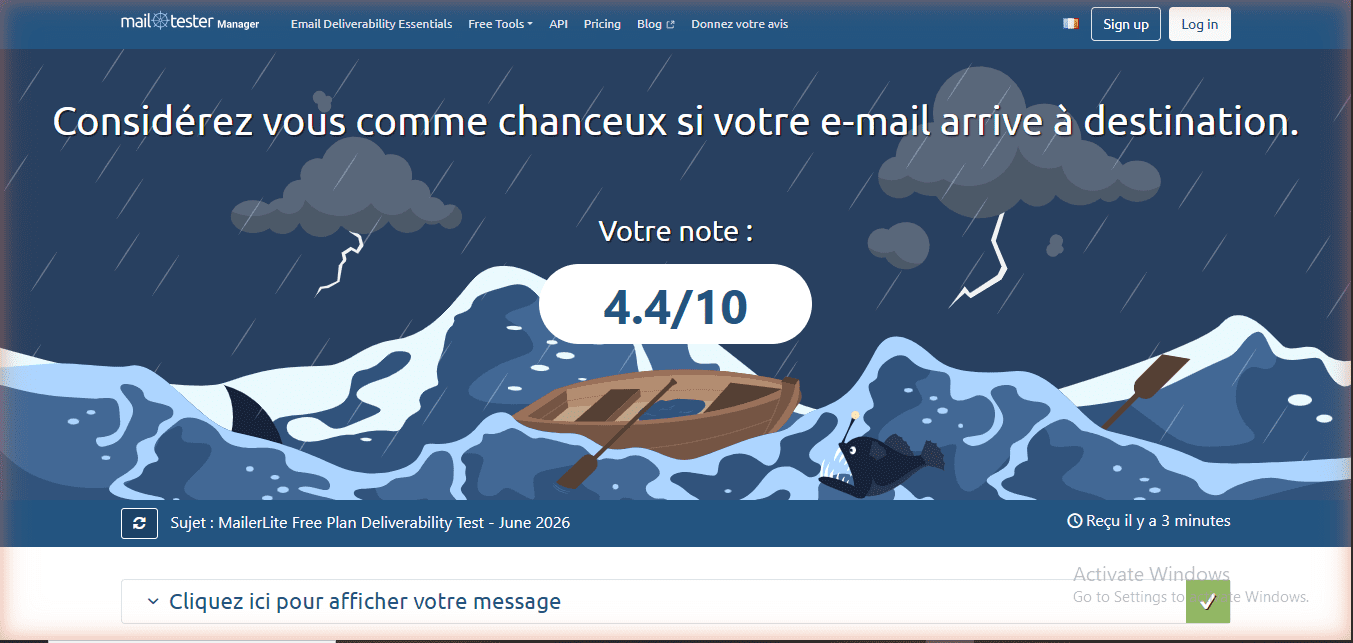
We tested MailerLite deliverability directly from our free account using mail-tester.com on June 27, 2026. Result: 4.4/10. The main issue flagged: MailerLite free sends from @send.mailerlite.eu while the Reply-To address remains your original email — SpamAssassin treats this sender mismatch as suspicious and deducts 2.5 points under the FREEMAIL_FORGED_REPLYTO rule. Server reputation was clean: not blacklisted, SPF passed, DKIM passed. DMARC was absent.
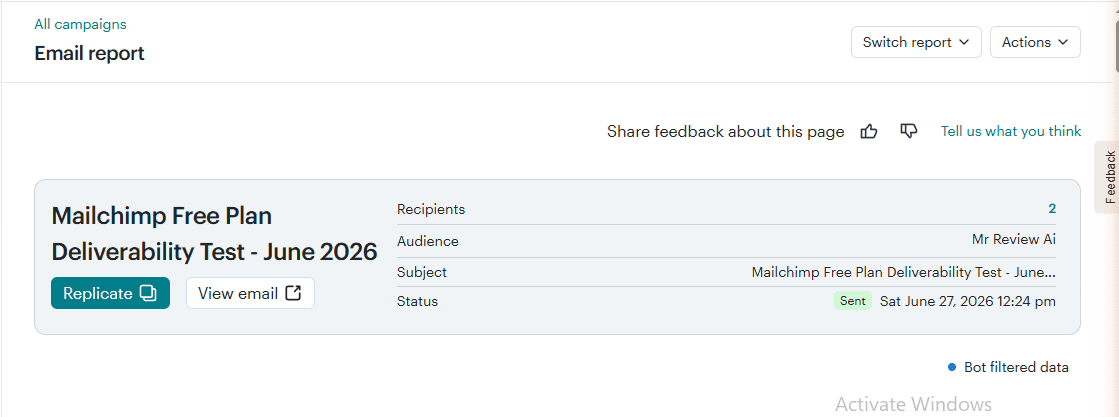
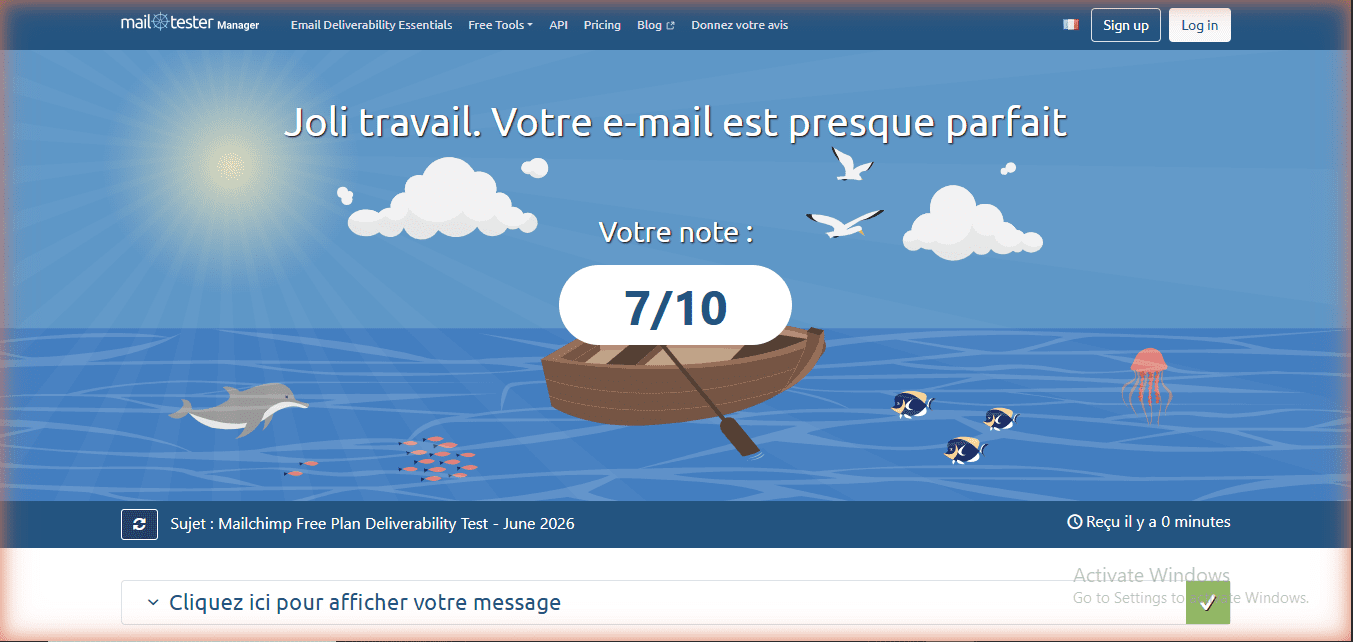
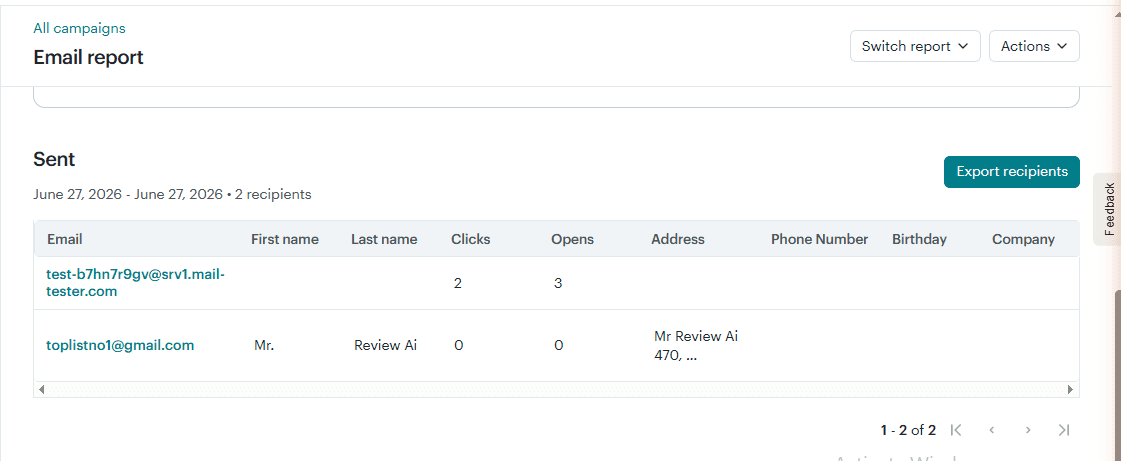
We ran the same test for Mailchimp. Sending from our free account (toplistno1@gmail.com, rewritten by Mailchimp to toplistno1@257085115.mailchimpapp.com), we sent to mail-tester.com on June 27, 2026. Result: 7/10 — noticeably better than MailerLite’s 4.4/10. SpamAssassin deducted -1.5 points total: the main flags were FREEMAIL_REPLYTO_END_DIGIT (-0.25), HEADER_FROM_DIFFERENT_DOMAINS (-0.249, because From domain is mailchimpapp.com while Reply-To is gmail.com), and HK_NAME_MR_MRS (-0.999, the sender name includes “Mr”). SPF passed, DKIM passed. DMARC was absent — the same gap as MailerLite. An additional -1.5 was deducted for 3 broken social links inside the template (template social icons linked to empty https:// placeholders). Server reputation was clean: not blacklisted.
Deliverability test results, both platforms tested the same day from real free accounts:
| MailerLite Free | Mailchimp Free | |
|---|---|---|
| mail-tester.com score | 4.4/10 | 7/10 |
| SPF | Pass | Pass |
| DKIM | Pass | Pass |
| DMARC | None | None |
| Sender address | @send.mailerlite.eu | @mailchimpapp.com |
| Main penalty | FREEMAIL_FORGED_REPLYTO (-2.5 pts) | Broken social links in template (-1.5 pts) |
| Date tested | June 27, 2026 | June 27, 2026 |
Pricing: When Do You Have to Pay?
MailerLite’s first paid tier is Comfort at $12/month for up to 500 subscribers. It unlocks 50 automations, a custom sender domain, 10 forms, 10 landing pages, the AI writing assistant, and removes MailerLite branding. For a solo creator who has grown past 250 subscribers, $12/month is the most affordable first step of any major email platform.
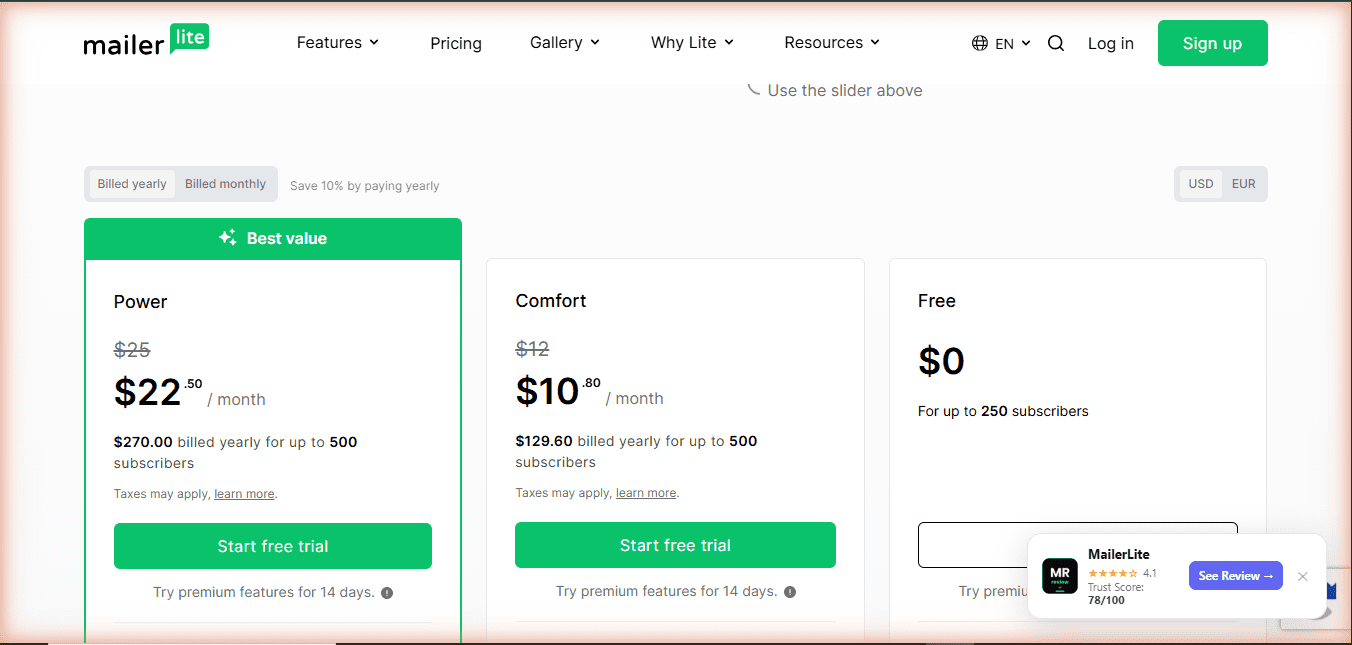
Mailchimp’s first paid tier is Essentials at $13/month. At the 0–500 contact tier, the contact ceiling stays at 500 — not unlimited — and email sends increase to 5,000/month. Notably, Mailchimp’s paid plan pricing scales steeply with contact count. At 500 contacts, Mailchimp Essentials costs $20/month. At that same list size, MailerLite’s Comfort plan is $12/month. The gap widens as your list grows.
Who Should Use Mailchimp Free?
Mailchimp’s free plan makes the most sense if you are already embedded in the Mailchimp ecosystem and migration costs — rebuilding integrations, exporting contacts, recreating automations — outweigh the benefit of switching. It also makes sense if you run a Shopify or WooCommerce store and rely on Mailchimp’s native integration, which is the deepest of any email tool at $0. If your list is small (under 200 contacts), stable, and you send once or twice a month, the 500-email limit does not bite you.
If you are starting from zero today and comparing options, Mailchimp is not where we would start. The trial trap, the restricted templates, the 500-email monthly cap, and the absence of scheduling and A/B testing on free make it the most restrictive major free plan in 2026.
Who Should Use MailerLite Free?
MailerLite free is the right starting point if you are building from zero and expect to stay under 250 subscribers for the first few months. The editor is genuinely one of the better ones you will find at any price point. A/B testing at $0 is unique. Three automations are enough for a basic funnel. The included website builder is a real addition — very few email platforms include full website hosting on a free plan at all.
MailerLite free is not the right choice if you expect fast list growth (250 is a low ceiling), if you need more than three automations, or if platform consistency is a priority for you. Three free plan cuts in two years is a documented pattern. That is a factual observation, not a reason to avoid MailerLite’s paid plans — which are priced well and technically strong — but it is a reason not to depend on the free tier’s specific limits staying fixed.
The Verdict
MailerLite wins this comparison on almost every metric that affects daily use: 5x more email sends per month, 3 automations vs 1, A/B testing free, predefined templates locked on free (but drag-and-drop editor available), email scheduling included, and no auto-charge trap when you sign up.
Mailchimp wins on eCommerce integration depth, a slightly longer support window on free (30 days vs 14 days), and deliverability score: our real test on June 27, 2026 showed Mailchimp scoring 7/10 vs MailerLite’s 4.4/10 on mail-tester.com. The gap comes down to MailerLite’s sender address mismatch (FREEMAIL_FORGED_REPLYTO), which Mailchimp does not trigger. If you have an active Shopify or WooCommerce store already connected to Mailchimp, those integrations are worth preserving. For everyone else starting fresh, there is still not a strong reason to choose Mailchimp free in 2026 — the sending volume and feature gaps are too wide.
One honest caveat on MailerLite: the June 2026 restructure pulled the subscriber ceiling down to match Mailchimp’s at 250. The platforms are now level on contacts, where MailerLite used to lead. If your priority is a large free contact list, neither of these tools gets you there — Kit.com (10,000 free subscribers) or Brevo (unlimited contacts, 9,000 emails/month) serve that need better.
Mr Review AI scores: MailerLite free 3.6/5 | Mailchimp free 3.0/5. MailerLite is the better free tool. Neither is a strong long-term free option for a growing list.
Free Plan Comparison: All Four Major Platforms (2026)
Data verified June 2026 from each platform’s official pricing page.
| Feature | Mailchimp Free | MailerLite Free | Brevo Free | Kit.com Free |
|---|---|---|---|---|
| Free contacts | 250 | 250 | Unlimited | 10,000 |
| Emails/month | 500 (250/day) | 2,500 | 9,000 (300/day) | Unlimited |
| Active automations | 1 flow | 3 automations | Draft only | 1 sequence |
| A/B testing | Paid | Free | Paid | Paid |
| Email templates | Limited on free | Predefined templates locked (editor available) | Free | Paid |
| Landing pages | 1 basic | 1 page + 1 website | Paid | Unlimited |
| Custom sender domain | Paid | Paid | Free (own domain) | Free |
| Trial trap risk | $20 auto-charge | None | None | None |
| Support on free | 30 days | 14 days | Community | |
| First paid plan | $13/mo | $12/mo | $9/mo | $29/mo |
| Mr Review AI score | 3.0/5 | 3.6/5 | 3.8/5 | 4.3/5 |
Is mailchimp-vs-mailerlite-free-2026 right for you?
- ✓ Starting from zero — MailerLite gives 5x more sends at $0
- ✓ Need A/B testing free — MailerLite includes it, Mailchimp does not
- ✓ Want 3 automations, not 1 — MailerLite wins
- ✓ No credit card at signup — MailerLite free plan, no trial trap
- ✓ Just testing before committing — both have real free plans
- ✕ Don't start on Mailchimp if you expect to send more than 2x/month — 500 emails runs out fast
- ✕ Don't ignore the $20 trial trap — Mailchimp auto-charges if you don't downgrade manually
- ✕ Don't stay on MailerLite free if your list will grow past 250 quickly — ceiling is low
- ✕ Don't pick either if you need unlimited contacts — Kit.com (10,000 free) or Brevo (unlimited) serve that better
Which Email Platform Is Right for Your Business?
Deep-dive reviews of every major email marketing tool — hands-on tested with real free accounts, real campaigns, real results.
Frequently Asked Questions
Is Mailchimp or MailerLite better for free in 2026?
MailerLite is the better free option. It offers 5x more email sends per month (2,500 vs 500), 3 automations vs 1, A/B testing at $0, no auto-charge trap. Note: predefined templates are locked on the MailerLite free plan — you can still use the drag-and-drop editor to build from scratch. Mailchimp edges ahead only on eCommerce integration depth and a slightly longer support window (30 days vs 14 days).
Does Mailchimp auto-charge on the free plan?
New Mailchimp accounts start on a Standard plan free trial, not the free plan. If you do not manually downgrade before the trial ends, your credit card is charged $20. We confirmed this auto-charge was active and scheduled on our own account created June 20, 2026. To downgrade: Account and Billing → Billing → Manage Plan → select Free. You get one lifetime downgrade to free per account.
How many emails can I send free on MailerLite vs Mailchimp?
MailerLite: 2,500 emails per month with no daily cap. Mailchimp: 500 emails per month with a 250 per day daily limit. With 250 subscribers, MailerLite allows roughly 10 emails per subscriber per month. Mailchimp allows 2. A weekly newsletter alone (4 broadcasts x 250 contacts = 1,000 sends) exceeds Mailchimp’s free monthly limit.
What happened to MailerLite’s free plan in June 2026?
On June 16, 2026, MailerLite restructured the free plan for the third time in approximately two years. Subscriber limit cut from 500 to 250. Monthly emails cut from 12,000 to 2,500. Automations capped at 3 (was unlimited). Forms capped at 3. Digital products capped at 1. In exchange, all email templates and promotional pop-ups were unlocked on free, and a second user seat was added.
Is there a free email marketing tool with more than 250 contacts?
Yes. Brevo offers unlimited free contacts (9,000 emails/month, 300 per day limit). Kit.com offers 10,000 free subscribers with unlimited email sends. Both are significantly more generous on contacts than Mailchimp or MailerLite in 2026. If your list will grow past 250 contacts quickly, start on one of those instead.
Can I switch from Mailchimp to MailerLite for free?
Yes. Export your contact list from Mailchimp as a CSV (Audience → Export Audience) and import into MailerLite on the free plan. The migration itself takes about 30 minutes for a list under 250 contacts. You will need to rebuild automations manually — there is no automatic migration tool between the two platforms.

About the Author
Mr Review AI Team
This review was researched and tested hands-on by the Mr Review AI editorial team. We create real accounts, run actual campaigns, and document every limitation we encounter — no vendor demos, no copied spec sheets. Our reviews are editorially independent: no tool pays for a score or placement, ever. Where we have affiliate relationships, we disclose them transparently on each page.
Want to know who founded this site and what drives our editorial standards? → Meet the founder on our About page