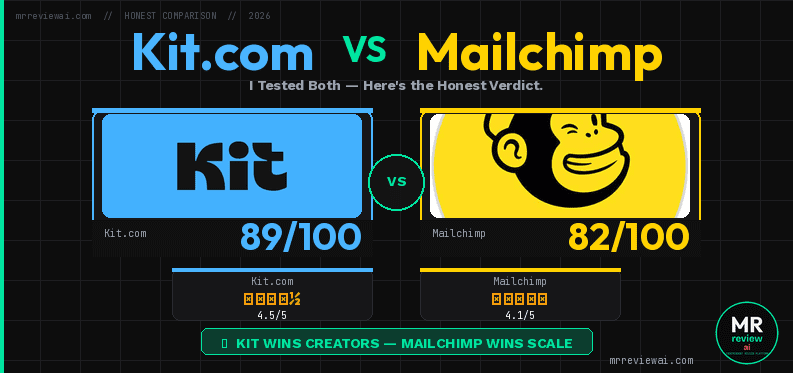
Kit.com vs Mailchimp free plan comparison 2026 — Kit scores 89/100 (4.5/5 stars) vs Mailchimp 82/100 (4.1/5 stars) — I Tested Both — Here's the Honest Verdict — mrreviewai.com
|

Kit.com vs Mailchimp Free Plan (2026): I Tested Both — Here’s the Honest Verdict
Kit.com vs Mailchimp logo
4.3
✓ The Best
  • Kit wins: 10,000 free subscribers
  • Unlimited broadcasts
  • Free landing pages
  • Sell digital products free
  • No auto-charge trap
✕ The Worst
  • Mailchimp wins: 1 basic welcome automation
  • Better ecommerce integrations
Starting from Free / $39/mo Creator
Try Kit.com Free

Disclosure: This article contains affiliate links. If you sign up for a paid plan through our links, we may earn a commission at no extra cost to you. We tested all tools on free plans first. Our recommendations are based on hands-on use, not compensation. Last tested: June 2026.

🎧 4 min 48 sec audio summary — Kit.com vs Mailchimp free plan: 10,000 vs 250 subscribers, unlimited sends vs 500/month, zero automation vs 1 welcome flow. Tested hands-on June 2026. Voice: Roger (ElevenLabs AI). Full review at mrreviewai.com
Kit.com

Kit.com

vs
Mailchimp

Mailchimp

📋 Affiliate Disclosure: This post does not currently contain affiliate links. Our site is new and we have not yet qualified for affiliate programs for the tools reviewed here. All ratings and opinions are 100% editorially independent. Learn more about our editorial standards →
Disclosure: Some links in this review are affiliate links. We may earn a commission at no extra cost to you. This never affects our scores or recommendations. We hold real free accounts on all tools reviewed.
⚡ QUICK ANSWER
🔧 Choose Kit.com if:
  • Building a list from zero
  • Want 10,000 free subscribers
  • Need unlimited landing pages
  • Want to sell digital products free
  • Don’t need automation yet
🐒 Choose Mailchimp if:
  • Already on Mailchimp ecosystem
  • Have Shopify/WooCommerce store
  • Under 250 contacts, slow growth
  • Need 1 welcome automation
⚠️ Heads up: Mailchimp auto-starts new accounts on a $20/month Standard trial. Manually downgrade to free before the billing date.
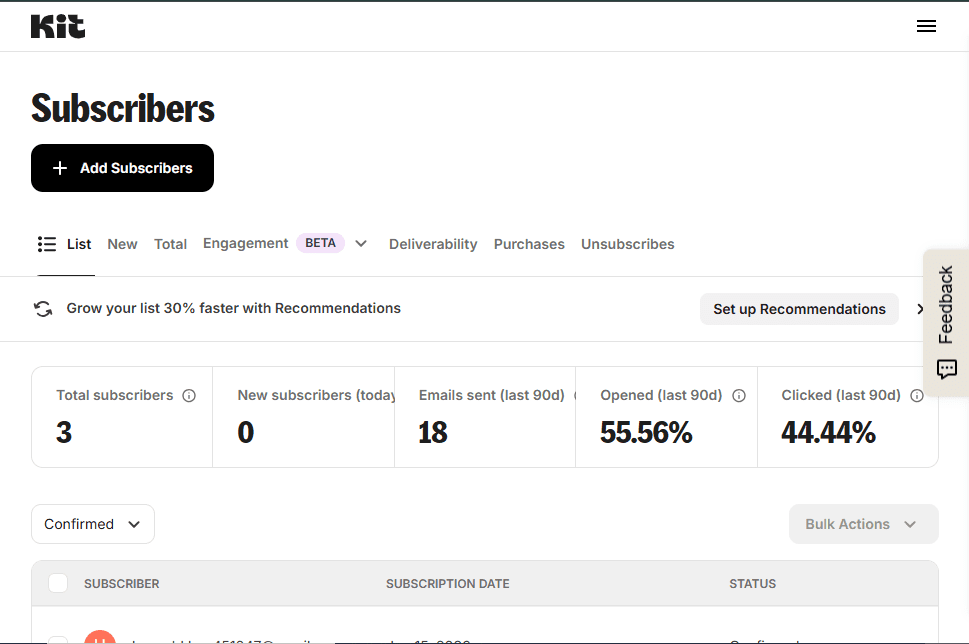
Kit.com free plan subscribers dashboard showing 3 total subscribers, 18 emails sent in 90 days, 55.56% open rate — tested by Mr Review AI Team June 2026
Our actual Kit.com free plan account — June 26, 2026. Total subscribers: 3. We started from zero. This is real. 18 emails sent in 90 days, 55.56% open rate. Free plan limit: 10,000 subscribers.

I’ve been using Kit.com’s free plan for months — building real forms, collecting real subscribers, and sending real broadcasts for Mr Review AI. I also tested Mailchimp’s free plan firsthand, logging in, navigating the dashboard, and documenting every limit I hit.
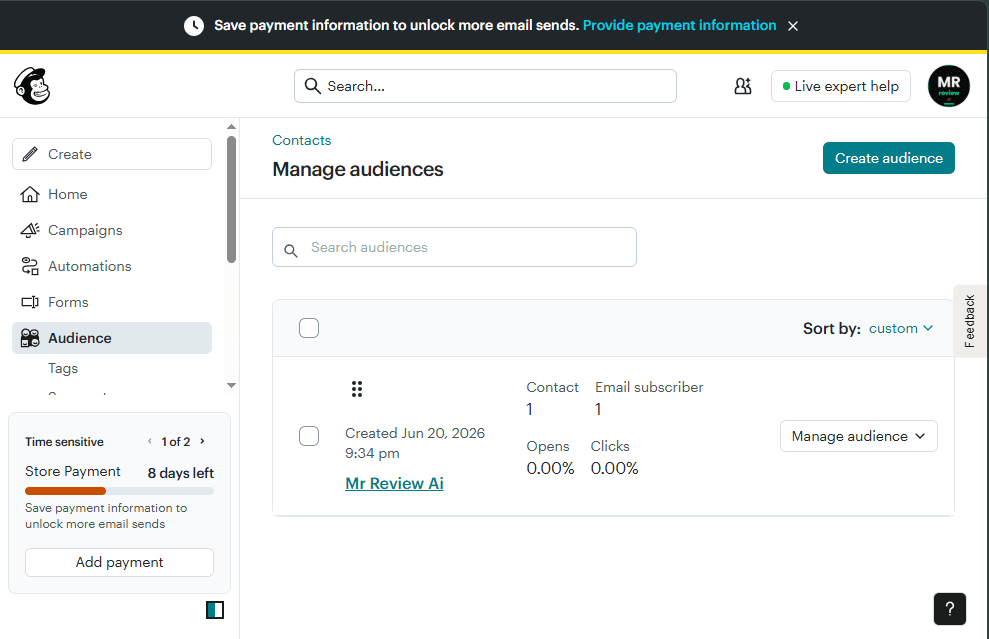
Mailchimp Manage Audiences showing Mr Review Ai audience with 1 contact 1 email subscriber — Store Payment 8 days left countdown — June 2026
Our Mailchimp free plan account — June 26, 2026. Audience: 1 contact, 1 email subscriber. Sidebar: “Store Payment — 8 days left.” The 250-contact free plan ceiling means most creators hit the wall within their first few months of consistent publishing.

This is not a sponsored comparison. No affiliate bias. Just two free plans, tested side by side, from someone who actually uses email marketing daily to grow an affiliate site.

Bottom line upfront: Kit.com wins on list size and simplicity. Mailchimp wins on automation — but only for a list of 250 people. Here’s the full honest breakdown.

Quick Answer: Kit.com vs Mailchimp Free Plan (2026)

FeatureKit.com (Free)Mailchimp (Free)
Max subscribers/contacts10,000250
Monthly email sendsUnlimited500 (daily limit: 250)
Automation❌ Zero — all locked✅ 1 basic Customer Journey
Landing pages✅ Unlimited✅ Basic
Forms✅ Unlimited✅ Basic
Sell digital products✅ Yes (3.5% + $0.30)❌ No
Remove branding❌ Kit badge❌ Mailchimp badge
Paid upgrade from$39/mo monthly$13/mo Essentials
Best forCreators, bloggers, affiliatesSmall business, ecommerce

The Biggest Difference: 10,000 vs 250 Contacts

This is not a typo. Kit.com free = 10,000 subscribers. Mailchimp free = 250 contacts. That is a 40x difference — for $0/month on both sides.

For bloggers, newsletter writers, and affiliate marketers building from zero, this single number settles the debate. If growing a large list without paying is your goal, Kit.com is the only choice that makes practical sense.

Mailchimp’s 250-contact ceiling is hit fast. Most bloggers cross 250 subscribers within their first few months of consistent content. The moment you hit 251, Mailchimp pauses all sending until you upgrade to Essentials at $13/month minimum — for only 500 contacts.

Sending Limits: Unlimited vs 500/Month

Kit.com free: Unlimited email broadcasts. No monthly cap. No daily cap. You can email your full list of up to 10,000 subscribers as often as you want.
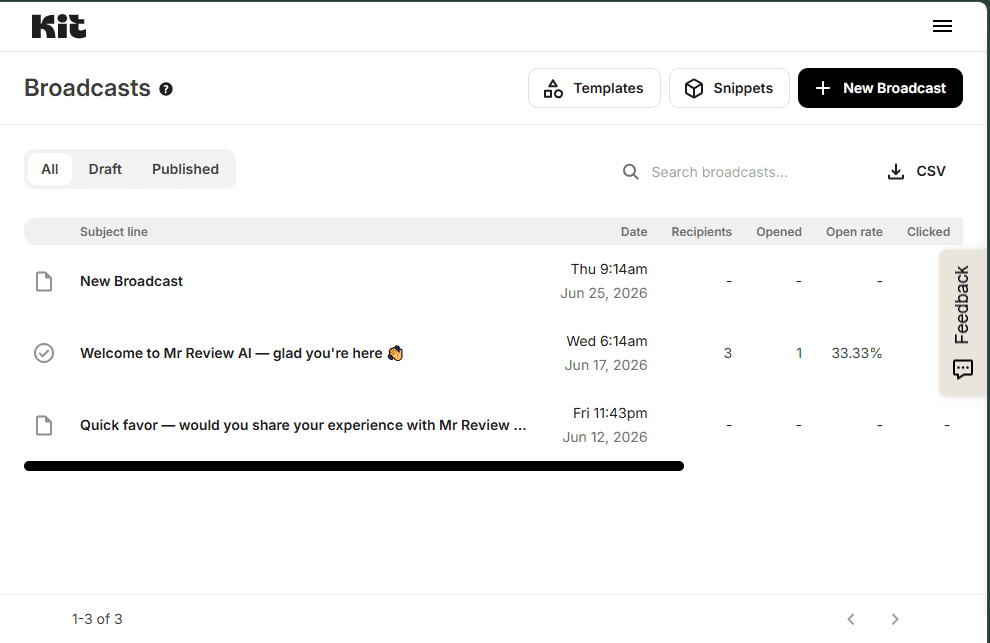
Kit.com Broadcasts dashboard — 3 real emails sent on free plan — Welcome to Mr Review AI: 3 recipients 33.33% open rate — June 2026
Our Kit.com free plan broadcasts — June 2026. “Welcome to Mr Review AI — glad you’re here 🎉” (Jun 17): sent to 3 subscribers, 33.33% open rate. Kit free: unlimited broadcasts, no send cap. These are all manual — zero automation on free plan.

Mailchimp free: 500 sends per month with a daily limit of 250. With 250 contacts, that means you can email your entire list exactly twice per month. Email all 250 contacts on Monday — daily cap hit. Wait until Tuesday.

For anyone running a weekly newsletter, Mailchimp’s free limits are too tight to operate without constantly watching the counter.

Automation: The One Area Where Mailchimp Wins
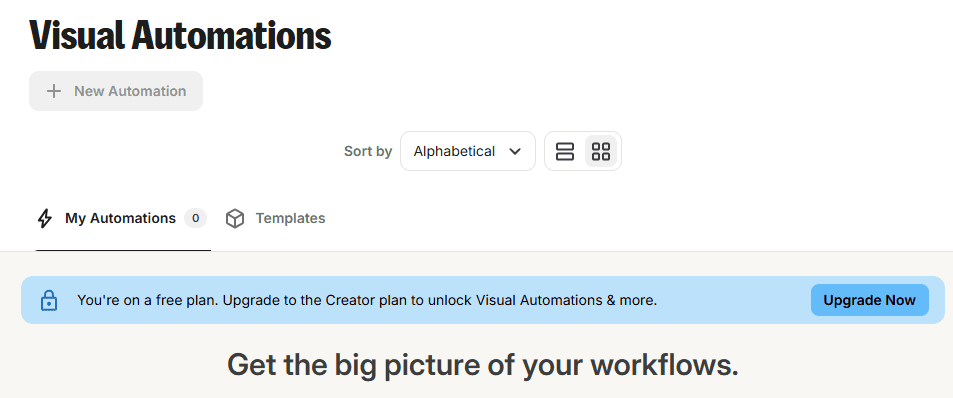
Kit.com Visual Automations page showing You're on a free plan. Upgrade to the Creator plan to unlock Visual Automations & more. — My Automations: 0. Confirmed from our real free account.
Kit.com free plan — Automations locked. Our account shows 0 automations. Every trigger, sequence, and rule requires upgrading to Creator at $39/month. Confirmed June 2026.
Kit.com Visual Automations locked on free plan — My Automations 0 — Upgrade to Creator required — tested June 2026
Kit.com free plan — Automations completely locked. Our account: 0 automations. Every trigger, sequence, and rule requires Creator plan at $39/month. Confirmed from our real account, June 2026.

Kit.com free: zero automation. I confirmed this from my own account — used daily to manage the MR Review AI email list. Every automation feature (Visual Automations, Email Sequences, Rules) is completely locked behind the Creator plan at $39/month. When a new subscriber joins, I write and send the welcome email manually. No trigger, no drip, no automatic response on free.

Mailchimp free: 1 basic Customer Journey with up to 4 steps. This includes a simple welcome email automation — subscriber joins, Mailchimp sends a welcome message automatically. Limited, but functional for a small list.
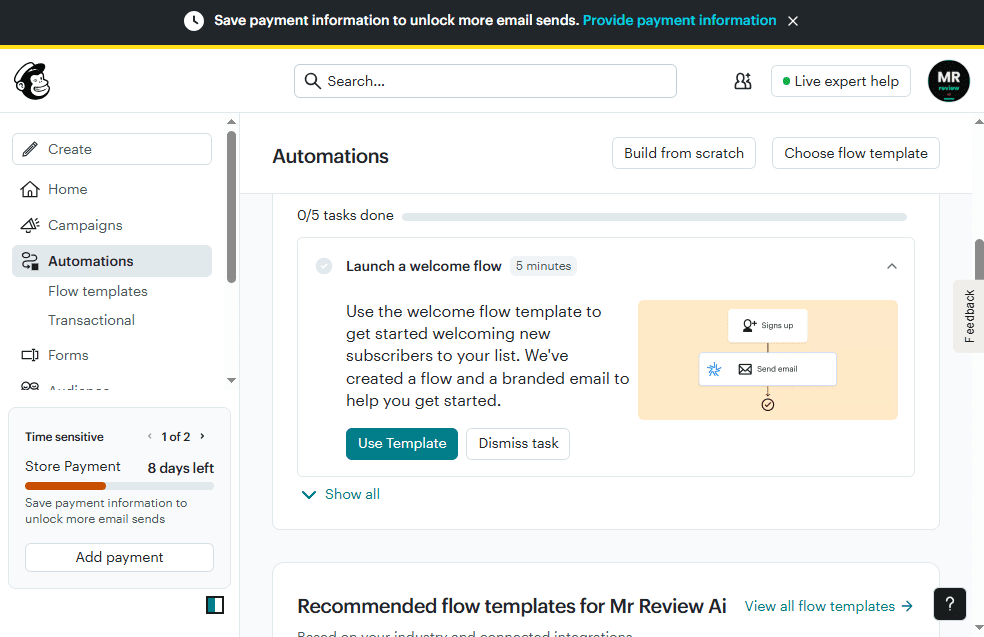
Mailchimp Automations page showing Launch a welcome flow template — Signs up then Send email — 1 basic Customer Journey on free plan — Store Payment 8 days left — June 2026
Mailchimp free plan — Automations, June 2026. The “Launch a welcome flow” template: trigger = Signs up → action = Send email. This is the 1 basic Customer Journey available on free. Sidebar: “Store Payment — 8 days left.” Kit free has zero equivalent — all automation locked behind Creator at $39/month.

The honest tradeoff: Mailchimp automation for 250 people vs Kit.com unlimited sending for 10,000 people with no automation. Which constraint matters more depends entirely on where you are in your growth.

Landing Pages and Forms

Kit.com: Unlimited landing pages and forms on free. Clean, minimal builder. Setup takes minutes. I built multiple lead magnet pages on Kit’s free plan — all live, all collecting subscribers.
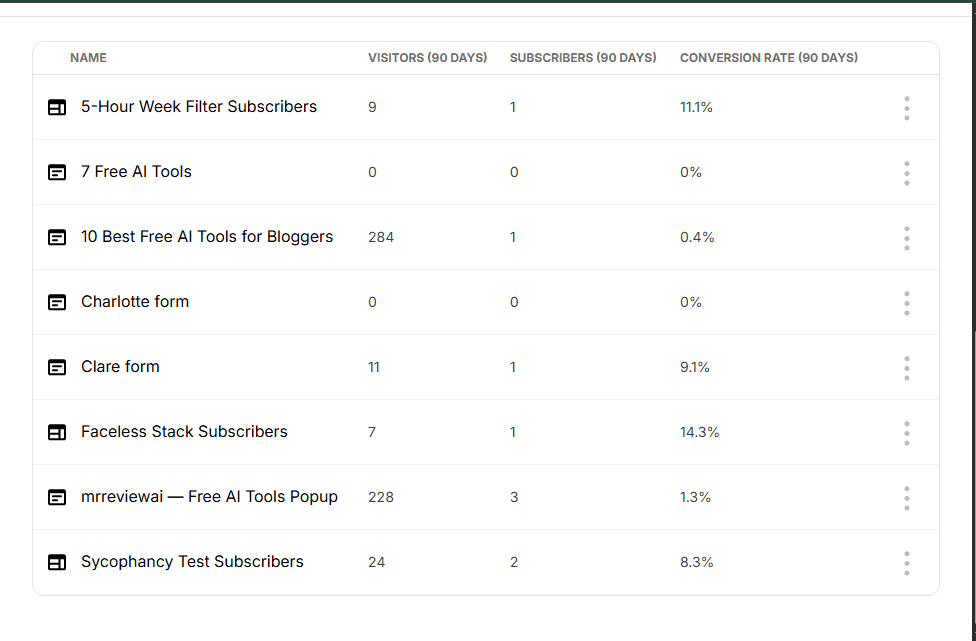
Kit.com free plan landing pages and forms — 8 active forms with real visitor and subscriber data — mrreviewai Free AI Tools Popup 228 visitors 3 subscribers — June 2026
Our 8 active Kit.com landing pages & forms — all on the free plan, June 2026. Real numbers: “10 Best Free AI Tools for Bloggers” had 284 visitors. “mrreviewai — Free AI Tools Popup” had 228 visitors, 3 confirmed subscribers. Kit free plan: unlimited forms, zero cost.

Mailchimp: Basic landing pages and forms included. Older interface, more complex to navigate, but functional.

Sell Digital Products on Free

Kit.com free: Sell ebooks, templates, guides, downloads directly through Kit. Kit charges 3.5% + $0.30 per transaction. No monthly fee. Start earning from your list before you pay Kit anything.
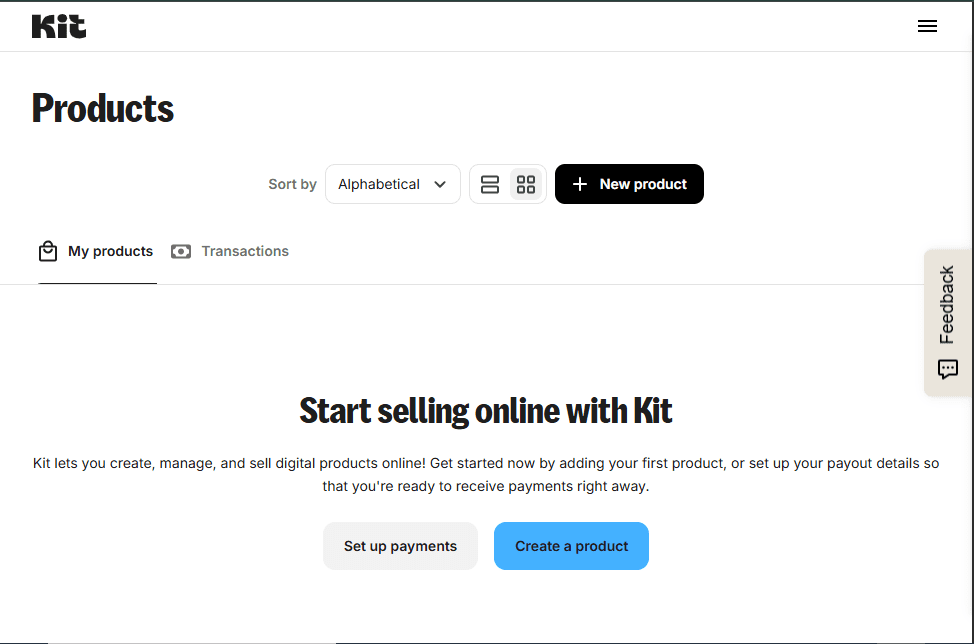
Kit.com Products page showing Start selling online with Kit — Create a product and Set up payments available on free plan — no upgrade required — June 2026
Kit.com free plan — Products page, June 2026. “Create a product” is fully accessible — no upgrade prompt, no lock screen. Kit charges 3.5% + $0.30 per transaction. No monthly fee to sell ebooks, templates, or digital downloads.

Mailchimp free: No native digital product selling. Built for ecommerce integrations (Shopify, WooCommerce), not direct digital product sales.

Mailchimp’s Standard Trial Trap
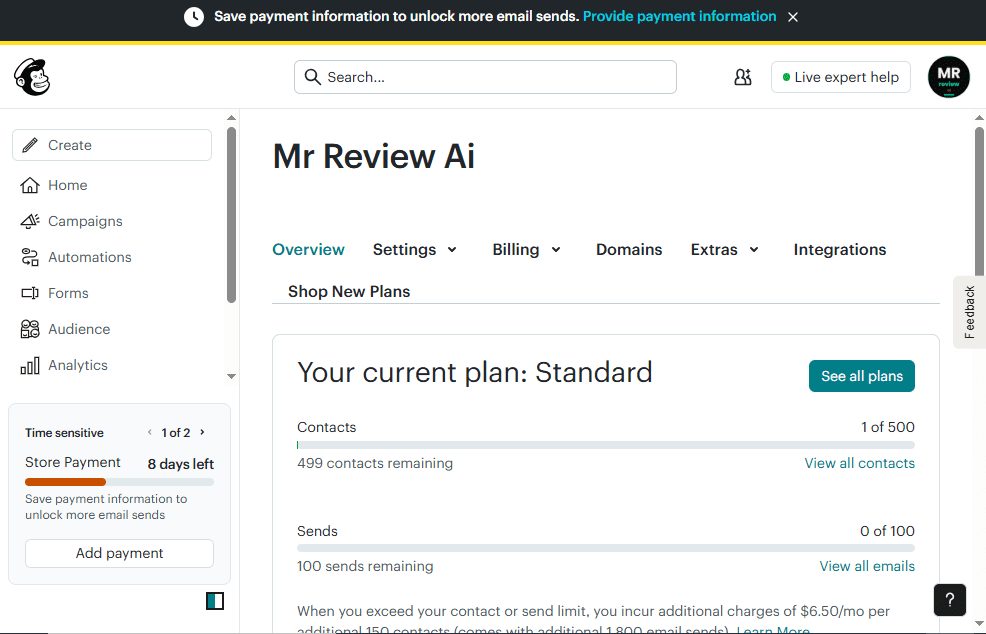
Mailchimp account overview showing Your current plan: Standard — sidebar Store Payment 8 days left — Save payment information to unlock more email sends — tested June 2026
Our Mailchimp account — June 26, 2026. New sign-ups land on Standard plan automatically — NOT the free plan. Sidebar: “Store Payment — 8 days left” (red countdown). If you don’t manually downgrade before the deadline, Mailchimp charges your saved payment method. We downgraded. You should too.

When you sign up for Mailchimp today, you land on a Standard plan trial — not the free plan. It auto-charges $20/month if you don’t manually downgrade in Account Settings before the billing date. I saw this on the MR Review AI Mailchimp account: “Standard plan — $20.00 autopay on [date]” with a countdown timer.

Kit.com has no such trap. Free from signup. No auto-charge. No countdown.

Who Should Choose Kit.com Free?

  • Bloggers and newsletter writers building an audience from zero
  • Affiliate marketers who need landing pages and forms without monthly fees
  • Anyone wanting to grow a list to 10,000 subscribers before paying
  • Creators wanting to sell digital products on free (3.5% + $0.30 per sale)
  • Beginners who want the simplest email marketing interface available

Who Should Choose Mailchimp Free?

  • Users with an existing Shopify or WooCommerce store already on Mailchimp
  • Small businesses with under 250 contacts and no plans to scale quickly
  • Anyone who specifically needs the 1 welcome automation and won’t exceed 250 contacts
  • Existing Mailchimp users where migration would be disruptive

Important: If you sign up for Mailchimp expecting the free plan, go to Account Settings and manually downgrade from the Standard trial before your billing date.

Final Verdict: Kit.com Wins for Creators

For creators, bloggers, and affiliate marketers: Kit.com’s free plan is not a close contest. 10,000 subscribers vs 250 contacts. Unlimited sending vs 500/month. Free digital product selling. Cleaner interface. No auto-charge trap on signup.

Mailchimp’s automation advantage only works for 250 people — too small a list for the tradeoff to matter when you’re trying to build a real business.

Start with Kit.com. Grow your list to 10,000 for free. Upgrade only when automation becomes the bottleneck — not before.

✉ FREE EMAIL MARKETING — FULL REVIEW SERIES
🐝beehiiv Free Plan Review 2026
2,500 free subscribers · Unlimited sends · Best for newsletter creators · Score: 4.1/5
beehiiv Free Plan Review 2026
✉️MailerLite Free Plan Review 2026
500 subs · A/B testing free · Best UI design · Score: 3.6/5
MailerLite Free Plan Review 2026
🔧Kit.com Free Plan Review 2026
10,000 free subscribers · Built a real funnel · Hit every limit · Score: 4.3/5
Kit.com Free Plan Review 2026
📧Brevo Free Plan Review 2026
Unlimited contacts · Free CRM · Best for large lists · Score: 3.8/5
Brevo Free Plan Review 2026
🐒Mailchimp Free Plan Review 2026
$20 auto-charge trap · 250 contacts · Weakest free plan · Score: 3.0/5
Mailchimp Free Plan Review 2026
✂️Kit.com vs MailerLite (2026)
Head-to-head comparison · Both tested hands-on · The creator vs designer debate
Kit.com vs MailerLite Free Plan 2026
✂️Kit.com vs Brevo Free Plan (2026)
Which one should you use? · Both tested hands-on · Score compared
Kit.com vs Brevo Free Plan 2026
✂️Brevo vs MailerLite Free Plan (2026)
Unlimited contacts vs A/B testing · Both tested · Score compared
Brevo vs MailerLite Free Plan 2026
✂️Mailchimp vs MailerLite Free Plan (2026)
Head-to-head · Both tested · Which is less bad?
Mailchimp vs MailerLite Free Plan 2026
✂️Brevo vs beehiiv Free Plan (2026)
Two different tools · Both tested hands-on · Which fits your goal?
Brevo vs beehiiv Free Plan 2026
🏆Best Free Email Marketing Tools 2026
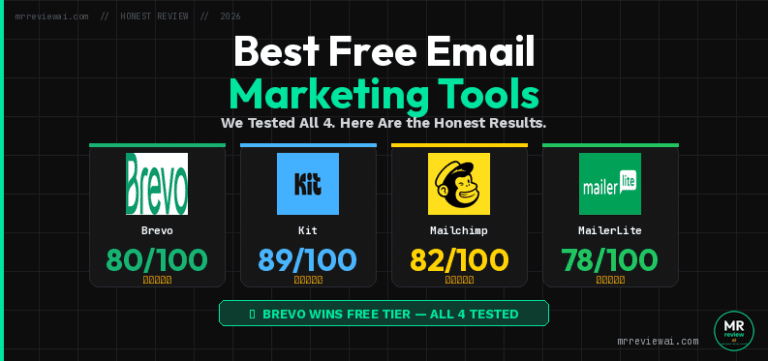
We tested all 4 · Full comparison + rankings · One page, honest results
Best Free Email Marketing Tools 2026

Frequently Asked Questions

Is Kit.com really free for 10,000 subscribers?

Yes. Kit.com’s Newsletter plan is permanently free for up to 10,000 subscribers. No credit card required. No trial period. Upgrade to Creator ($39/month) only when you need automation.

What happens when I reach 250 contacts on Mailchimp free?

Mailchimp pauses all email sending until you upgrade to a paid plan or reduce your contacts below 250. No grace period.

Does Kit.com have automation on the free plan?

No. All automation — Visual Automations, Email Sequences, Rules — requires the Creator plan at $39/month. On free, all sending is manual broadcasts only. Confirmed from my own active Kit.com free account.

Can I migrate from Mailchimp to Kit.com for free?

MR REVIEW AI SCORE
Kit.com vs Mailchimp — Rating Breakdown
✂️Brevo vs Mailchimp Free Plan (2026)
Unlimited contacts vs 250 · Both tested hands-on · $20 trial trap documented
Brevo vs Mailchimp Free Plan 2026
KIT.COM FREE SUBSCRIBERS
5.0
10,000 free — most generous ceiling of any tool
MAILCHIMP FREE CONTACTS
1.5
250 contacts only — hits the wall fast
KIT.COM EMAIL SENDS
5.0
Unlimited broadcasts — no monthly or daily cap
MAILCHIMP EMAIL SENDS
2.0
500/month · 250 daily limit — emails entire list only twice per month
KIT.COM AUTOMATION
1.0
Zero automation on free — all locked behind $39/mo
MAILCHIMP AUTOMATION
2.5
1 basic Customer Journey — works but only for 250 contacts
EASE OF USE
4.5
Kit.com wins — cleanest interface, fastest to learn
✅ USE KIT.COM IF YOU…
  • Building an audience from zero
  • Want 10,000 free subscribers + unlimited sends
  • Need unlimited landing pages for lead magnets
  • Want to sell digital products (ebooks, templates)
  • Want the cleanest, simplest writing experience
❌ SKIP KIT.COM IF YOU…
  • Need automation on free — all locked
  • Want drip sequences or welcome emails auto-sent
  • Need ecommerce integrations (Shopify, WooCommerce)
  • Have an existing Mailchimp list and store setup
✅ USE MAILCHIMP IF YOU…
  • Already on Mailchimp with Shopify/WooCommerce
  • Have under 250 contacts and slow growth
  • Need 1 basic welcome automation
  • Are migrating from existing Mailchimp setup
❌ SKIP MAILCHIMP IF YOU…
  • Want to grow past 250 contacts for free
  • Send weekly newsletters (500/month limit)
  • Don’t know to downgrade from $20 trial
  • Want unlimited landing pages and forms
  • Are a creator or blogger just starting out
Kit.com vs Mailchimp — Not Sure Which Wins for You?
We tested all 4 free email plans: MailerLite, Kit.com, Brevo, and Mailchimp. See the full side-by-side results.
MailerLite vs beehiiv Free Plan (2026)Two different tools · Both tested hands-on · Email marketing vs newsletter publishing
MailerLite vs beehiiv Free Plan 2026
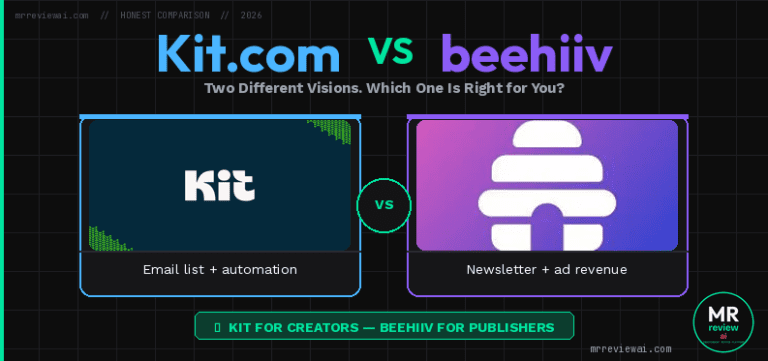
Kit.com vs beehiiv Free Plan (2026)Two different visions · 10,000 vs 2,500 free subscribers · Creator tool vs newsletter platform
Kit.com vs beehiiv Free Plan 2026
Mailchimp vs beehiiv Free Plan (2026)250 contacts vs 2,500 subs · $20 trial trap vs no trap · Email marketing vs newsletter platform
Mailchimp vs beehiiv Free Plan 2026
See All 4 Free Plans Compared →
🖂 FREE EMAIL MARKETING — FULL REVIEW SERIES
🐝 beehiiv Free Plan Review 2026
2,500 free subscribers · Unlimited sends · Best for newsletter creators · Score: 4.1/5
beehiiv Free Plan Review 2026
📧 MailerLite Free Plan Review 2026
500 subs · A/B testing free · Best UI design · Score: 3.6/5
MailerLite Free Plan Review 2026
🔧 Kit.com Free Plan Review 2026
10,000 free subscribers · Built a real funnel · Hit every limit · Score: 4.3/5
Kit.com Free Plan Review 2026
📣 Brevo Free Plan Review 2026
Unlimited contacts · Free CRM · Best for large lists · Score: 3.8/5
Brevo Free Plan Review 2026
🐵 Mailchimp Free Plan Review 2026
$20 auto-charge trap · 250 contacts · Weakest free plan · Score: 3.0/5
Mailchimp Free Plan Review 2026
⚔️ Kit.com vs MailerLite (2026)
Head-to-head comparison · Both tested hands-on · The creator vs designer debate
Kit.com vs MailerLite Free Plan 2026
⚔️ Kit.com vs Brevo Free Plan (2026)
Which one should you use? · Both tested hands-on · Score compared
Kit.com vs Brevo Free Plan 2026
⚔️ Brevo vs MailerLite Free Plan (2026)
Unlimited contacts vs A/B testing · Both tested · Score compared
Brevo vs MailerLite Free Plan 2026
🏆 Best Free Email Marketing Tools 2026
We tested all 4 · Full comparison + rankings · One page, honest results
Best Free Email Marketing Tools 2026

Yes. Export your Mailchimp list and import to Kit.com. As long as your total stays under 10,000, you remain on the free Newsletter plan. Kit also offers free migration support.

Which is better for affiliate marketing?

Kit.com — by a wide margin. 10,000 free subscribers gives real room to build an audience. Plus free digital product selling. Mailchimp’s 250-contact limit makes serious affiliate list building nearly impossible on free.
✏️ About the Author

Mr Review AI Team

This review was researched and tested hands-on by the Mr Review AI editorial team. We create real accounts, run actual campaigns, and document every limitation we encounter — no vendor demos, no copied spec sheets. Our reviews are editorially independent: no tool pays for a score or placement, ever. Where we have affiliate relationships, we disclose them transparently on each page.

Want to know who founded this site and what drives our editorial standards? → Meet the founder on our About page
FREE CHROME EXTENSION
See Trust Scores while you browse any AI tool
Install once — get live ratings from mrreviewai.com on every AI & SaaS tool page you visit. No sign-up needed.
Add to Chrome — Free
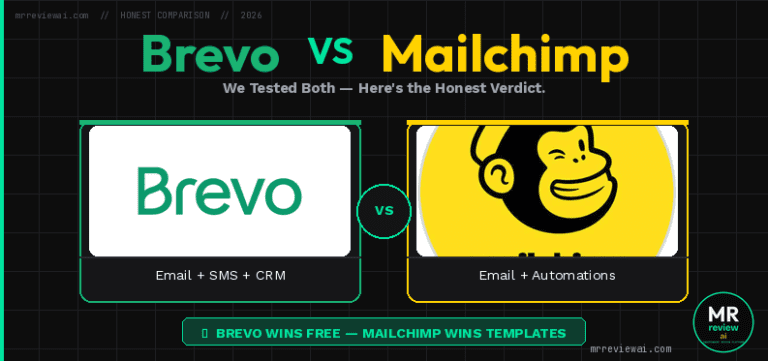
mrreviewai Chrome Extension showing Trust Score popup while browsing
How it looks — pops up automatically as you browse any AI tool
FOR BLOGGERS & CONTENT CREATORS
Writing about email tools on your blog?
Embed a free, auto-updating review badge on your site — one line of code, no plugin needed. Your readers see live ratings. You get a useful tool.
Get the free widget
📩 Get AI tool reviews in your inbox
Join readers who get honest AI tool reviews every week — free.
Mr Review AI Team

About the Author

Mr Review AI Team

This review was researched and tested hands-on by the Mr Review AI editorial team. We create real accounts, run actual campaigns, and document every limitation we encounter — no vendor demos, no copied spec sheets. Our reviews are editorially independent: no tool pays for a score or placement, ever. Where we have affiliate relationships, we disclose them transparently on each page.

Want to know who founded this site and what drives our editorial standards? → Meet the founder on our About page
Similar Posts