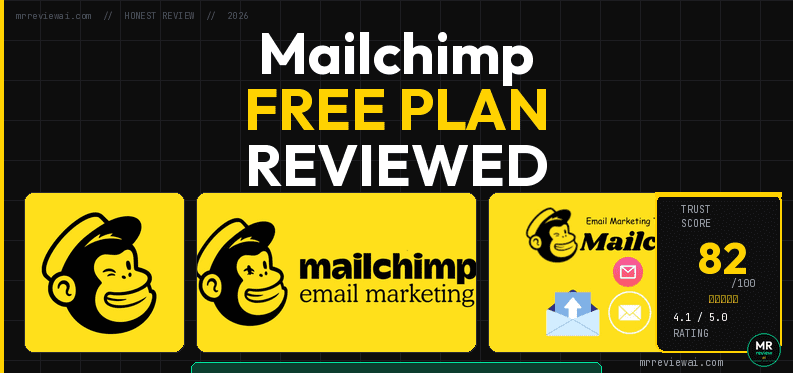
Mailchimp Free Plan Review 2026: What You Actually Get (Tested From Inside the Dashboard)

- ✓1 Customer Journey automation free
- ✓Polished dashboard & templates
- ✓Strong ecommerce integrations
- ✓Good documentation
- ✕$20 auto-charge trial trap
- ✕250-contact ceiling
- ✕1,000 emails/month only
- ✕Weakest free plan of 4 tools tested
📋 Scope of this review: This review covers only the Mailchimp Free plan in 2026. We created a real Mailchimp account, navigated every section of the dashboard, documented the trial trap, and confirmed all free-plan limits firsthand. We have no affiliate relationship with Mailchimp. No placement fees influence this review.
📋 Update Log
June 21, 2026 — Article published. Free plan data based on account created June 20, 2026 (500 contacts / 1,000 emails/month as shown in dashboard at time of testing).
June 22, 2026 — Data corrected. Mailchimp’s official help page confirmed the free plan was further reduced: 250 contacts / 500 emails per month / 250 daily limit. All figures in this article have been updated to reflect current limits. Source: Mailchimp official pricing plans page →
Quick verdict: Mailchimp’s free plan in 2026 is the most restricted it has ever been. The contact ceiling dropped to 250, emails are capped at 500/month, and new accounts are auto-enrolled on a paid Standard trial that charges $20 if you do not manually downgrade. If you are starting from zero, Brevo, MailerLite, or Kit.com offer significantly more value at $0.
Key Facts at a Glance (June 2026)
Free plan contacts: 250 (hard ceiling)
Emails per month: 500 (daily limit: 250)
Automation: 1 Customer Journey flow (limited)
Landing pages: 1 basic page
Templates: Limited selection on free
Support: Email + chat for first 30 days only
Trial trap: New accounts start on Standard trial — auto-charges $20 if not downgraded
Branding: Mailchimp badge on all outgoing emails
Price to remove branding: Essentials plan ($13/month minimum)
How We Tested
We created a new Mailchimp account on June 20, 2026 for mrreviewai.com. The account was automatically placed on a Standard plan free trial — not a free plan. We navigated every major section: Home dashboard, Campaigns, Templates, Automations (Customer Journeys), Audience, and Billing. We documented the trial structure, billing warning, and all feature access points. We did not send live campaigns to real subscribers — this is a UI and free-plan limits documentation review.
The First Thing You See: A Trial, Not a Free Account
This is the most important thing to know about Mailchimp in 2026 that most review articles do not clearly explain: when you create a new Mailchimp account, you are not on the free plan. You are on a Standard plan free trial.
When we logged in on June 20, 2026, the dashboard showed: “Your current plan: Standard — Contacts: 1 of 250. Sends: 0 of 100. Next estimated bill: $20.00 — Autopay on Jul 5, 2026.” There is a countdown timer in the left sidebar: “Store Payment — 13 days left.”
This means: if you sign up for Mailchimp today and forget to downgrade, your credit card will be charged $20 on your trial end date. There is no warning email before the charge. The downgrade option is buried in Account & Billing → Manage Plan.
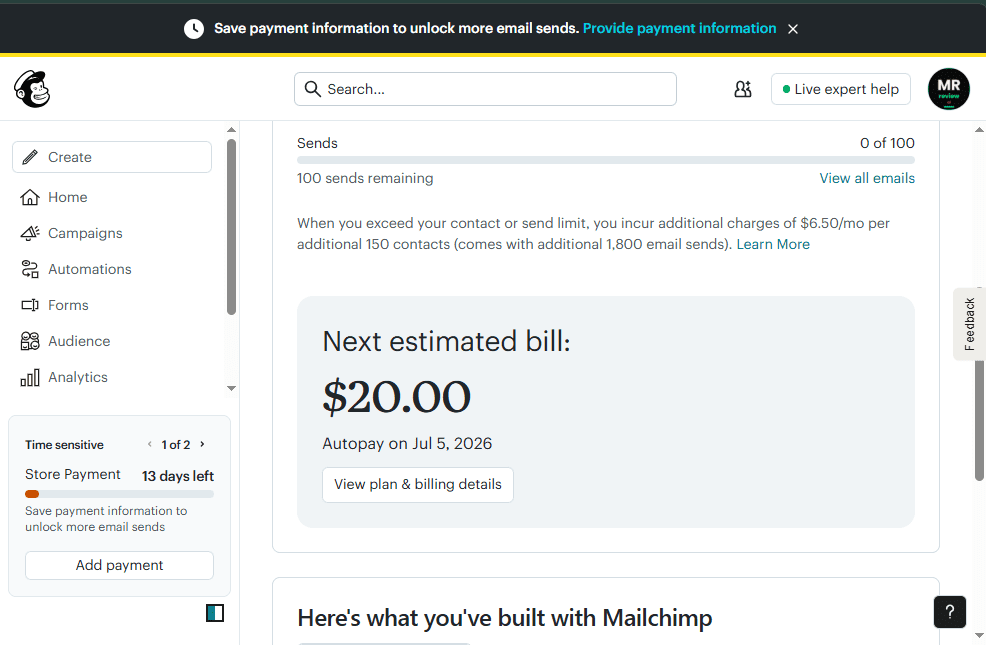
How to downgrade to the free plan: Log into Mailchimp → click your account name (top right) → Account & Billing → Billing → Manage Plan → select Free. You must do this before the trial ends. Important: Mailchimp only allows one lifetime downgrade to free per account. If your contact list is already over 250 at the time of downgrade, the option will be unavailable — you must remove contacts first.
What the Mailchimp Free Plan Actually Includes in 2026
Contact and Email Limits
The free plan allows up to 250 contacts and 500 email sends per month, with a daily limit of 250 sends. To put this in context: if you have 250 contacts, you can only email your entire list twice per month. If you send a welcome email to every new subscriber plus one monthly newsletter, you will hit the cap quickly.
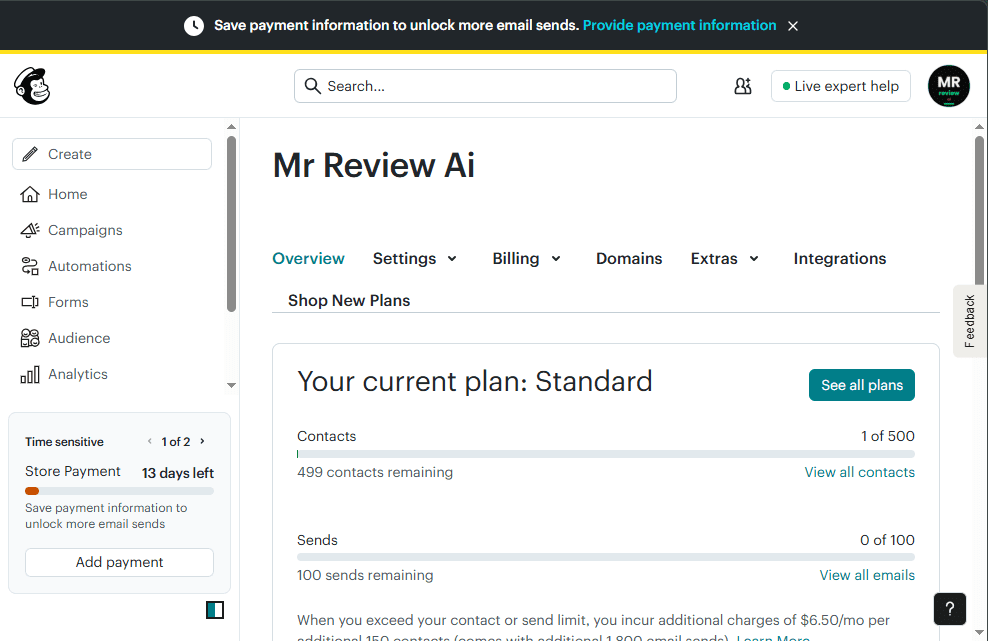
You can verify the current free plan limits on Mailchimp’s official pricing plans page.
For comparison — Brevo’s free plan allows unlimited contacts with 9,000 emails/month. Kit.com allows 10,000 subscribers with unlimited sends. Even MailerLite, which recently cut its own free plan, allows 2,500 emails/month. Mailchimp’s 500/month limit is the most restrictive of any major platform in 2026.
Audience Structure
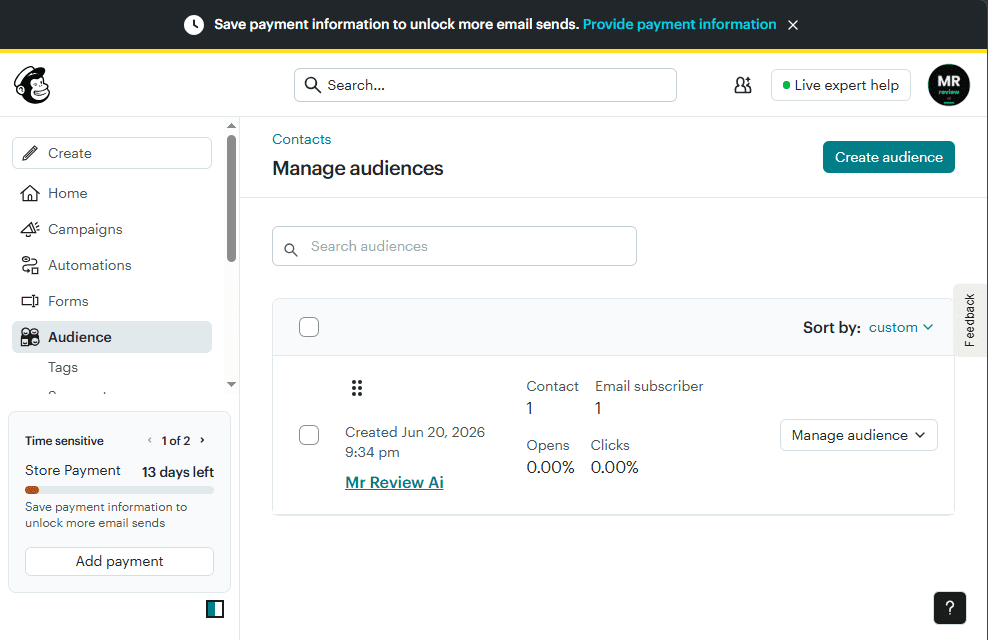
The free plan includes 1 audience (Mailchimp’s term for a contact list). You cannot create multiple lists or segment across audiences. Within that single audience, you can create tags and groups to organize contacts, but these are basic compared to what paid plans offer. Advanced segmentation (behavioral targeting, purchase history, predictive demographics) requires the Standard or Premium plan.
Automation on the Free Plan: One Flow, With Limits
Mailchimp calls its automation system “Customer Journeys.” On the free plan, you get 1 active Customer Journey. The builder itself is accessible and uses a visual drag-and-drop interface — you can add trigger points, time delays, conditional splits, and actions.
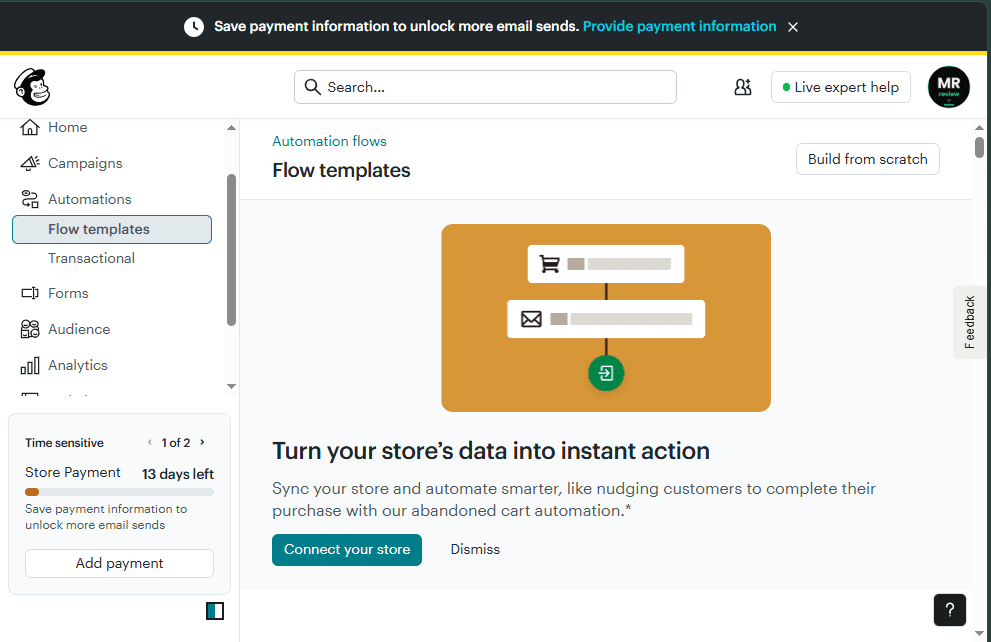
During our testing (while on the Standard trial), we accessed the Customer Journeys builder fully. The “Build from scratch” and pre-built flow templates were both available. Common templates visible included: Welcome new subscribers, Re-engage inactive contacts, and Birthday emails.
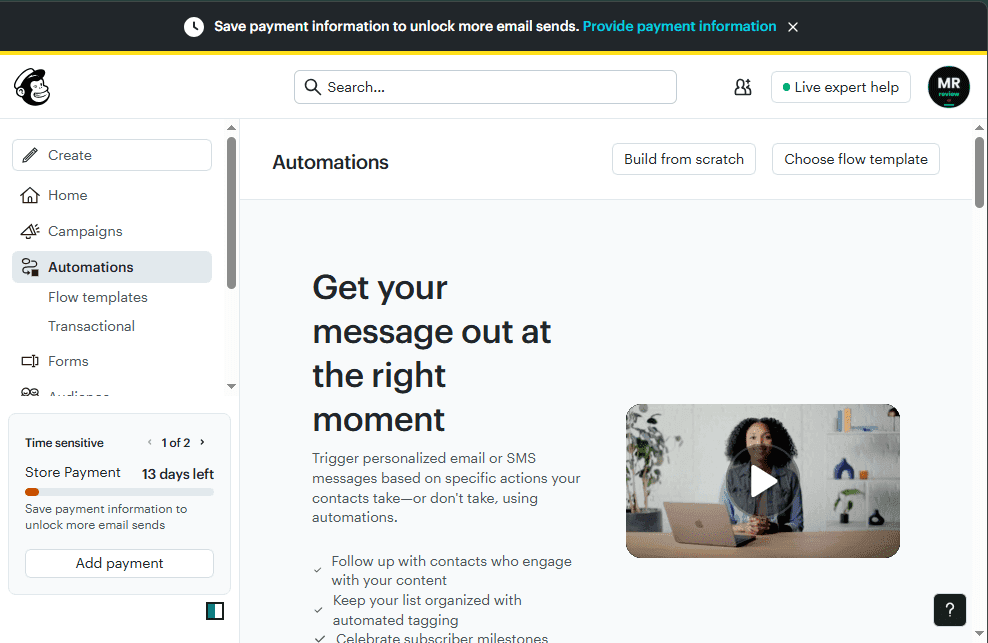
What the free plan cannot do with automation: You cannot run multiple simultaneous Customer Journeys. There are no advanced branching conditions based on purchase behavior or web activity. SMS automation is paid. Retargeting ads triggered by email behavior are Standard-plan-only.
The single Customer Journey on free is genuinely useful for one thing: a welcome email sequence. If your only automation need is “send a welcome email when someone subscribes,” the free plan covers that. For anything more complex, you will hit the wall at flow #2.
Email Templates: Large Library, Limited on Free
Mailchimp has one of the largest template libraries of any email platform — we counted over 316 templates in the Standard trial view, organized by category (Basic, Newsletters, E-commerce, Events, Holidays). The drag-and-drop editor is polished and beginner-friendly.
On the free plan, template access is restricted. Most of the 316 templates require a paid plan. Free plan users have access to a smaller set of basic layouts. The exact number of free templates is not displayed upfront — you only discover the paywall when you click on a template and see “Upgrade to use this template.”
The email editor itself (the drag-and-drop builder) is fully functional on free — you can create emails from scratch with any design you want. The restriction is on pre-built templates, not on the editor capability.
What Works Well on the Mailchimp Free Plan
The interface and onboarding: Mailchimp has the most polished user experience of any email marketing tool at this price point. The dashboard is clean, the campaign creation flow is guided, and there are helpful tooltips throughout. For a complete beginner, Mailchimp is the least intimidating tool to start with.
Integrations: Even on free, Mailchimp connects with over 300 third-party tools — Shopify, WooCommerce, WordPress, Squarespace, Eventbrite, and many more. This integration depth is unmatched at $0. If you run a small e-commerce store on any major platform, the Mailchimp integration likely exists and works on free.
Reporting: Mailchimp’s analytics are genuinely good on the free plan. Open rates, click rates, bounce rates, unsubscribes, and geographic data are all visible. The “Campaign benchmark” feature shows how your emails compare to industry averages — a useful feature for beginners trying to understand whether their results are normal.
Website and landing page builder: A basic website builder and 1 landing page are included on free. These are simple but functional — useful for someone who needs a single lead capture page without a full website.
What Does Not Work on the Free Plan
Support after 30 days: Email and chat support are included for the first 30 days only. After that, free plan users have access to the Help Center documentation only. There is no way to contact a human if something goes wrong with your account on the free plan past day 30. This is a significant disadvantage compared to MailerLite (email support on free) and Kit.com (community support).
Campaign scheduling: Scheduling emails to send at a specific future time requires the Standard plan. Free plan users can only send emails immediately — you cannot queue a campaign for tomorrow morning or optimize send time by time zone.
A/B testing: Split testing subject lines, send times, or content is locked behind paid plans. MailerLite includes A/B testing on its free plan — Mailchimp does not.
Transactional email: Mailchimp’s transactional email service (Mandrill) is a separate paid add-on. Brevo includes transactional email via SMTP/API completely free. This matters for developers or businesses that need to send order confirmations, password resets, or receipts.
Removing Mailchimp branding: Every email sent on the free plan has a “Sent by Mailchimp” badge in the footer. Removing this requires the Essentials plan at a minimum — starting at $13/month for 250 contacts.
How Mailchimp’s Free Plan Has Changed Over Time
Understanding what Mailchimp’s free plan used to offer helps explain why many older review articles describe it very differently from what you will find today. The free plan has been reduced multiple times since Intuit acquired Mailchimp.
Pre-2019: 2,000 contacts, 12,000 emails/month, basic automations included.
2019–2022: 2,000 contacts, 10,000 emails/month, automations removed.
2022–early 2026: 500 contacts, 2,500 emails/month.
February 17, 2026 (current): 250 contacts, 500 emails/month, 250 daily limit.
Each reduction was announced via email to existing users with approximately 30 days notice. The February 2026 cut generated significant discussion on Reddit’s r/MailChimp community, with many long-term free users announcing they were switching to alternatives.
Who Should Use Mailchimp Free in 2026?
Use Mailchimp free if: You are already embedded in the Mailchimp ecosystem and migration costs exceed the benefit of switching. You have an active Shopify or WooCommerce integration that would require rebuilding elsewhere. You have under 300 contacts and send infrequently (once or twice a month). You need the best-in-class reporting without paying.
Do not use Mailchimp free if: You are starting from zero and comparing options. Your list is growing and will exceed 250 contacts soon. You need automation beyond a single welcome email. You need campaign scheduling. You need human support after the first month. You want to avoid the trial-to-paid auto-charge risk.
Free Plan Comparison: Mailchimp vs Top Alternatives (2026)
Before deciding whether Mailchimp’s free plan is right for you, here is how it compares to the top free email marketing platforms in 2026 on the metrics that matter most:
| Feature | Mailchimp Free | Brevo Free | MailerLite Free | Kit.com Free |
|---|---|---|---|---|
| Free contacts | 250 | Unlimited | 1,000 | 10,000 |
| Emails/month | 500 | 9,000 | 12,000 | Unlimited |
| Daily send limit | 250 | 300 | None | None |
| Automation | 1 flow only | Yes (unlimited) | 1 workflow | No |
| A/B Testing | No | No | Yes | No |
| Email scheduling | No | Yes | Yes | Yes |
| Support (free) | 30 days only | Email support | Email support | Community |
| Remove branding | Paid only | Paid only | Paid only | Paid only |
| Transactional email | Paid add-on | Free (SMTP/API) | No | No |
| Trial trap risk | Yes — $20 auto-charge | No | No | No |
Key takeaway: Mailchimp’s free plan offers the fewest contacts (250), the fewest monthly sends (500), no email scheduling, no A/B testing, and the only platform in this group that auto-charges new users without a clear warning. If you are starting from zero, any of the three alternatives above provides significantly more room to grow.
Free Alternatives Worth Considering Instead
If you are evaluating Mailchimp and are not already committed to its ecosystem, these alternatives offer more on the free plan in 2026:
Brevo: Unlimited contacts, 9,000 emails/month, full CRM, transactional email via API — significantly more generous than Mailchimp on every quantitative metric.
MailerLite: 250 subscribers (lower than Mailchimp), but includes A/B testing, up to 3 automation workflows, pop-up forms, and email support — features Mailchimp locks behind paid plans.
Kit.com: 10,000 subscribers and unlimited broadcasts — 20x Mailchimp’s contact limit, with a cleaner interface for newsletter-focused creators. No automation on free, but the list size advantage is substantial.
See our full comparison: Best Free Email Marketing Tools 2026: We Tested All 4 (Honest Results)
Frequently Asked Questions
Is Mailchimp free plan really free?
Yes, but there is a catch: new Mailchimp accounts start on a paid Standard trial, not the free plan. You must manually downgrade to the free plan before the trial ends to avoid being charged. Once on the free plan, it is genuinely free with no credit card required for ongoing use.
How many emails can I send for free with Mailchimp?
As of February 2026, the Mailchimp free plan allows 500 email sends per month with a daily limit of 250. This is the most restrictive sending limit of any major free email marketing platform. For context, Brevo allows 9,000 emails/month for free.
Does Mailchimp free plan include automation?
Yes — the free plan includes 1 active Customer Journey (Mailchimp’s automation builder). This is enough for a basic welcome email sequence. You cannot run multiple simultaneous automations on the free plan. More complex behavioral automations require a paid plan.
Can I use Mailchimp for free forever?
Yes, but with significant limitations. The free plan does not expire as long as you are actively using the account. However, if your contact list grows beyond 250 subscribers, you will be required to upgrade. Mailchimp’s free plan is designed as an entry point — the limits are set specifically to push growing businesses toward paid plans.
What happens when I reach 250 contacts on Mailchimp free?
When your contact count reaches 250, Mailchimp will notify you that you need to upgrade to continue adding contacts. You can either upgrade to a paid plan or remove contacts to stay within the free limit. Archived contacts still count toward your limit in some plan structures — check the contact count carefully before assuming you have room.
Is there a Mailchimp alternative with more free contacts?
Yes — several. Brevo offers unlimited free contacts (with a 9,000 emails/month sending cap). Kit.com offers 10,000 free subscribers with unlimited sending. EmailOctopus offers 2,500 free contacts. Sender offers 2,500 free contacts with 15,000 emails/month. All of these are significantly more generous than Mailchimp’s 250-contact ceiling.
mailchimp — Rating Breakdown
250 contacts — same as MailerLite, but MailerLite has more features
1,000 emails/month — the most restrictive of 4 tools
1 Customer Journey flow free — better than Kit.com
$20 auto-charge if not manually downgraded from Standard trial
Best ecommerce integrations — Shopify, WooCommerce, etc.
Mr Review AI Score
Mailchimp Free Plan — 2026
Tested June 2026 · Downgraded from $20 Standard trial · Auto-charge risk confirmed
🎯 Is Mailchimp Free Right for You?
✅ USE IT IF YOU…
- Already embedded in Mailchimp ecosystem
- Have Shopify/WooCommerce integration to preserve
- Under 300 contacts sending only 1–2x/month
- Need best-in-class reporting without paying
- Brand recognition matters to your audience
❌ SKIP IT IF YOU…
- Starting from zero — use Kit.com (10K free subs)
- List will exceed 250 contacts soon
- Need automation beyond one welcome email
- Want campaign scheduling on free
- Worried about $20 auto-charge — downgrade is hidden
Is Mailchimp right for you?
- ✓ You're just starting out and need a recognizable brand
- ✓ You want a simple drag-and-drop editor
- ✓ You need basic automation on free
- ✓ You have under 500 contacts
- ✕ You want to grow beyond 500 contacts without paying
- ✕ You need advanced segmentation
- ✕ You're price-sensitive — paid plans get expensive fast
- ✕ You need 24/7 support on free
Mr Review AI Verdict on Mailchimp Free Plan 2026
Mailchimp built its reputation on a generous free plan that made email marketing accessible to small businesses. That era is over. The 2026 free plan — 250 contacts, 500 emails/month, no scheduling, no A/B testing, no support after 30 days — is the weakest it has ever been.
The tool itself remains genuinely good. The interface is polished, the integrations are deep, and the reporting is comprehensive. If you are already using Mailchimp and your list is under 200 contacts, there is no urgent reason to switch. But if you are comparing options for the first time in 2026, Mailchimp is not the starting point we would recommend.
The trial trap — auto-enrolling new users on a $20/month plan without making the downgrade path obvious — is a design pattern that works against user trust. We document it here so you are not caught off guard.
Overall rating on free plan alone: 3.0 / 5.0
Best feature on free: integrations and reporting
Worst feature on free: contact ceiling (250) and auto-charging trial structure
Who it still makes sense for: existing Mailchimp users with small, stable lists
🤝 Win-Win Partnership
Running a blog about email marketing tools?
Embed a free, auto-updating review badge on your site — no maintenance needed. Your readers get live ratings pulled from mrreviewai.com. You get a useful tool. We get a backlink. Both win.
Preview
Available Widgets — Copy & Paste:
<script src="https://mrreviewai.com/widget.js" data-tool="beehiiv"></script><script src="https://mrreviewai.com/widget.js" data-tool="mailerlite"></script><script src="https://mrreviewai.com/widget.js" data-tool="kit"></script><script src="https://mrreviewai.com/widget.js" data-tool="brevo"></script><script src="https://mrreviewai.com/widget.js" data-tool="mailchimp"></script>✨ Free forever · Auto-updates when we update scores · Links back to full review on mrreviewai.com
Mailchimp vs Brevo vs Kit.com — Which Free Plan Actually Wins?
We tested all 4 platforms. Honest results, no paid placements. See who wins for your use case.
🖊️ About the Author
Mr Review AI Team
This review was researched and tested hands-on by the Mr Review AI editorial team. We create real accounts, run actual campaigns, and document every limitation we encounter — no vendor demos, no copied spec sheets. Our reviews are editorially independent: no tool pays for a score or placement, ever. Where we have affiliate relationships, we disclose them transparently on each page.
Want to know who founded this site and what drives our editorial standards? → Meet the founder on our About page

About the Author
Mr Review AI Team
This review was researched and tested hands-on by the Mr Review AI editorial team. We create real accounts, run actual campaigns, and document every limitation we encounter — no vendor demos, no copied spec sheets. Our reviews are editorially independent: no tool pays for a score or placement, ever. Where we have affiliate relationships, we disclose them transparently on each page.
Want to know who founded this site and what drives our editorial standards? → Meet the founder on our About page