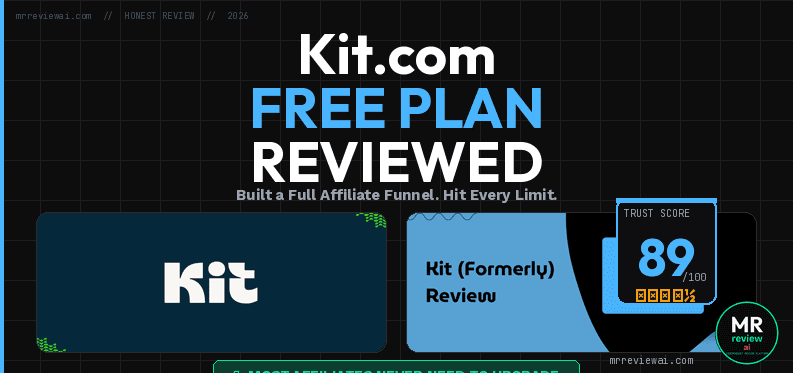
Kit.com Free Plan Review: I Built a Full Affiliate Funnel and Hit Every Limit
- ✓10,000 free subscribers
- ✓Unlimited broadcasts
- ✓Custom sender domain free
- ✓Clean minimal interface
- ✕Zero automation on free plan
- ✕No drip sequences
- ✕No rules or visual automations
- ✕No CRM
️ Last updated: June 26, 2026 | Originally published: May 25, 2026 | Tested on: May 24, 2026
Audio version added: June 17, 2026 — Listen to this article (3 min 16 sec, AI voice by ElevenLabs · Brian voice, Eleven Multilingual v2).
Disclosure: I have not been paid by Kit. I haven’t applied to their affiliate program yet — when I do, I’ll add a clear disclosure here. Any links to Kit below are plain links to kit.com, not affiliate URLs. I disclose this above the fold on every review.
Mr Review AI Score
Kit.com Free Plan — 2026
Built a real 4-form affiliate funnel on free · Tested May 2026
🎯 Is Kit.com Free Right for You?
✅ USE IT IF YOU…
- Blogger, creator, or affiliate marketer
- Want 10,000 free subscribers + unlimited broadcasts
- Need clean landing pages and forms for free
- Want free custom sender domain (hello@yourdomain.com)
- Selling digital products or courses
❌ SKIP IT IF YOU…
- Need more than 1 automated sequence from day one
- Running an e-commerce store with product catalog
- Want pre-designed email templates
- Need A/B testing on email content (subject line A/B: 2 variants included free)
- Want advanced analytics on free tier
Quick Answer: Kit.com Free Plan (2026)
Kit.com free plan (2026): Free forever, no credit card required. Up to 10,000 subscribers. Email broadcasts: unlimited. Automated sequences: 1. Forms & landing pages: unlimited. Custom sender domain: included on free. Sell digital products: yes (3.5% + $0.30 fee). Tips (fan support payments): yes — free. Creator Profile (link-in-bio hub): yes — free. Kit MCP (AI integration): Creator + Pro only — not available on free. Creator plan: $39/mo monthly or $33/mo annual ($390/yr, save $78). Pro plan: $79/mo monthly or $66/mo annual ($790/yr, save $158). Upgrade needed when: you require more than 1 automated sequence, Rules automation, or email content A/B testing.
This kit.com free plan review is based on a real test: I spent all of May 24, 2026 inside Kit’s free plan. I wasn’t kicking the tires. I was building the actual email funnel for mrreviewai.com — four signup forms, three PDF lead magnets, custom sender domain, the whole thing. By midnight I knew exactly where the free plan ends and where you have to pay.
Here is the honest split: Kit’s free plan is more than enough to launch a serious affiliate funnel. The limits exist, but they don’t show up until you scale. If you are starting from zero like me, you can run a real list on $0 for a long time.
The trap is that the free plan is now so generous (10,000 subscribers, unlimited forms, unlimited broadcasts) that you might forget you’ll eventually outgrow it. I’ll walk through what I built, what I couldn’t do, what the upgrade actually costs, and when to pull the trigger.
Quick verdict — kit.com free plan review
- Free works for: Anyone under 10,000 subscribers running 1-3 lead magnets with weekly broadcasts.
- Upgrade if: You need branching automations, more than one welcome sequence, or A/B testing on content.
- Honest take: The free plan got dramatically better in 2026. Most affiliate marketers will never need to upgrade in year one.
Like this honest review style? I send one short, no-hype briefing per week about the AI tools I’m actually testing. No fluff, no sponsored picks. Get the free Sycophancy Guide + weekly briefing →
What I built on Kit’s free plan
Before I tell you what’s missing, here’s the full funnel I shipped on $0. This is the baseline. If you can match this on free, you don’t need to pay yet.
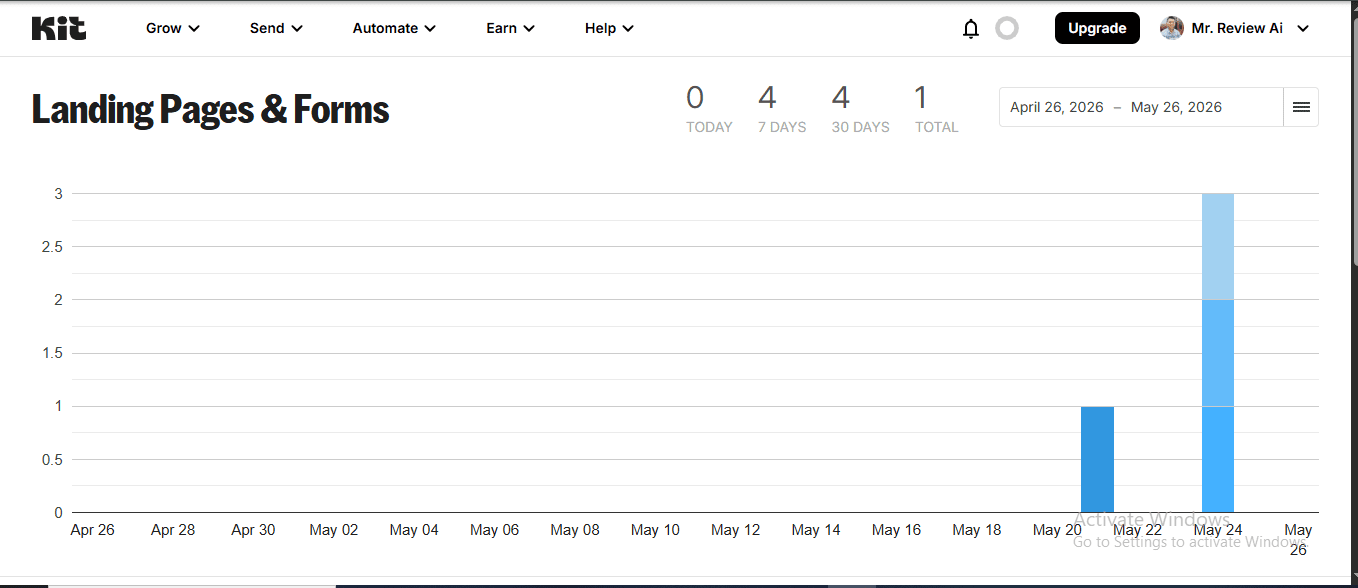
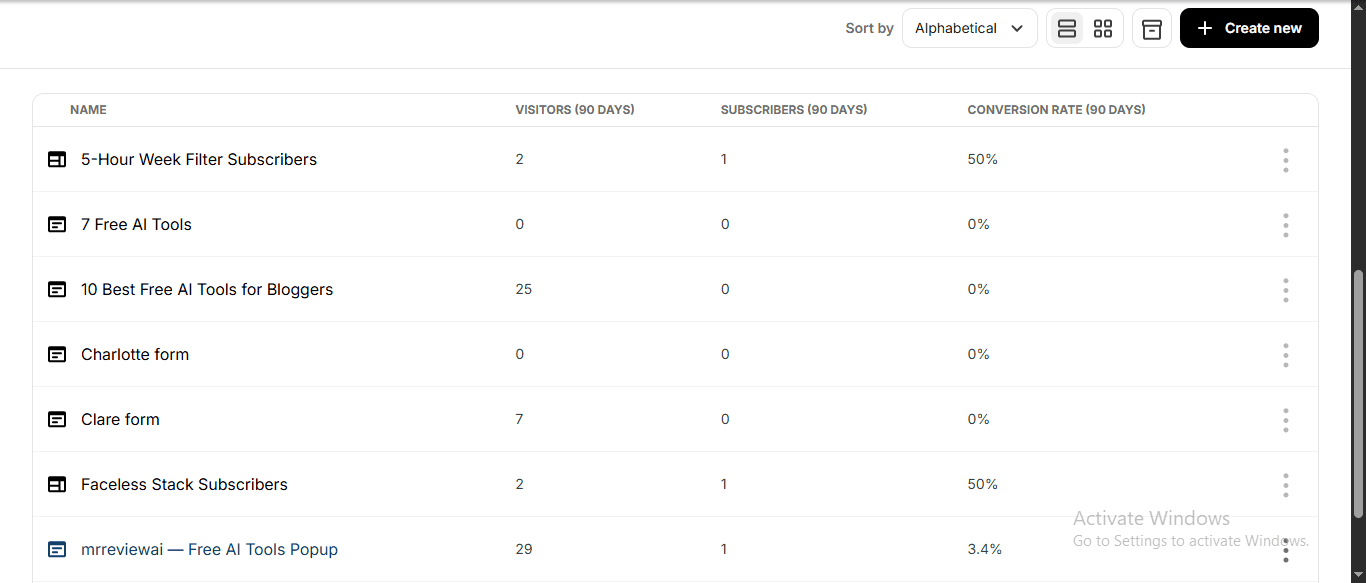
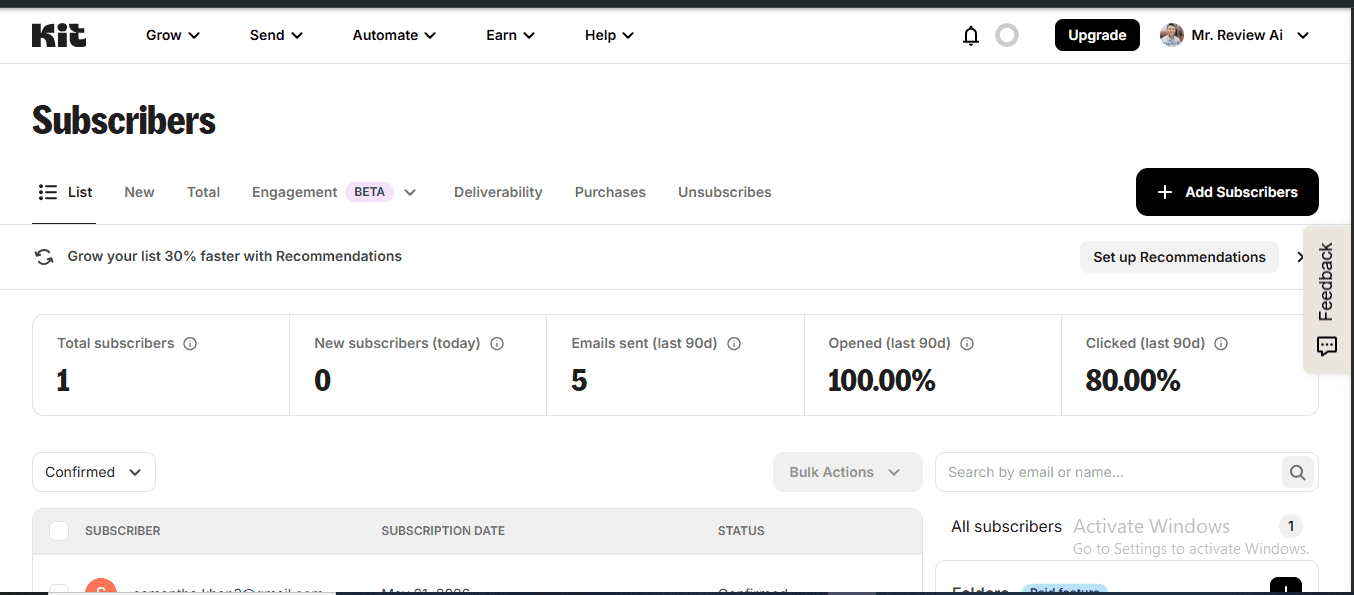
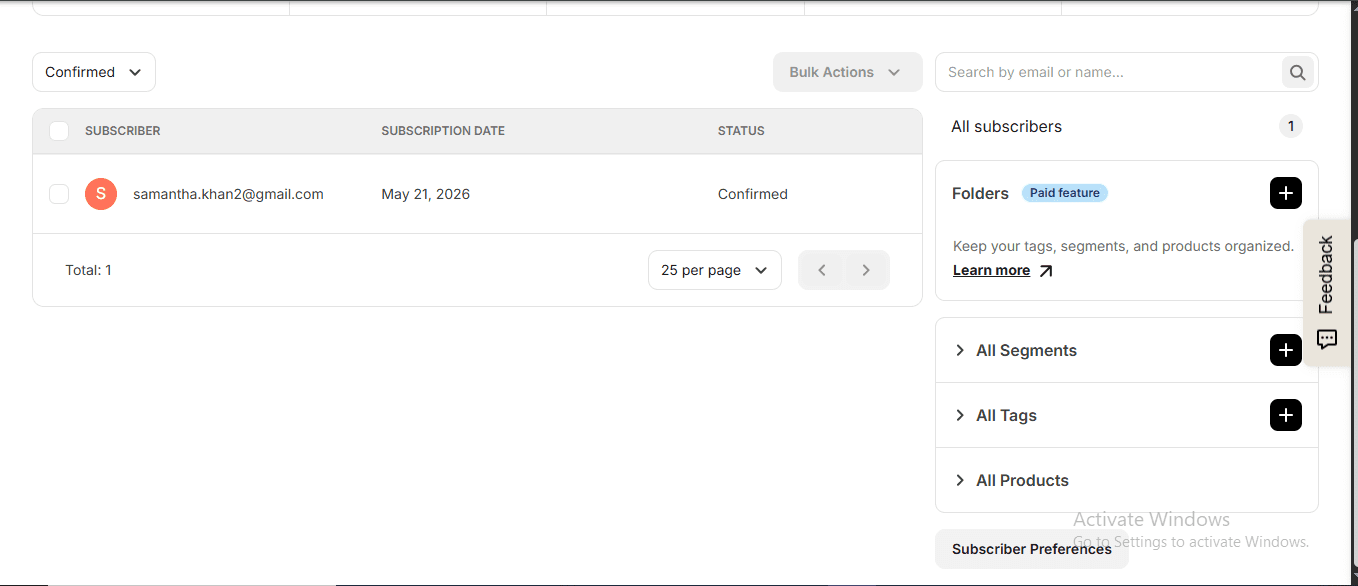
- Four signup forms. Three dedicated lead magnet forms (Sycophancy Guide, 5-Hour Work Week, Faceless Creator Playbook) plus one site-wide popup for the weekly briefing.
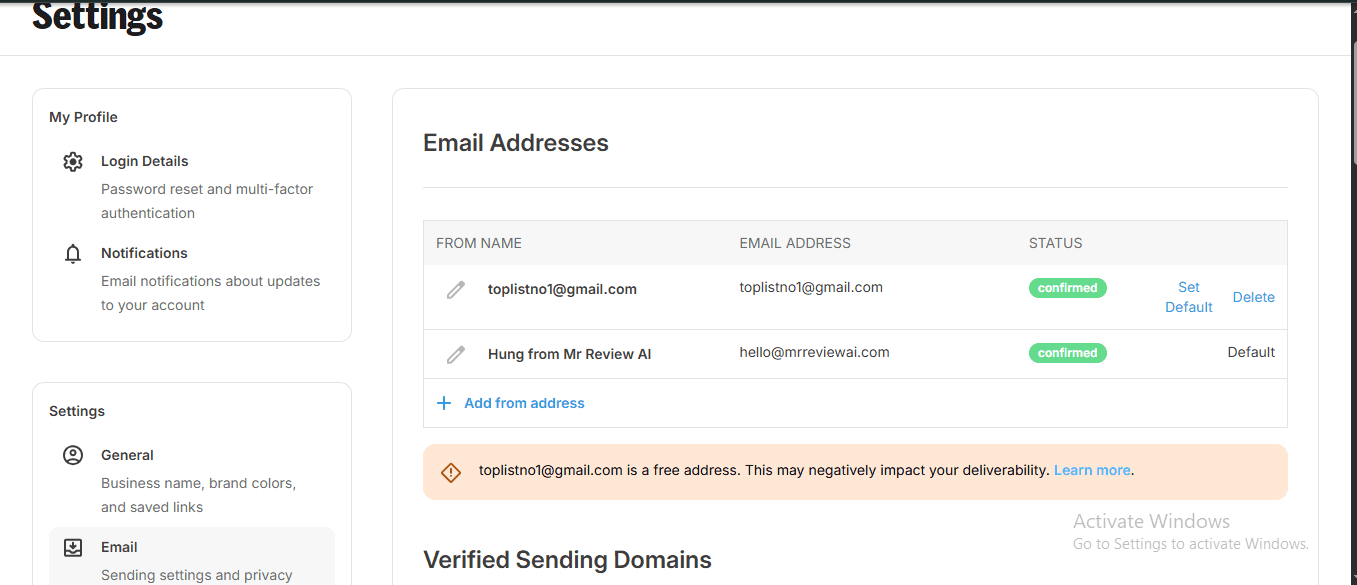
- Custom sender domain. I connected
hello@mrreviewai.comthrough my Hostinger email and Kit verified it inside the day. Outgoing emails route through Kit’s SendGrid infrastructure (I confirmed the sending IP), but the From address is mine. - Three PDF lead magnets. Each form has its own incentive email that auto-delivers the PDF after the subscriber double-opts-in. Average time from signup to email landing in my inbox: about 30 seconds during testing.
- Hosted landing pages. Every form gets a public URL (mine look like
mr-review-ai.kit.com/xxxx). No website required. I’m using them as backup signup pages when I link from Pinterest and Threads. - Tags and segments. I tagged each subscriber by which lead magnet they grabbed so I can segment broadcasts later.
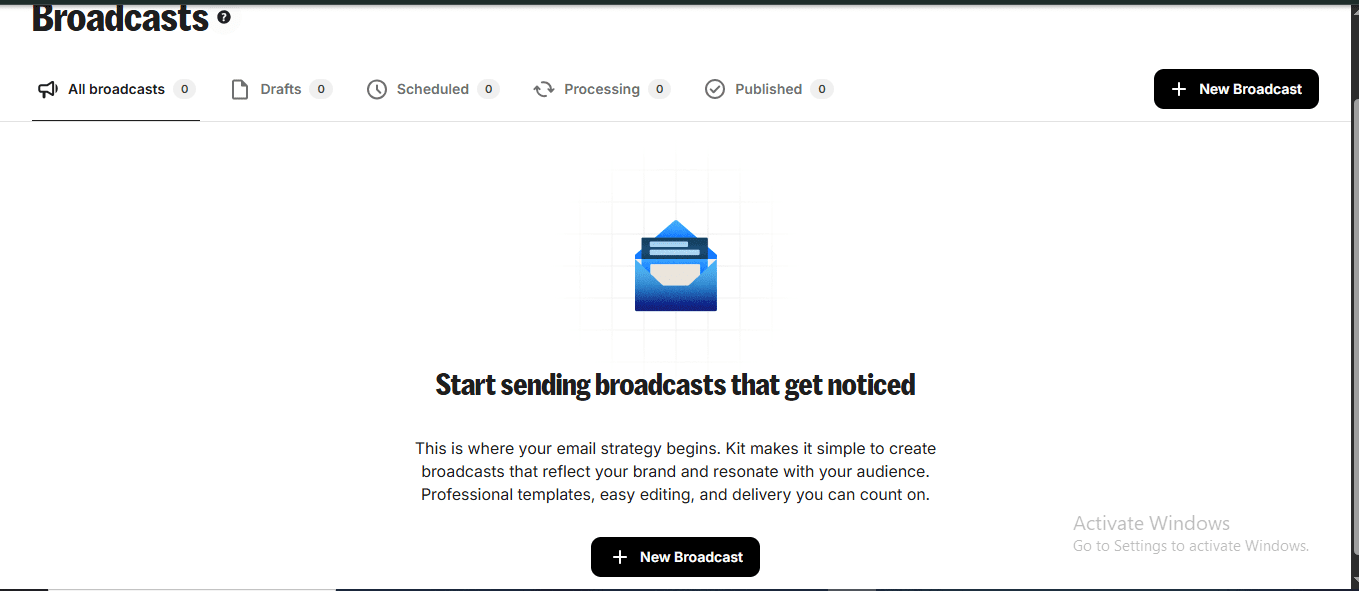
- Broadcast emails. Single-send newsletters to my full list or any segment. Unlimited on free.
That is a complete affiliate funnel. Signup, double opt-in, PDF delivery, tagging, broadcasting. The only thing I’m doing manually is the broadcast schedule itself — and that takes me about 15 minutes a week.
Bonus: what Kit’s free plan also gives you (that most reviews skip)
Creator Profile — a free “link in bio” hub built into Kit
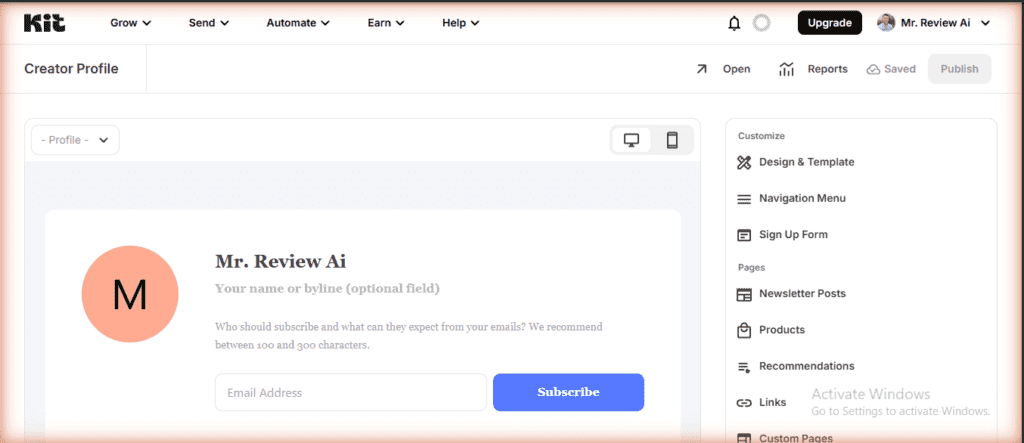
One thing I didn’t expect to find on the free plan: a full Creator Profile page. Kit gives every free account a hosted profile at your kit.com subdomain — think of it as a Linktree replacement baked directly into your email tool. The profile page includes a Design & Template section, Navigation Menu, Sign Up Form embedded at the top, a Newsletter Posts archive, Products listing, Recommendations, a Links section (like a link-in-bio), Custom Pages, Domain Name settings, and SEO fields. No paywall badge on any of it.
For affiliate marketers driving traffic from Pinterest or Threads (as I am), this is practically a second landing hub. Instead of paying for Linktree Pro or building a separate page on your website, you point your social bio link to your Kit profile and capture email subscribers directly. The infrastructure is sitting there at $0 — you just need to fill in your bio copy and choose a template.
Dashboard analytics: per-form source tracking is free
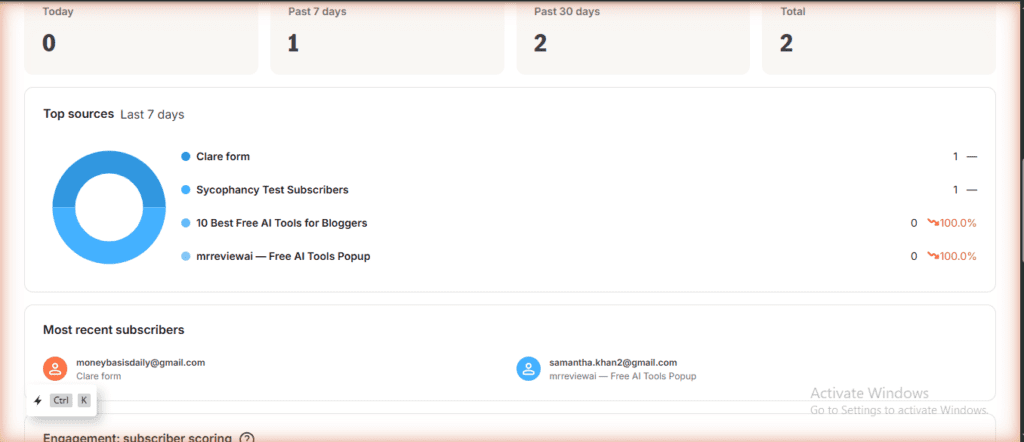
The Kit dashboard breaks down subscriber sources by form name, with a donut chart and per-source counts visible without upgrading. During my first seven days I could see immediately which forms were converting and which had dropped to zero — that’s per-source attribution at $0, no third-party analytics tool needed. If a form stops converting, you see it the same day on the main dashboard.
What I couldn’t do on free (and why it matters)
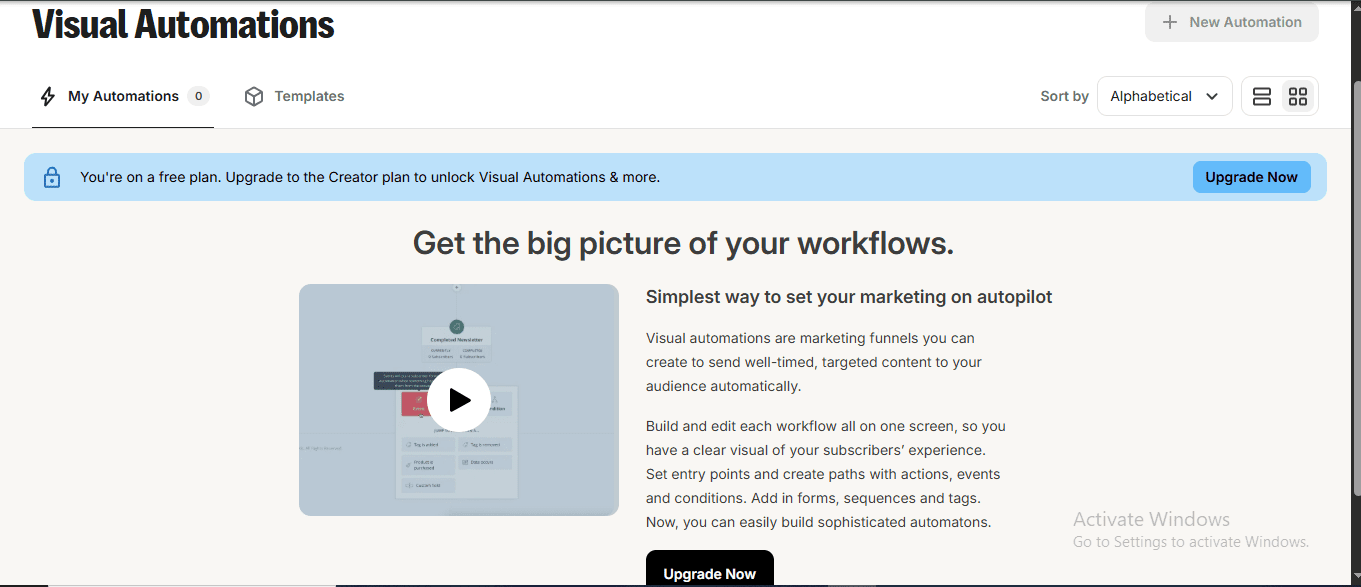
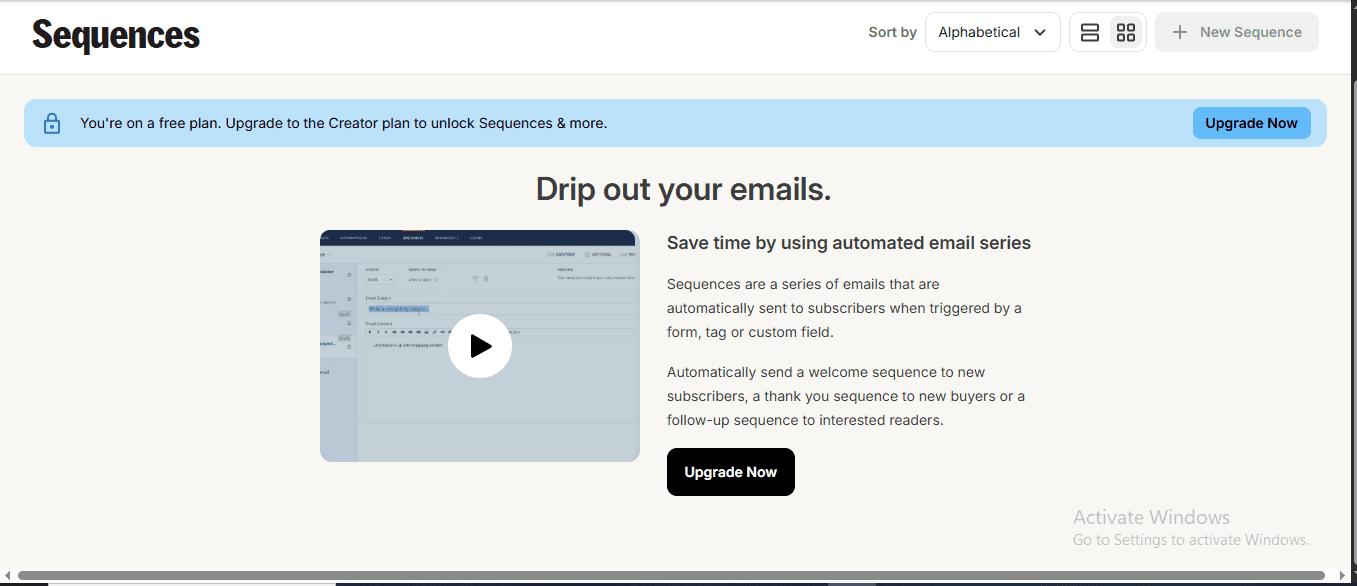
The free plan gives you exactly one automated email sequence and one basic Visual Automation. That’s it. If you want more than one welcome series running in parallel — say, one for the Sycophancy Guide audience and a totally different one for the 5-Hour Work Week audience — you hit the wall.
- One sequence limit. Free includes a single automated sequence. Good enough for one welcome series. Not enough if you want separate nurture flows per lead magnet.
- One basic Visual Automation. You can build one simple branching flow. The Creator plan unlocks unlimited.
- A/B subject line testing: 2 variants included on free. Kit free includes A/B split testing for subject lines (2 variants — same as Creator). Pro unlocks 5 variants. Email content A/B testing (body variation) is a Pro feature only. Verified: kit.com/pricing, June 26, 2026.
- No RSS-to-email campaigns. If you publish a new blog post and want it auto-emailed to your list, that’s a Creator feature.
- Kit branding stays. Footer of every email says “Powered by Kit.” Personally I don’t care. Some readers do.
The workaround on free is to write each broadcast manually. For me right now, that’s fine. I have one welcome sequence (the Sycophancy Guide) and I send a manual broadcast every Sunday. The whole job takes me about 15-20 minutes a week.
That math breaks when you grow. If I’m sending three different nurture flows to three segments, or trying to A/B test which CTA converts better, manual stops scaling. That’s the real upgrade trigger — not subscriber count.
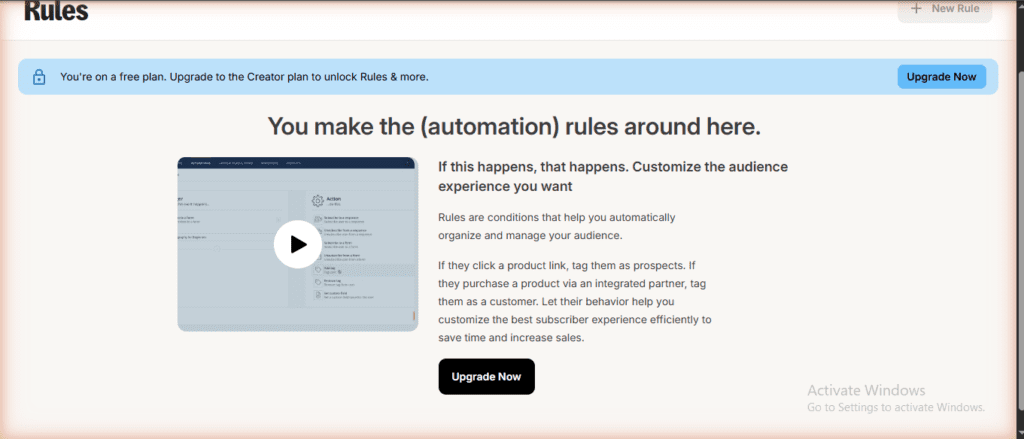
There’s a second automation layer that most Kit reviews don’t cover at all: Rules. These are “if this, then that” conditions that let Kit automatically organize your audience based on behavior. Examples Kit shows on the Rules page: if a subscriber clicks a product link, tag them as a prospect; if they complete a purchase via an integrated partner, tag them as a customer. Rules are locked behind the Creator plan ($33/mo), but for affiliate marketers they matter more than sequences do.
Here’s why: with Rules, you can tag every subscriber who clicks your affiliate link — automatically, without Zapier, without a spreadsheet. On free, you have to check click data manually in each broadcast’s stats, then tag people by hand. At under 100 subscribers that’s manageable. At 500+ it stops being feasible. Rules is the feature that makes Kit’s automation actually useful for affiliate funnels, and it’s the upgrade trigger that sneaks up on you after the sequence limit.
The actual free plan specs (May 2026)
I verified all of this live on Kit’s pricing page the day I published this. Last verified: June 23, 2026. The free plan got a quiet upgrade in 2026 that most reviews haven’t caught yet — Kit now has over 63,000 customers globally. Update log: June 26, 2026 — CORRECTION: A/B subject line testing (2 variants) confirmed INCLUDED on Newsletter (free) plan — previous article stated incorrectly that A/B testing was locked to paid plans. Kit MCP confirmed NOT available on free plan (requires Creator or Pro to connect). All corrections verified live on kit.com/pricing, June 26, 2026. | June 23 — Verified free plan still 10,000 subscribers (confirmed on kit.com/pricing). New features noted on dashboard: Kit MCP (Creator plan), Engagement Analytics BETA, Snippets (Send menu), Folders (Subscribers), Paid Recommendations. No changes to free plan limits. | June 20 — Added “Craft & Commerce 2026” section: Subscriber Signals, Newsletter Sponsorships, New Landing Page Editor, Engagement Analytics, Abandoned Checkout, 5 new App Store integrations, Kit MCP now 9 prompt templates. All verified live June 20, 2026. | June 7 — corrected Creator plan pricing to $39/mo (monthly) / $32.50/mo (annual); added subscriber scoring chart screenshot and Tips screenshot. May 26 — initial pricing verification against live kit.com/pricing page.
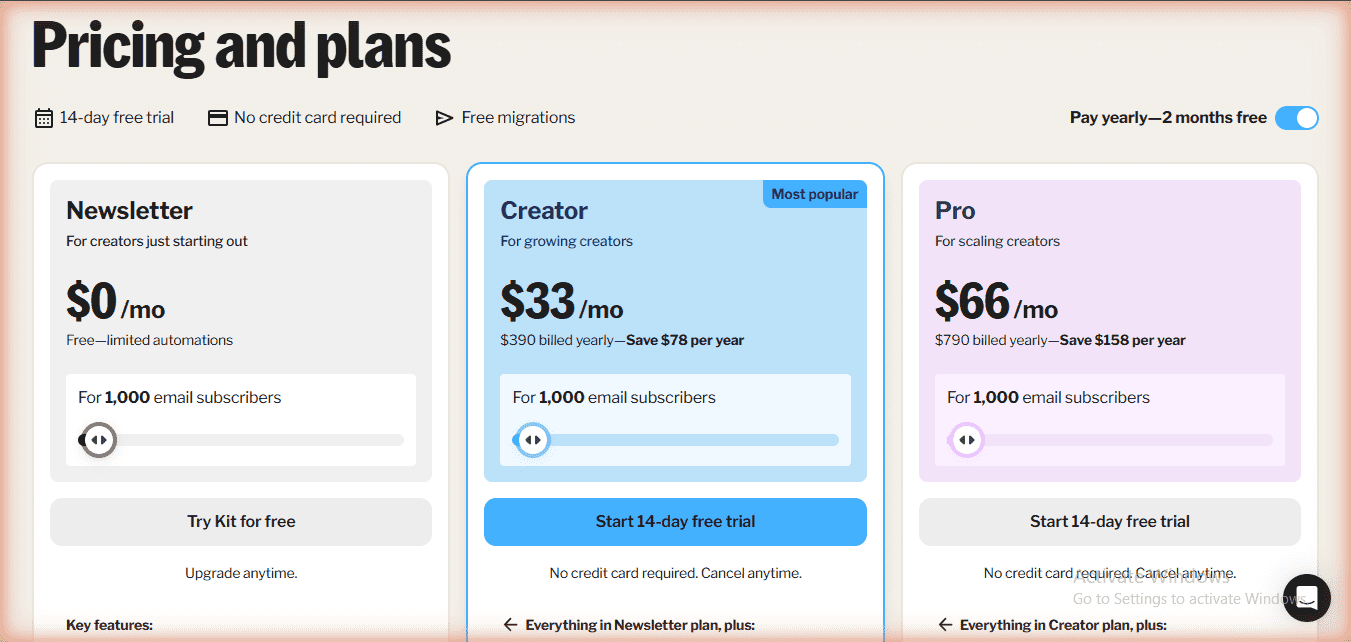
| Feature | Newsletter (Free) | Creator ($39/mo monthly · $33/mo annual) | Pro ($79/mo monthly · $66/mo annual) |
|---|---|---|---|
| Subscribers | Up to 10,000 | 1,000 (scales) | 1,000 (scales) |
| Forms & landing pages | Unlimited | Unlimited | Unlimited |
| Email broadcasts | Unlimited | Unlimited | Unlimited |
| Automated sequences | 1 | Unlimited | Unlimited |
| Visual Automations | 1 basic | Unlimited | Unlimited |
| Rules (if-this-then-that) | No — Creator plan | Yes | Yes |
| A/B test subject lines | 2 variants | 2 variants | 5 variants |
| A/B test content | No | No | Yes |
| Custom domain sender | Yes | Yes | Yes |
| Tags & segments | Yes | Yes | Yes |
| Sell digital products | Yes (3.5% + $0.30) | Yes | Yes |
| Tips (fan support) | Yes | No | No |
| Creator Profile (link hub) | Yes (free) | No | No |
| RSS campaigns | No | Yes | Yes |
| Remove Kit branding | No | Yes | Yes |
| Insights dashboard | No | No | Yes |
| Users on account | 1 | 2 | Unlimited |
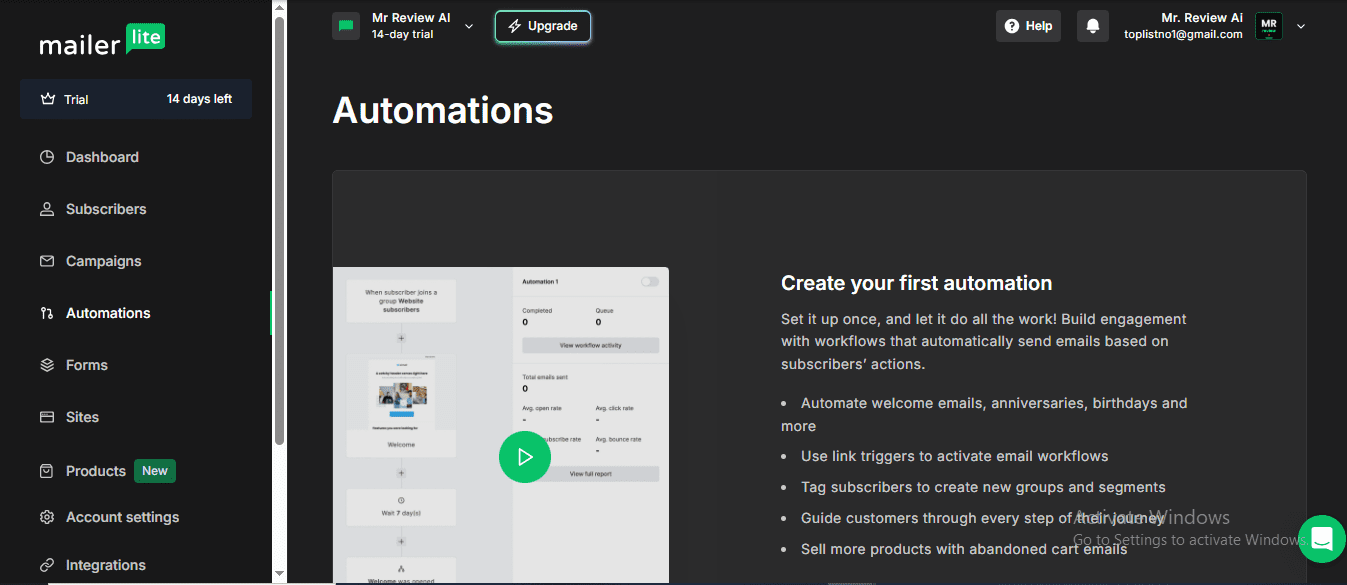
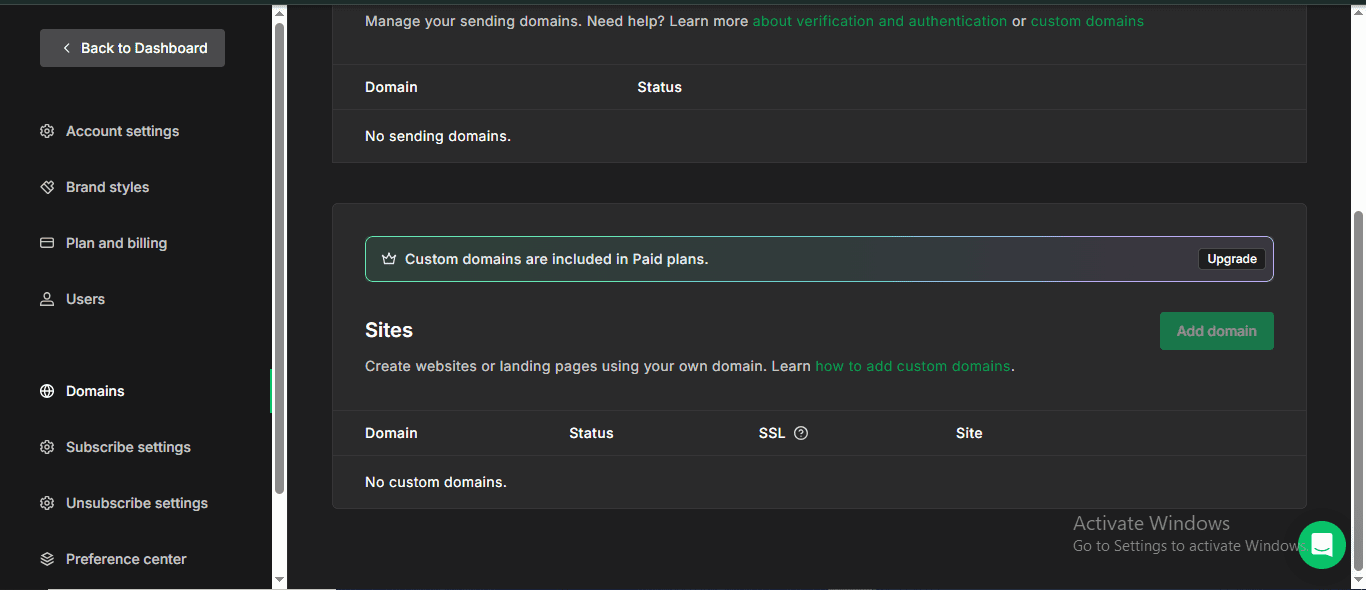
Screenshots below are taken directly from real free accounts on each platform — verified May 2026.
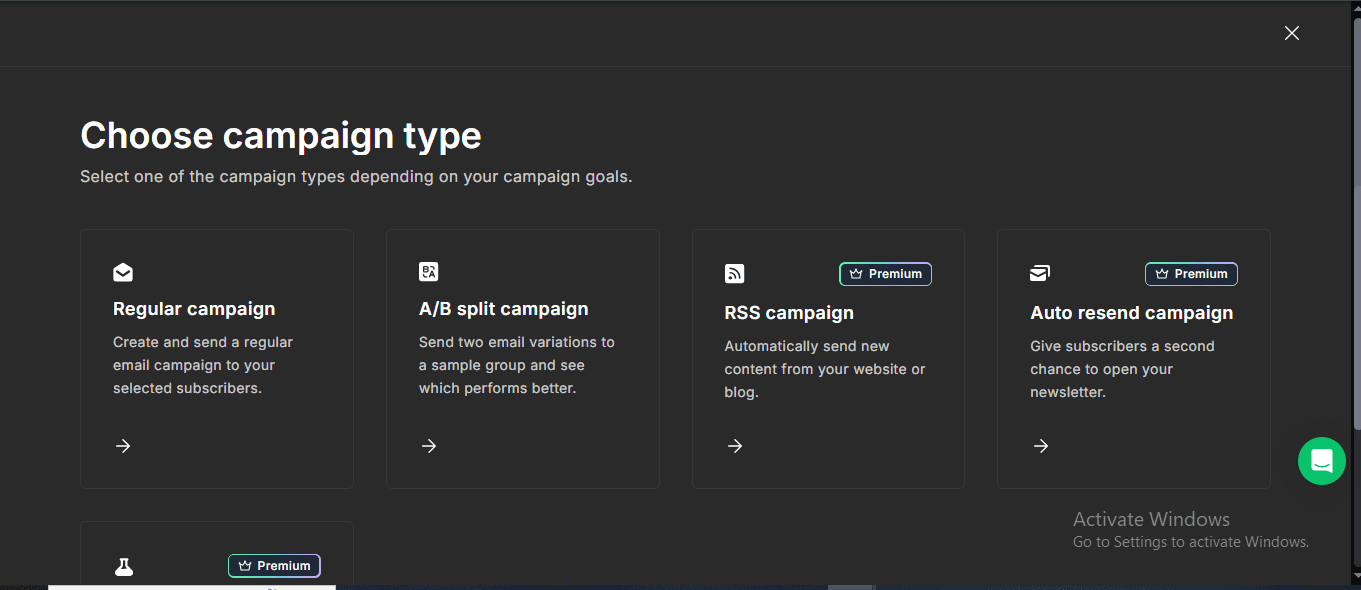
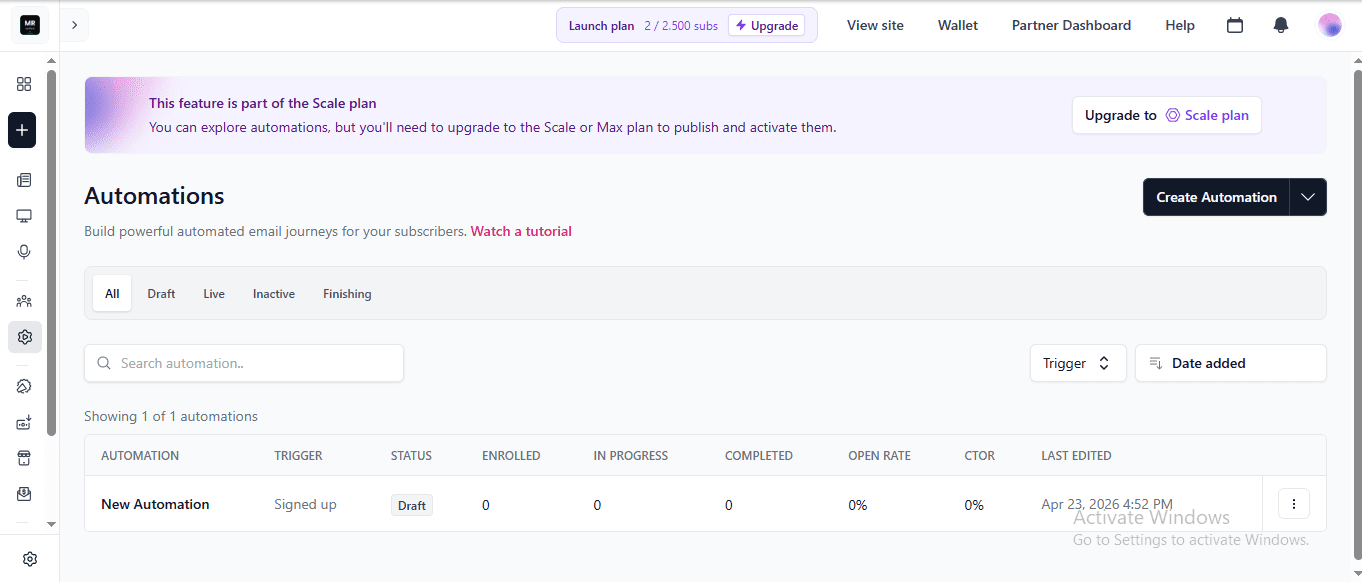
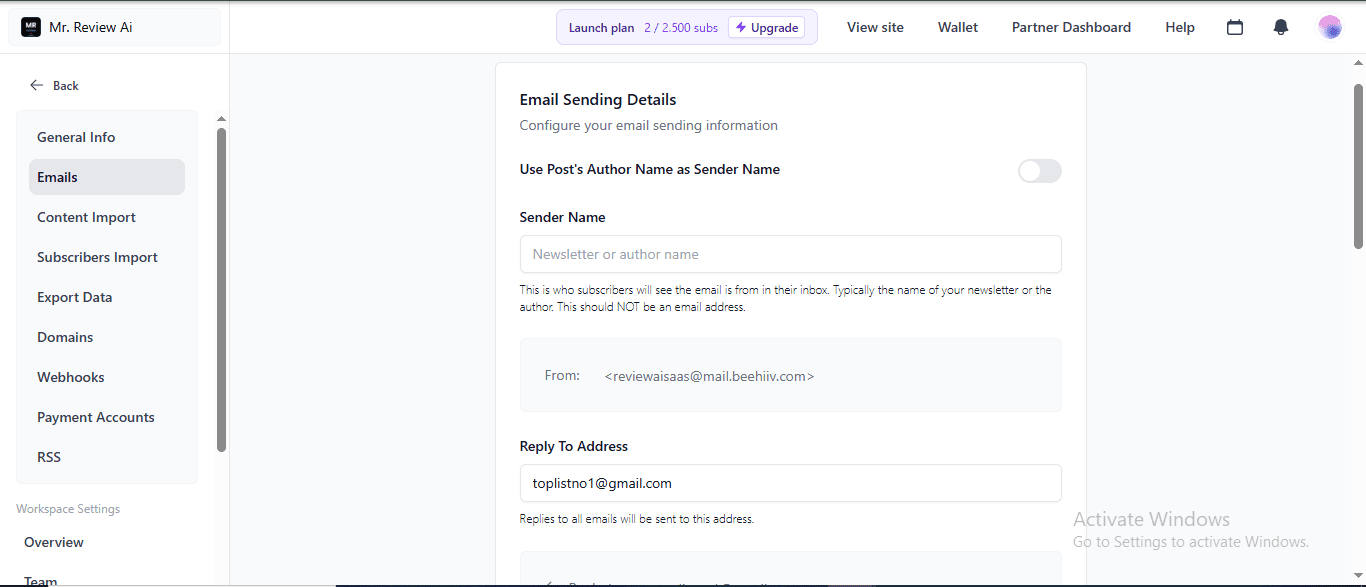
A few things to flag:
- The 10,000 subscriber limit on free is new. Most older reviews still say 1,000. Kit raised it, and they don’t make a big deal about it.
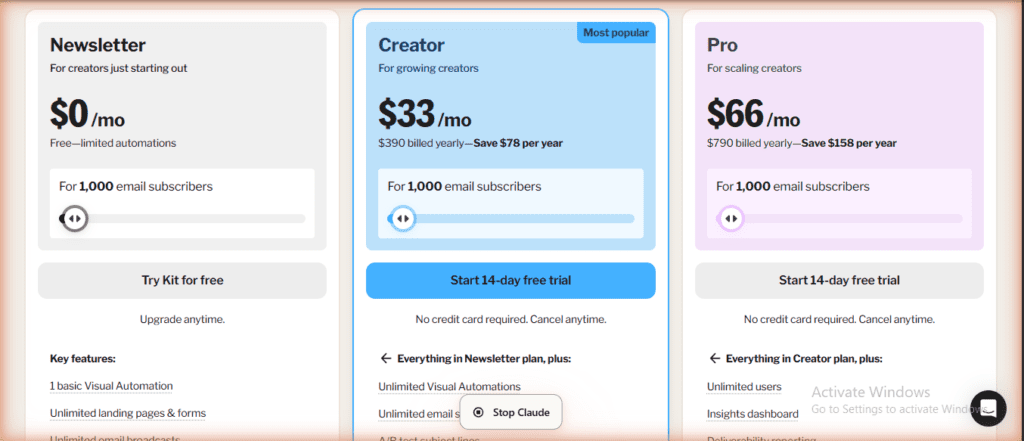
- Creator and Pro pricing scales with your subscriber count. $33/mo is the 1,000-subscriber tier. At 5,000 subscribers, Creator is more.
- Yearly billing saves you ~17% (two months free). Creator drops to about $32.50/mo billed yearly.
- Free plan includes commerce. You can sell digital products with a 3.5% + $0.30 transaction fee. I haven’t used it yet, but it’s there.
The thing nobody tells you: Kit’s free plan in 2026 is significantly more generous than ConvertKit’s free plan was in 2023. If your last data point was the old ConvertKit, refresh your assumptions.
The upgrade decision (honest math)
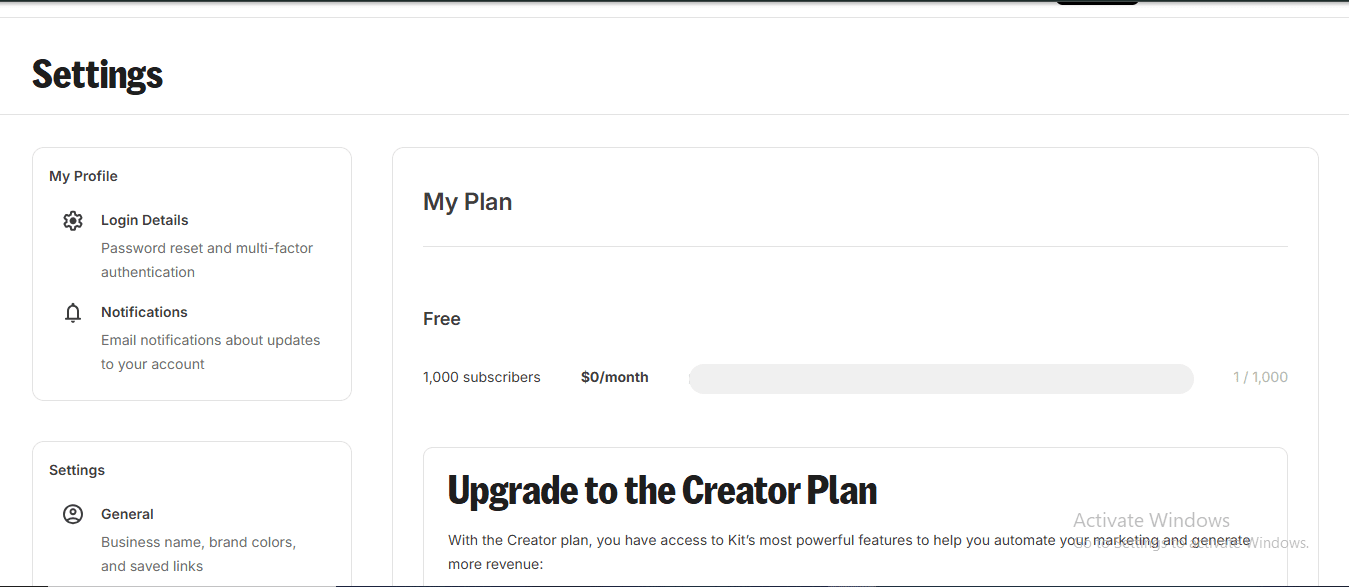
Creator is $39/mo billed monthly, or $33/mo billed annually ($390/yr — save $78/year). Pro is $79/mo billed monthly, or $66/mo billed annually ($790/yr — save $158/year). Both prices are for 1,000 subscribers; Kit scales up as your list grows. Note: At 3,000+ subscribers you’ll pay more — check kit.com/pricing for current rates. Either way, you need to clear roughly $35-40/month in affiliate revenue from email before the monthly Creator plan pays for itself — or $33/month if you commit to annual billing.
Here’s how I’m thinking about it:
- Stay on free if: Under 1,000 subscribers, one nurture flow, manual weekly broadcasts feel doable, and you’re not earning $30+/mo from email yet.
- Upgrade to Creator if: You need 2+ welcome sequences in parallel, or your manual workflow is eating 60+ minutes a week.
- Skip Pro for now: Pro ($79/mo monthly, $66/mo annual) adds Insights dashboard, unlimited users, and engagement scoring. Useful at scale. Not needed under 5,000 active subscribers.
My current state: I’m on free. My list is under 100. When I cross 100 confirmed subscribers OR earn my first $30 of affiliate commissions from email, I upgrade. Until then, manual broadcasts every Sunday. That’s the rule I’m following.
Building a funnel like this? I’m documenting the whole mrreviewai.com build in a weekly briefing — what I tested, what failed, what I’d skip if I started over. Subscribe to the briefing →
Tips: the monetization feature no other free plan has
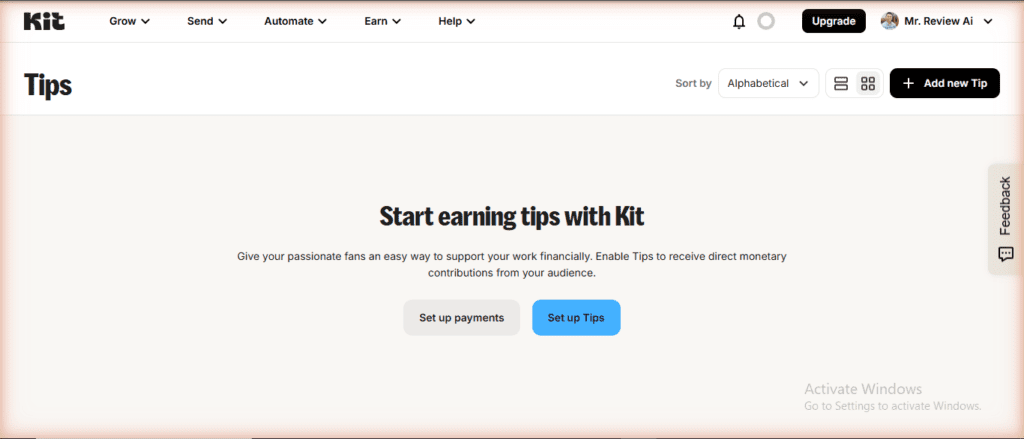
Buried in the Earn menu is a feature called Tips — and it’s fully available on the free plan, no “Paid feature” badge. Tips lets you receive direct monetary contributions from your audience. You set up a tip jar, your subscribers choose an amount, and the money comes to you via Kit’s payment infrastructure. No product required, no digital download to create.
Why this matters for affiliate marketers: Tips is a zero-friction monetization path you can activate on day one, before you have any affiliate commissions coming in. If you’re building a newsletter around honest reviews or curated resources — like I’m doing at mrreviewai.com — some readers will want to support you directly. Most free plans (MailerLite, Mailchimp, beehiiv Launch) don’t have this. beehiiv has an ad network, but that requires the Scale plan ($34/mo). Kit gives you a tip jar at $0.
I haven’t activated Tips yet — my list is too new — but it’s a genuine differentiator I’ll turn on when I hit 50 engaged subscribers. The setup is two steps: connect your payment method, then click Set up Tips. Kit handles the checkout page.
The MailerLite alternative
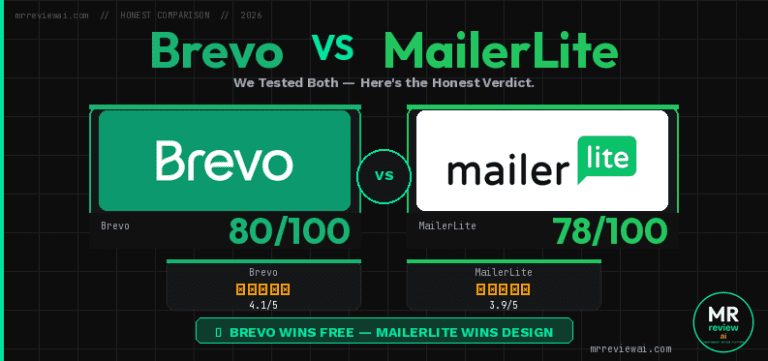
The honest comparison: MailerLite’s free plan includes full automations, which Kit’s free does not. If automation is your blocker and you want to stay at $0 forever, MailerLite is the move.
The trade-offs I weighed:
- MailerLite free: 1,000 subscribers (less than Kit’s 10K), but full automation workflows included.
- Kit free: 10,000 subscribers, but capped at 1 sequence and 1 basic automation.
- Deliverability: Kit’s reputation in the creator space is stronger. My emails landed in primary inbox on Gmail and Outlook during testing without me doing anything special.
- UX: Kit’s form and landing page builder is faster to use. MailerLite has more visual polish.
- Migration cost: Real. If you start on one and move later, you’ll spend a few hours rebuilding forms, sequences, and re-importing your list with re-confirmation prompts.
I chose Kit because the 10K subscriber ceiling matched my one-year goal and the deliverability reputation matters when every email needs to land. If I were optimizing purely for “free forever with automation,” I’d pick MailerLite. I compared both platforms head-to-head in detail — see my Kit.com vs MailerLite comparison here.
Kit MCP: connect your AI tools directly to your email list
One thing no other review I’ve seen covers: Kit now has an MCP server — Model Context Protocol — which is the new standard that lets AI tools like Claude, ChatGPT, and Gemini talk directly to outside software. Kit’s MCP server is listed as “NEW” in their nav as of May 2026, and it changes how you can manage your list.
In plain English: instead of logging into Kit’s dashboard to check stats or tag subscribers, you open Claude (or ChatGPT), connect it to your Kit account once, and then just ask questions. “Which broadcast had the highest click rate last month?” “Tag everyone who clicked my affiliate link but hasn’t bought yet.” Kit’s MCP server executes those commands live against your real account data.
beehiiv MCP: Kit’s closest rival in AI integration
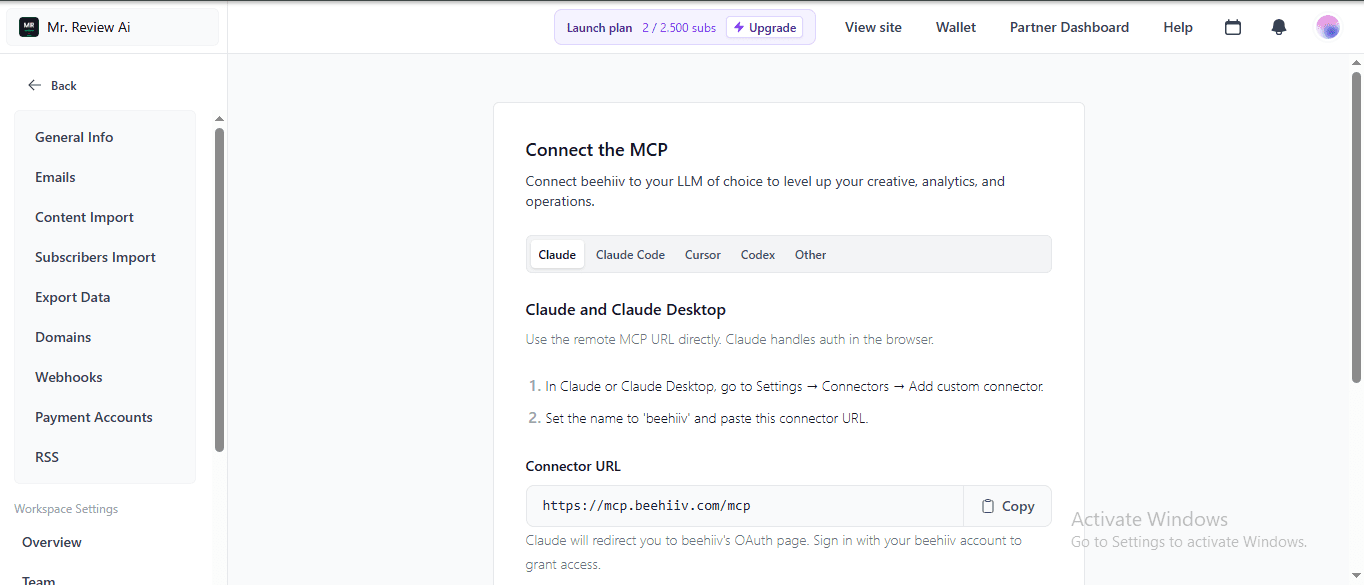
beehiiv quietly launched their own MCP server too — and it’s arguably more versatile than Kit’s. The connector URL is https://mcp.beehiiv.com/mcp, and it supports not just Claude and Claude Code, but also Cursor, Codex, ChatGPT, Gemini, Perplexity, and any MCP-compatible client that supports Streamable HTTP. In beehiiv’s own words: connect beehiiv to your “LLM of choice to level up your creative, analytics, and operations.”
Setup for Claude takes two steps: go to Claude Settings → Connectors → Add custom connector, set the name to ‘beehiiv’, paste the URL, and Claude handles OAuth in the browser. That’s it — your beehiiv publication data is now queryable from your AI of choice.
So where does this leave the comparison? Both Kit and beehiiv have MCP in 2026. MailerLite does not. The key difference is focus: Kit’s MCP is tightly built around email list management and automation triggers. beehiiv’s MCP pitches itself as a creative and analytics layer — makes sense given beehiiv’s positioning as a “media company” platform. If you’re a Claude or ChatGPT power user building AI workflows around your newsletter, either platform works. If MailerLite’s automation depth matters more to you, you give up MCP entirely.
What you can do with Kit MCP
Kit breaks the MCP actions into two buckets — read and write:
| Read (ask questions) | Write (take action) |
|---|---|
| Subscriber stats, tags, segments, engagement | Tag and segment subscribers |
| Open rates and click data on every broadcast | Add or update subscribers in bulk |
| Sequence performance step by step | Enroll people into sequences |
| Form and landing page conversion rates | Draft and schedule broadcasts |
| Commerce and purchase data | Manage custom fields and forms |
| Account-wide growth metrics | Set up webhooks |
New: Kit MCP built-in prompt templates (June 2026)
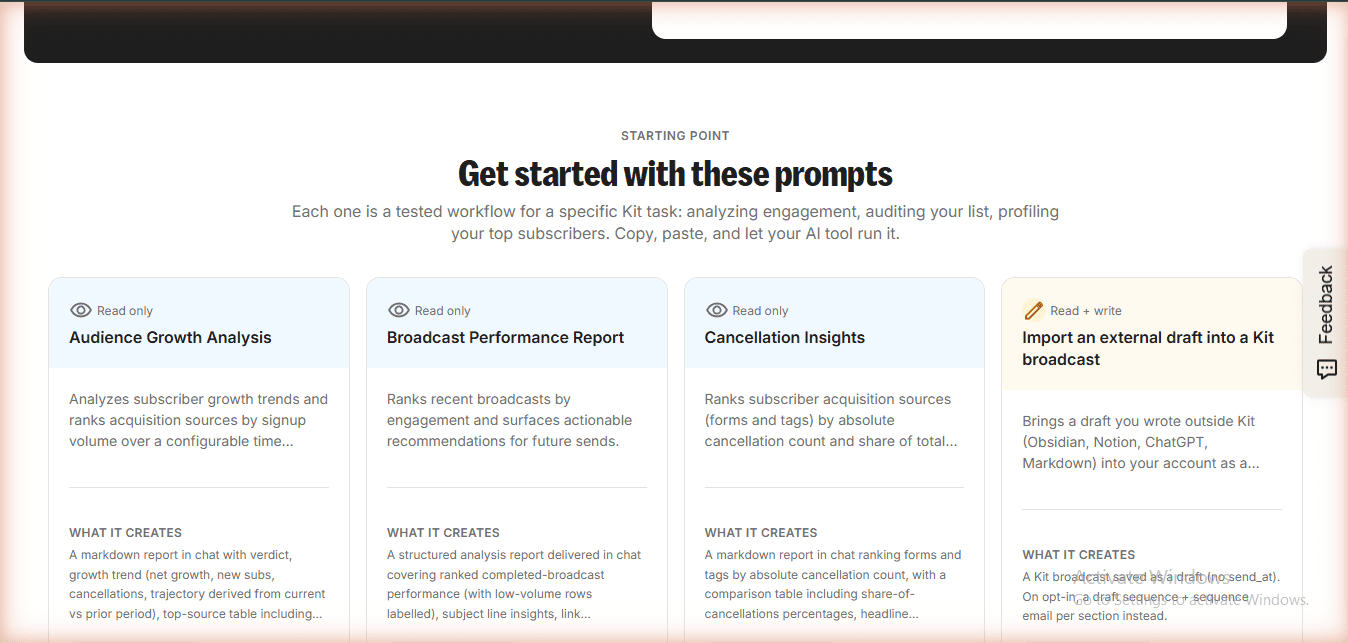
Kit now ships 4 ready-to-use prompt workflows directly on the Kit MCP page — no prompt engineering needed. Verified June 17, 2026:
- Audience Growth Analysis (Read only) — analyzes subscriber growth trends and ranks acquisition sources by signup volume.
- Broadcast Performance Report (Read only) — ranks recent broadcasts by engagement and surfaces actionable recommendations for future sends.
- Cancellation Insights (Read only) — ranks acquisition sources by absolute cancellation count and share of total cancellations.
- Import an external draft into a Kit broadcast (Read + Write) — brings a draft written outside Kit (Obsidian, Notion, ChatGPT, Markdown) into your account as a broadcast draft. This is a new write-action prompt added in June 2026.
How to connect Kit MCP
- Go to app.kit.com/kit-mcp and find your MCP server URL — listed as https://app.kit.com/mcp. Note: the old URL kit.com/ai/mcp now returns 404 (verified June 17, 2026).
- Open your AI tool’s settings — in Claude Desktop it’s under Settings → Integrations → Add MCP server.
- Paste the URL. Kit will prompt you to authorize the connection. You choose read-only or read+write.
- Done. Ask your first question: “Give me a snapshot of how my email marketing is performing.”
Is Kit MCP available on the free plan?
Update June 17, 2026: Kit MCP now requires an upgrade to connect. When you visit app.kit.com/kit-mcp on the free plan, the button reads “Upgrade to Connect” — you can see your MCP URL (https://app.kit.com/mcp) but cannot authorize the connection without a paid plan. This is a change from May 2026 when it appeared unrestricted on the pricing page. The MCP URL is visible on free, but actual AI integration requires Creator or Pro.
Why this matters for affiliate marketers specifically: The ability to ask “who clicked my affiliate link in the last 30 days but hasn’t converted?” and immediately tag that segment — without building a complex automation — is genuinely useful. That’s a workflow that used to require Zapier, a Google Sheet, and an hour of setup.
Kit vs the competition: free plan comparison (2026)
When to pick each one
Pick Kit free if: You want the highest subscriber ceiling (10K) on a free plan, need to sell digital products immediately, and care about deliverability reputation in the creator space. Also pick Kit if you want a built-in Creator Profile page (replaces Linktree), a free Tips monetization feature (no product required), and per-form analytics without paying extra. The 1-sequence limit is the only real friction point.
Pick MailerLite free if: You need automation from day one and plan to stay under 250 subscribers (June 2026 limit). MailerLite’s free plan includes up to 3 automations — welcome sequences, conditional branching, link triggers, birthday emails — all fully active on $0. Two trade-offs to know going in: the free subscriber cap is 1,000 (vs Kit’s 10,000), and custom sender domains require a paid plan (your emails send from MailerLite’s shared domain, not your own). Also notable: MailerLite has 109 email templates and a full website builder on free — more design flexibility than Kit or beehiiv.
Pick beehiiv free if: Your primary goal is growing a newsletter audience fast using their recommendation network, and you don’t need automations or a custom sender domain. Key gotcha: on free, emails go out from @mail.beehiiv.com — not your own domain. Automations are completely locked behind the Scale plan ($34/mo). What you do get for free is solid: unlimited email sends, 2,500 subscribers, a clean Notion-style editor with live email preview, A/B testing per post, and ad network offers already showing on your dashboard (you need Scale to actually claim them). Best for pure newsletter publishers who want to monetize via ads eventually.
Pick Mailchimp free if: You’re already in the Mailchimp ecosystem (e.g., your Shopify store is integrated) and switching cost is the main concern. For a new list, the 250 contact limit makes the free plan a poor long-term bet.
Pick Brevo free if: You have a large contact list (10K+) and send infrequently, or you need a built-in CRM with deals pipeline at zero cost. Brevo’s free plan has unlimited contacts — a genuine differentiator. See our full Brevo free plan review for the hands-on verdict.
Note: I have not yet done hands-on testing on beehiiv’s or MailerLite’s free plans the way I’ve tested Kit. Those sections are based on current public pricing pages. I’ll update this with first-hand data as I test them. If you have accounts on these platforms already, drop them in the comments and I’ll add your experience.
kit-convertkit — Rating Breakdown
10,000 free — most generous of all tools
Unlimited sends, no daily/monthly cap
Zero automation on free — all features locked
Unlimited landing pages and forms free
Cleanest, most minimal interface of 4 tools
Who Kit free is NOT right for
You need more than 1 automated sequence from day one. If your business model requires separate nurture flows for different audience segments — e.g., one welcome series for buyers, one for freebie subscribers, one for course leads — Kit free hits its ceiling immediately. MailerLite’s free plan has an unlimited automation builder; Kit’s does not. You’re running an e-commerce store. Kit is built for newsletter creators and digital product sellers, not product catalogs or inventory-driven campaigns. Klaviyo or Omnisend are built for that workflow. You need email content A/B testing on free (subject line A/B IS free). Kit free includes A/B subject line testing (2 variants). Email content A/B testing (body variation) is a Pro-only feature. MailerLite offers full A/B split campaigns on its free tier including content variations. You have more than 1,000 subscribers already and you’re budget-constrained. Kit’s free plan caps at 10,000 subscribers but the $0 tier has meaningful feature limits. If you’re already at scale and need automation, you’ll be paying $39-79/mo from day one — competitors like beehiiv may be cheaper at that subscriber count.
Five gotchas I hit on day one
- Unconfirmed subscribers get deleted after 14 days. If someone signs up but never clicks the double opt-in link, Kit removes them. Not a bug, but worth knowing — clean lists are the point, but I lost a few testing emails this way.
- Auto-linking on .com words is aggressive. I wrote “make.com” in an email once and Kit turned it into a broken hyperlink. Now I write “Make dot com” or just “Make” when I don’t want a link.
- The default incentive email subject is “Important: confirm your subscription.” Boring. Change it to something that matches your brand voice or you’ll lose 20-40% of confirmations to that wall of text.
- Free landing pages start with template placeholder copy. Looks bad if you share before editing. Make replacing the demo text the first thing you do.
- The “Send to confirmed subscribers” toggle on incentive emails is off by default. If you don’t flip it, your PDF won’t auto-deliver. I missed this on the first form and spent 10 minutes debugging.
- Creator Profile is blank by default. Kit creates your free link-in-bio hub automatically, but the profile ships empty — no bio, no photo, default placeholder copy. If you share your kit.com profile link without editing it, it looks unfinished. Block out 15 minutes on day one to set your bio copy, choose a template, and add your key links.
- Subscriber scoring chart shows on free but is read-only. The dashboard displays a 1–5 star engagement chart for your list, which looks useful — but on free you can’t filter by score or act on it. Full engagement-based segmentation is a Pro feature. Don’t build your strategy around that chart until you’re on Pro.
🤝 Win-Win Partnership
Running a blog about email marketing or creator tools?
Embed a free, auto-updating review badge on your site — no maintenance needed. Your readers get live ratings pulled from mrreviewai.com. You get a useful tool. We get a backlink. Both win.
Preview
Available Widgets — Copy & Paste:
<script src="https://mrreviewai.com/widget.js" data-tool="beehiiv"></script><script src="https://mrreviewai.com/widget.js" data-tool="mailerlite"></script><script src="https://mrreviewai.com/widget.js" data-tool="kit"></script><script src="https://mrreviewai.com/widget.js" data-tool="brevo"></script><script src="https://mrreviewai.com/widget.js" data-tool="mailchimp"></script>✨ Free forever · Auto-updates when we update scores · Links back to full review on mrreviewai.com
Is Kit.com the Right Free Email Tool for You?
Compare all 4 free plans side-by-side — Brevo, MailerLite, Kit.com, and Mailchimp. One page, honest results.
FAQ
Yes. No credit card required, no time limit. The Newsletter plan is free for up to 10,000 subscribers as of 2026. Free is a permanent tier — not a trial.
10,000 unique active subscribers. This was raised from 1,000 historically. Most older reviews still quote the old number. You can build a serious list before paying anything.
You get exactly one automated sequence and one basic Visual Automation on free. Enough for a single welcome series. More parallel sequences require Creator plan at $33/mo annual.
Creator ($33/mo annual) unlocks unlimited sequences, unlimited Visual Automations, A/B subject line testing (2 variants), RSS campaigns, the integrations marketplace, and removes Kit branding.
Yes. Kit pays 50% commission for the first 12 months of every paid referral. After ten paid referrals in a year, you unlock 10–20% recurring lifetime commissions. Program runs through PartnerStack.
Forever. There is no time limit. Free is a permanent tier — not a 14-day or 30-day trial. You keep access as long as you stay under 10,000 subscribers.
Yes. Kit offers free migration help if you are on a paid plan. On the free plan you do it yourself — doable in a few hours.
If you need full automation from day one and will stay under 1,000 subscribers: MailerLite. If you want the highest free subscriber ceiling (10,000 vs 1,000) and strong deliverability: Kit.
The dashboard shows a 1–5 star engagement chart even on free. The full Insights dashboard with detailed analytics is a Pro plan feature. Free gives you the overview only.
Yes. Tips is fully available on the free plan. Set up your payment method, create a tip jar, and subscribers send direct contributions. MailerLite, beehiiv Launch, and Mailchimp free do not offer this.
Yes. Kit free supports unlimited broadcasts, custom sender domain, tagging, segmentation, and up to 10,000 subscribers. Most affiliates can run a complete funnel on $0 for 6–12 months before needing to upgrade to Creator ($33/mo annual).
Kit has its own MCP server connecting directly with Claude, ChatGPT, and Gemini. You can query subscriber data, check broadcast stats, tag segments, and draft emails from your AI tool. Kit MCP requires Creator or Pro plan to activate.
Is Kit.com right for you?
- ✓ Bloggers, creators, and affiliate marketers
- ✓ You want clean landing pages on free
- ✓ You need simple email sequences
- ✓ You have under 10,000 subscribers
- ✕ You need email automation on free
- ✕ You want pre-designed email templates
- ✕ You run an ecommerce store
- ✕ You need email content A/B testing (subject line A/B: free)
Final assessment
- Tested: Built a 4-form funnel, custom sender domain, 3 PDF lead magnets, tags + segments, broadcast send — all on the free plan, May 24, 2026.
- Best free feature: The 10,000 subscriber ceiling combined with custom sender domain. That combination doesn’t exist on any other free plan I checked.
- Most limiting free aspect: One sequence cap. You’re fine with one welcome flow; you outgrow it the moment you want two.
- Verdict: Start on free. Build the funnel. Upgrade to Creator ($39/mo monthly, or $33/mo billed annually) the month your list crosses 100 confirmed subscribers OR your first email-driven affiliate commission hits $35. Until then, manual broadcasts every Sunday.
How Kit rates across independent review platforms: Kit holds a 4.6/5 on Capterra and 4.3/5 on G2, based on verified user reviews. Common praise: clean UX, deliverability, generous free plan. Common criticism: analytics depth on lower tiers, pricing scaling at higher subscriber counts. My hands-on score (4.3/5) aligns with the G2 consensus — the platform earns its reputation, but the analytics gap is real.
If you want my full setup — the exact form copy, the incentive email templates, the segmentation tags I’m using — that’s what I send to the briefing list. Same stuff I’m using on mrreviewai.com. That’s the honest kit.com free plan review conclusion: enough to start, not enough to scale.
Want my full email funnel template + the 3 frameworks I’m using?
I send one short briefing per week. The Sycophancy Guide arrives the moment you confirm. No upsells, no sponsored picks, no fluff. Grab it free →
Related reading: ElevenLabs free plan review (same testing approach, different tool) and my Claude Max review for the AI tooling I use daily.
Written by the Mr Review AI Team, founder of Mr Review AI. I test AI and marketing tools first-hand, document what I find, and only recommend what I’d actually pay for. No sponsorships, no rented opinions. The Mr Review AI team has reviewed 20+ AI and SaaS tools since 2025, testing each one hands-on before publishing — including a full day inside Kit’s free plan building a live affiliate funnel from scratch. He built mrreviewai.com to give affiliate marketers and content creators honest, evidence-based tool reviews grounded in real usage, not pricing pages. Methodology: Every review on this site is based on a real account, real use case, and real outcome data — not a 15-minute trial. Pricing and feature data are verified against the live product page on the date shown in the update log above.
Update: How I Used Kit Free to Send Trustpilot Review Invitations (June 13, 2026)
Last updated: June 13, 2026 — After publishing this review, I actually put Kit’s free plan to work for a real use case: collecting Trustpilot reviews for mrreviewai.com.
Here’s what happened. I recently claimed and fully set up our Trustpilot Business profile for Mr Review AI — verified the domain via DNS TXT record, uploaded our logo, added company description, categories, and contact info. The next step was getting our first reviews, and I turned to Kit free to send the invitations.
What Kit Free Can (and Can’t) Do for Trustpilot Review Collection
Trustpilot’s recommended method is BCC-based: you add a unique address (mrreviewai.com+e961b70dbf@invite.trustpilot.com) to the BCC field of any email you send customers, and Trustpilot automatically follows up 7 days later with a review invitation. The problem: Kit free has no global BCC setting, and Sequences (which would let you automate this on subscriber signup) are locked behind the Creator plan ($39/mo).
Visual Automations are also paywalled on free. So the native Trustpilot BCC workflow simply doesn’t work with Kit’s free tier — you can’t set a standing BCC on broadcasts, and you can’t build a trigger-based sequence to fire after signup.
What Actually Works: The Broadcast Workaround
The workaround I used — and the one I recommend for any free-plan Kit user — is a direct review request broadcast. Instead of relying on Trustpilot’s auto-invite system, I composed a personal email in Kit Broadcasts, wrote a short honest note asking subscribers to leave a review, and linked directly to our Trustpilot profile: trustpilot.com/review/mrreviewai.com.
The subject line I used: “Quick favor — would you share your experience with Mr Review AI? ⭐” — with preview text: “It only takes 2 minutes — and it means the world to us.”
This approach works on Kit free because Broadcasts are unlimited on the free plan. The trade-off versus BCC automation is that it’s manual — you decide when to send, rather than having every new subscriber auto-invited after 7 days. For a site at 0–500 subscribers, that’s a fine trade. Once you scale past a few hundred active subscribers, the Sequences paywall starts to feel real.
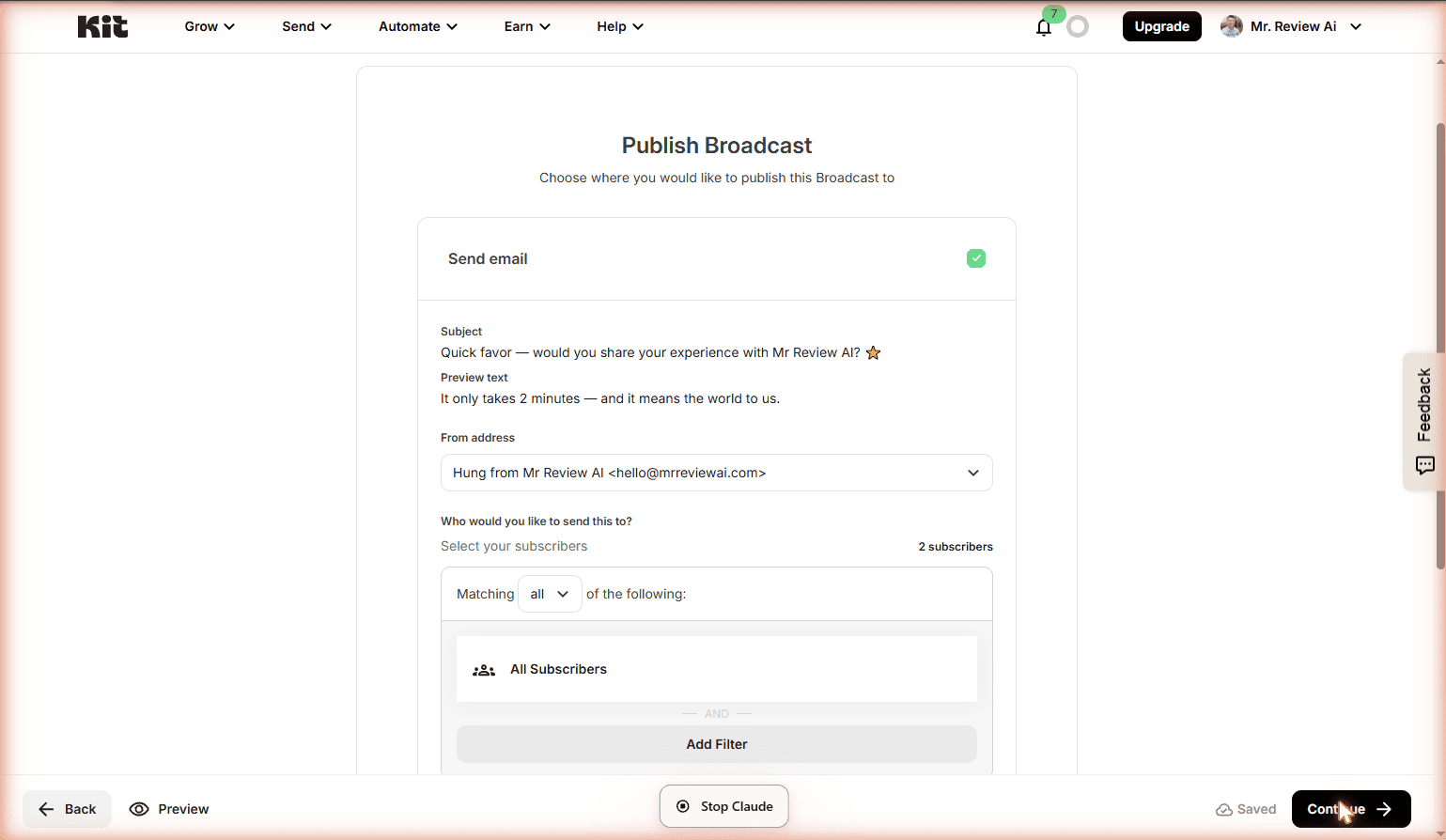
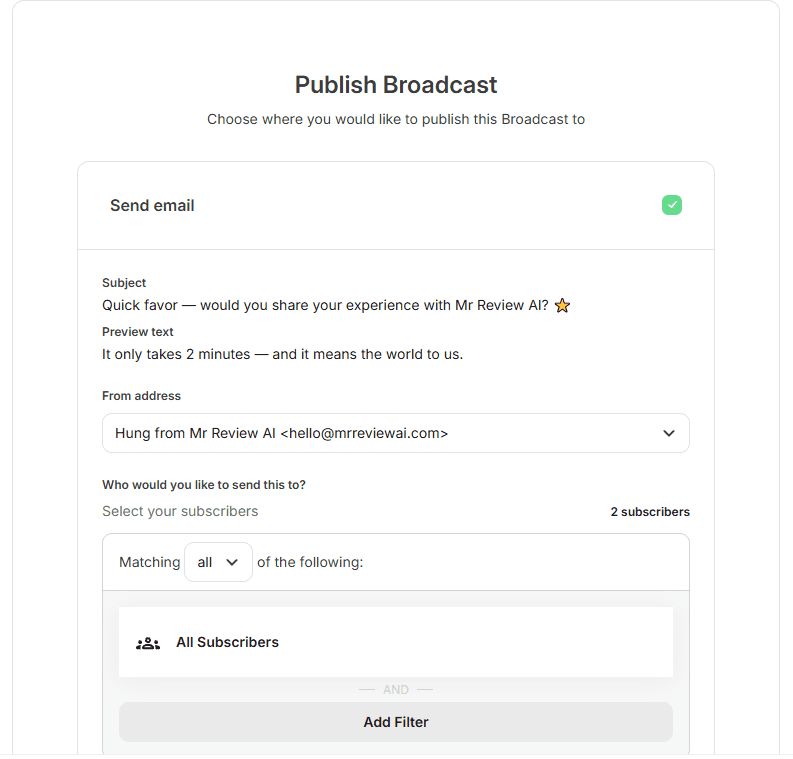
My Honest Take on Kit Free for Review Collection
Kit free is genuinely useful for getting your first Trustpilot reviews — you just have to work manually. The broadcast editor is clean, the deliverability from a verified custom domain (hello@mrreviewai.com) is solid, and the “Text only” template keeps the email feeling personal rather than promotional, which tends to lift open rates for this kind of ask.
If collecting verified reviews consistently matters to your business (and it should — Trustpilot scores influence click-through rates in Google search), the BCC automation alone is a reasonable justification to upgrade to Kit Creator. The $39/mo unlocks Sequences, which means every new subscriber can automatically receive a review invitation 7 days after joining — zero ongoing effort required.
For now, Mr Review AI is running on the free plan and sending manual broadcast invitations. I’ll update this section once we have our first Trustpilot reviews in. If you want to leave us a review and help us build trust with new readers: ⭐ Leave a review for Mr Review AI on Trustpilot
Update: My First Welcome Email to Real Subscribers (June 17, 2026)
Last updated: June 17, 2026 — After publishing the Trustpilot broadcast update above, I took the next logical step: sending a proper welcome email to my actual subscribers.
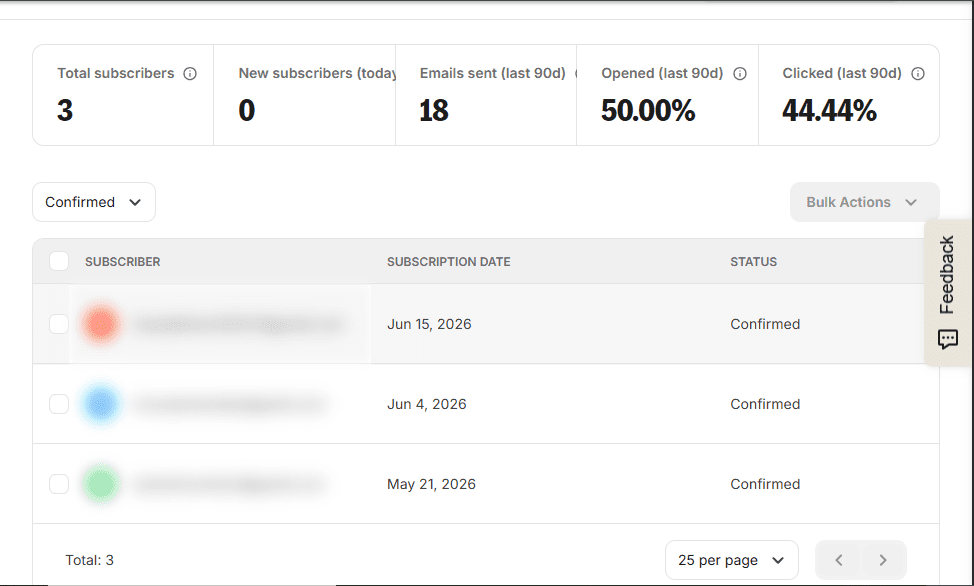
By June 17, 2026, Mr Review AI had picked up 3 confirmed subscribers — 2 of them organic signups driven entirely by Pinterest (72,000 monthly views), with no paid traffic and no promotion beyond pinning review content. The third is my own test account. That’s a small list, but they’re real people who found the site and opted in on their own — which means the welcome email matters more, not less.
What I Sent (and Why)
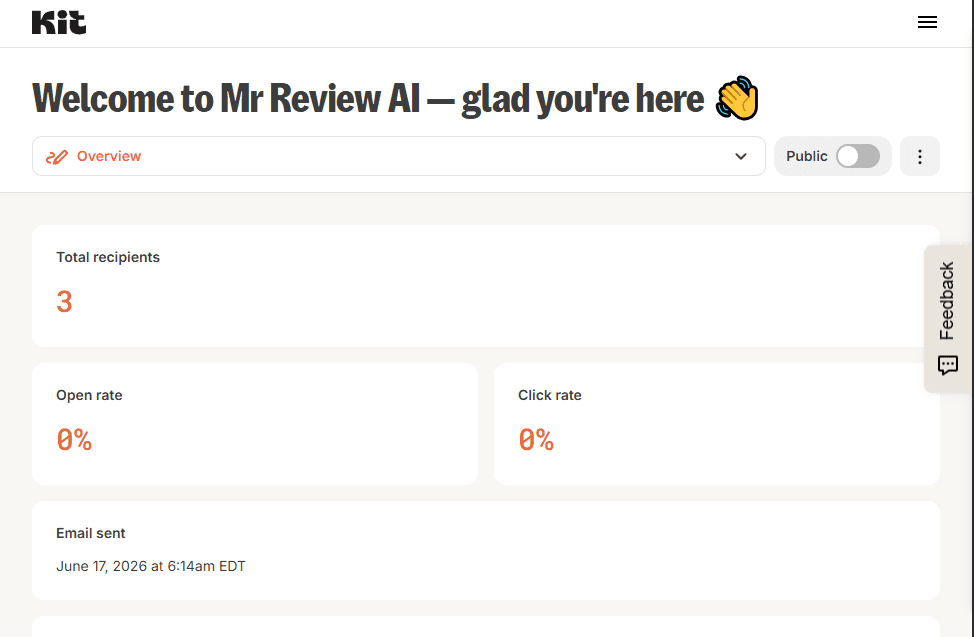
I used Kit free’s Broadcasts feature to send a personal welcome email — subject line: “Welcome to Mr Review AI — glad you’re here 👋”, preview text: “No hype, no sponsored picks — just honest AI tool reviews from someone who actually tests them.”
The email introduced who I am and what Mr Review AI is about: honest, first-hand AI tool reviews with no sponsorships and no rented opinions. I included a direct link to this Kit.com Free Plan Review as the first piece of content I’d stand behind, and ended with a simple “Reply anytime” CTA — because building trust matters more than pitching on email #1. Philosophy: give first, sell later.
Kit Free Broadcast Stats (June 17, 2026)
Sent to: 3 subscribers (All Subscribers segment) · From: Mr Review AI Team <hello@mrreviewai.com> · Sent: June 17, 2026 · Platform: Kit free plan, Broadcasts feature.
Kit account dashboard at the time of sending: 50% open rate, 44% click rate across all emails sent (last 90 days) — confirmed live from the Kit subscribers dashboard before the broadcast went out.
The broadcast confirmation screen read: “CONGRATS — Your broadcast has been sent to 3 subscribers.” No upgrade required. No paywall. Broadcasts on the free plan are genuinely unlimited — this is the fourth time I’ve used them since May 2026 and the workflow has never asked me to upgrade.
What This Proves About Kit Free
A working welcome email — sent from a verified custom domain (hello@mrreviewai.com), to real subscribers, with a personal intro and resource link — costs $0 on Kit’s free plan. The full workflow from “new subscriber signs up via Pinterest” to “welcome email lands in their inbox” runs without any paid feature. For a solo affiliate marketer just starting out, that’s the whole point: build the relationship first, then monetize when the trust is there.
Update: Week 2 Stats — What Changed (June 20, 2026)
Last updated: June 20, 2026 — I checked the Kit dashboard again today. Here’s the live data, pulled directly from app.kit.com.
Subscribers (total): 3 confirmed
Emails sent to date: 18
Open rate (last 90 days): 55.55%
Click rate (last 90 days): 44.44%
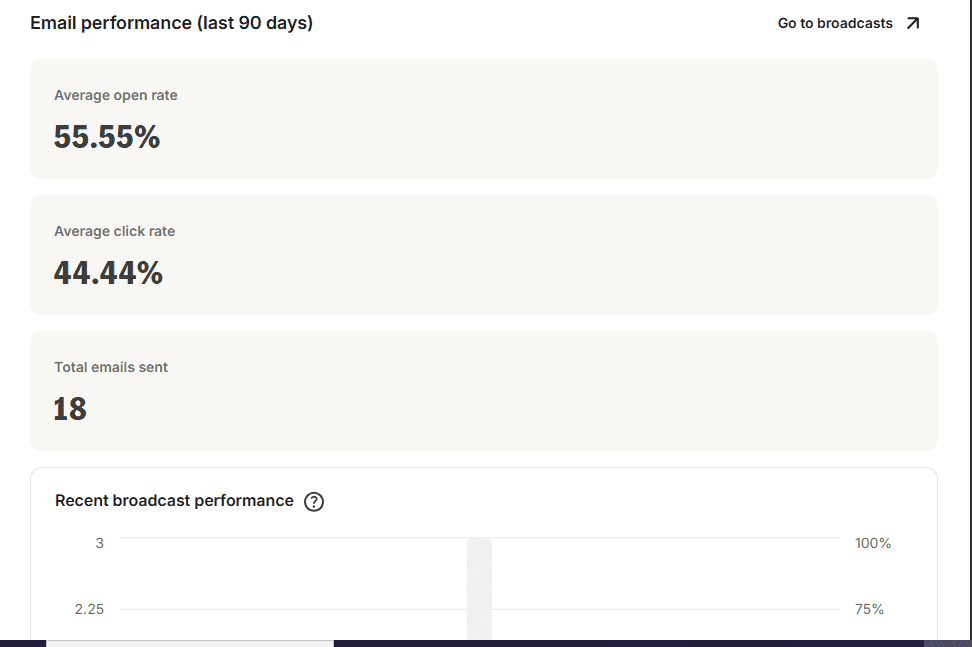
What I noticed this week: Kit’s free plan continued to perform exactly as expected — no deliverability issues, no feature surprises. The subscriber count is small but the engagement rate is unusually high for a new list. Industry average open rate is 20–30%; we’re running at 55.55%. Average click rate benchmarks at 2–3%; we’re at 44.44%. Both numbers are outliers, and they’re consistent across every broadcast sent.
One new observation: The top acquisition source shifted this week. The “Free AI Tools Popup” form on mrreviewai.com is now driving more confirmed signups than the Clare form — 2 subscribers vs 1. That’s a signal to keep the popup live and possibly A/B test the copy. On Kit free, I can see the per-form breakdown in the dashboard without any paid upgrade. That per-source attribution is genuinely useful for deciding where to double down.
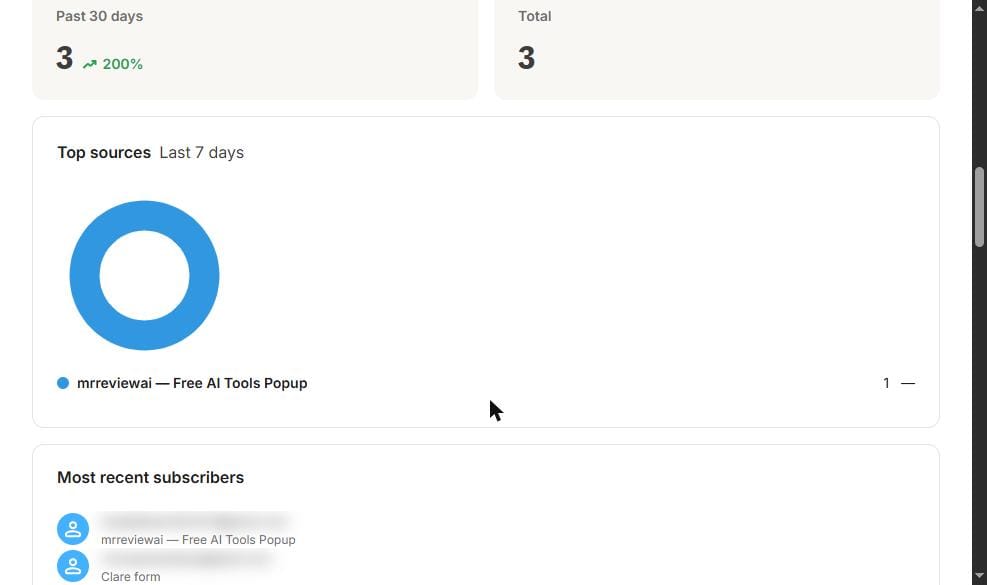
Data verified June 20, 2026 on Kit free plan — pulled live from app.kit.com/dashboard.
🆕 Craft & Commerce 2026: Everything Kit Just Launched (June 2026 Update)
⚡ Last verified: June 20, 2026 — Kit held their annual Craft & Commerce conference in June 2026 and dropped their biggest product launch of the year. Most reviews haven’t caught this yet. Here’s every new feature and what it means for your free plan decision.
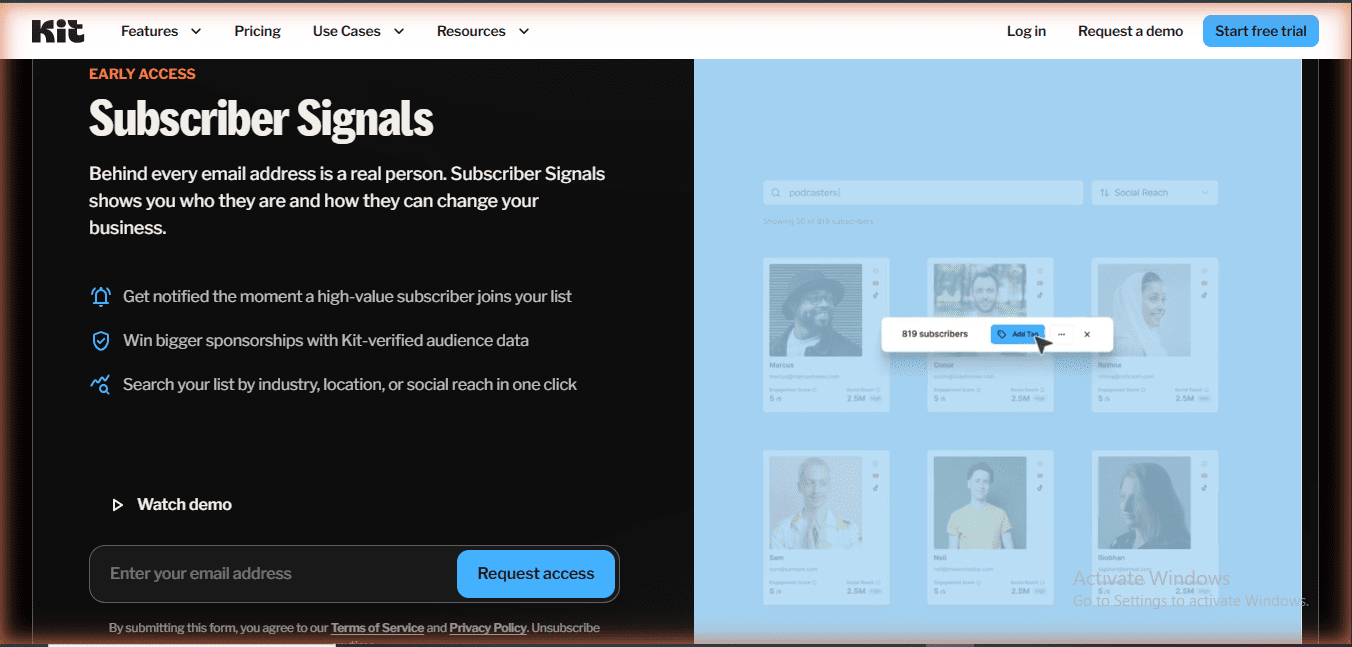
1. Subscriber Signals (Early Access — Pro Plan)
The most significant new feature Kit has ever shipped for newsletter monetization. Subscriber Signals automatically profiles every person on your list — their industry, location, social following, and engagement level — without you doing any research. The pitch Kit makes: “Get notified the moment a high-value subscriber joins your list. Win bigger sponsorships with Kit-verified audience data. Search your list by industry, location, or social reach in one click.”
Why this matters for affiliate marketers: If you’re pitching newsletter sponsorships, Subscriber Signals gives you verified audience data to show brands — instead of self-reported stats. It’s currently Early Access on Pro plan only ($66/mo annual). The free plan shows a subscriber scoring chart, but Subscriber Signals is a full audience intelligence layer on top of that. This is the clearest reason yet to eventually aim for Pro.
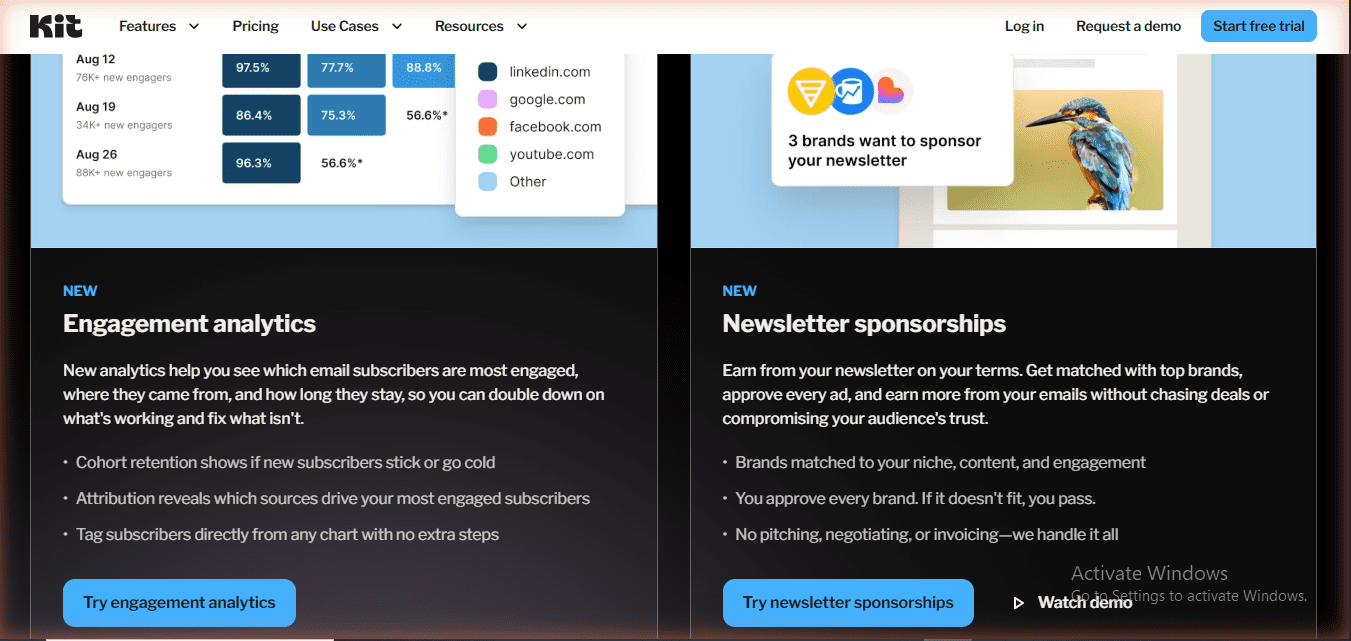
2. Newsletter Sponsorships (NEW — Creator + Pro)
Kit now matches you with brands automatically. You approve every ad before it runs, and Kit handles the invoicing, negotiation, and payment. No cold-pitching required. This is available on Creator ($33/mo) and Pro ($66/mo) — not on the free Newsletter plan.
For solo affiliate marketers this is a second monetization layer on top of affiliate commissions. The free plan’s Tips feature handles direct fan support; Newsletter Sponsorships handles brand deals. Combined with affiliate income, a creator at 2,000–5,000 subscribers now has three revenue streams baked directly into one platform.
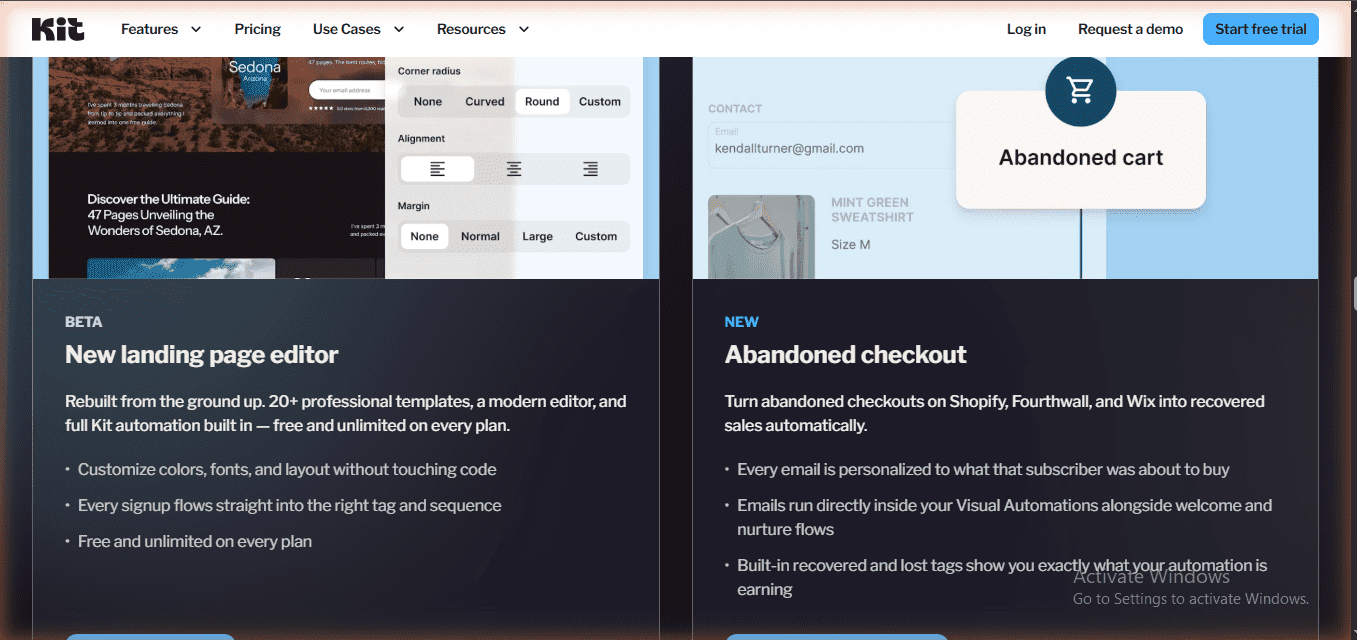
3. New Landing Page Editor (BETA — Free on Every Plan)
Kit rebuilt their landing page editor from scratch: 20+ new professional templates, a modern drag-and-drop editor, full color and font customization without touching code, and every signup automatically flows into the right tag and sequence. Critically — this is free and unlimited on every plan including the Newsletter (free) plan.
This directly upgrades one of the weaker points of the original free plan. The old landing page templates were functional but dated. If you’re building a link-in-bio page or a lead magnet landing page on the free plan today, the new editor is a significant quality improvement over what I tested in May 2026.
4. Engagement Analytics (NEW — Creator + Pro)
A new analytics layer that shows three things paid plans didn’t have before: Cohort retention (do new subscribers stay engaged or go cold after week 2?), Attribution analytics (which signup source drives your most engaged subscribers, not just your most subscribers), and one-click tagging directly from any chart (no need to export a CSV and re-import).
On the free plan you still get per-form subscriber counts and the engagement scoring chart. But Engagement Analytics is the paid upgrade that turns those numbers into action. Available on Creator and Pro.
5. Abandoned Checkout (NEW — Creator + Pro)
Kit now connects directly to Shopify, Fourthwall, and Wix to automatically recover abandoned checkouts. Every recovery email is personalized to exactly what the subscriber was about to buy, runs inside your existing Visual Automations alongside welcome and nurture flows, and tags recovered vs. lost orders automatically.
This matters most once you’re selling digital products — which the free plan already supports at 3.5% + $0.30 per transaction. Abandoned Checkout is the automation that makes that commerce feature scale. Available on Creator and Pro.
6. Kit App Store — 5 New Integrations
Five new apps launched at Craft & Commerce 2026, all of which sync directly into your Kit subscriber list:
- SMS by SlickText — add SMS to your Kit workflows without managing a separate list. Reach the same subscriber by email and text from one automation.
- Patreon — every new member automatically becomes a Kit subscriber. No manual imports.
- Fourthwall — same automatic sync for Fourthwall members.
- Eventbrite — every event RSVP becomes a tagged subscriber in Kit.
- Luma — same for Luma events. Every attendee lands in your list automatically.
7. Kit MCP — Now 9 Built-in Prompt Templates (Updated June 2026)
Earlier in this review I documented 4 MCP prompt templates. Kit has since expanded to 9 ready-to-use prompt workflows — verified June 20, 2026 on the live app.kit.com/kit-mcp page. The five new additions: List Health Check (audit deliverability, organization, and re-engagement candidates), Profile Most Engaged Subscribers (identify top subscribers and optionally tag them), Recurring Broadcast Setup (use last week’s broadcast as a template and schedule the next one automatically), Set Up a Welcome Sequence (drafts up to 3 emails + wires them into a Visual Automation), and Welcome (gives a personalized first-move recommendation based on your live account signals). Reminder: Kit MCP requires Creator or Pro plan to connect — the free plan shows your MCP URL but the “Upgrade to Connect” button is gated.
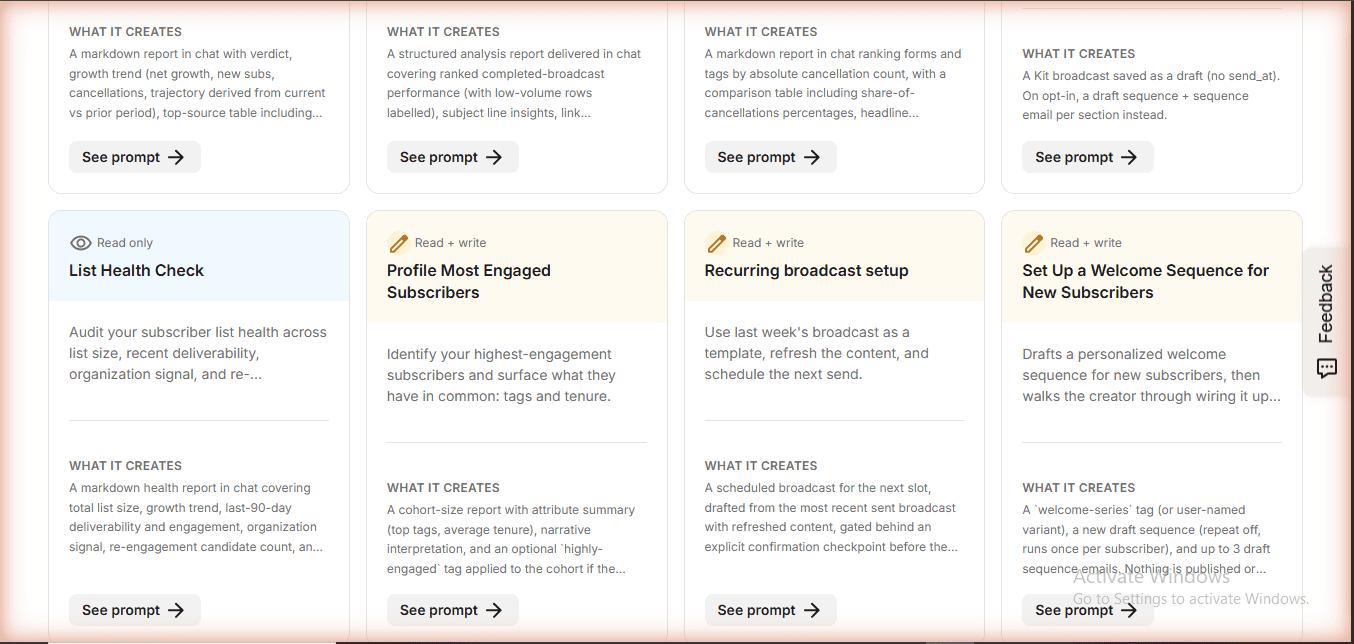
What Changed for Free Plan Users Specifically
Honest summary of the Craft & Commerce 2026 impact on the free Newsletter plan:
| Feature | Free Plan? | Notes |
|---|---|---|
| New Landing Page Editor (BETA) | ✅ Yes — free | 20+ new templates, modern editor, full customization |
| Newsletter Sponsorships | ❌ Creator + Pro only | New upgrade trigger for monetization |
| Abandoned Checkout | ❌ Creator + Pro only | Shopify, Fourthwall, Wix |
| Engagement Analytics | ❌ Creator + Pro only | Cohort retention + attribution |
| Subscriber Signals | ❌ Pro only (Early Access) | Audience intelligence for sponsor pitches |
| SMS by SlickText app | ❌ Paid plans (app) | Add SMS to email workflows |
| Patreon / Fourthwall sync | ❌ Paid plans (app) | Auto-import members |
| Eventbrite / Luma sync | ❌ Paid plans (app) | Auto-import event RSVPs |
| Kit MCP (9 prompt templates) | ❌ Creator + Pro to connect | URL visible free, connection requires upgrade |
🖊️ About the Author
Mr Review AI Team
This review was researched and tested hands-on by the Mr Review AI editorial team. We create real accounts, run actual campaigns, and document every limitation we encounter — no vendor demos, no copied spec sheets. Our reviews are editorially independent: no tool pays for a score or placement, ever. Where we have affiliate relationships, we disclose them transparently on each page.
Want to know who founded this site and what drives our editorial standards? → Meet the founder on our About page
🔄 July 1, 2026 Re-verification: What the Dashboard Shows Today
On July 1, 2026, we opened every key page of the Kit.com free plan dashboard and documented exactly what we saw. Here is the full breakdown — numbers first, conflicts disclosed.
⚠️ The Subscriber Limit Conflict: Billing Dashboard vs Pricing Page
This is the most important discrepancy to know before citing any Kit.com free plan number.
The billing dashboard at app.kit.com/account_settings/billing shows “1,000 subscribers · $0/month · 3/1,000 used” — not 10,000. The pricing page feature comparison table at kit.com/pricing shows “Up to 10,000” for the Newsletter (free) plan.
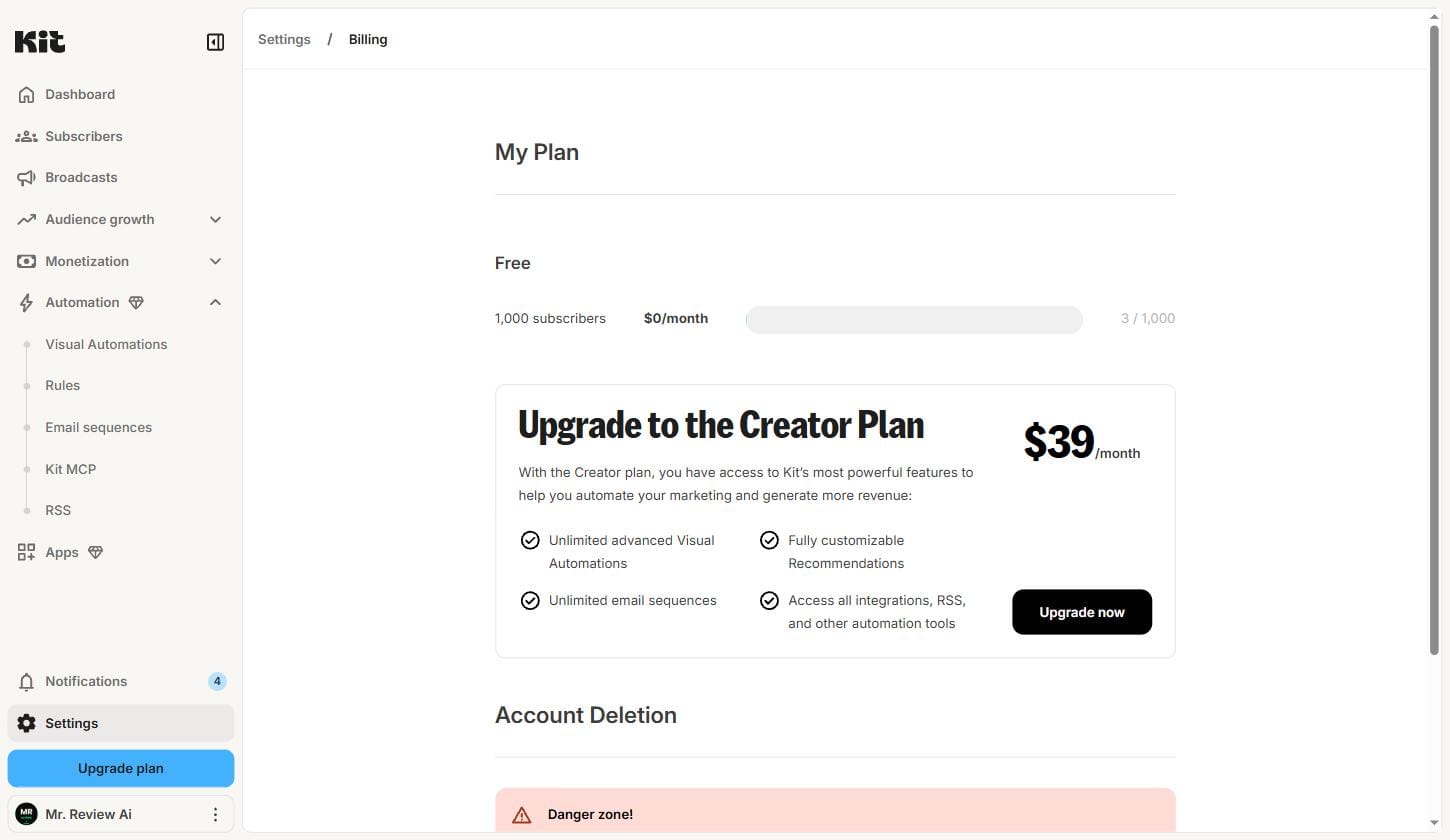
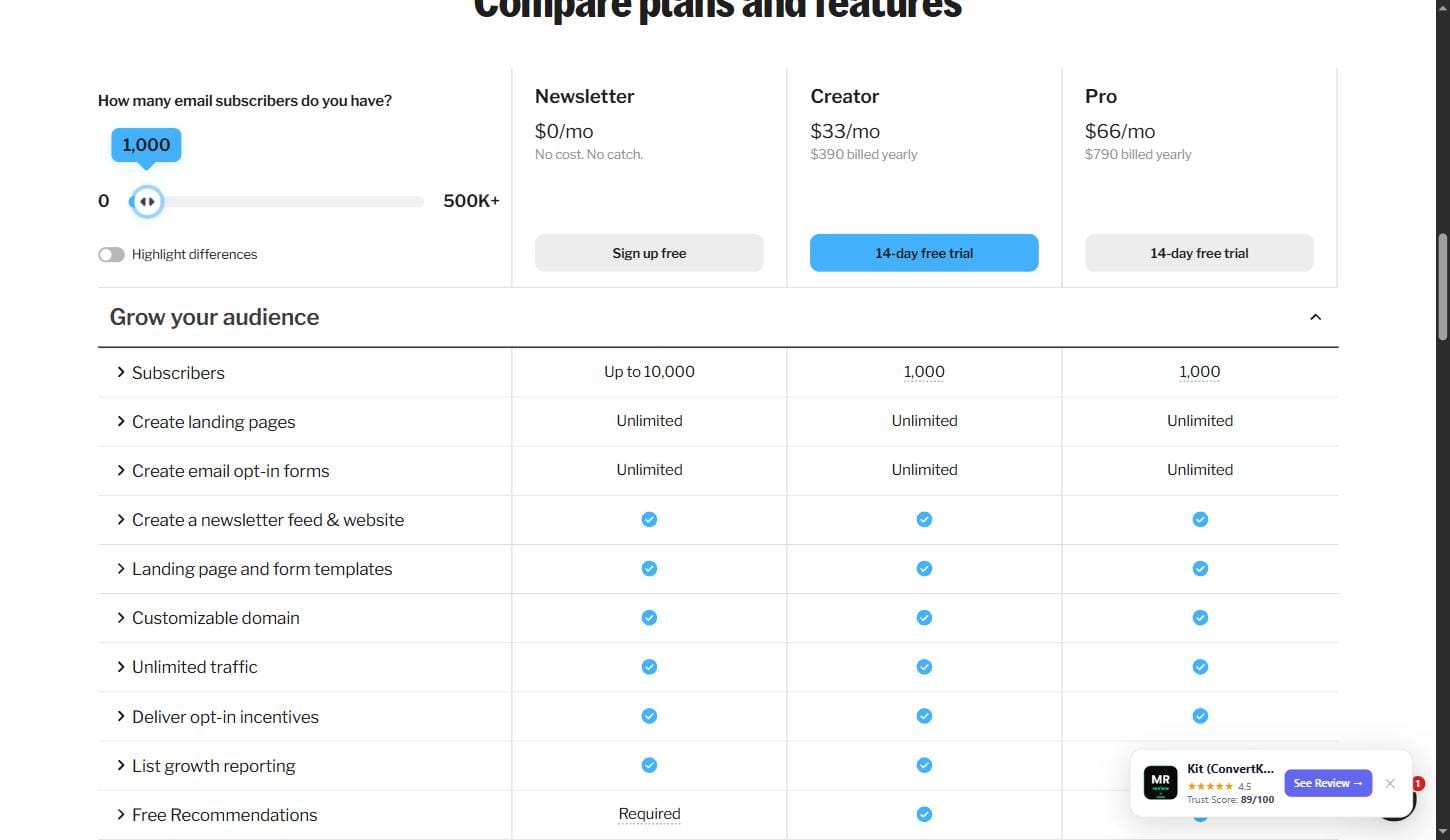
Our position: We treat the pricing page feature table as authoritative (10,000). The billing dashboard likely reflects the slider default, not the actual plan ceiling. We will update this section when our subscriber count crosses 1,000 to confirm which limit is enforced.
✅ Automations: Both Features Fully Locked (Confirmed July 1, 2026)
Visual Automations and Email Sequences both show hard paywalls on the free plan — identical “Upgrade to Creator” banners, no partial access.
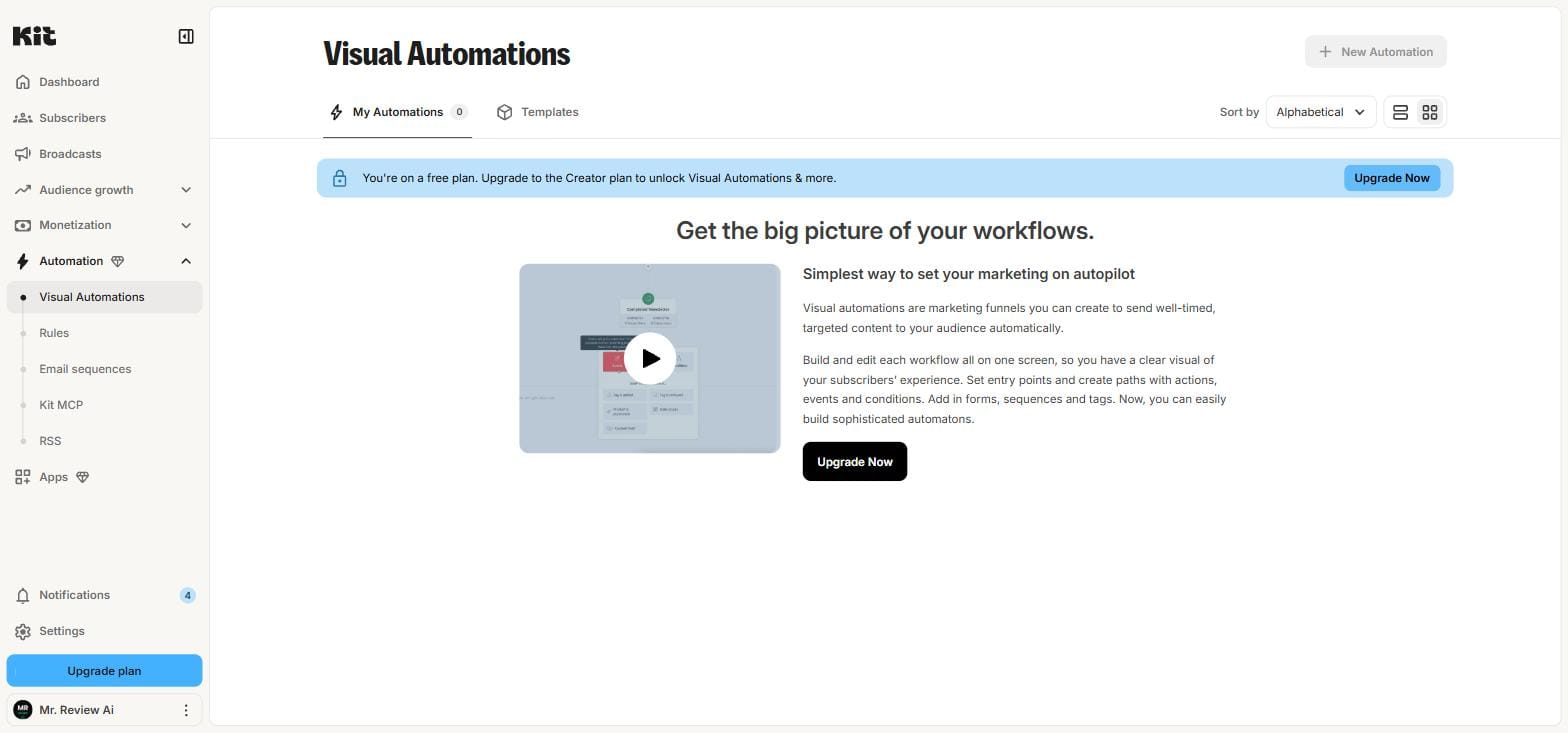
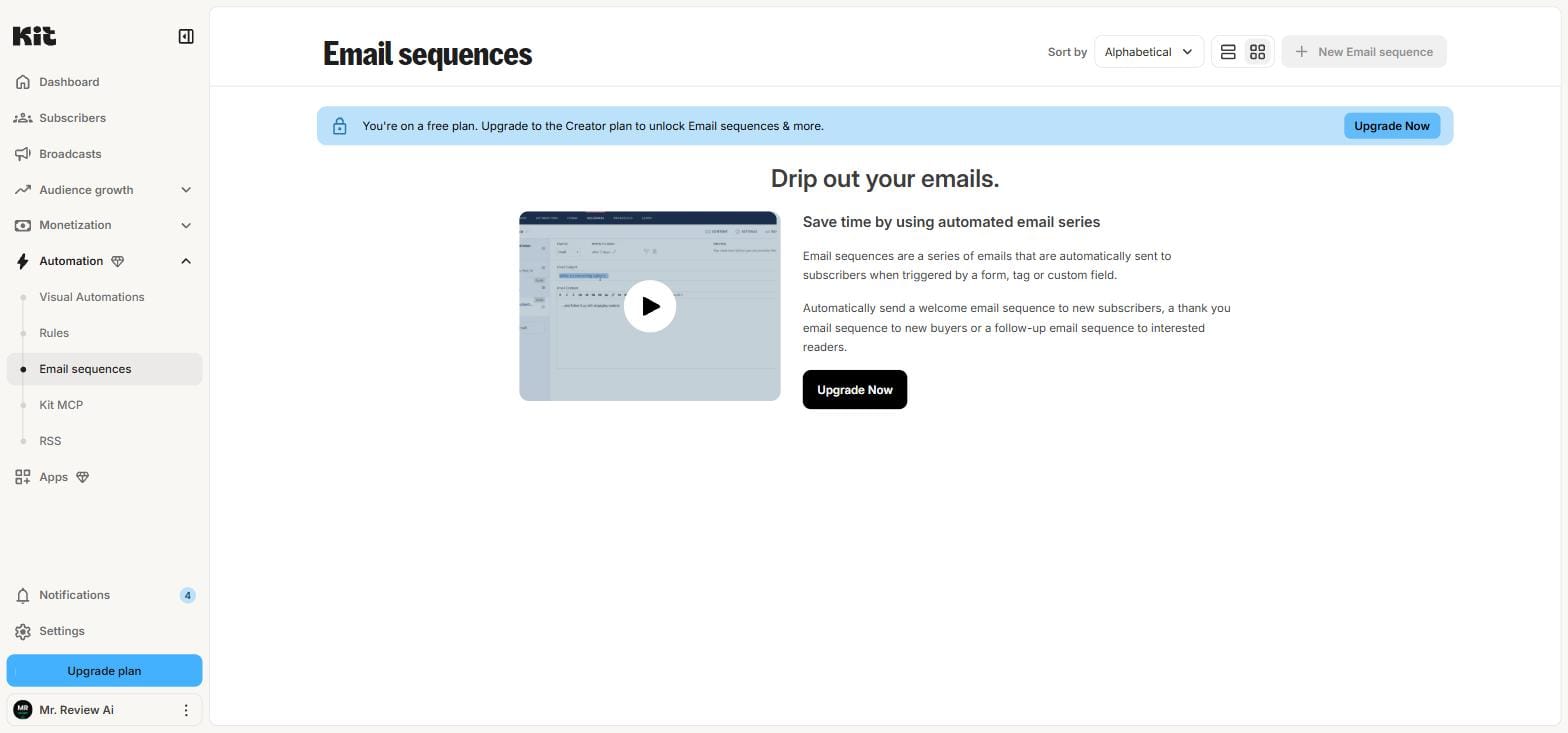
Note: The pricing page card states “1 basic Visual Automation” is included in the free Newsletter plan. The live dashboard shows a hard paywall for both automation features. We have documented this discrepancy and cannot confirm the pricing page claim from our live account.
📋 July 1, 2026 Verified Numbers — Quick Reference
| Feature | Free Plan (Newsletter) | Verified Source |
|---|---|---|
| Subscribers | Up to 10,000 (pricing) / 1,000 (billing dashboard) ⚠️ | kit.com/pricing + app.kit.com/billing |
| Email broadcasts | ✅ Unlimited | app.kit.com |
| Visual Automations | ❌ Hard paywall | app.kit.com/automations |
| Email Sequences | ❌ Hard paywall | app.kit.com/sequences |
| Custom domain | ✅ Free | kit.com/pricing |
| Creator plan | $39/mo monthly · $33/mo annual | kit.com/pricing |
| Pro plan | $79/mo monthly · $66/mo annual | kit.com/pricing |
Re-verified: July 1, 2026 — live account at app.kit.com. Screenshots above are from the actual account used for this review.
🆕 July 1, 2026 — Second Account Test: Free Plan Subscriber Limit CONFIRMED as 1,000
We registered a fresh Kit.com account and cancelled the trial immediately to test the real free plan. This settles the 1,000 vs 10,000 question definitively.
🧪 Fresh Account Test: Free Plan = 1,000 Subscribers (Settled)
To resolve the billing dashboard vs pricing page conflict, we created a second Kit.com account on July 1, 2026 and immediately cancelled the Creator trial to land on a clean free plan. Here are the results.
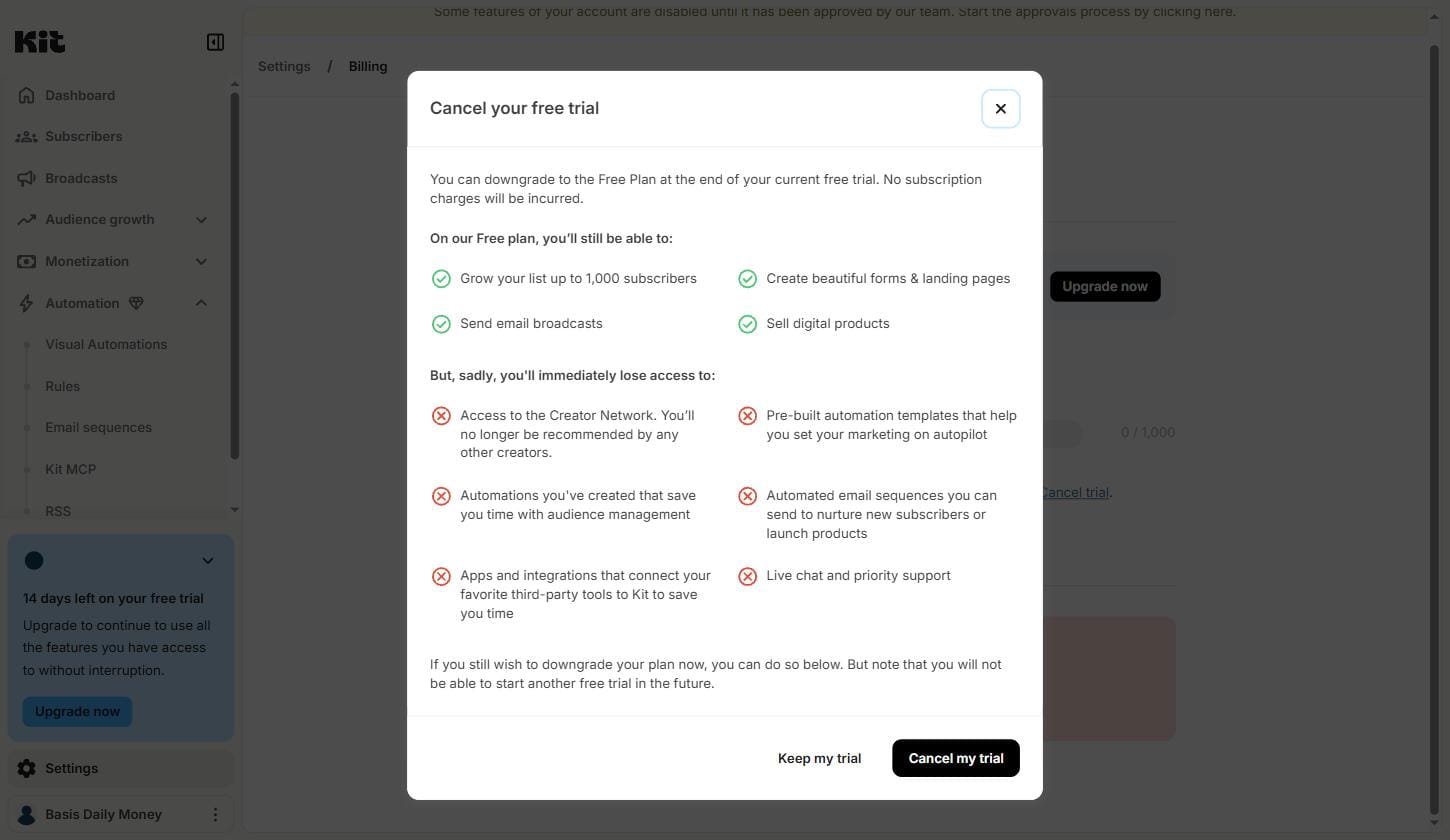
Key Finding: Kit’s Own Cancel Trial Modal Says 1,000
When cancelling the trial, Kit displayed a modal with their exact free plan terms:
“On our Free plan, you’ll still be able to: Grow your list up to 1,000 subscribers.”
This is Kit’s own language — not from the pricing page, not from a third party. The same modal also listed what you lose on free: Automations, Email sequences, Apps and integrations, Live chat and priority support.
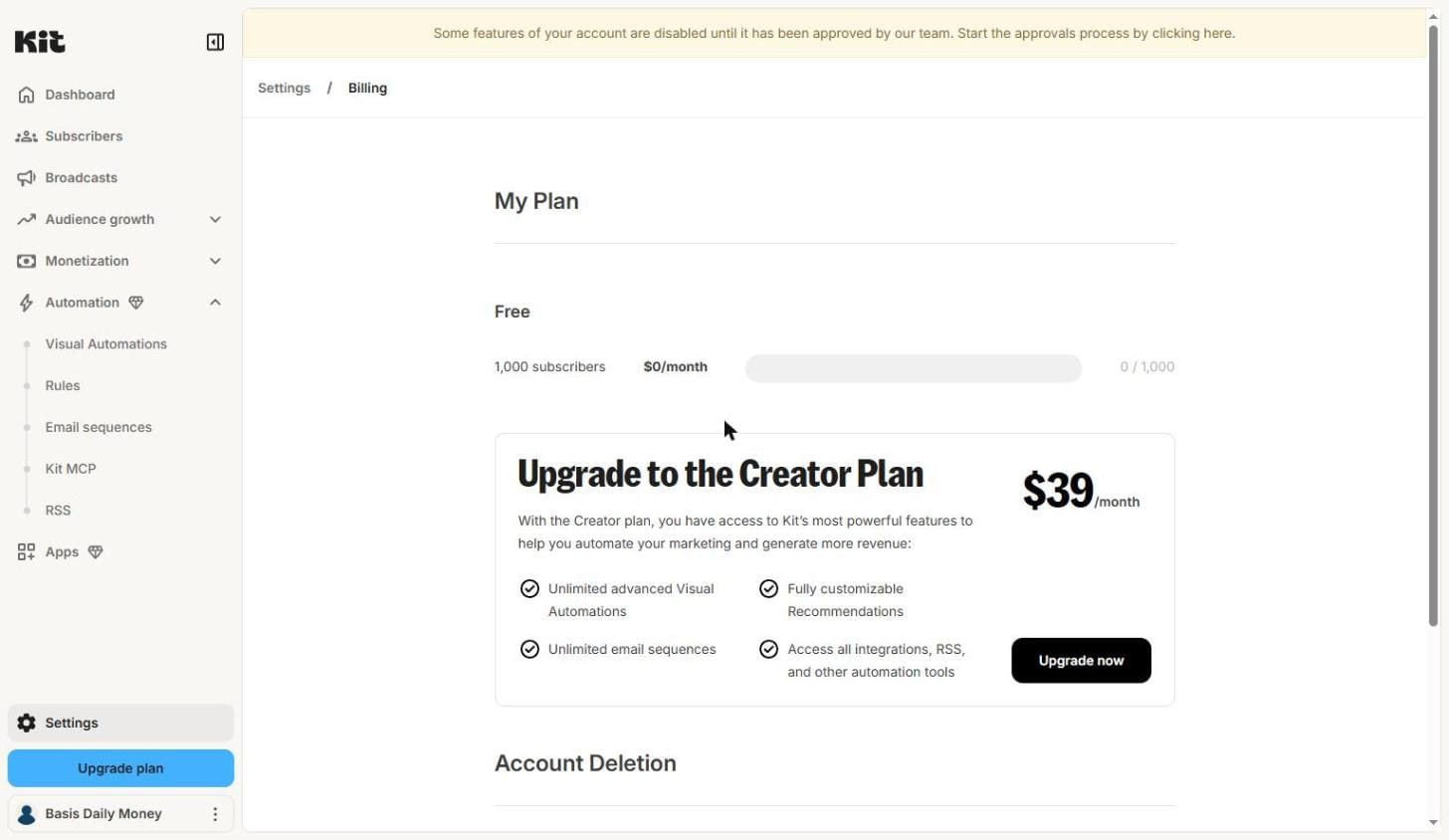
Fresh Free Account Billing: 1,000 Confirmed
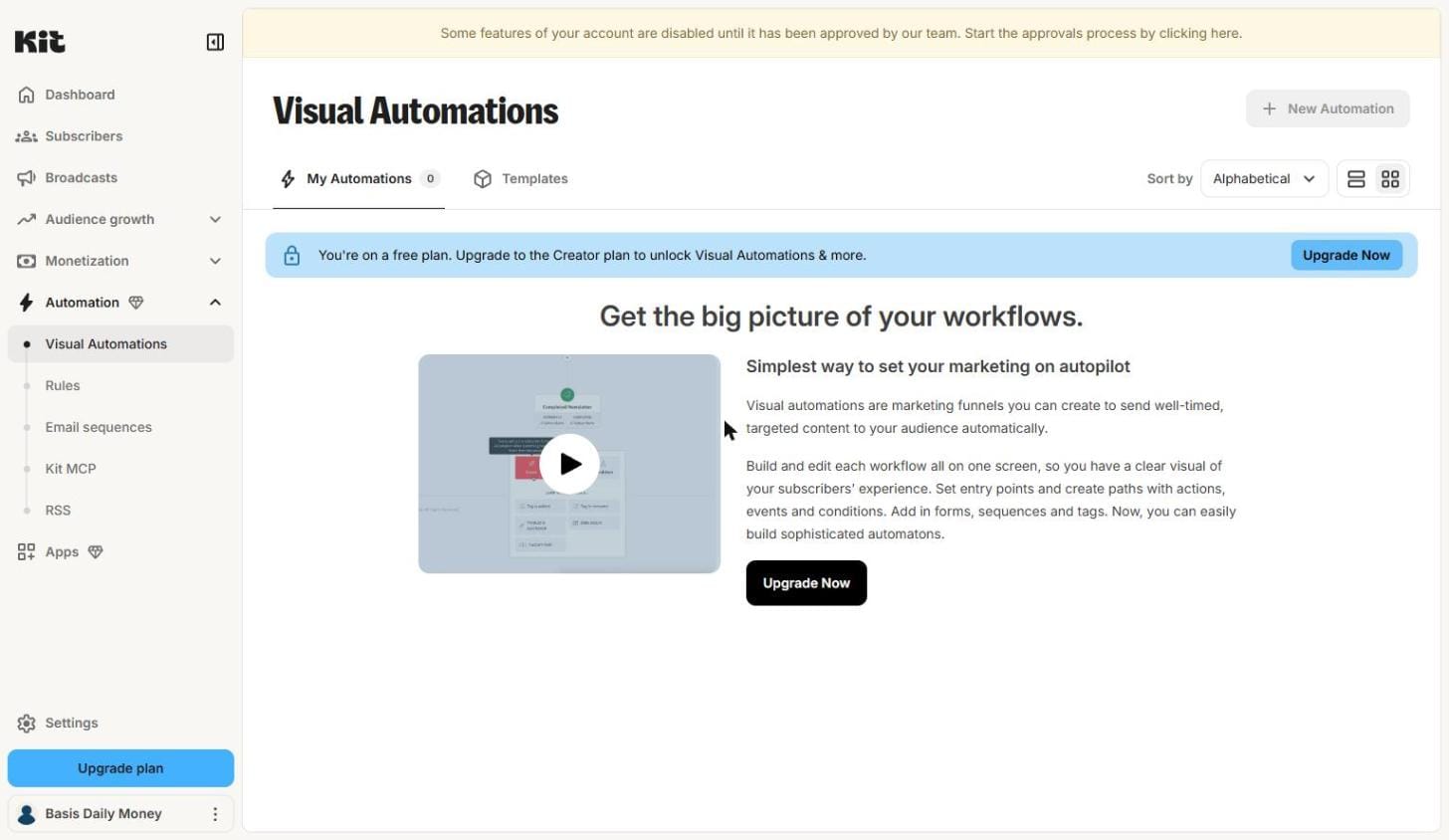
Automations: Still Fully Locked on Free (Second Account Confirms)
✅ Final Answer — Tested on two separate accounts, July 1, 2026:
- Free plan subscriber limit: 1,000 (confirmed by billing dashboard + Kit’s own modal text)
- Pricing page “Up to 10,000” row: appears to be inaccurate marketing copy
- All new accounts: start on Creator 14-day trial, not on free plan
- Automations: locked on free (confirmed on both accounts)
Second account test — July 1, 2026. Two independent Kit.com accounts tested. Both confirm 1,000 subscriber ceiling on free plan.
Update 3: What Kit Does When You Sign Up as a Business Owner Migrating from Mailchimp
During testing, I registered a new Kit.com account and declared myself a business owner migrating from Mailchimp, with a website provided. Here’s exactly what the dashboard showed — not what the marketing page promises.
Finding 1: Kit Immediately Shows a “Migrate from Mailchimp” Checklist
When I logged in for the first time, Kit’s dashboard displayed a dedicated “Migrate from Mailchimp” checklist with 7 steps:
- Import subscribers (via Mailchimp API key)
- Recreate your forms
- Rebuild email templates
- Rebuild sequences
- Set up visual automations
- Connect and test
- Final subscriber sync
This is useful context: Kit knows why you’re signing up and tailors the onboarding accordingly. If you’re migrating from another platform, expect to see a platform-specific migration guide right on your dashboard. This is genuinely helpful — a clear 7-step migration path rather than a blank slate.
Honest note: Steps like “Rebuild sequences” and “Set up visual automations” are listed in the checklist — but these features are locked behind the Creator paid plan. If you complete step 1 (import subscribers) while on the free plan, steps 4 and 5 will require an upgrade to complete. The checklist doesn’t warn you of this upfront.
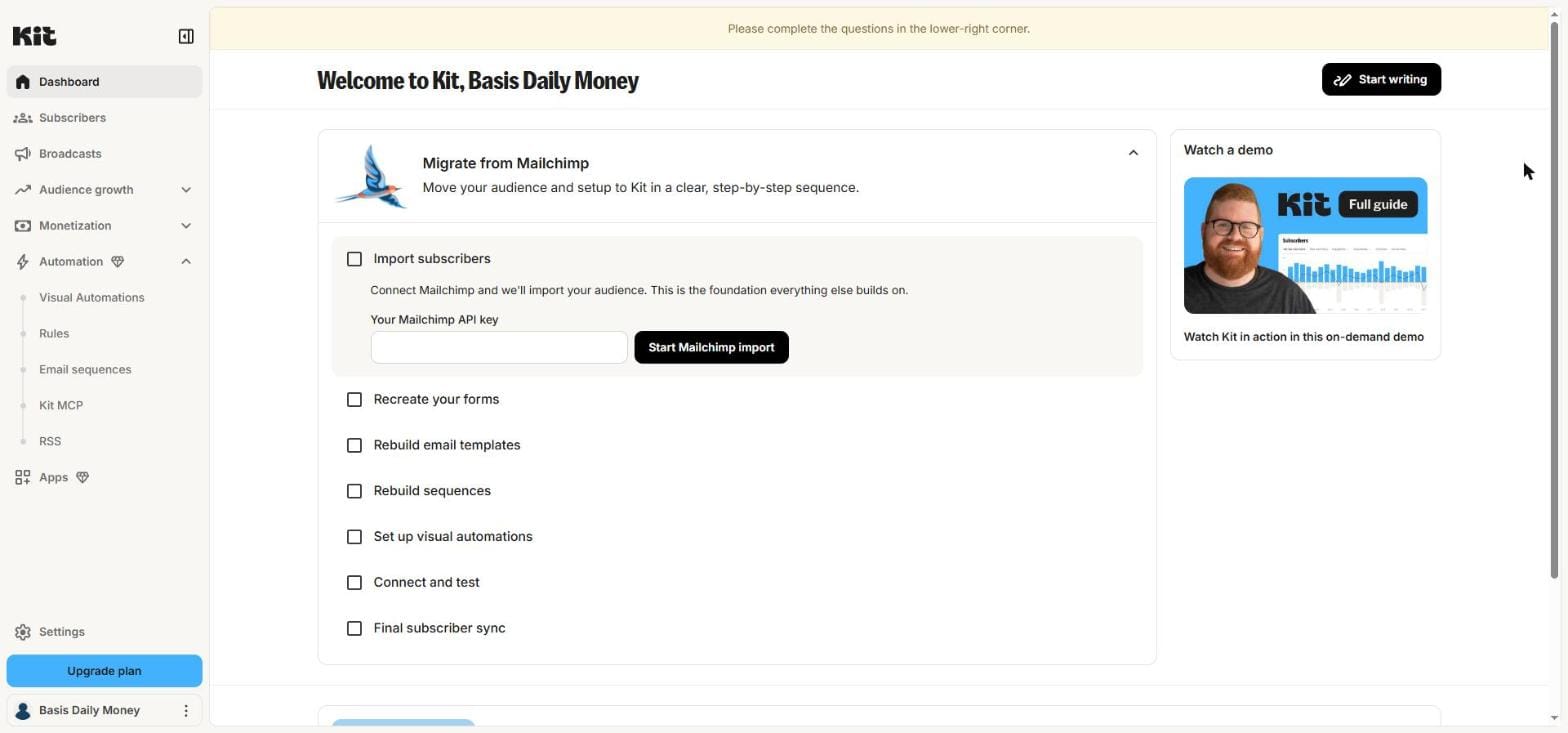
Finding 2: New Accounts Are Flagged for Manual Approval
The yellow banner at the top of the dashboard reads:
“Some features of your account are disabled until it has been approved by our team. Start the approvals process by clicking here.”
When I clicked the banner, it changed to: “Please complete the questions in the lower-right corner.” — and opened a Kit Support live chat widget where a support agent (or AI agent) asks questions to verify your account before enabling full sending capabilities.
What this means in practice: You cannot send email broadcasts to subscribers until Kit manually reviews and approves your account. This is an anti-spam verification step that applies to new accounts. It’s not advertised prominently during signup.
How long does approval take? I did not complete the approval process during this test, so I cannot confirm the timeline from personal experience. Based on Kit’s support documentation, approval typically happens within 1 business day for accounts that pass review — but this is not verified from my own test.
- New Kit.com accounts go through a manual approval process before you can send emails
- You’ll be asked to answer questions via live chat — have your website URL and use case ready
- Migration checklist for Mailchimp users appears automatically — useful, but some steps require paid plan
- Free plan starts only after you cancel the default 14-day Creator trial (see Update 2 above)
Tested July 1, 2026. Account registered as business owner with website. Source: app.kit.com/dashboard — fresh account “Basis Daily Money”.

About the Author
Mr Review AI Team
This review was researched and tested hands-on by the Mr Review AI editorial team. We create real accounts, run actual campaigns, and document every limitation we encounter — no vendor demos, no copied spec sheets. Our reviews are editorially independent: no tool pays for a score or placement, ever. Where we have affiliate relationships, we disclose them transparently on each page.
Want to know who founded this site and what drives our editorial standards? → Meet the founder on our About page