Murf AI Free Plan Review (2026): I Tested It So You Don’t Waste Your 10 Minutes

- ✓Best block-based editor in AI voice
- ✓200+ voices with named emotion presets
- ✓Emotion presets change pacing, not just tone
- ✓Full voice library access on free plan
- ✕10 minutes LIFETIME — never resets
- ✕Zero audio downloads on free plan
- ✕No commercial rights on free
- ✕Entry paid plan $19/mo vs ElevenLabs $6/mo
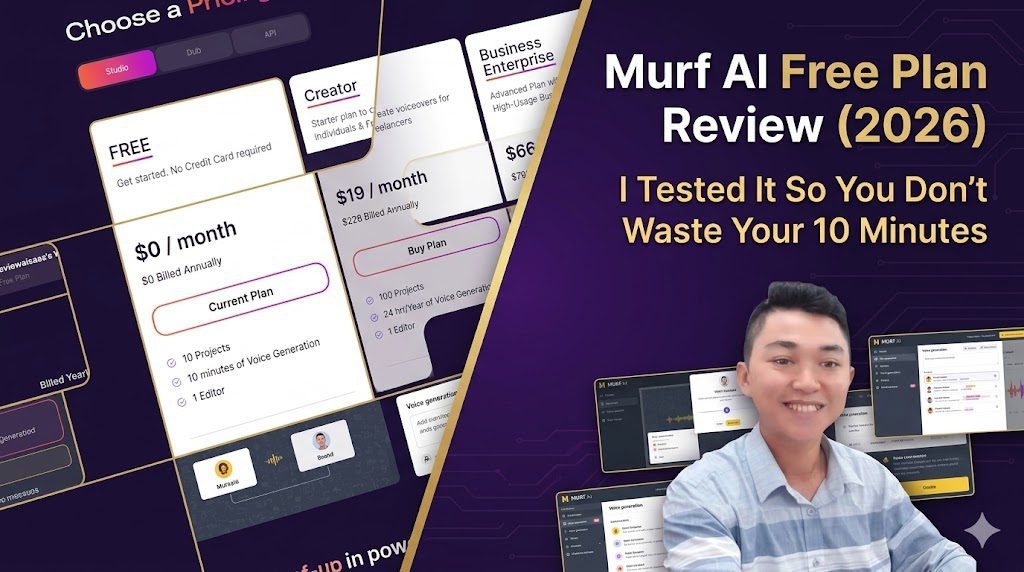
Quick verdict: Murf AI’s free plan gives you genuine access to one of the best-designed AI voiceover studios on the market — but the 10-minute lifetime cap and zero download access make it a product demo, not a working tool. Score: 6.5/10. Best for testing voice quality before upgrading. Not for actually creating usable content.
⚠️ Affiliate Disclosure: This article contains affiliate links. If you purchase through our Murf AI link, we may earn a small commission at no extra cost to you. We only recommend tools we have personally tested. All screenshots are from our own reviewaisaas account.
📅 Last Updated: June 25, 2026 (originally published May 30, 2026 · verified and updated June 25, 2026)
What Is the Murf AI Free Plan? (The Short Answer)
Murf AI is one of the most polished AI voiceover platforms on the market right now. Trusted by over 1 million users across 100+ countries, it’s used for e-learning courses, YouTube videos, podcast intros, explainer videos, and corporate presentations.
The free plan sounds generous on paper: no credit card required, access to 200+ AI voices, 41 languages, and their full Studio editor. But there are two limitations that most reviewers gloss over — and they change everything.
| What You Get | What You Don’t Get |
|---|---|
| 200+ AI voices | Downloads (zero) |
| 41 languages | Commercial rights |
| 10 projects | Monthly reset |
| Full Studio editor access | Emphasis/Variability controls |
| Murf Suite (new feature) | Voice cloning |
| 10 minutes voice generation | More than 10 minutes — ever |
Yes, you read that right. The 10 minutes is lifetime, not monthly. Once it’s gone, it’s gone — there is no reset.
Let me be upfront about something before we dive in. The first time I clicked the Export button on Murf — after spending 20 minutes building a script I actually liked — I sat there for a second and just laughed. Not because it was funny. Because I genuinely didn’t see it coming. The interface is so polished, the voices sound so good, that I’d kind of forgotten I was on a free plan. Then the “Unlock unlimited downloads” wall appeared and reminded me exactly where I stood.
That moment is actually the most honest summary of Murf’s free plan I can give you: it’s good enough to make you want it. Which is, of course, the whole point.
How I Tested Murf AI’s Free Plan
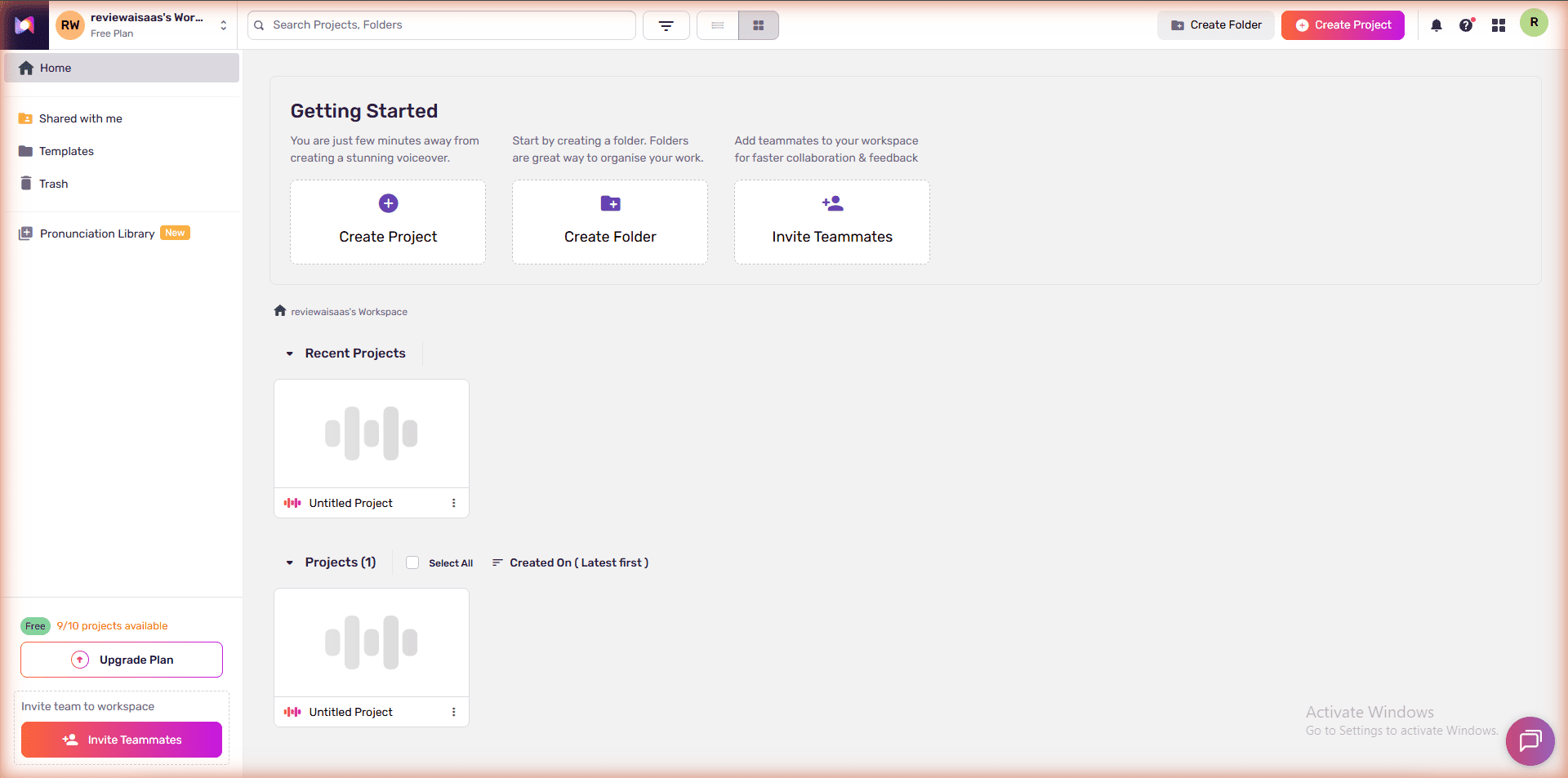
I’ve been using Murf AI’s free plan as part of my broader testing for our 3-way comparison of MiniMax Audio vs ElevenLabs vs Murf AI and our Murf vs ElevenLabs head-to-head test. After generating multiple voice samples across different projects, I had 8 minutes and 22 seconds remaining when I sat down to write this review.
My testing included:
- Creating 3 projects with different voice styles and scripts
- Testing voices across multiple emotion styles (Inspirational, Meditative, Terrified, Sorrowful, Furious)
- Attempting to export audio — and hitting the upgrade wall
- Exploring every sidebar tool and the new Murf Suite feature
- Running the same scripts through ElevenLabs and MiniMax for direct comparison
- Tracking exact credit consumption per generation
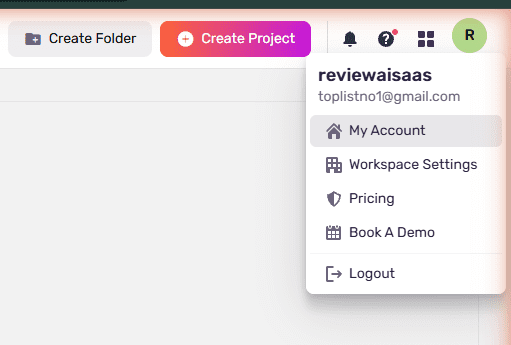
I’m reviewing this as someone with an active Murf AI account — not pulling specs from a marketing page. Account: reviewaisaas, Free Plan, tested May 30, 2026 at 10:33 AM ICT.
Murf AI Free Plan: At a Glance
| Feature | Free Plan |
|---|---|
| Monthly Voice Generation | 10 minutes (lifetime one-time, NOT monthly) |
| Projects | 10 max |
| AI Voices | 200+ (full library access) |
| Languages & Accents | 30+ |
| Voice Styles & Tonalities | Unlimited (preview only) |
| Audio Downloads | ❌ Blocked — upgrade required |
| Commercial Rights | ❌ No |
| Emphasis Control | ❌ Business plan only |
| Variability Control | ❌ Business plan only |
| Say It My Way | ❌ Business plan only |
| Voice Cloning | ❌ Enterprise only |
| Canva Integration | ❌ Creator plan+ |
| Price | $0/month — no credit card required |
murf-ai — Rating Breakdown
Natural emotion presets — better mood accuracy than ElevenLabs
Best structured editor — per-block voice, speed, pitch, emotion
10 min LIFETIME + no downloads = demo only, not a tool
Named presets pre-bake speed and emphasis — not just tone labels
$19/mo Creator vs ElevenLabs $6/mo — 3x more expensive
What You Actually Get on the Murf AI Free Plan
Voice Library: Full Access, Genuinely Impressive
Honestly, this caught me off guard. The free plan unlocks the full voice library — over 200 voices across 41 languages. These aren’t watered-down placeholder voices; they’re the same Gen 2 MultiNative voices available on paid plans.
Each voice comes with multiple emotion styles. The popular “Natalie” voice (Female, Young, US English) alone supports: Inspirational, Meditative, Terrified, Sorrowful, Furious, Newscast, Conversational, Promo, Angry, and more — 12+ styles in total. You can preview all of them before committing your precious minutes.
Language coverage spans American, British, Australian, Scottish, and Indian English variants, plus French, German, Spanish, Japanese, Korean, Hindi, Arabic, Mandarin, and 27 more. The voice quality on Gen 2 voices is excellent — natural breathing patterns, realistic intonation, multiple emotional registers. For business content, e-learning, or YouTube narration, you’d be hard-pressed to tell these apart from a human voice actor.
The voice library filter system is thorough: filter by use case (E-Learning, Advertisements, Audiobooks, YouTube, IVR, Games, Podcasts/Blogs, Documentary, Explainers), gender, age group, and style. This B2B-oriented taxonomy is telling — more on what that means for who Murf is actually built for in a later section.
The Studio Editor — Murf’s Secret Weapon
I’ve tested a lot of TTS editors. Murf’s Studio is the one I’d actually want to use daily — and I say that having spent real time with ElevenLabs, MiniMax, and a few others. Unlike ElevenLabs or MiniMax (which use a single text box), Murf uses a block-based workflow.
Each paragraph becomes its own block. Each block can have a different voice, different speed, different pitch, and different emotion style. This means you can build a full multi-speaker script where Block 1 uses “Natalie – Inspirational,” Block 2 uses “Ken – Calm,” and Block 3 uses a French voice — all in one project, on a single timeline.
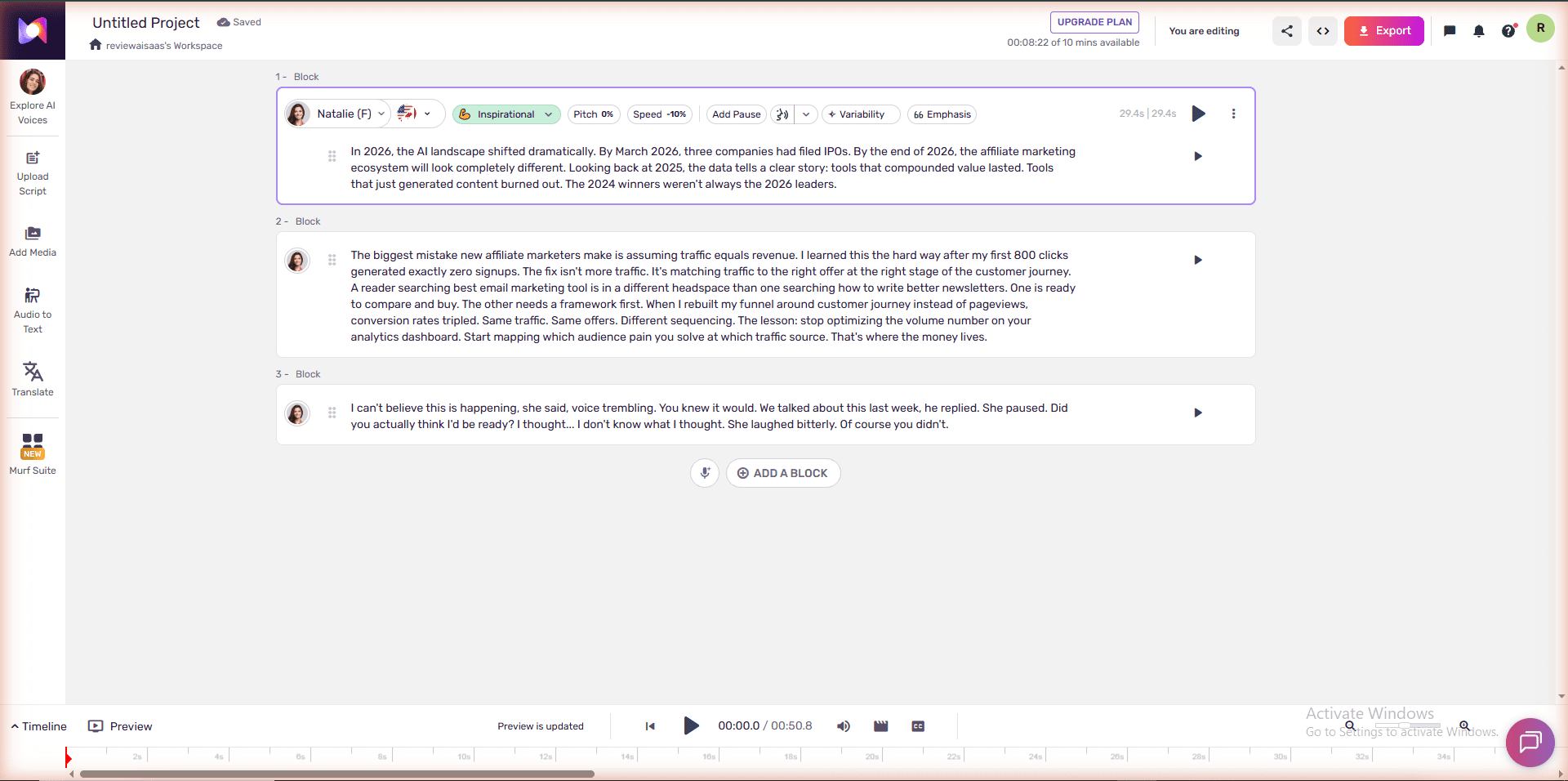
What I noticed during testing that most reviews skip: each block has five independent controls sitting right on the toolbar — Pitch, Speed, Add Pause, Variability, and Emphasis. Not buried in a settings menu. Right there, inline, block by block. In my test, Block 1 was already running Speed −10% and Emphasis 66 before I touched anything — Murf had pre-configured those for the Inspirational preset.
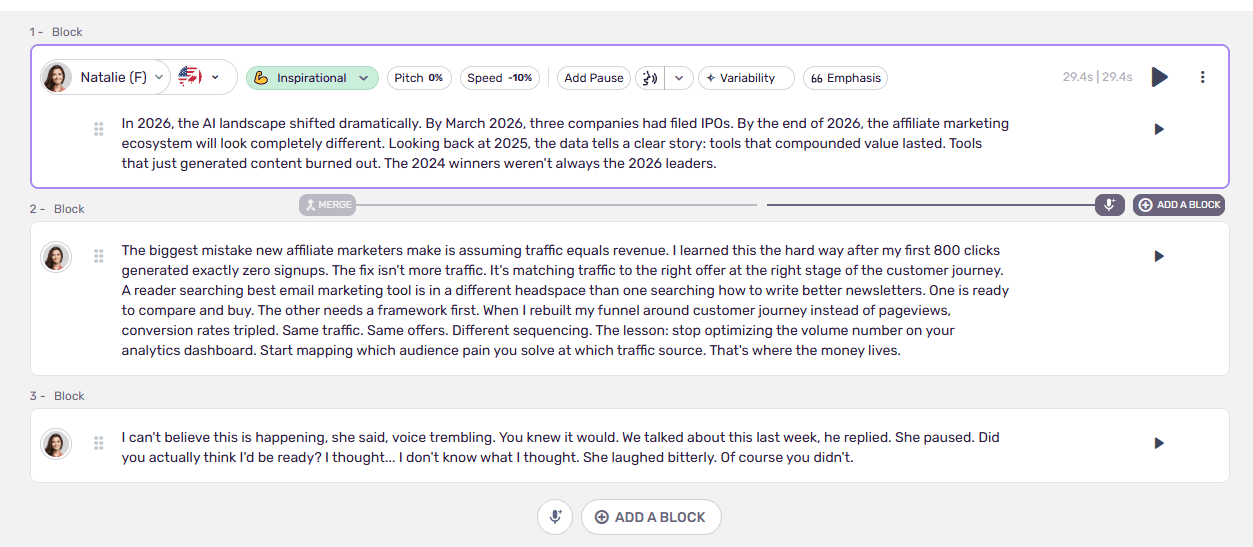
That’s the real story behind the named emotion styles: they’re not just a mood label. Each preset ships with a full set of micro-adjustments pre-baked in — you get a tuned starting point, and you can still override it. The preset is a floor, not a ceiling.
ElevenLabs TTS has Speed, Stability, Similarity, and Style sliders — but they apply globally. You can’t say “slow down this one sentence by 10% and emphasise this specific word.” Murf can, at the block level. For anyone doing explainers, character voices, or audiobooks where pacing varies paragraph to paragraph — that’s a meaningful edge that most comparison articles never mention.
Free plan access includes: Adding blocks, assigning voices, adjusting pitch and speed, adding pauses, and previewing audio in-browser.
Not available on free: Emphasis control, Variability control, Say It My Way, and — most importantly — downloading anything.
Murf Suite — The New Addition
Murf recently added a Murf Suite section to the sidebar (marked NEW). This is a bundle of additional productivity tools — currently in expansion. Free plan users can explore it, though full functionality is gated behind paid plans. Worth noting because it signals Murf’s direction: moving toward an all-in-one audio production hub.
10 Projects Cap
You get up to 10 projects on the free plan. My account showed “9/10 projects available” after initial setup. Each project can have multiple blocks and voices, so 10 projects is workable for evaluation — but any serious production workflow will hit this ceiling quickly.
The Big Limitations You Need to Know
1. No Downloads — The Dealbreaker
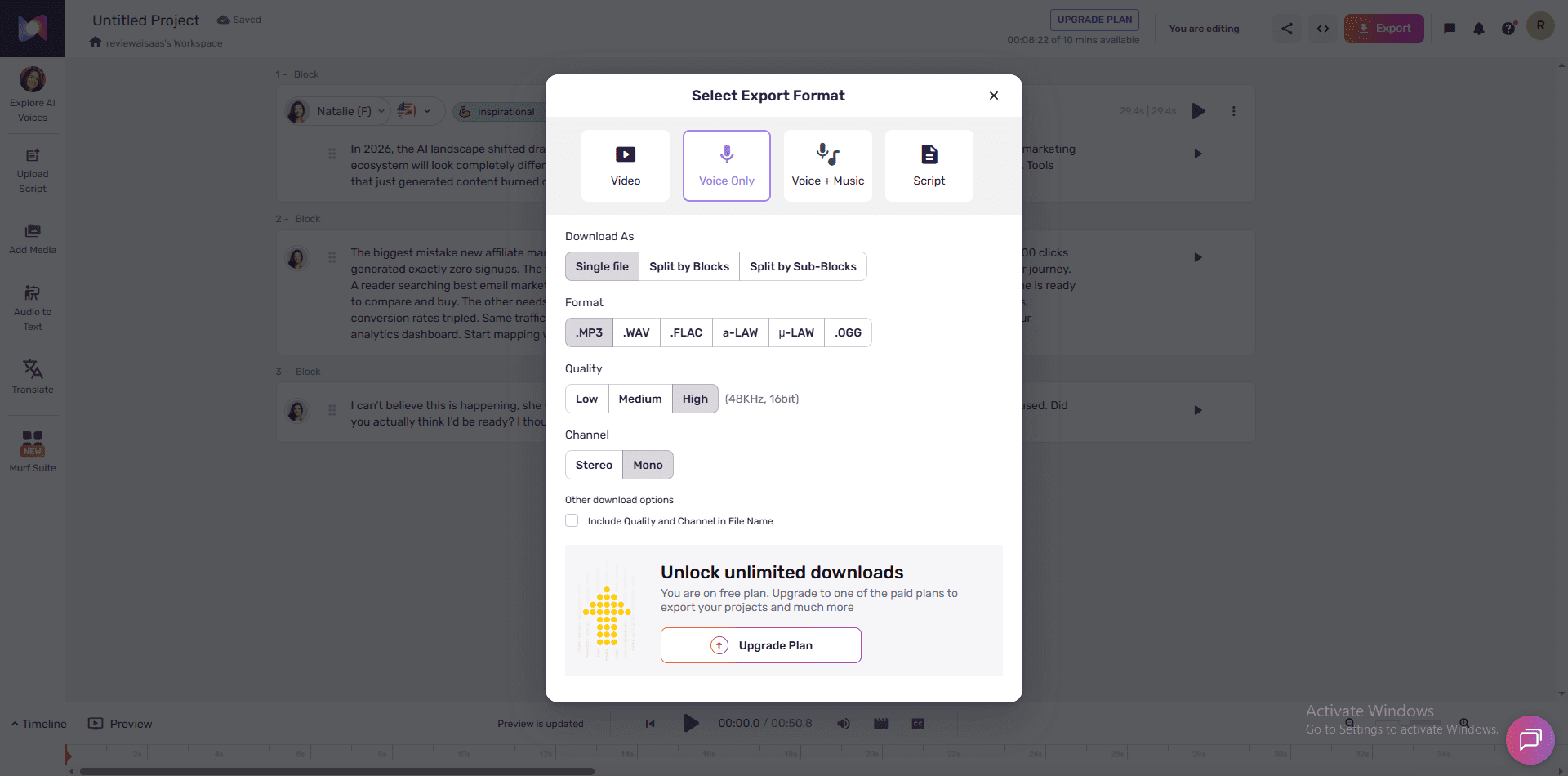
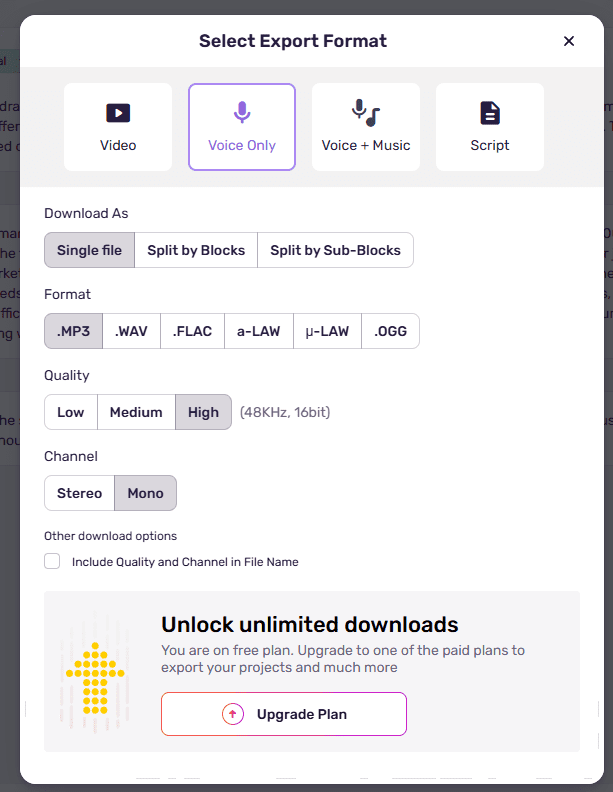
Here’s the thing nobody told me before I signed up: you cannot download anything. I had to find this out by clicking Export myself.
You cannot download any audio on the free plan. Full stop.
You can preview audio in-browser. You can share a project link. But you cannot export an MP3, WAV, or any other file format. The export button is replaced by an “Unlock unlimited downloads — You are on free plan. Upgrade to one of the paid plans to export your projects” message.
For most people reading this, that means the free plan is useful for exactly one thing: deciding whether you like Murf enough to pay for it. You cannot deliver a client file. You cannot drop it into a YouTube draft. You cannot test it in CapCut. Nothing leaves the browser.
2. The 10 Minutes Is LIFETIME — Not Monthly ⚠️
This one surprised me more than the download wall. I assumed “10 minutes” worked like ElevenLabs — resets every month. It does not.
Murf’s pricing page says: “Try Business Plan for free — 10 mins of Voice Generation.” Most people read this and assume it’s 10 minutes per month, like ElevenLabs’ 10,000 characters/month. It is not.
The 10 minutes is a one-time lifetime allocation. It does not reset. Once you use it, you’re done with the free tier.
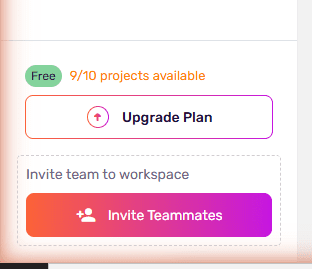
To put that in perspective: a typical 5-minute explainer video script takes about 4–5 minutes of audio. You’ll exhaust your free allowance in 2 projects. I ran 3 scripts (a 200-word script, a year-numbers test, and an emotion dialog) and had only 8 minutes 22 seconds remaining — meaning those three tests alone consumed roughly 1 minute 38 seconds.
And crucially: every regeneration counts. On Murf free, if you tweak pacing or pronunciation and click Generate again, that eats more of your lifetime cap. There are no free regenerations.
Compare this to ElevenLabs free plan (10,000 characters/month — resets monthly, plus 2 free regenerations per project) or MiniMax Audio free plan (10,000 credits/month — resets monthly with commercial rights). Murf’s free plan is strictly for evaluation, not production.
3. No Commercial Rights
Even if you could somehow use your in-browser previews, the free plan carries zero commercial rights. Any audio you generate is strictly for personal testing. This means no YouTube monetization, no client deliverables, no affiliate video content — nothing revenue-generating.
4. Advanced Voice Controls Are Locked
On paid plans (Business and above), Murf offers three powerful controls that make a real difference in output quality:
- Emphasis: Highlight specific words for stronger stress
- Variability: Add natural variation to prevent the “robotic repetition” effect in long content
- Say It My Way: Record yourself saying a phrase and have the AI replicate your exact delivery
On the free plan, you get pitch, speed, and basic pauses only. The voices still sound good, but you’re missing the tools that make Murf truly professional-grade.
5. No Voice Cloning
Voice cloning is Enterprise-only on Murf. This requires contacting their sales team and is priced separately. Compare that to ElevenLabs (voice cloning on free plan from 30 seconds of audio) and MiniMax Audio (voice cloning free from just a 10-second clip). For free-plan users, this gap is significant.
Voice Quality Test Results
Despite the harsh limitations on what you can do with the output, the voice quality itself is legitimately impressive. After listening through clips generated on Murf, ElevenLabs, and MiniMax with identical scripts:
| Quality Criterion | Murf AI Score | ElevenLabs Score | Notes |
|---|---|---|---|
| Naturalness | 4.3 / 5 | 4.8 / 5 | ElevenLabs sounds slightly more human |
| Pacing | 4.5 / 5 | 4.5 / 5 | Tie — both handle pauses well |
| Emotion accuracy | 4.5 / 5 | 3.5 / 5 | Murf’s named presets win here |
| Clarity | 4.8 / 5 | 4.8 / 5 | Both excellent |
| Zero robotic artifacts | 4.2 / 5 | 4.7 / 5 | ElevenLabs cleaner on long-form |
| Overall | 4.3 / 5 | 4.8 / 5 | ElevenLabs edges ahead on raw quality |
The key finding: Murf’s emotion system is its biggest advantage. When I applied “Sad” style vs default, the audio stretched 22% longer — Murf actually changes pacing, not just tone. It sounds like a sad person speaking. ElevenLabs changes tone intensity via sliders but keeps the same duration. Different philosophies, and Murf’s named presets are faster and more intuitive if you know what mood you want.
For year-number-heavy content, Murf scored 4.3/5 vs ElevenLabs’ 4.8/5. ElevenLabs handles “2026” as “twenty-twenty-six” more consistently. On a 100-word year-numbers script, Murf ran 29.4 seconds vs ElevenLabs’ 26 seconds — ElevenLabs delivers noticeably tighter pacing on dense numerical content.
Full audio comparisons with actual clips: see our Murf vs ElevenLabs head-to-head test.
FREE WEEKLY BRIEFING
Get AI tool insights before everyone else
One real story. One tested tool. One takeaway. Every week. No spam, no sponsored picks.
No thanks, I already know enough
Murf AI Pricing — Is Upgrading Worth It?
👉 Check current Murf AI pricing →
| Plan | Price (Annual) | Voice Generation | Downloads | Commercial Rights | Key Add |
|---|---|---|---|---|---|
| Free | $0/mo | 10 min (lifetime ⚠️) | ❌ No | ❌ No | — |
| Creator | ~$19/mo | 24 hrs/year (~2 hrs/mo) | ✅ Unlimited | ✅ Yes | 200+ voices, Canva, Google Slides |
| Business | ~$66/mo | 96 hrs/year (~8 hrs/mo) | ✅ Unlimited | ✅ Business License | Emphasis, Variability, Say It My Way, PPT |
| Enterprise | Custom | Unlimited | ✅ Custom | ✅ Full Broadcasting | Voice Cloning, SSO, Collaboration |
Free → Creator ($19/mo): What Actually Changes?
The Creator plan is the first meaningful tier. You unlock: unlimited downloads, commercial rights, all 200+ voices and styles, Canva integration, Google Slides add-on, and 24 hours of voice generation per year (2 hours/month). For most individual content creators, this is the sweet spot.
The price jump is real though. At $19/month, Murf Creator is more than 3× ElevenLabs’ Starter at $6/month. For pure cost-per-output, ElevenLabs wins. Murf’s justification is the block editor workflow and use-case-oriented voice library — which matters if you’re doing structured productions, not just quick clips.
Creator → Business ($66/mo): The Professional Jump
Business adds the three advanced controls — Emphasis, Variability, Say It My Way — plus Business License (required for agency work and client deliverables), PowerPoint integration, and Audio-to-Text. The jump from $19 to $66 is steep, but if you’re producing content professionally and need those granular controls, it’s justified. If you’re a solo creator, Creator at $19 is likely your ceiling.
Murf AI Free vs ElevenLabs Free vs MiniMax Free
| Murf AI Free | ElevenLabs Free | MiniMax Free | |
|---|---|---|---|
| Free Allocation | 10 min (lifetime ⚠️) | 10,000 chars/month ♻️ | 10,000 credits/month ♻️ |
| Resets Monthly? | ❌ Never | ✅ Yes | ✅ Yes |
| Downloads | ❌ Blocked | ✅ Yes | ✅ Yes |
| Commercial Use | ❌ No | ❌ No (paid only) | ✅ Yes (free) |
| Voice Quality | ⭐⭐⭐⭐ (4.3/5) | ⭐⭐⭐⭐⭐ (4.8/5) | ⭐⭐⭐⭐ (4.0/5) |
| Voice Library | 200+ voices | 3,000+ voices | 100+ voices |
| Editor Type | Block-based studio ✅ | Simple text box | Text box + emotion tags |
| Voice Cloning | ❌ Enterprise only | ❌ Paid only | ✅ Free (10-sec clip) |
| Music Generation | ❌ No | ✅ Yes (limited) | ✅ Yes (Music 2.6) |
| Emotion Control | ✅ Named presets (free) | ❌ Paid only | ✅ Inline tags (free) |
| Entry Paid Plan | $19/mo | $6/mo | ~$4.50/mo |
| Best For Free | Testing Murf workflow | Testing + small production | Budget production + music |
For a full breakdown of all three with real audio samples: MiniMax vs ElevenLabs vs Murf AI 3-way comparison.
Something I Noticed About Who Murf Is Actually Built For
Spending time inside Murf’s product back-to-back with ElevenLabs and MiniMax made one thing obvious that the landing page won’t tell you: Murf is not targeting solo creators. It’s targeting teams and businesses.
Inside Murf’s voice library, the filter tabs read: E-Learning & Presentations, Advertisements, Audiobooks, YouTube, IVR, Games, Podcasts/Blogs, Documentary, Explainers. That’s a B2B taxonomy — designed for L&D departments building training videos, not a solo creator grinding out content at midnight. The project structure, named blocks, timeline preview, export-to-video — it all feels enterprise-oriented.
This explains why the free plan blocks downloads. Murf can afford to do that because their real buyers — enterprise teams, L&D managers — are going to pay regardless. The free plan is a demo slot designed to get sign-off from a decision-maker, not to let a solo blogger produce content for free.
ElevenLabs needs solo creators to test inside their real workflow (hence free downloads). MiniMax is aggressively acquiring users with generous free credits. Murf is running a different sales motion entirely — and the free plan reflects that.
What I find interesting about this — and I haven’t seen any other reviewer mention it — is what it means for you as someone comparing these tools. If you’re a solo creator working on YouTube scripts or podcast intros, the free plan comparison isn’t really fair to Murf. You’re testing a B2B product using a B2C use case. Murf will always “lose” on free-plan generosity because it’s not trying to win on that. It’s trying to get a corporate procurement approval, not win your personal signup.
I actually respect that clarity, even if it makes Murf harder to recommend for individual creators on a tight budget. At least you know exactly what you’re dealing with: a professional-grade tool with a very deliberate paywall. Compare that to tools that give you generous free credits that quietly expire, or voice quality that degrades on the free tier. Murf is honest about the wall. It just doesn’t warn you loudly enough about the lifetime cap.
Who Should Use Murf AI’s Free Plan?
✅ Good For:
- Evaluating before buying — genuinely good for this. You’ll get a real feel for the interface, voice quality, and block-based workflow before committing.
- E-learning developers who want to test specific voices and emotion styles before committing to a Creator plan for their course.
- Marketing managers assessing whether Murf fits a team’s workflow before getting budget approval.
- Freelancers demoing Murf to a client before pitching a project with it.
- Anyone switching from ElevenLabs or MiniMax who wants to compare the block editor experience before paying.
🚫 Not Good For:
- Anyone who needs to deliver actual audio files — you can’t download anything.
- Bloggers or YouTubers expecting to generate content and use it immediately.
- Developers — no API access on the free plan; look at Murf API pricing or consider ElevenLabs’ free API.
- Budget-conscious creators comparing free plan value — MiniMax and ElevenLabs offer more usable free-tier output.
- Anyone who regenerates often — every attempt eats your lifetime cap.
Is murf-ai right for you?
- ✓ Evaluating AI voice tools before buying — best product demo
- ✓ E-learning developer testing voices for a course
- ✓ Marketing manager assessing tool for team approval
- ✓ Structured script work — block editor beats all rivals
- ✓ Want named emotion presets (Inspirational, Terrified, Furious) — unique to Murf
- ✕ Need to download audio files — zero downloads on free
- ✕ Creating monetized content — no commercial rights
- ✕ Budget creator — ElevenLabs Starter ($6/mo) gives more for less
- ✕ Regenerating often — every attempt eats your lifetime 10-min cap
- ✕ Developers needing API access — not available on free plan
Murf AI Free Plan vs. Paid: My Honest Verdict
Murf AI’s free plan is best understood as what it is: a very well-crafted product demo. The interface is genuinely the best in the TTS market. The voices are excellent. The block-based editor is a real differentiator for content creators who work with structured scripts. The emotion presets — actual named styles that change pacing, not just sliders — are something ElevenLabs and MiniMax don’t match on the free tier.
But the lifetime 10-minute cap and zero-download policy mean you’re not getting a free tool. You’re getting a free trial with no expiry date on when you start it.
If you test it and love the workflow, Creator at $19/month is solid value — 24 hours of generation/year, unlimited downloads, commercial rights. That’s roughly 2 hours of voiceover per month, which covers most individual creator use cases. The block editor alone makes it worth considering over ElevenLabs if you do structured script work.
If you need more emotional control, advanced features, or business licensing, Business at $66/month is the step up that makes Murf AI a professional-grade studio — but it’s expensive. At that price, you should be using every feature.
My score: 6.5/10 for the free plan specifically.
The product is a 9/10. The free plan is a 6.5/10 because it’s a gateway, not a tool.
👉 Try Murf AI Free Plan → (No credit card required)
🔊 Try Murf AI Text-to-Speech → Test the voice quality free — no credit card needed.
⚠️What About Play.ht? (Important Warning for 2026)
If you’ve been researching AI voice generators and came across recommendations for Play.ht (also written as PlayHT or PlayAI) — you need to know this before you sign up anywhere.
Play.ht permanently shut down in December 2024. The service is no longer available. Any links, reviews, or comparisons mentioning Play.ht as a current alternative are outdated. If you’re looking for a Play.ht alternative, the three tools we’ve tested on this site — Murf AI, ElevenLabs, and MiniMax Audio — are all actively maintained and genuinely free to start.
👉 See our full comparison: MiniMax Audio vs ElevenLabs vs Murf AI — 3-Way Free Plan Test
📚 Related Reading
- Murf AI vs ElevenLabs Free Plan — Head-to-Head Test: Same scripts, same voices, side-by-side audio comparison. Which one actually sounds better?
- MiniMax Audio vs ElevenLabs vs Murf AI — 3-Way Free Plan Test: Full scorecard across 7 categories. The only comparison that tests all three on identical scripts.
- MiniMax Audio vs ElevenLabs Free Plan Test: If Murf’s free plan doesn’t suit you, here’s why MiniMax might be your best free alternative.
- How to Build an AI Podcast With ElevenLabs (Free Plan): Step-by-step guide to launching a fully automated AI podcast — using the same ElevenLabs voice technology reviewed here.
FREE WEEKLY BRIEFING
Get AI tool insights before everyone else
One real story. One tested tool. One takeaway. Every week. No spam, no sponsored picks.
No thanks, I already know enough
Frequently Asked Questions
Can I download audio on Murf AI’s free plan?
No. Audio downloads are completely blocked on the free plan. You can preview audio in your browser and share project links, but exporting any file format requires a paid plan. This is Murf’s biggest free-plan limitation compared to ElevenLabs and MiniMax.
Does the Murf AI free plan reset every month?
Murf AI vs ElevenLabs — Which Free Plan Actually Wins?
Same scripts, same voices, real audio samples. We ran the head-to-head so you don't have to.
No — and this surprises most users. The 10 minutes of voice generation on the free plan is a one-time lifetime allocation. It does not reset monthly. Once you use it, you need to upgrade to continue generating audio. Compare this to ElevenLabs (10,000 chars/month, resets monthly) and MiniMax (10,000 credits/month, resets monthly) — both are much more generous on ongoing free access.
Is Murf AI really free?
Yes, it’s genuinely free to sign up with no credit card. But the free tier is designed for evaluation, not production. The most meaningful production features — downloads, commercial rights, and ongoing monthly generation — all require a paid plan.
How many projects can I create on Murf AI free?
Up to 10 projects on the free plan. Each project can have multiple blocks and voices assigned. The 9/10 counter in the sidebar tracks your usage in real time.
What’s the best free alternative to Murf AI?
For downloading and using audio immediately: ElevenLabs — 10,000 characters/month (resets monthly), free downloads, and 2 free regenerations per project. For commercial use on a free plan: MiniMax Audio — 10,000 credits/month (resets monthly), commercial rights included, voice cloning from 10 seconds, and AI music generation. See our full 3-way comparison for side-by-side results.
Is Murf AI good for YouTube?
Not on the free plan — no downloads, no commercial rights. On Creator ($19/mo) or Business ($66/mo), yes. The voice quality is professional-grade and the block editor makes it easy to match pacing to different sections of a script. But for budget-conscious YouTubers, ElevenLabs ($6/mo Starter) or MiniMax Audio (~$4.50/mo) are cheaper paths to commercial-use downloads.
How does Murf AI compare to ElevenLabs?
On free plans: ElevenLabs wins on value — more audio, free downloads, and monthly reset. On paid plans: Murf wins on structured workflow — block editor, named emotion presets, PowerPoint integration. ElevenLabs wins on raw voice quality and cost per minute. Full test with same scripts, timings, and audio samples: Murf vs ElevenLabs head-to-head.
About the Author
AI VOICE — FULL REVIEW SERIES
10K credits/mo resets · Voice Isolator 60K free · Score: 4.6/5
Same 3 scripts · Real audio · Timing data · Who actually wins?
Full scorecard · 7 categories · Same scripts on all 3 tools
All tools ranked · Pillar guide · Updated June 2026
Step-by-step · Free plan only · Full workflow guide
Mr Review AI Team is the founder of mrreviewai.com, an independent AI tool review site based in Vietnam. He has personally tested 20+ AI voice, writing, and SaaS tools using real paid and free accounts — not spec sheets or press releases. His reviews focus on what actually works for solo creators and small teams, with an emphasis on free plans, pricing transparency, and honest limitations. This review was written and tested on May 30, 2026. Account used: reviewaisaas (Murf AI Free Plan).

About the Author
Mr Review AI Team
This review was researched and tested hands-on by the Mr Review AI editorial team. We create real accounts, run actual campaigns, and document every limitation we encounter — no vendor demos, no copied spec sheets. Our reviews are editorially independent: no tool pays for a score or placement, ever. Where we have affiliate relationships, we disclose them transparently on each page.
Want to know who founded this site and what drives our editorial standards? → Meet the founder on our About page