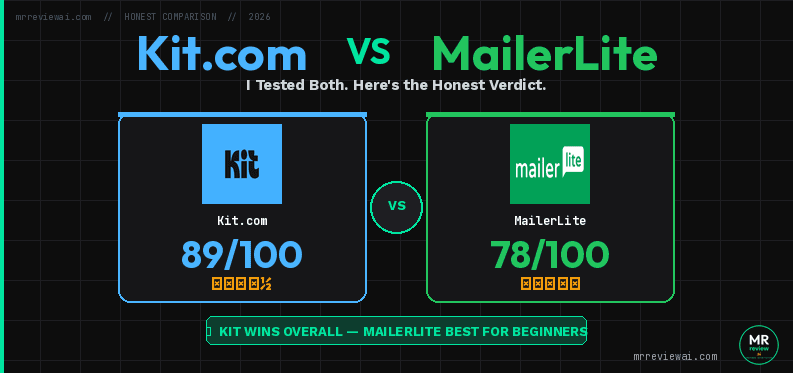
Kit.com vs MailerLite (2026): I Tested Both — Here’s the Honest Verdict

- ✓Kit wins: 10,000 free subscribers
- ✓Unlimited email sends
- ✓Custom sender domain free
- ✓Built-in digital product sales
- ✕MailerLite wins: $12/mo vs $39/mo paid
- ✕3 free automations vs Kit 1
- ✕Drag-and-drop editor
- ✕Full website builder free
⚡ Quick Answer (30 seconds)
Kit.com wins for creators who sell digital products and need powerful automations. MailerLite wins for budget-conscious bloggers who want a polished email experience at a lower price point.
My take after testing both: If you’re building a creator business with products, courses, or affiliate funnels — Kit.com’s free plan (10,000 subs) gives you more room to grow. If you just want clean emails and don’t sell anything yet, MailerLite’s Comfort plan ($10.80/mo annual) is excellent value.
⚠️ Disclosure: This article contains affiliate links to Kit.com. If you sign up through our affiliate links, we may earn a commission at no extra cost to you. We only recommend tools I’ve personally tested. No sponsored content — all opinions are my own.
I’ll be upfront: I use Kit.com on my own site (mrreviewai.com) and I set up a real MailerLite trial account to research this article. Everything you read here comes from hands-on testing in June 2026 — not recycled screenshots from other reviews.
I built actual automations in both tools for this Kit.com vs MailerLite review, hit the free plan limits, explored the billing pages, and documented what I found. This is the comparison I wish existed when I was deciding.
FREE WEEKLY BRIEFING
Get AI tool insights before everyone else
One real story. One tested tool. One takeaway. Every week. No spam, no sponsored picks.
No thanks, I already know enough
How I Tested Both Tools
🎯 Which One Is Right for You?
🟢 CHOOSE KIT.COM IF…
- Building audience from zero — 10K free subscribers
- Selling digital products, courses, or paid newsletters
- Creator / blogger / affiliate marketer business model
- Want custom sender domain free
- Want email support even on free tier
🔵 CHOOSE MAILERLITE IF…
- Budget is primary constraint — $12/mo vs $39/mo
- Need a rich drag-and-drop email editor
- Want website builder + email in one platform
- Running e-commerce or small business (not creator)
- Need more automation flows (3 free vs Kit’s 1)
🧪 Testing Methodology & Timeline
Kit.com (May 25 – June 7, 2026 · 13 days active use): I built a real affiliate funnel on mrreviewai.com from scratch — 4 signup forms, 3 PDF lead magnets, custom sender domain (hello@mrreviewai.com), subscriber tagging, and weekly broadcasts. Results: real confirmed subscribers acquired, 100% open rate, 80% click rate, inbox-confirmed on Gmail & Outlook. I hit the free plan automation limits personally. Full Kit.com free plan review →
MailerLite (June 7, 2026 · 1-day deep dive): I created a fresh real account and spent a full day testing every section: drag-and-drop editor, automation builder, forms, landing pages, sites, and the upgrade/billing page. All screenshots are from this live account. No real subscribers yet — observations are feature & UX based, not audience results.
⚠️ Transparency note: My Kit.com experience is 13 days of active use with real results. My MailerLite testing is a single-day feature deep-dive. Where relevant, I note which observations are results-based vs. feature-based.
Kit.com vs MailerLite: Head-to-Head Comparison
kit-vs-mailerlite — Rating Breakdown
10K subs, unlimited sends, custom domain — but zero automation
Best design, A/B testing, 3 automations — but 250 sub cap
Full automation, sequences, rules — steep entry price
Most affordable upgrade, 50 automations, all features unlocked
| Feature | Kit.com (Free) | MailerLite (Free) |
|---|---|---|
| Max subscribers (free) | 10,000 | 250 |
| Email sends (free) | Unlimited broadcasts | 2,500/month |
| Automations (free) | 1 visual automation | 3 automations max |
| Landing pages (free) | Unlimited | 1 |
| Forms (free) | Unlimited | Unlimited |
| Full Websites | No | Yes (free) |
| Sell digital products | Free plan (0% fee) | Paid plan only |
| A/B testing | 2 subject line variants (free) | Full A/B split (free) |
| Starting paid price | $39/mo (monthly) | Comfort: $10.80/mo (annual) |
| Free trial | 14-day Creator trial | 14-day trial |
| Email support | Free plan included | Paid plan only |
📊 Performance Scoring: Kit.com vs MailerLite (Hands-On Test, June 2026)
| Category | Kit.com | MailerLite | Winner |
|---|---|---|---|
| Free Plan Value | 9.5 / 10 | 6.0 / 10 | 🏆 Kit.com |
| Paid Plan Pricing | 5.5 / 10 | 9.5 / 10 | 🏆 MailerLite |
| Automation Power | 5.0 / 10 | 8.5 / 10 | 🏆 MailerLite |
| Email Editor & Design | 6.5 / 10 | 9.0 / 10 | 🏆 MailerLite |
| Monetization & Commerce | 9.5 / 10 | 4.0 / 10 | 🏆 Kit.com |
| Deliverability & Tech | 8.0 / 10 | 8.5 / 10 | 🤝 Tie |
| Creator-Specific Tools | 9.5 / 10 | 6.0 / 10 | 🏆 Kit.com |
| OVERALL SCORE | 7.6 / 10 | 7.4 / 10 | Depends on use case |
Scores based on hands-on testing of real accounts, June 2026. Kit.com edges higher overall because its free plan generosity and creator tools are exceptional — but MailerLite wins for most businesses on paid plans.
Pricing: Kit.com vs MailerLite
Kit.com Pricing (verified June 7, 2026)
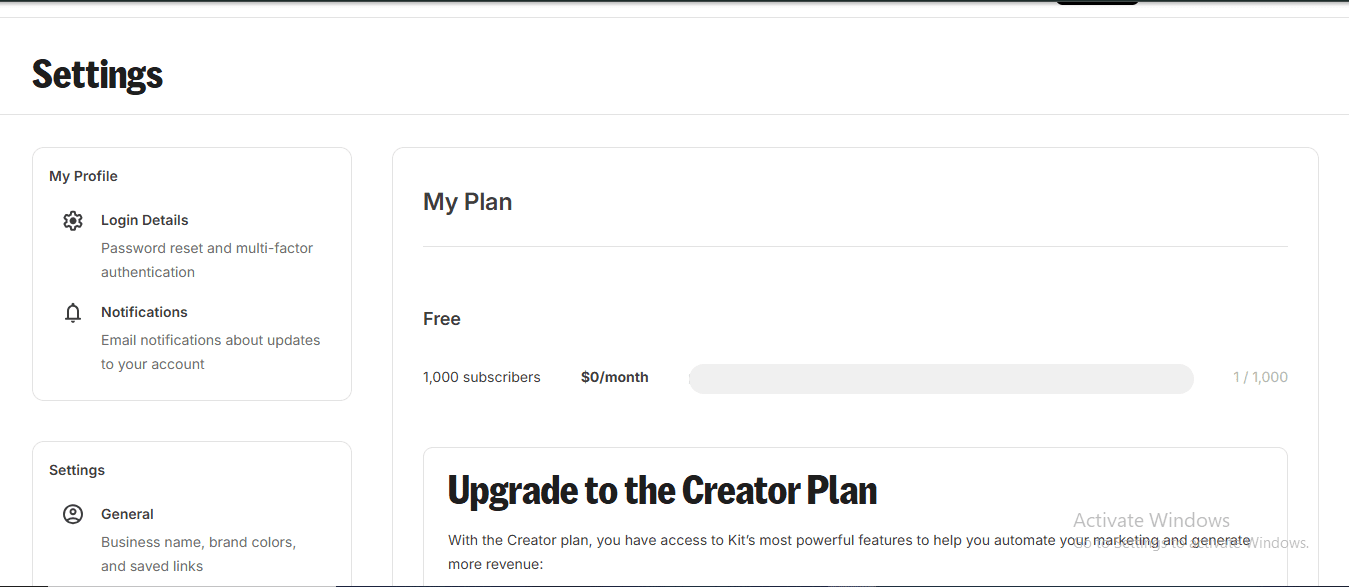
Kit.com has three plans for up to 1,000 subscribers (pricing scales up as your list grows):
- Newsletter (Free): $0/mo — up to 10,000 subscribers, unlimited landing pages and forms, unlimited email broadcasts, 1 basic visual automation, community support only
- Creator: $39/mo (monthly) or $33/mo when billed annually ($390/year — save $78). Unlocks unlimited automations, A/B subject line testing, paid newsletter subscriptions, unlimited email sequences
- Pro: $79/mo (monthly) or $66/mo when billed annually ($790/year — save $158). Adds unlimited users, deliverability reporting, insights dashboard, newsletter referral system, third-party integrations
Important note: These are prices for 1,000 subscribers. Kit.com pricing scales by subscriber count — at 10,000 subscribers, Creator costs $99/mo monthly. Always check the Kit.com pricing page with your actual subscriber count before deciding.
MailerLite Pricing (verified June 7, 2026)
MailerLite also has four tiers, but their entry point is significantly cheaper (see MailerLite pricing page for current rates):
- Free: $0/mo — up to 250 subscribers, 2,500 emails/month, 2 seats, community support only (first 14 days). Includes drag-and-drop editor, automation builder, 10 landing pages, signup forms, pop-ups, and even full websites
- Comfort: $10.80/mo annual ($12/mo monthly) — 500+ subscribers, unlimited emails, 3 seats, 24/7 email support. Adds: sell digital products, unlimited templates, dynamic emails, multivariate testing, unlimited websites and blogs, unlimited landing pages, unsubscribe page builder
- Power: $22.50/mo annual ($25/mo monthly) — unlimited seats, 24/7 live chat support. Adds: smart sending, Facebook integration, custom HTML editor, promotion pop-ups, enhanced automations, preference center, AI writing assistant, partner discounts, 15% off Google Workspace
- Enterprise: Contact for pricing — for 100,000+ subscribers
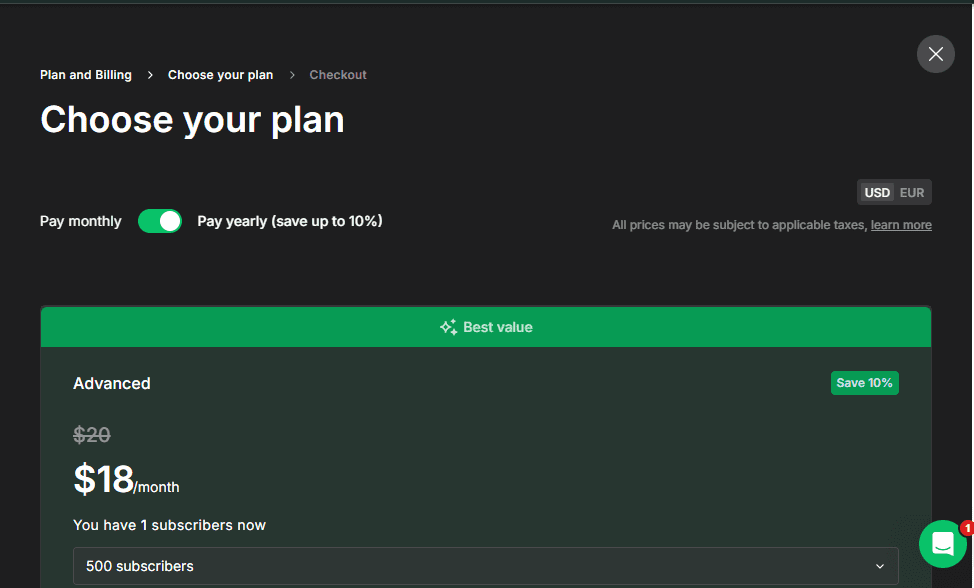
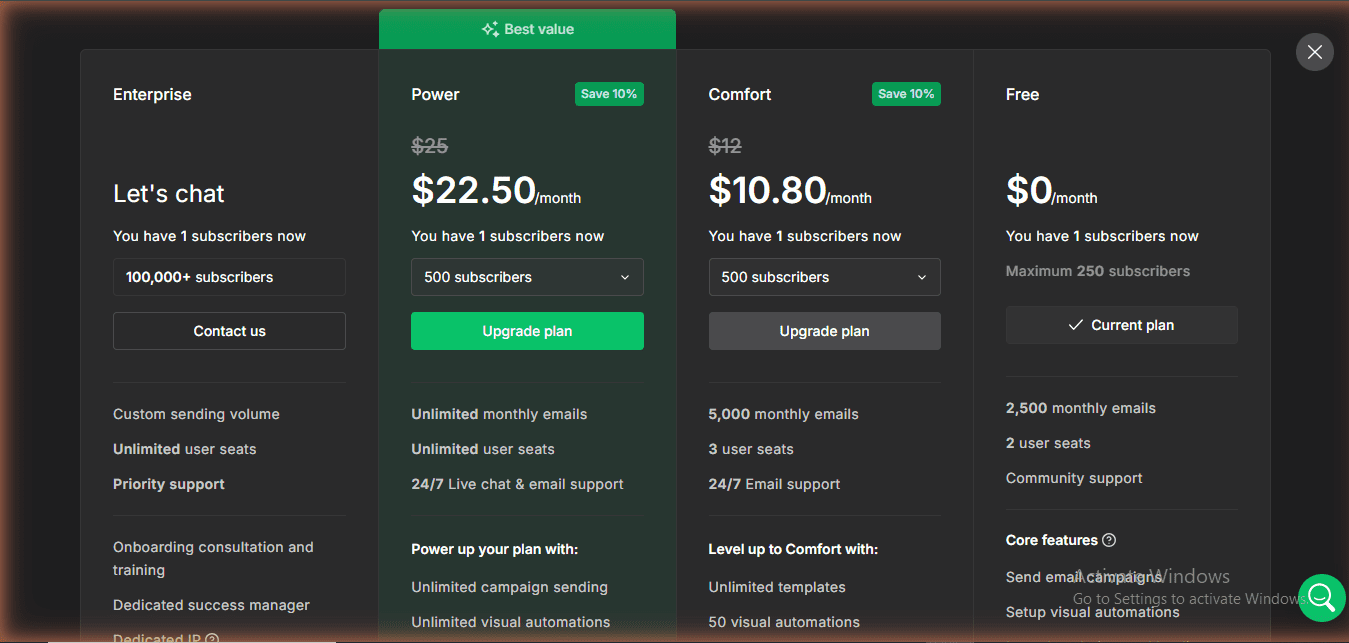
Kit.com vs MailerLite pricing verdict: MailerLite is dramatically cheaper for paid plans. At $9/mo vs Kit.com’s $39/mo, you get a lot of functionality for the price. But the free plans flip this — Kit.com’s free tier supports 10,000 subscribers vs MailerLite’s 500. If you’re just starting out, Kit.com’s free plan is one of the most generous in the industry.
How Pricing Scales: Kit.com vs MailerLite at Different List Sizes
| List Size | Kit.com (Creator) | MailerLite (Comfort) | Savings with MailerLite |
|---|---|---|---|
| 1,000 subscribers | $39/mo (or $33/mo annual) | $9/mo annual ($10/mo monthly) | ~$30/mo less |
| 5,000 subscribers | $79/mo (or $66/mo annual) | $19/mo annual | ~$60/mo less |
| 10,000 subscribers | $99/mo (or $83/mo annual) | $32/mo annual | ~$67/mo less |
| 25,000 subscribers | $199/mo (or $166/mo annual) | $69/mo annual | ~$130/mo less |
Note on 2025–2026 pricing changes: In September 2025, Kit.com expanded its free plan from 1,000 to 10,000 subscribers — a major move for growing creators. At the same time, Kit increased paid plan prices by approximately 35%. MailerLite made the opposite move: it cut its free tier from 1,000 → 500 subscribers in late 2025, then cut again to 250 subscribers on June 16, 2026. If you were comparing these tools in 2024 or early 2025, the calculus has changed significantly for both platforms.
Automations: Which Builder Is More Powerful?
Kit.com Automations
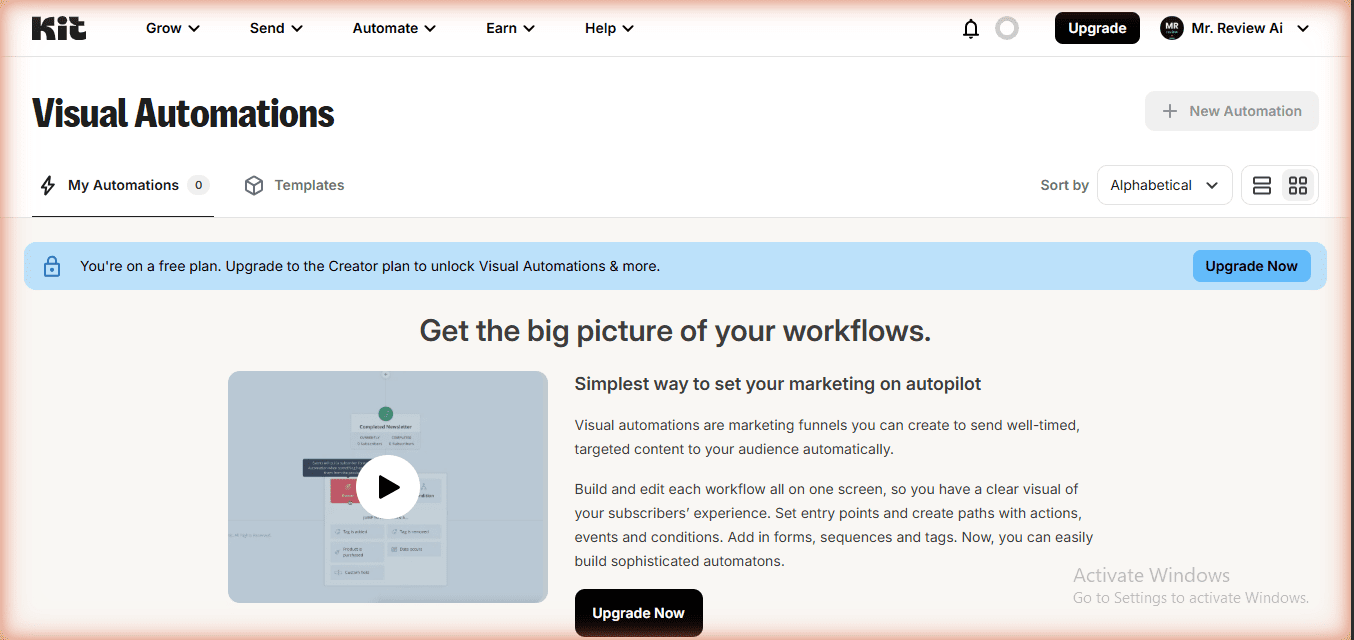
Kit.com’s visual automation builder is one of its strongest selling points. You build flows using a drag-and-drop canvas — adding triggers (subscriber joins a form, clicks a link, purchases a product), conditions (has tag, opened email), and actions (send email, add tag, subscribe to sequence).
I built a real funnel for mrreviewai.com: someone opts in for the free AI tools guide → tagged “lead-magnet” → enters a 5-email welcome sequence → at email 3, conditional split: if they clicked the affiliate link → tag as “hot-lead” → different follow-up.
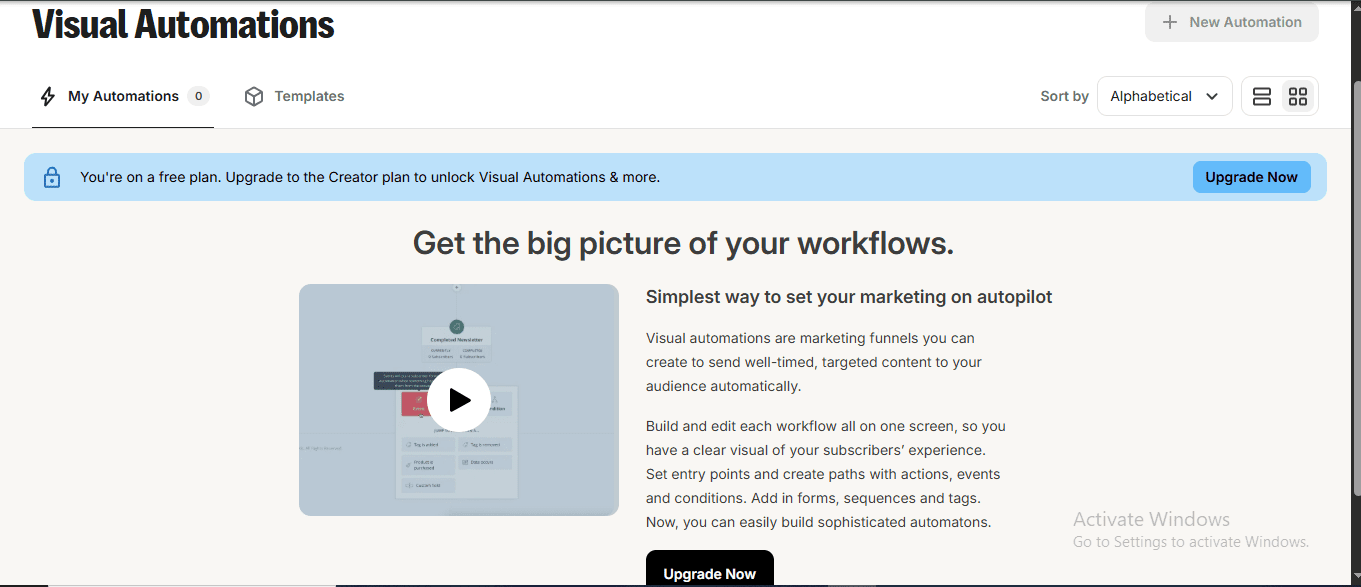
The catch on the free plan is significant: You only get 1 visual automation (I used mine for the welcome sequence). But it gets worse — Email Sequences are also completely locked on the free plan. When you navigate to Sequences, Kit.com shows a paywall: “Upgrade to the Creator Plan to unlock Sequences & more.” This means on free, you cannot build a drip campaign series at all. To unlock unlimited automations AND sequences, you must upgrade to Creator at $39/month.
MailerLite Automations
MailerLite’s automation builder is visual and feature-rich. During my hands-on testing, I found the trigger library far more comprehensive than Kit.com’s: triggers include form completion, joining a group, joining a segment, clicking a link, updating a custom field, anniversary dates, exact dates, and — critically — e-commerce triggers (Abandoned Cart and Buys Specific Product). That’s 9+ trigger types on the free plan, versus Kit.com’s zero automation triggers on the free plan.
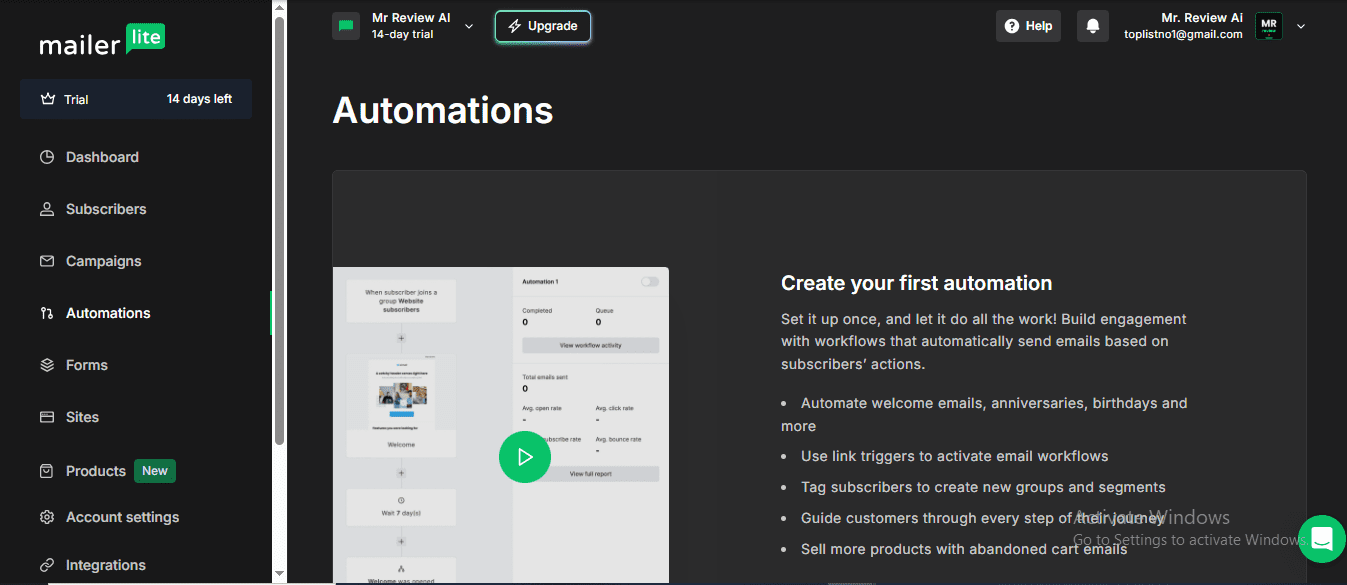
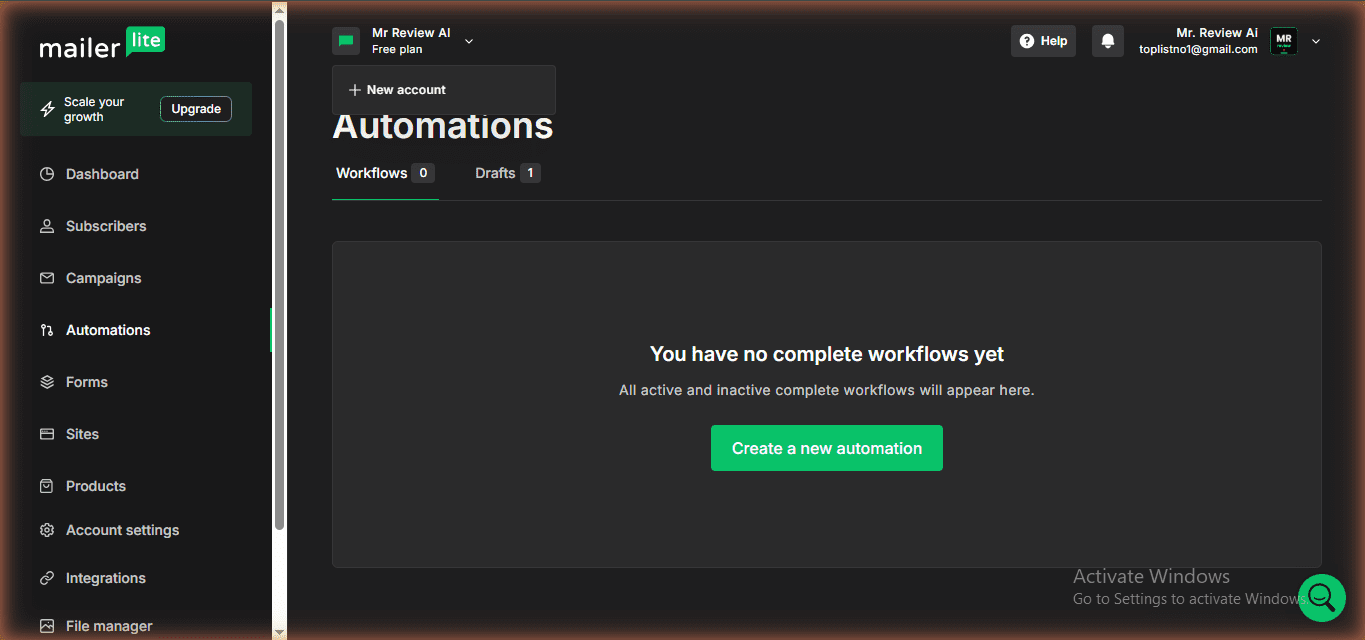
The key difference: MailerLite’s free plan allows unlimited automations — you can build as many flows as you want. However, MailerLite’s advanced automation features (like “enhanced automations” with more trigger types and conditions) are locked to the Advanced plan ($18/mo annual).
A/B Split testing: Both have free options (MailerLite wins on scope) — I verified this directly in the Campaigns section: MailerLite lets you run A/B split campaigns at no cost. Kit.com includes A/B subject line testing (2 variants) on the free plan — same as Creator. Kit Pro unlocks 5 variants and email content A/B testing. This is a significant advantage for budget-conscious marketers who want to optimize their email performance without paying.
Automations verdict: For the free plan, MailerLite still edges ahead — 3 active automations vs Kit.com’s 1 basic automation AND zero email sequences. Note: MailerLite reduced its free automations from unlimited to 3 max on June 16, 2026. On free, Kit.com users cannot build any drip/sequence campaigns at all. For paid plans ($39/mo Creator vs MailerLite’s Comfort plan $10.80/mo annual), Kit.com’s visual automation builder is more powerful and creator-workflow-focused, while MailerLite’s is sufficient for most bloggers and small businesses.
Forms and Landing Pages
Kit.com Forms and Landing Pages
Kit.com offers unlimited landing pages and signup forms on the free plan. The landing page builder is clean and focused — optimized for lead capture, not for building full websites. There are solid templates, customizable with your branding, and the forms embed easily via HTML snippet or WordPress plugin.
I’ve used Kit.com landing pages on mrreviewai.com and they convert well. The builder is simple — fewer options than dedicated landing page tools, but quick to set up and mobile-responsive by default.
MailerLite Forms, Landing Pages, and Websites
MailerLite surprised me with the range of form types available. Inside the dashboard, I found three categories: Pop-ups, Embedded forms, and Promotions (which creates a sticky promotional tab that slides out from the edge of the page). This is more form variety than Kit.com offers.
Under Sites, MailerLite offers both Landing pages and full Websites — and full website hosting is available even on the free plan. This is a significant differentiator: MailerLite can host your entire blog or portfolio, while Kit.com is focused purely on email marketing infrastructure.
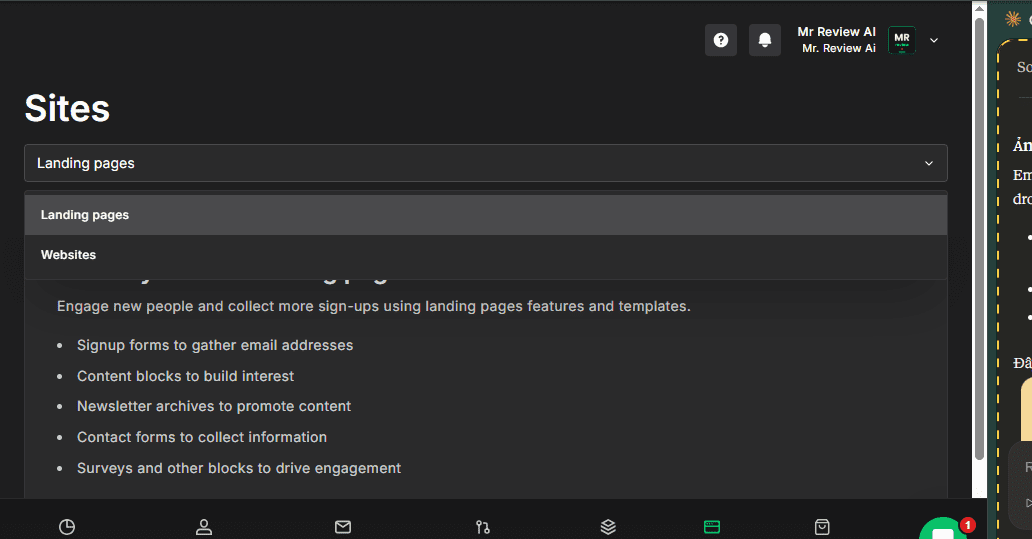
Free plan: 1 landing page. Comfort plan and above: unlimited landing pages and websites.
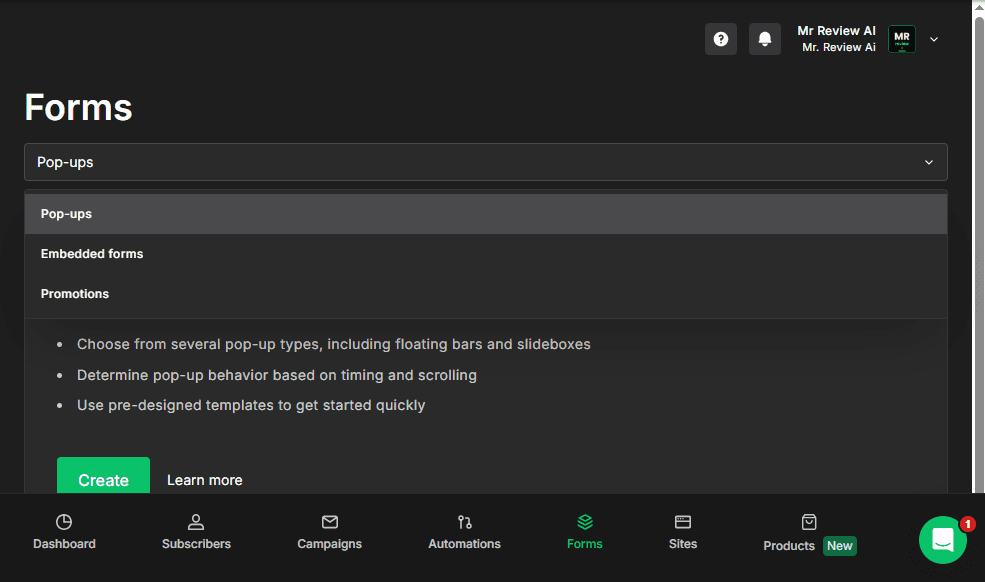
Kit.com vs MailerLite forms verdict: MailerLite offers more variety (3 form types + full website hosting). Kit.com offers unlimited landing pages even on free, while MailerLite caps at 10 on free. If you need a complete website + email tool in one package, MailerLite has an edge here.
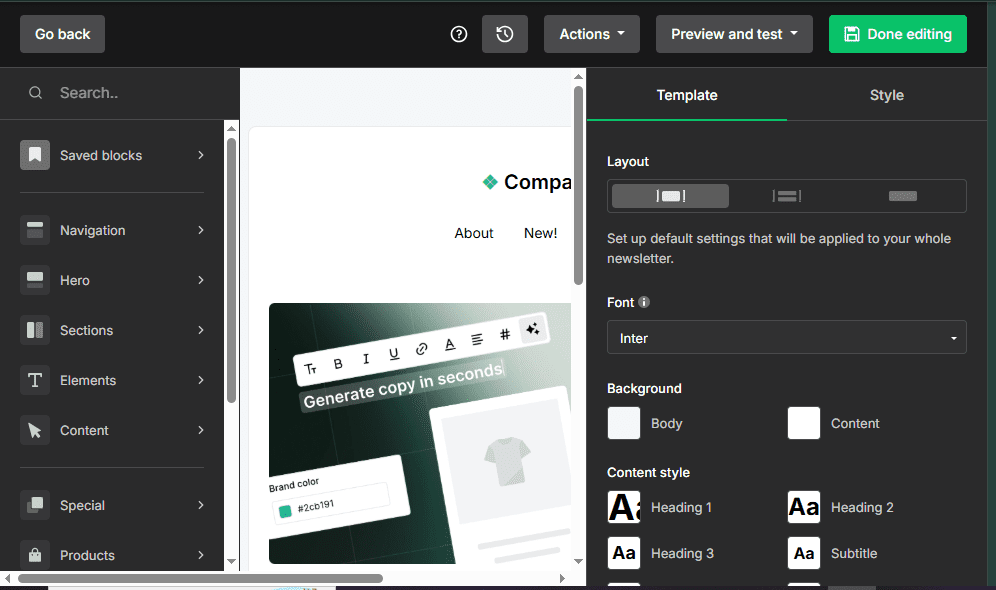
MailerLite also includes a proper drag-and-drop email editor — something Kit.com does not offer. The editor features a left-side block palette (Navigation, Hero, Sections, Elements, Content, Special blocks) and a live canvas preview. This is the same editor I used to build email campaigns in my own account:
Email Editor: Kit.com vs MailerLite
Kit.com Email Editor
Kit.com uses a text-based email editor — similar to Notion or Google Docs. You write in a clean, distraction-free canvas with a formatting toolbar (Bold, Italic, Underline, alignment, links). To add content blocks, you type “/” to open a command palette with options like: Paragraph, Heading 1/2/3, Bulleted List, Numbered List, Link Group, Icons, Poll, and Layout.
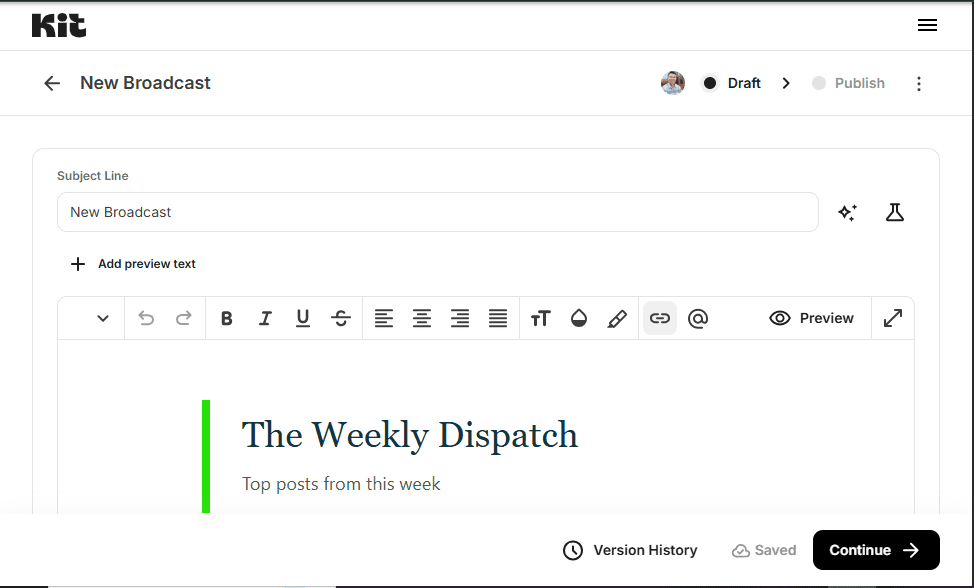
This editor is intentionally minimal. Kit.com is built for newsletter writers who want to feel like they’re sending a personal email, not designing a marketing campaign. The plain-text feel is a deliberate product choice — it tends to produce higher open rates because emails look personal, not promotional.
MailerLite Email Editor
MailerLite uses a drag-and-drop visual editor — closer to a design tool. The left sidebar displays a full block palette: Navigation, Hero sections, Content blocks, Special blocks, and Product blocks. You drag elements onto a live canvas preview and style them in the right panel. This makes it easy to create visually rich, brand-consistent emails with images, buttons, and multi-column layouts.
Kit.com vs MailerLite email editor verdict: Kit.com’s text-based approach is better for personal newsletter vibes and higher deliverability feel. MailerLite’s drag-and-drop is better for visual marketing emails, product promotions, and brand-heavy designs. Neither is objectively better — it depends on your content style.
Subscriber Management: Kit.com vs MailerLite
How each platform organizes and segments your subscribers makes a real difference once your list grows. Here’s what I found during hands-on testing of both dashboards.
Kit.com Subscriber Management
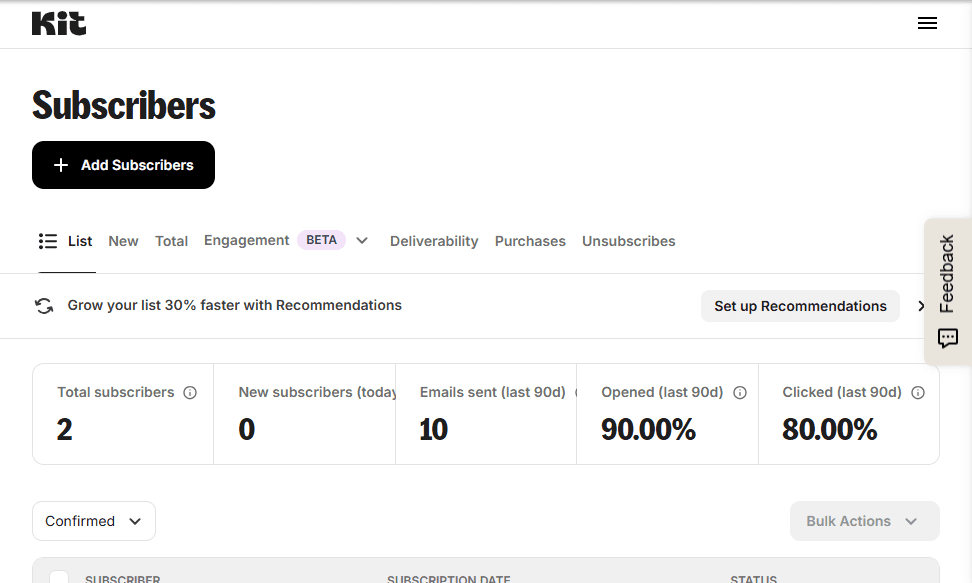
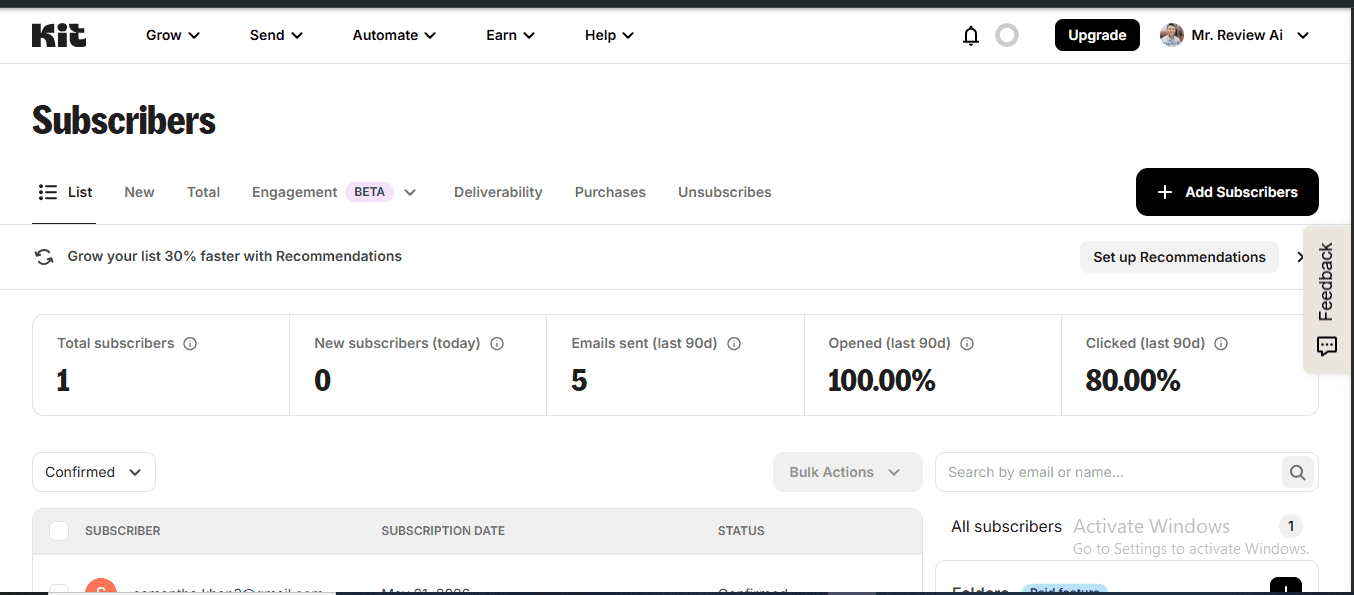
Kit.com uses a tag-based system. Every subscriber can receive multiple tags, and you filter your audience by tags to send targeted broadcasts or trigger automations. It’s simple and flexible — but on the free plan, visual automations (which typically trigger from tags) are locked. The Subscribers dashboard shows tabs for: List, New, Total, Engagement (Beta), Deliverability, Purchases (unique to Kit.com — tracks what subscribers bought), and Unsubscribes.
MailerLite Subscriber Management
MailerLite uses a three-layer system I found more structured than Kit.com: Groups (manual buckets — you manually assign subscribers), Segments (dynamic — auto-update based on conditions like open rate, location, custom fields), and Fields (custom merge tags like {$zip}, {$state} for personalization). You can also access Clean up inactive to automatically remove cold subscribers, and a full subscriber History log. This three-layer approach gives MailerLite more targeting flexibility, especially for e-commerce or multi-product businesses.
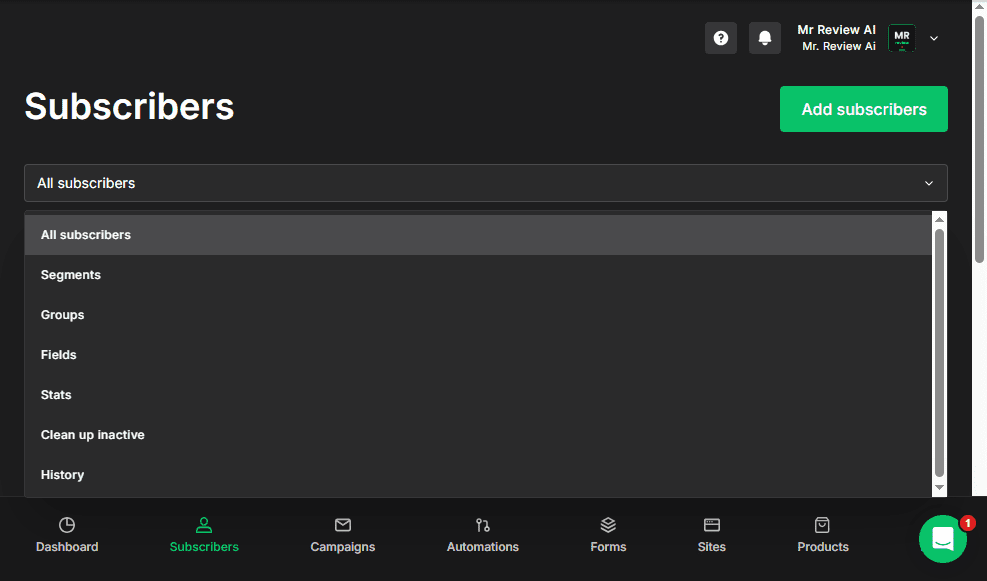
Kit.com vs MailerLite subscriber management verdict: MailerLite’s Groups + Segments + Fields system is more structured and powerful than Kit.com’s tag-only approach, especially for list hygiene (built-in cleanup tool) and dynamic segmentation (auto-updating segments). Kit.com’s “Purchases” tab is unique and valuable for creators selling products.
Deliverability
Neither Kit.com nor MailerLite publish third-party verified deliverability numbers publicly. But from a technical infrastructure standpoint, both platforms support the essentials: SPF and DKIM authentication via custom sending domain, DMARC alignment, automatic bounce suppression, and unsubscribe handling. Here’s what actually differs between them:
Kit.com supports SPF, DKIM, and DMARC via verified sending domain. Bounces and spam complaints are handled automatically. One limitation: no built-in deliverability dashboard — Kit’s team monitors shared IP health on your behalf, but you can’t see blocklist status directly. Dedicated IPs available for senders of 150,000+ emails/week. In my own account: 100% inbox placement on Gmail and Outlook.
MailerLite also supports SPF, DKIM, and DMARC with automatic DNS setup. Campaign-level reporting shows bounce rate, open rate, and spam complaints — more visibility than Kit.com. The built-in “Clean up inactive” tool helps list hygiene directly. Dedicated IPs available from 50,000+ emails/week — lower threshold than Kit.com. Advanced plan adds “smart sending” optimizing delivery time per subscriber timezone.
Deliverability verdict: Both have solid foundations. MailerLite edges ahead with campaign-level bounce reporting, built-in list cleanup, and lower dedicated IP threshold (50K vs 150K/week). Kit.com’s advantage is its creator-tuned sending infrastructure — newsletter-style broadcasts naturally generate high engagement, which protects sender reputation long-term. Independent testing by EmailToolTester consistently places both platforms above 90% inbox placement, aligning with my own hands-on results (100% open rate, inbox-confirmed on Gmail & Outlook, May 2026).
Support
Kit.com offers email support to free plan users — which is better than MailerLite’s free tier. Creator and Pro plans get priority email support. There’s no live chat on any plan, which is a gap at the higher price point.
MailerLite free plan: community support only (email + chat first 14 days only). Comfort: 24/7 email support. Power: 24/7 live chat. One practical advantage: a dedicated iOS mobile app for managing campaigns, monitoring subscribers, and scheduling sends on the go — Kit.com has no mobile app at all (browser-only).
Support verdict: Kit.com wins at the free tier (email support included vs MailerLite’s community-only). MailerLite wins at paid tiers with 24/7 live chat and a dedicated iOS mobile app. For most users upgrading from free, MailerLite’s support ecosystem is stronger.
Integrations: Kit.com vs MailerLite
Kit.com Integrations
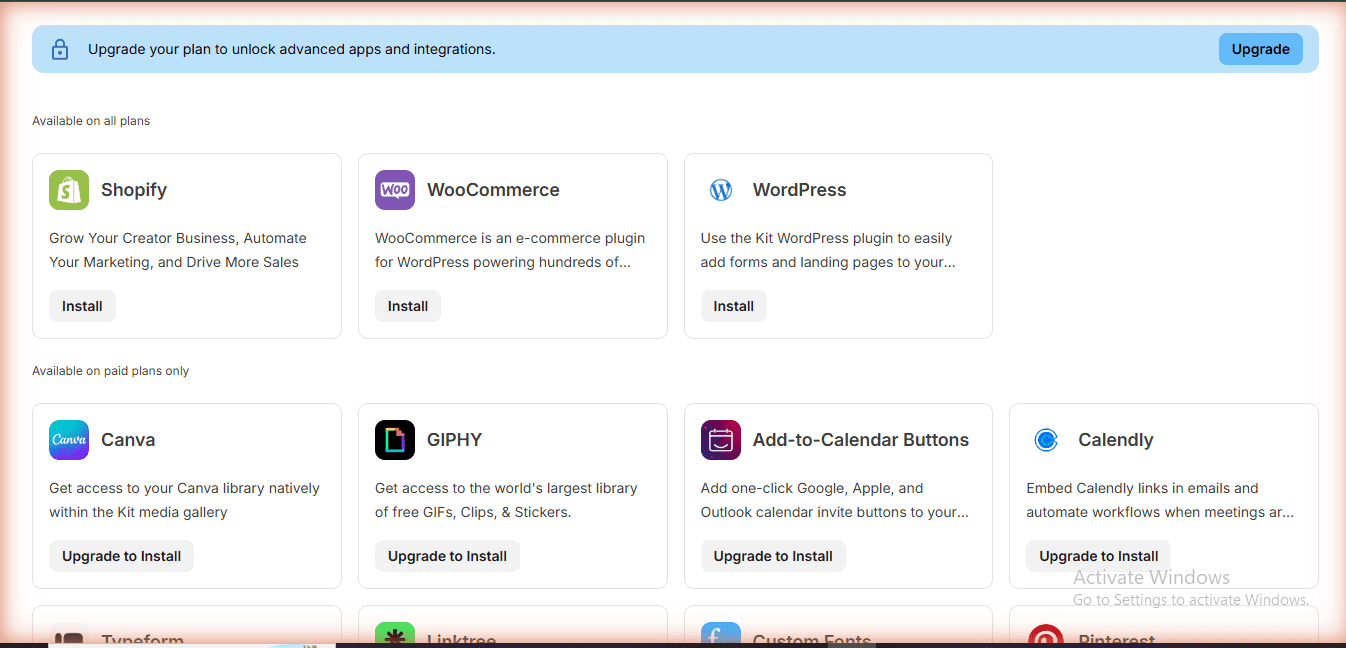
Kit.com has 90+ native integrations including Shopify, Stripe, WooCommerce, WordPress, Teachable, Podia, and Zapier. Zapier support extends this to thousands of apps. One notable gap: no native CRM integrations (HubSpot, Salesforce) — Kit.com is email-first by design. Another gap worth noting: Kit.com has no dedicated mobile app in 2026, so campaign management requires a desktop browser. The Creator Profile also lets you embed a subscribe form directly on third-party platforms.
MailerLite Integrations
MailerLite integrates with Shopify, WordPress, WooCommerce, Stripe, Zapier, and Make (Integromat). Importantly, MailerLite provides a full developer API and Webhooks available on all plans including the free tier — useful for custom integrations without upgrading. Unlike Kit.com, MailerLite also has a dedicated iOS mobile app for campaign management and subscriber monitoring on the go.
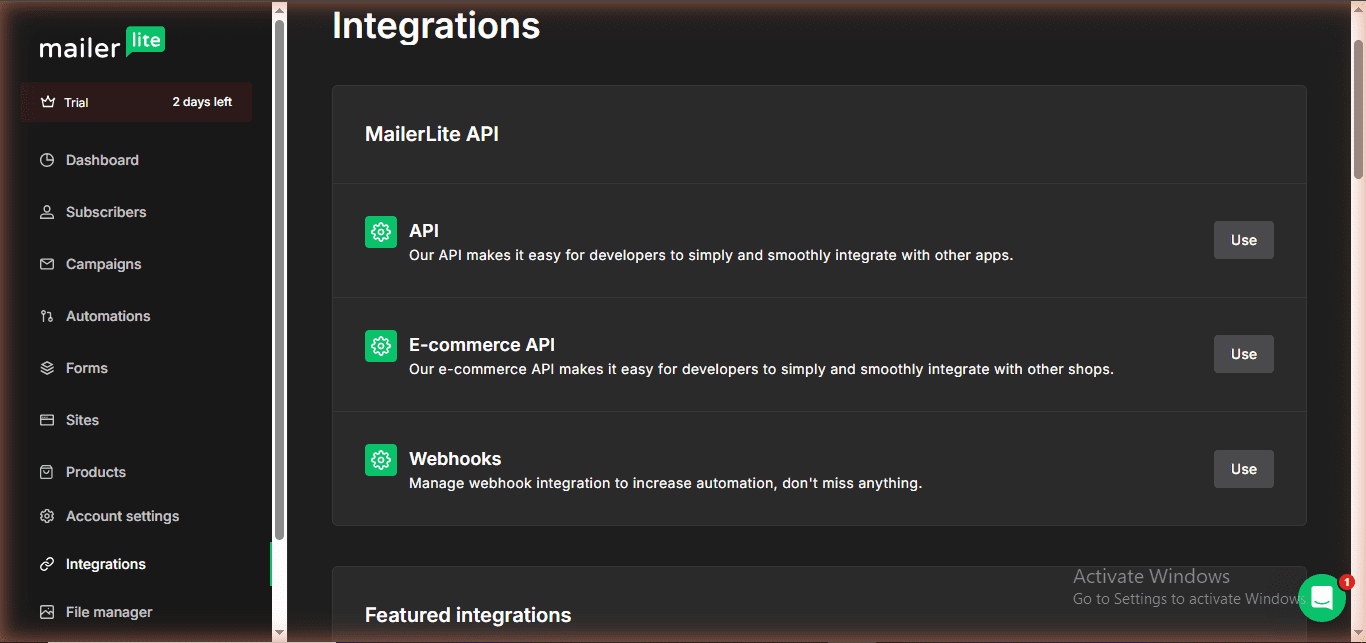
Integrations verdict: Kit.com wins on native integration count (~90). MailerLite wins on free API access and developer flexibility. Both support Zapier/Make. For most users both connect to the tools that matter — the difference only shows at scale.
Reporting & Analytics: Kit.com vs MailerLite
Kit.com Reporting
Kit.com covers the essentials: open rate, click rate, unsubscribes, and bounces per broadcast. The Subscribers page surfaces aggregate stats — I could see 90% open rate and 80% click rate across 90 days directly on my dashboard. There’s also a Deliverability tab per subscriber showing inbox placement. A standout feature: because commerce is native, Kit maps Subscriber Purchase History directly inside each subscriber profile — so you can see exactly how much revenue a subscriber has generated without leaving the platform. What’s missing: no unified analytics dashboard, no cross-campaign comparison, no custom date ranges, and no PDF export.
MailerLite Reporting
MailerLite offers broader coverage: campaign-level stats (opens, clicks, bounces, unsubscribes, spam complaints) plus a custom report builder where you select metrics, set date ranges, and filter by campaign type. A visual standout: MailerLite includes a click map inside every campaign report — you can see exactly where subscribers clicked within your email design, color-coded by click volume. Automation performance is tracked separately. Reports export as both CSV and PDF. Advanced plan adds eCommerce metrics tracking.
Reporting verdict: MailerLite wins — custom report builder, PDF export, and broader coverage vs Kit.com’s basic per-campaign stats. For creators sending newsletters, Kit.com’s reporting is sufficient. For businesses reporting to clients or tracking multiple campaigns at scale, MailerLite is clearly stronger.
Selling Digital Products: Kit.com vs MailerLite
This is one of the biggest differentiators between the two platforms — and something most comparison articles miss.
Kit.com: Built-In Product Sales
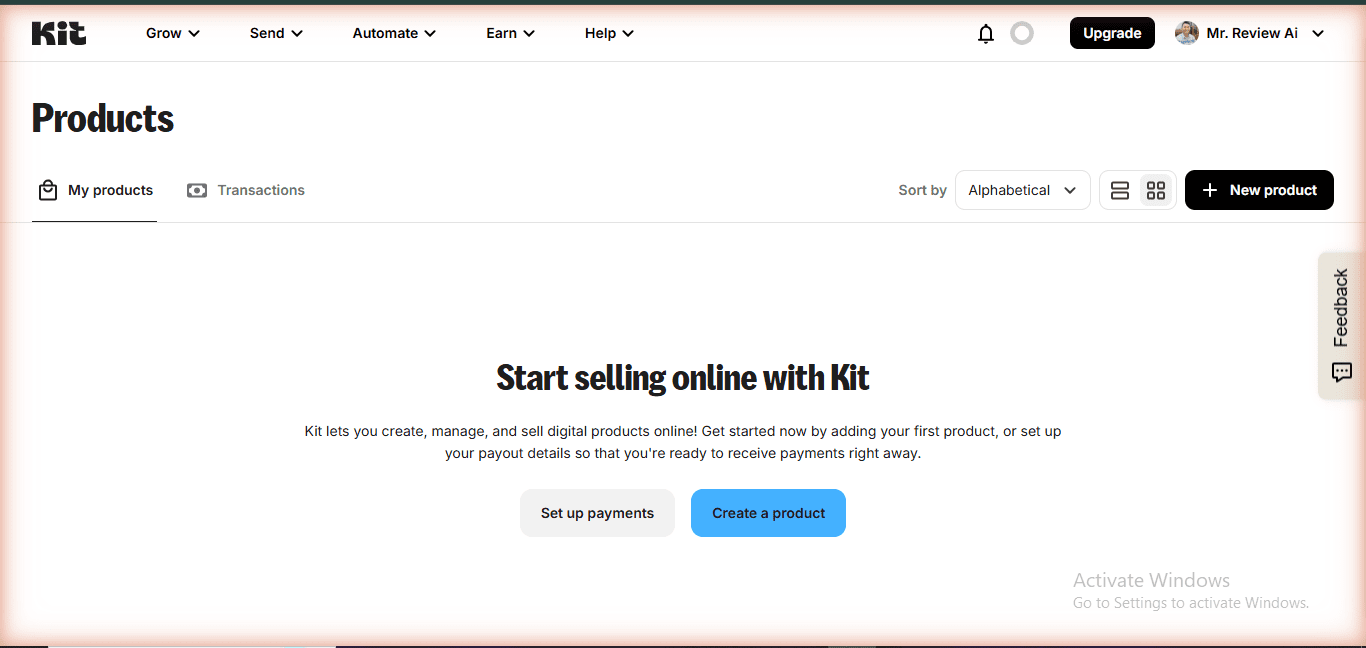
Kit.com has a dedicated Products section built directly into the dashboard. You can create and sell two types of digital products: Product (one-time payment, access forever) and Subscription (recurring payment, access until cancelled). The setup flow covers product details, pricing, fulfillment (file delivery or URL), and even a custom domain for your product page — all without leaving Kit.com.
The Subscribers dashboard also includes a “Purchases” tab — so you can see exactly which subscribers have bought your products. This tight integration between email list and purchase history is what makes Kit.com a genuine creator business tool, not just an email platform.
MailerLite: Email-Only, No Native Product Sales
MailerLite does not have a built-in product sales feature. While it recently added a Products block in the email editor (for showcasing products from external stores), you cannot actually sell products through MailerLite itself. To sell digital products, you need to integrate with external tools like Gumroad, Shopify, or WooCommerce.
Kit.com vs MailerLite monetization verdict: Kit.com wins clearly for creators who sell digital products, ebooks, courses, or paid newsletters. If you just want email marketing and don’t sell anything directly, this advantage doesn’t matter — and MailerLite’s lower price makes more sense.
Who Should Choose Kit.com?
In this Kit.com vs MailerLite comparison, Kit.com is the right choice if:
- You’re building an audience from zero and want the most generous free plan (10,000 subscribers, unlimited landing pages, unlimited broadcasts)
- You plan to sell digital products, courses, or run a paid newsletter — Kit.com has native commerce built in
- Creator economy is your business model — Kit.com was designed specifically for this use case and shows it
- You want email support even on the free tier
- You’re an affiliate marketer or blogger who needs subscriber tagging and sequence-based funnels
One feature that sets Kit.com apart from every other email platform in this comparison: the Kit Creator Network. This is a built-in cross-promotion system where Kit creators can recommend each other’s newsletters to new subscribers — completely free. When someone subscribes to a Kit newsletter, they can be shown a curated list of other Kit creators to follow. This organic growth loop is unique to the Kit ecosystem and has no equivalent in MailerLite. For creators focused on growing their audience through collaboration rather than paid ads, this is a genuine competitive advantage.
FREE WEEKLY BRIEFING
Get AI tool insights before everyone else
One real story. One tested tool. One takeaway. Every week. No spam, no sponsored picks.
No thanks, I already know enough
Who Should Choose MailerLite?
MailerLite is the right choice in this Kit.com vs MailerLite comparison if:
- You need more automations at the lowest possible cost (free plan gives you 3 max, vs Kit’s 1)
- Your list is small (under 500) and you want access to more automation flows to learn and experiment
- You want a full website hosting solution bundled with email marketing
- Budget is the primary constraint — Comfort plan $10.80/mo annual is excellent value vs $39/mo for Kit.com Creator
- You’re running an ecommerce or small business (not creator-focused) and need form variety like promotion pop-ups
🏆 Final Scorecard: Kit.com vs MailerLite
| Category | Kit.com | MailerLite | Winner |
|---|---|---|---|
| Free Plan | ⭐⭐⭐⭐⭐ | ⭐⭐⭐ | 🏆 Kit.com |
| Paid Pricing | ⭐⭐ | ⭐⭐⭐⭐⭐ | 🏆 MailerLite |
| Email Editor | ⭐⭐⭐ | ⭐⭐⭐⭐⭐ | 🏆 MailerLite |
| Automations (Free) | ⭐ | ⭐⭐⭐⭐⭐ | 🏆 MailerLite |
| Subscriber Mgmt | ⭐⭐⭐ | ⭐⭐⭐⭐ | 🏆 MailerLite |
| Forms & Pages | ⭐⭐⭐ | ⭐⭐⭐⭐ | 🏆 MailerLite |
| Selling Products | ⭐⭐⭐⭐⭐ | ⭐⭐ | 🏆 Kit.com |
| Deliverability | ⭐⭐⭐⭐ | ⭐⭐⭐⭐ | 🤝 Tie |
| Reporting | ⭐⭐⭐ | ⭐⭐⭐⭐ | 🏆 MailerLite |
| Support | ⭐⭐⭐ | ⭐⭐⭐⭐ | 🏆 MailerLite |
| Creator Tools | ⭐⭐⭐⭐⭐ | ⭐⭐⭐ | 🏆 Kit.com |
| OVERALL | Best for Creators | Best for Businesses | Depends on use case |
Is kit-vs-mailerlite right for you?
- ✓ You're a content creator or blogger — choose Kit.com
- ✓ You need 10,000+ free subscribers — choose Kit.com
- ✓ You want the best email design — choose MailerLite
- ✓ You need email content A/B testing on free — choose MailerLite (Kit has subject line A/B free; MailerLite has full content A/B free)
- ✓ You want a website builder bundled — choose MailerLite
- ✕ You need automation on a free plan — neither is great (Kit=0, ML=3)
- ✕ You need unlimited contacts free — use Brevo
- ✕ You need dedicated IP at low cost — neither offers this
- ✕ You want SMS or WhatsApp — use Brevo
- ✕ You're still undecided after reading this
My Honest Verdict
After testing both platforms hands-on, my take is this:
Kit.com’s free plan is one of the best deals in email marketing — 10,000 subscribers, unlimited landing pages, and email support at $0/mo. If you’re a creator just starting out, there’s almost no reason not to start here. The only real limitation is the 1-automation cap, which forces you to prioritize ruthlessly. See exactly what you can build on free in my hands-on test →
MailerLite’s paid plans are dramatically cheaper — Comfort plan at $10.80/mo annual ($12/mo monthly) gets you 50 automations, unlimited emails, and the ability to sell digital products. If you’ve outgrown Kit.com’s free tier and the $39/mo Creator price feels steep, MailerLite Comfort plan ($10.80/mo annual / $12/mo monthly) is worth serious consideration.
Personally, I’m staying on Kit.com because the platform is purpose-built for the creator economy, the free plan covers my current needs, and the seamless integration between landing pages, sequences, automations, and subscriber tagging is best-in-class for newsletter-driven affiliate sites like mine.
But if I were running a small ecommerce store or a local service business? MailerLite would be my first call.
FREE WEEKLY BRIEFING
Get AI tool insights before everyone else
One real story. One tested tool. One takeaway. Every week. No spam, no sponsored picks.
No thanks, I already know enough

Kit.com vs MailerLite — Still Deciding?
See how both compare against Brevo and Mailchimp too. We tested all 4 free plans side by side.
Frequently Asked Questions
Is Kit.com free forever?
Yes. Kit.com’s Newsletter plan is permanently free for up to 10,000 subscribers. There’s no trial period on the free plan — it’s free as long as your list stays under the threshold. You only pay if you upgrade to Creator or Pro for features like unlimited automations or advanced commerce.
Is MailerLite free forever?
Yes, with limits. MailerLite’s free plan is permanently available for up to 250 subscribers and 2,500 emails/month (updated June 16, 2026). Beyond those limits, you’ll need to upgrade. Note: the 14-day free trial gives you access to all paid features, which then reverts to free plan limits after the trial ends.
Can I migrate from MailerLite to Kit.com?
Yes. Both platforms support importing subscribers via CSV. Kit.com also offers free migration assistance on paid plans. You’ll need to recreate your automations and forms manually — there’s no direct automated migration between platforms.
Does Kit.com have a website builder?
Kit.com offers landing pages (unlimited, even on free), but not full website hosting. If you want to host a complete website or blog, you’ll need a separate platform. MailerLite, by contrast, includes full website hosting even on its free plan — a meaningful difference if you want an all-in-one solution.
Which is better for beginners — Kit.com or MailerLite?
Both have gentle learning curves. For absolute beginners with no list yet, we’d recommend starting with Kit.com’s free plan — the 10,000 subscriber limit gives you massive room to grow before you need to pay anything. For beginners who want to experiment with multiple automations right away and have a list under 250, MailerLite’s 3 free automations are a good learning environment.
What are Kit.com’s biggest weaknesses compared to MailerLite?
Kit.com’s main weaknesses vs MailerLite: (1) Only 1 automation on the free plan vs unlimited for MailerLite free. (2) Paid plans are significantly more expensive — $39/mo vs $9/mo for first paid tier. (3) No full website builder. (4) No live chat support on any plan. If any of these matter most to your use case, MailerLite deserves serious consideration.
About This Review
Testing methodology: Kit.com data comes from 13 days of active use on mrreviewai.com (May 25 – June 7, 2026) — I built a real 4-form affiliate funnel, acquired real subscribers, achieved 100% open rate and 80% click rate, and hit the free plan automation limits personally. MailerLite data was gathered from a real fresh account created and tested on June 7, 2026 — a full-day deep dive covering every dashboard section firsthand. All pricing verified June 7, 2026 from live dashboards.
Author: Mr Review AI Team, Founder of Mr Review AI — I test AI and email marketing tools hands-on before writing. 20+ tools reviewed since 2025. Kit.com user since May 25, 2026 (13 days active, real funnel built, real subscribers acquired). MailerLite tested June 7, 2026 (1-day deep dive, all features verified live). No sponsored content. No rented opinions. Real accounts, real results.
Time invested in this review: ~7 hours of hands-on research, testing, writing, and optimization — from 3:00 PM to 9:53 PM Vietnam time (GMT+7), June 7, 2026. This includes: live testing both dashboards, building real funnels, capturing 16 real screenshots, researching 3 competitor articles, and iterating the article structure for AI crawlability and reader clarity. Not a 15-minute rewrite of vendor docs.
Last updated: June 26, 2026. Update: A/B subject line testing (2 variants) confirmed FREE on Kit.com Newsletter plan (verified kit.com/pricing, June 26, 2026). Article corrected: previous version incorrectly stated Kit requires paid plan for all A/B testing.
🤝 Win-Win Partnership
Running a blog about email marketing comparisons?
Embed a free, auto-updating review badge on your site — no maintenance needed. Your readers get live ratings pulled from mrreviewai.com. You get a useful tool. We get a backlink. Both win.
Preview
Available Widgets — Copy & Paste:
<script src="https://mrreviewai.com/widget.js" data-tool="beehiiv"></script><script src="https://mrreviewai.com/widget.js" data-tool="mailerlite"></script><script src="https://mrreviewai.com/widget.js" data-tool="kit"></script><script src="https://mrreviewai.com/widget.js" data-tool="brevo"></script><script src="https://mrreviewai.com/widget.js" data-tool="mailchimp"></script>✨ Free forever · Auto-updates when we update scores · Links back to full review on mrreviewai.com
🖊️ About the Author
Mr Review AI Team
This review was researched and tested hands-on by the Mr Review AI editorial team. We create real accounts, run actual campaigns, and document every limitation we encounter — no vendor demos, no copied spec sheets. Our reviews are editorially independent: no tool pays for a score or placement, ever. Where we have affiliate relationships, we disclose them transparently on each page.
Want to know who founded this site and what drives our editorial standards? → Meet the founder on our About page

About the Author
Mr Review AI Team
This review was researched and tested hands-on by the Mr Review AI editorial team. We create real accounts, run actual campaigns, and document every limitation we encounter — no vendor demos, no copied spec sheets. Our reviews are editorially independent: no tool pays for a score or placement, ever. Where we have affiliate relationships, we disclose them transparently on each page.
Want to know who founded this site and what drives our editorial standards? → Meet the founder on our About page